

Wireless and wildly convenient.
We may receive a commission on purchases made from links.
Page-turning remotes used to be a niche workaround, something readers cobbled together with third-party clip-on gadgets that tapped the screen on their behalf. Life has changed quite a bit over the past year, as the biggest names in ereaders rolled out official solutions. Rakuten’s Kobo got there first with the Kobo Remote and last week, more than a year later, Amazon has introduced the Kindle Click.
Both accessories solve the same basic problem, namely the inconvenience of reaching over to tap your ereader every time you want to turn the page. It can be mildly annoying to do that when you’re under the covers with your device mounted to a stand or propped up on the treadmill while you’re getting your workout in. A small wireless remote lets you keep your hands wherever they’re most comfortable while still reading your story.
On the surface, the Kindle Click and Kobo Remote look like they’re solving the same problem in nearly identical ways. Both connect over Bluetooth, both skip the need to physically touch the screen and both come with an optional wrist lanyard. A closer look at pricing, design, battery setup and compatibility reveals some real differences that might matter depending on which ecosystem you’re in and what you value in a reading accessory.
Kindle Click
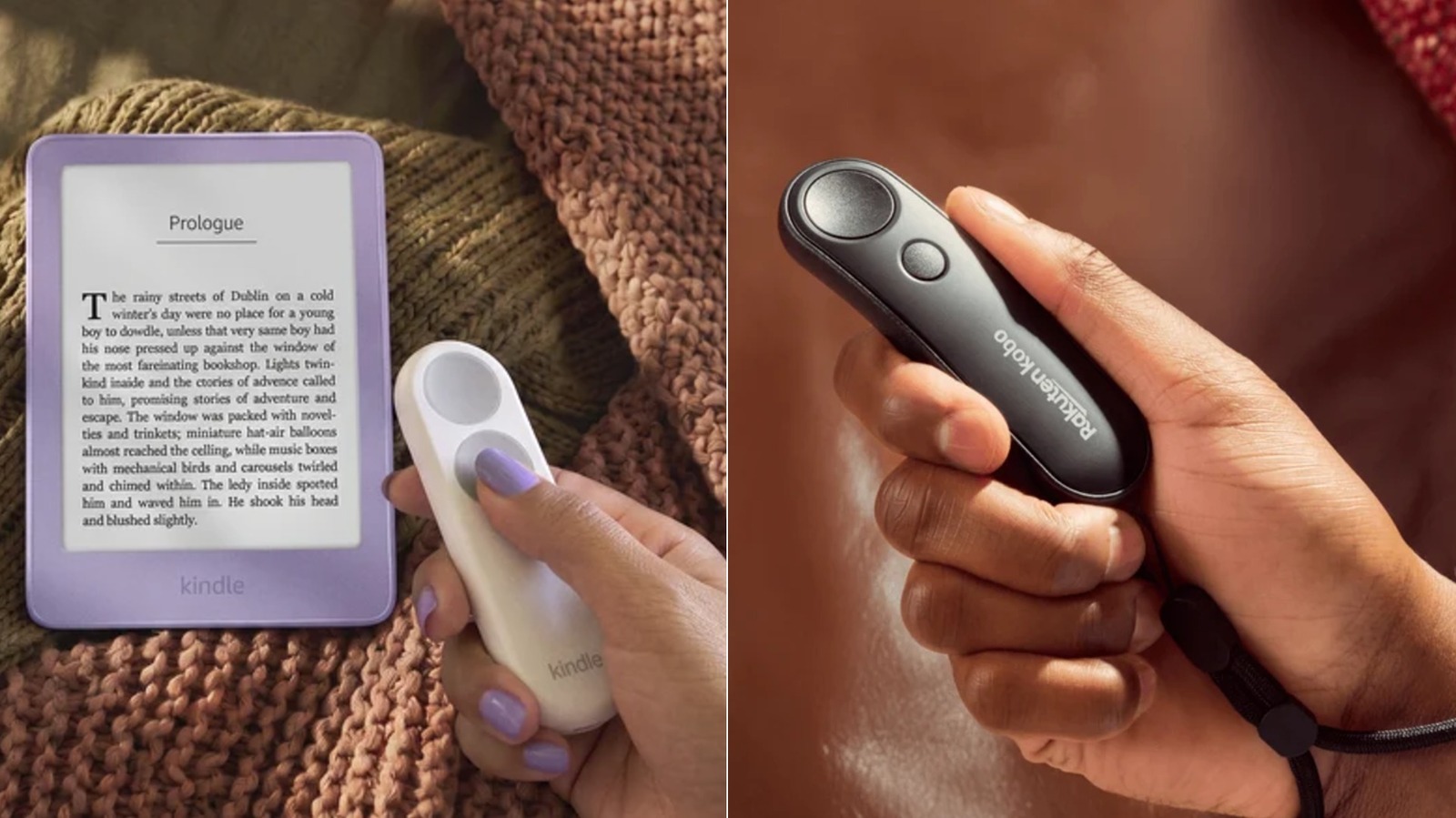
The Kindle Click costs $34.99 and marks Amazon’s first entry into the Bluetooth page-turner space. It’s a compact remote with two large, equally sized buttons: one for paging forward and one for going back. On the side, there are dedicated buttons that let you adjust the screen brightness without opening a menu, which is quite handy to have. If you press both at the same time, it’ll put your Kindle to sleep.
It comes in a single colorway, a boring but classy white with grey buttons. Considering that it’s a companion tool to a device that usually gets “dressed” in colorful cases or a gazillion stickers, going for such a simple understated white and gray combo seems like a missed opportunity.
Compatibility is fairly broad. The Click will not only work with the bunch of new Kindle devices that Amazon just launched, but also any Kindle model from 2024 or later. This does mean, though, that older Kindles are left out.
One thing that’s extremely convenient about the Kindle Click is that it has a USB-C port so you won’t need to swap out any batteries — just plug it in every few weeks, much like you do with your Kindle.
While it’s true that at $35, the Click is more expensive than other Bluetooth ereader remotes, it is a lot more convenient to use. The Kindle Click will be released on October 28, but you can pre-order it now.
Kobo Remote
The Kobo Remote was launched back in November 2025 at $29.99 and it was sold out for months due to demand. It’s now available at that price on Rakuten’s website, but is slightly more expensive at retailers like Target ($31.99) and Amazon($33.99). It comes in both black and white (also a missed opportunity) and connects via Bluetooth, pairing almost instantly and reconnecting automatically whenever a compatible Kobo eReader wakes from sleep. Design-wise, the Kobo Remote brings a more ergonomic model to the table, featuring a 20-degree curve that lets it sit naturally in your hand.
Its two buttons are also shaped differently. One is larger and concave while the other is smaller and convex, so they’re easy to tell apart by touch alone. Unlike the Kindle Click, the Kobo Remote uses a replaceable AAA battery that should give you months of use. The device works with any Kobo ereader with Bluetooth, which is quite a long list.
So, how different are these two page-turner gadgets? The design distinctions are obvious, as Kobo created a more ergonomic model, with an arch for easier gripping. There’s also a major difference in functionality, because while both devices let you turn the page, the new Kindle Click also lets you adjust screen brightness and lock the e-reader. Finally, the Kobo Remote takes AAA batteries, while the Kindle Click charges over a basic USB-C cable. And though the Kobo Remote does have two color options, neither gadget shines in that aspect.
As far as price goes, there’s about a $5 gap between the two. But at the end of the day, the price difference won’t matter much if you’re already locked into an ecosystem — you’ll just get whichever works. Comparing the two on just their features, though, the Kindle Click is a much better option thanks to its greater functionality.
