

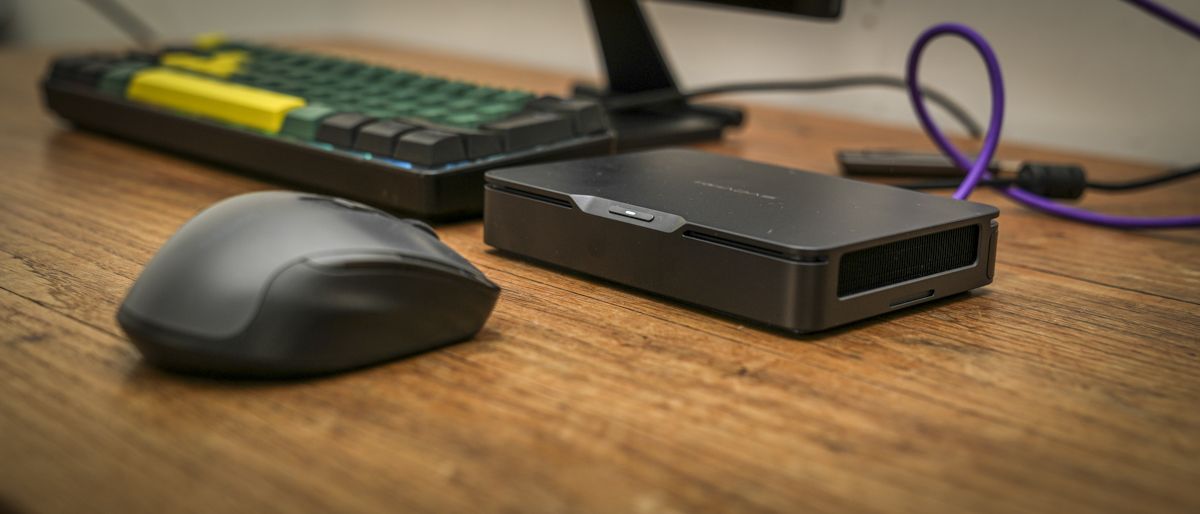
Khadas Mind Pro: 30-second review
Having reviewed the Khadas Mind 2S just over a year ago, I was impressed by just how much processing power Khadas had managed to squeeze into such a small machine. Now, with the arrival of the Mind Pro, the company has retained much the same compact form factor and innovative modular design, while introducing Intel’s latest Core Ultra processor and Arc integrated graphics.
The result is an exceptionally powerful mini PC that feels just as capable as many considerably larger desktop systems, especially when it comes to everyday productivity as well as creative applications.
It once again features the premium metal construction, and with dimensions of just 146 × 105 × 28mm, it’s small enough to slip into a bag and carry between home and office. What makes this particularly useful is the integrated 7.98Wh standby battery, which allows the machine to maintain your Windows session while moving between those locations, much the same as using a laptop.
During testing, I was able to leave applications open, disconnect the computer, throw the Khadas Mind Pro in my backpack and travel home. Then I was able to reconnect to a monitor, mouse and keyboard at home and continue the session without needing to re-open applications and work. This is what we have come to expect from laptops, but not with a Mini PC, and it’s a surprisingly useful feature, boosted by the option of extras such as the Dock and GPU modules.
Performance is equally impressive as it features an Intel Core Ultra X7 358H, combined with 64GB of RAM and integrated Arc B390 graphics. This combination proved to handle Microsoft Office, Photoshop and Lightroom extremely well. Even Adobe Premiere Pro and DaVinci Resolve proved more usable than I had anticipated with 4K footage shot on the GoPro Mission 1 ILS.
Gaming was another surprise, with Cyberpunk 2077 and Indiana Jones and the Great Circle both running at medium-quality settings; although as I extended play there were occasional frame drops, there was nothing too much to impact gameplay. The other point here was that the fans kicked in and, while audible, they remained relatively quiet.
The machine also has considerable AI potential, with a dedicated NPU and 64GB of shared memory. My initial CPU-based Lemonade AI testing showed that it could handle practical local AI tasks, although switching between models wasn’t always straightforward. Using the dedicated NPU with the right models gained some impressive results, but again selecting the right LLM manager and model takes some time, this process took me from Lemonade to the LM Studio.
Through the test, my main issue with the machine was the connectivity. With only two Thunderbolt 4 ports, it’s easy to run out of high-speed connections when using a USB-C monitor, power supply and external storage. If you are using the Mind Pro as your main desktop, this is where the optional Mind Dock starts to make sense and is more like an essential purchase.
Ultimately, the Mind Pro is an impressive example of innovation and how far mini PCs have progressed. It won’t be the best mini PC for most users. It isn’t cheap, and you’ll need to invest further to see the full potential of its modular design, but the impressive processing power, portability and modular extras make it expensive but very desirable.
Khadas Mind Pro: Price and availability
- How much does it cost?From $2,559
- When is it out?Available now
- Where can you get it?Directly from Khadas
The Khadas Mind Pro costs $2,599 for the Core Ultra X7 358H, 64GB RAM and 2TB SSD configuration that I’ve looked at in this review and is available directly from Khadas. Alongside the Mini PC, you can also purchase the optional Mind Dock, Mind xPlay and Mind Graphics 2, although these will add considerably to the overall cost.
Khadas Mind Pro: Specs
CPU:Intel Core Ultra X7 358H, 16 cores / 16 threads
Graphics:Intel Arc B390 integrated graphics
NPU:Intel AI Boost NPU 5, up to 50 TOPS
RAM:64GB LPDDR5X, 8533MT/s
Storage:2TB PCIe 4.0 M.2 2230 SSD
Additional storage:M.2 2230 NVMe expansion slot
Rear Ports:2 x Thunderbolt 4, 2× USB-A 3.2 Gen 2, HDMI 2.1 FRL
Expansion:Khadas Mind Link proprietary modular interface
Connectivity:Wi-Fi 7, Bluetooth 6.0
Audio:Audio output via supported display, USB and compatible expansion accessories. Battery:7.98Wh internal standby battery
Dimensions:146 × 105 × 28mm
Weight:562g
Operating System:Windows 11 Home
Power:100W USB-C power adapter
Optional Accessories:Mind Dock, Mind xPlay and Mind Graphics 2
Khadas Mind Pro: Design
Unpacking the compact AX9 Max, the metal casing and detailed plastic base of this mini PC instantly reinforced its price point. Only after carefully checking the detailing and the large, shiny logo on top did I start to question whether this was a premium machine or just one trying to look premium.
Checking the specifications and that the price point was justified, but there’s still something about the design that feels a little over the top. The rest of the design is solid, and at 134.9 × 131.8 × 57.7mm and 777.5g, it’s a great size and weight for this style of machine.
Around the casing, there are four USB 3.2 Gen 2 Type-A ports and a 3.5mm stereo headphone jack. On the left side of the casing is an SD 4.0 memory card slot, while the back has two USB4 Type-C ports, a USB 2.0 port, two HDMI 2.1 ports, two 2.5Gb RJ45 sockets, a USB 3.2 Gen 2 Type-A port, and the DC-in port.
Having reviewed the Khadas Mind 2S just over a year ago, I was impressed by the combination of its exceptionally small size, processing power and innovative modular design. With the arrival of the Mind Pro, it’s immediately apparent that the company has retained much of the ethos of those initial machines and what made them so interesting.
The form factor is familiar, the design remains incredibly minimalist, and once again, it’s the modular expansion ecosystem that differentiates this from the usual mini PCs I look at.
The first impression is that this is an exceptionally well-made and small mini PC. The metal casing gives it a premium feel, with solid construction, and it’s just understated when it comes to styling, which I really like.
The front just features the power button mounted into a subtle cutaway, and all connectivity options are lined up at the rear.
The compact dimensions are great if you have limited desk space or you need to take the machine between locations. This portability is one of the key features and, like a laptop that enables you to close the lid without powering down, the Mind Pro enable you to do much the same when you move from one location to another. Simply unplug the monitor, keyboard and mouse, and pop it in your bag; then, when you get to the next location, connect up and off you go. All the apps and work that you were working on will still be there and ready for you to continue with.
The idea behind the machine is that you have the core, which is the Mind Pro, then you have the accessories, so in the office where you need to focus on high-demand work, you’ll have the Mind Graphics 2 eGPU Module and Mind Dock All-In-One Docking Station.
While at home, where you may just want to check email and do some light work, you may just need the Mind xPlay Portable Display + Keyboard, which will, in low-power mode, essentially give you the same abilities as a Windows Home laptop. You can also plug in the Tone2 for audio. The point is the Mind Pro is just the core, and how and where you use it will dictate what additional extras you want and need.
What makes the portability possible is the integrated 7.98Wh standby battery. This isn’t designed primarily to power the machine in the same way as a laptop battery and instead is used to maintain the machine’s working state when disconnected from external power.
Taking a look at the limited ports on the back, there are two Thunderbolt 4 ports, an HDMI 2.1 connection and two USB-A 3.2 Gen 2 ports. While this matches most premium laptops, I found that the two Thunderbolt connections became a bit of an issue, particularly when using the Mind Pro for creative work.
With a Thunderbolt monitor and power connected, there was no fast connection left for connecting high-speed external SSDs or card readers without using an additional adapter. The two USB-A connections are useful, but their 10Gbps maximum transfer rate is far slower than the Thunderbolt 4’s 40Gbps connection bandwidth.
Considering the performance on offer here, a third Thunderbolt connection would have been welcome. For anyone intending to use the Mind Pro as their main desktop computer, the Mind Dock is essential, and at $199, that’s quite an additional cost on an already expensive machine.
The all-metal construction does make the Mind Pro look like it should be passively cooled. However, there is an active cooling system inside, and while the fans become audible on many of the more demanding tasks, I was generally well controlled.
During intensive creative work, the casing also became warm to the touch, which isn’t particularly surprising given the amount of processing power packed into such a small space.
The design of this small machine is stunning, and the portability of the design with the integrated standby battery is actually a great idea. However, when it comes to the design, the limited port selection is frustrating, especially at this price, but it has been designed to be used as a modular setup, and the dock and GPU are available to boost the performance further at a cost.
Khadas Mind Pro: Features
The Khadas Mind Pro builds on the modular design of the machines that I have looked at in the past from the company and combines powerful processing with a proprietary expansion interface and an integrated standby battery.
At the heart of the system is Intel’s Core Ultra X7 358H, a 16-core processor supported by Intel Arc B390 integrated graphics and a dedicated AI Boost NPU. In this review, I have looked at the standard Pro machine with 64GB of LPDDR5X memory and a 2TB PCIe 4.0 SSD.
While those specifications are impressive, what separates this from most other mini PCs is that it has been designed so that the Mind Pro can easily move between different work and home environments, with a range of Mind Link connection expansion modules that adapt its use depending on your needs.
These modules include the Mind Dock that provides additional connectivity for when it’s used as a desktop workstation, and this comes in at around $200. Then there’s the Mind xPlay portable display at $99, or with keyboard at $399, which offers a more mobile configuration.
There’s also the Mind Graphics 2 that adds dedicated graphics processing for creative applications, gaming and potentially supported AI workloads, and this will set you back a further $1449.
Unfortunately, none of these modules was available during my testing, so I wasn’t able to assess the complete ecosystem. Even without the expansion options, however, the Mind Pro has plenty of raw processing power.
The internal 7.98Wh battery is the most unique, and as I found this on a normal working day when I regularly travel between office, home and college, with a journey time that can vary from ten minutes up to an hour and a half.
With a conventional mini PC, that would mean saving everything, closing applications and shutting down before leaving, then re-opening everything when I get to my next destination. Which is one of the reasons I use a laptop, as I can keep everything open; however, the laptop isn’t light.
With the Mind Pro, I could simply disconnect the power, place the machine in my backpack and reconnect it at the other end, just like a laptop, just minus the screen, keyboard, and trackpad.
Throughout testing, this worked exceptionally well. I could leave Adobe Premiere Pro and other applications open, move between locations and return to the same Windows session without having to reopen everything.
It certainly makes for a lightweight alternative, although the internal 2TB SSD provides plenty of space for applications and smaller projects; I generally edit video from external storage.
This makes the portable workflow slightly more complicated, as unplugging an external SSD while Premiere Pro is accessing footage isn’t particularly advisable, but then that’s the same on a laptop. For shorter productions, however, the system really comes into its own.
During testing, I was editing approximately five-minute videos using footage from the GoPro Mission One, with the files stored directly on the internal SSD. This enabled me to start editing at the office, disconnect the computer and finish the project at home without closing Premiere Pro or shutting down Windows.
The battery also allows the Mind Pro to operate independently of external power for short periods, although this is very much a secondary feature. Using the Khadas Mind app, it’s possible to select the Use Battery option under Device Mode When Unplugged, allowing the computer to continue operating instead of immediately entering a standby state.
To see how practical this was, I tested the machine using three power settings, with a mixture of Microsoft Word, web browsing and Adobe Lightroom. At maximum power, the system lasted approximately seven minutes before displaying a low-battery warning and entering its low-power state.
Switching to the medium power setting in the Mind application was able to extend this working time to around 14 minutes, while the lowest power setting was around 30 minutes. These figures are far less than the 60 minutes quoted by Khadas for light active use. Most importantly, this internal battery feature means the machine wasn’t losing my work when the battery ran low.
Khadas Mind Pro: Performance
CrystalDiskMark Read: 5,224.09 MB/s
CrystalDiskMark Write: 4,860.54 MB/s
Geekbench 6 CPU Multi: 16,660
Geekbench 6 CPU Single: 2,883
Geekbench 6 GPU: 58,502
Geekbench 7 CPU Multi: 18,118
Geekbench 7 CPU Single: 2,587
Geekbench 7 GPU: 55,027
PCMark Overall: 9,429
Cinebench R23 CPU Multi (Threads): 20,252
Cinebench R23 CPU Single (Threads): 2,084
Cinebench 2026 CPU Multi (Threads): 4,835
Cinebench 2026 CPU Single (Threads): 505
Fire Strike Overall: 15,128
Fire Strike Graphics: 18,110
Fire Strike Physics: 29,411
Fire Strike Combined: 5,105
Time Spy Overall: 7,647
Time Spy Graphics: 7,049
Time Spy CPU: 14,738
Wild Life Overall: 44,322
Steel Nomad Overall: 1,601
Windows Experience Overall: 8.9
Procyon: 1,485
Getting started with the Khadas Mind Pro follows the usual process, and the machine arrives with Windows 11 Home preinstalled, alongside the Khadas Mind software, and the initial Windows setup takes around 10 to 15 minutes.
Aside from the usual process of accepting or declining Microsoft’s various additional services, there is very little to do before you’re up and running. Then the Khadas Mind application provides access to the machine’s power management and battery options, highlighting that this is far more than a normal mini PC.
While the modular ecosystem enables you to expand the system with a docking station or external GPU, even as the core unit when used as a standalone computer, the Mind Pro offers impressive performance, especially considering its small size.
I started the test by installing Microsoft Office; there was more than enough performance to run Word, Excel and PowerPoint all at the same time, alongside multiple browser windows. Everything remained fast and responsive, and even when adding Photoshop and Lightroom into the mix, there was little indication that the system was struggling.
As is now common, there’s also a dedicated Intel NPU, and that adds potential for supported local AI features, although cloud-based Microsoft Copilot functionality shouldn’t be confused with processing directly on the NPU. Opening up the task manager indicates when the NPU comes into play and often as a support role to cloud-based connections and some app integration.
After seeing that standard office applications were well within the machine’s capabilities, I moved on to Adobe’s creative applications, and running these showed just how powerful this machine is even without the boost that the optional modules would obviously offer.
Lightroom Classic ran extremely smoothly, opening large catalogues, processing high-resolution photographs and exporting batches of images without difficulty. The internal 2TB SSD also performed well, keeping up with the demands of loading, editing and saving substantial image files.
Loading Photoshop and the performance was equally impressive. I worked with high-resolution photographs from the Canon EOS R5 C and Sony A7 IV, and the Mind Pro handled them without any noticeable problems. Opening Adobe Bridge, thumbnails appeared quickly, and I could select batches of up to 30 files and open them in Adobe Camera Raw for editing.
If you’re a professional photographer, then the small size of the machine and its portability make it a great option, especially when connected to a large monitor. I also found that the 64GB RAM provided substantial headroom, and with the Arc B390 integrated graphics, all image editing and processing was again well within the machine’s abilities.
One of the features that I really liked was the ability to plug into my monitor and dock in the office and use the machine as I do with any Mini PC; then, when I headed home, I was able to leave several video projects and other documents open, pop the machine in my bag and then reconnect to another monitor in the home office, with all apps and documents still open and ready to go. The machine in that respect is just like a laptop without the screen and keyboard, of course. The benefit here is that it’s far smaller and lighter, so even more portable than a laptop, especially a laptop with this kind of power.
While the performance is good, I did have a connectivity issue. My test monitor uses USB-C rather than HDMI, so connecting the display and power supply occupied both Thunderbolt 4 ports. This left only the two USB-A 3.2 Gen 2 connections for external storage and accessories. While these are rated at 10Gbps, they’re considerably slower than the 40Gbps connection bandwidth offered by Thunderbolt 4.
For photographers and videographers using fast external SSDs, the optional Mini Dock would make a difference on this front.
When video editing, this machine again proved surprisingly capable and while I initially had reservations about how comfortably a mini PC of this size would handle 4K footage in Adobe Premiere Pro, editing a short five-minute project went well with few problems.
There were occasional slowdowns, particularly as the edit became more complex, but the overall workflow was better than I expected. After switching the video editing application to DaVinci Resolve, I found through the edits that the performance was similar. Straightforward 4K timelines were fine, although increasing the complexity of the edit resulted in additional slowdowns, particularly during rendering.
This is where an external GPU would potentially make a significant difference, and the Mind Graphics 2 looks like an interesting expansion option if you are planning to use this system for more intensive video production. Although, again, this does come at quite a financial cost.
Before moving on to the AI potential, I tried out a few games, and again I was surprised by the ability of the machine. I tested Cyberpunk 2077 and Indiana Jones and the Great Circle, and both titles loaded successfully, with no issues with the integrated CPU.
At medium graphics settings, gameplay was surprisingly good considering that all the graphics processing was being handled by that integrated Intel Arc B390. While I wouldn’t position the Mind Pro as a replacement for a dedicated gaming PC, the ability to run demanding modern titles on a computer this small is impressive.
The final test was to take a closer look at the AI potential of the Khadas Mind Pro, loading Lemonade AI and the Qwen model to see just how capable this compact mini PC was when running AI workloads locally.
I started by testing several AI models to code a website, generate images, organise files, recognise image content and handle general chatbot and text-generation tasks. The results were mixed, although the 64GB of RAM provided enough headroom to run some relatively large models locally.
One issue with the stability of the Lemonade and the AI process that I came up against was when switching between tasks and therefore LLM models. While there was enough memory to load and run individual models, running two larger models side by side seemed to cause issues and checking Task Manager, it showed the RAM maxing out. Instead, I found myself working through different stages, unloading one model before loading the next.
For example, when organising images, I first used PowerShell to create a CSV file containing a list of images before handing that information over to the Qwen model to help manage the files. I then switched to an image recognition model to identify image contents and add the relevant tagging information. For small batches, this worked; however, increasing the count from 20 to 100 images, something between the CPU, Lemonade, and the model kept falling over.
Through this process, I also found that switching models wasn’t always straightforward. Rather than simply unloading one model and loading another, it was often more reliable to close Lemonade Server completely, restart it and then load the next model. Without restarting, the software could become confused, and the process was noticeably less reliable.
For a measurable test, I ran through a batch of 20 images, using the AI tools to assist with basic file organisation and CSV-based content management. Because the workflow involved switching between several models, it was difficult to calculate the total number of tokens used across the entire process.
However, during one of the main processing stages, the system recorded a time to first token of 9.08 seconds and generated 1,340 tokens in total. CPU utilisation reached 100%, while RAM usage fluctuated between 60% and 80%, showing the machine was capable of handling the workload but was also being pushed relatively hard.
The synthetic AI benchmark results backed up the practical testing, with the Khadas Mind Pro achieving a Procyon AI performance score of 1,485. This highlights that when configured correctly with the AI LLM management software, it will have impressive AI processing capabilities, although the real-world tests highlighted that available memory, model management and workflow optimisation are just as important as raw processing performance.
What impressed me most was that all of this was possible on such a small machine without an external GPU. The integrated graphics and 64GB of RAM provide a useful starting point for local AI development, experimentation and lighter production tasks, although experimentation with models and setup is at present a necessity.
That said, if you’re planning to use the Mind Pro extensively for AI processing, the optional Mind Graphics 2 external GPU will be worth the upgrade.
Khadas Mind Pro: Final verdict
The Khadas Mind Pro is an exceptionally compact and powerful mini PC aimed at professionals, creatives and anyone who needs desktop performance across multiple locations without carrying a laptop.
What makes this small machine so versatile is the modular design, although I haven’t tested the additional modules in this review, focusing on the RAW power of the core unit.
As it stands, used in isolation, it’s surprisingly powerful and a small and stylish option for use in the office or studio; then, if you do need that boost, it can, at a price, be connected to the optional Mind Dock and Mind Graphics 2 external GPU, transforming it into a far more capable workstation for demanding creative applications, video editing and AI workloads.
Likewise at home, simply connect a monitor and keyboard, potentially alongside the Mind xPlay portable display, and you’re ready to continue working, or just the occasional check on email.
The solid metal construction gives the Mind Pro a premium feel, and its weight and small size make it easy to carry between locations. More importantly, the integrated standby battery means you can unplug the machine, slip it into your bag and reconnect elsewhere without closing applications or restarting Windows.
There are some issues, most notably the limited connectivity without a dock and the integrated GPU’s limitations under heavier workloads. However, the impressive CPU performance, 64GB of RAM and excellent portability do make this a highly versatile and desirable machine.
You are paying a premium for the quality of the build, the innovation, and the modular concept, but for professionals who regularly move between workspaces, the Mind Pro offers an attractive alternative to a conventional desktop or laptop.
Should I buy the Khadas Mind Pro?
|
Expensive, but impressive versatility and upgrade potential. |
||
|
Exceptionally compact, solid construction with an innovative integrated battery. |
||
|
Excellent modular expandability, although onboard connectivity is limited. |
||
|
Powerful CPU, plenty of RAM and impressive creative performance. |
||
|
An innovative, portable workstation with genuine professional appeal. |
Buy it if…
You want a powerful, portable mini PC
The Mind Pro combines impressive performance, compact metal construction, and an integrated standby battery, making it easy to transport between workspaces.
You like the idea of a modular workstation.
The Mind Dock expands connectivity, while the Mind Graphics 2 external GPU boosts performance for demanding creative workloads.
Don’t buy it if…
You need plenty of ports without buying accessories.
Connectivity is limited, especially when using USB-C for both power and a display. The optional Mind Dock starts to feel like an essential purchase.
You need serious graphics performance out of the box.
The integrated GPU handles lighter workloads, but demanding video editing, gaming and AI tasks will benefit from an external GPU.
For more professional-grade desktops, we’ve tested thebest business computers.
