Close Menu
MyAppsPlus

    Subscribe to Updates

    Get the latest creative news from FooBar about art, design and business.

    What's Hot

    Bose QuietComfort Headphones (2nd gen) review: Upgraded in all the right places

    September 11, 2026

    Apple’s 2026 Studio Display XDR just dropped back to best price ever at $330 off (Or $500 off refurb)

    September 11, 2026

    Apple’s iPhone Handoff feature will cost you $5 a month on T-Mobile

    September 11, 2026
    Facebook X (Twitter) Instagram
    Facebook X (Twitter) Instagram
    MyAppsPlusMyAppsPlus
    Friday, September 11
    • Home
    • Breaking Tech
    • Apps & Software
    • AI & Automation
    • Android
    • iPhone & iOS
    • More
      • Reviews
      • How-To Guides
      • Deals & Discounts
      • Shop
    MyAppsPlus
    Home»Breaking Tech»Instagram now lets you add tagged photos to your profile grid
    Breaking Tech

    Instagram now lets you add tagged photos to your profile grid

    myappsplusBy myappsplusSeptember 11, 2026002 Mins Read
    Share Facebook Twitter Pinterest Copy Link LinkedIn Tumblr Email Telegram WhatsApp
    Follow Us
    Google News Flipboard
    Instagram now lets you add tagged photos to your profile grid
    Share
    Facebook Twitter LinkedIn Pinterest Email Copy Link

    Here’s how to do it.

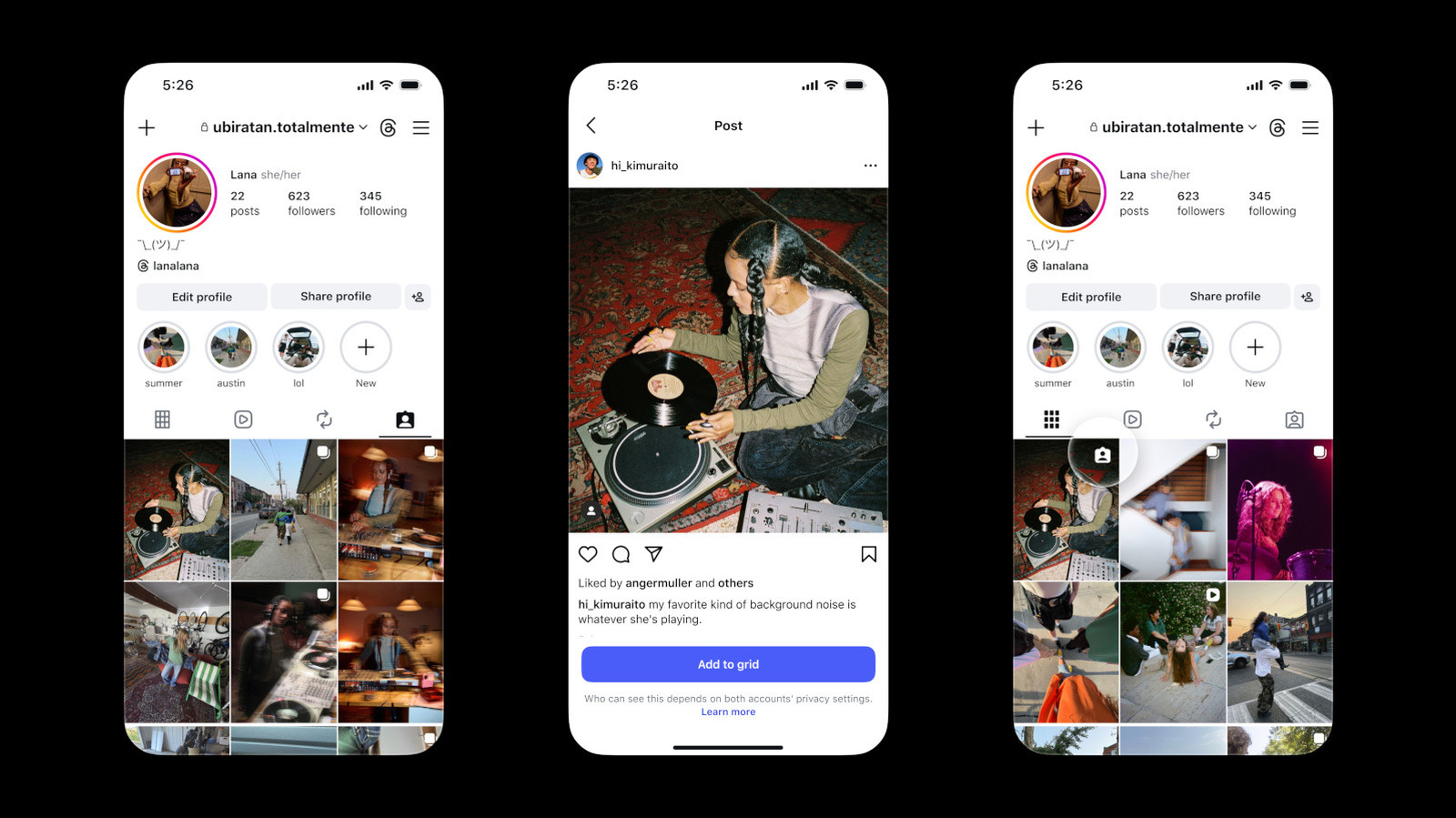
    Instagram will now let you promote tagged photos to your main profile grid. The Tagged tab still exists, and it’s still where you can see all the posts you’ve been tagged in. But if there are particular posts that you would like to display on your main grid, you can now do that, as well. Instagram says you can do so for favorite group photos, creator collaborations and memories, but really, you can add any post you’d like.

    There are several ways to add a tagged post to your grid. You can do it straight from the DM notification you receive when you’re tagged or from the three-dot menu on the upper right portion of the post you’re tagged in. You can also press and hold a post in your Tagged tab to see the option. Under the “Add to grid” button, you’ll see a notice saying that even if you add the post to your profile, who can see it depends on the privacy setting of your account and the account of the user who tagged you. 

    If you change your mind in the future, you can easily remove a tagged post from your profile without having to delete it completely. All tagged posts you add will show up on your grid in reverse-chronological order by default. However, you can rearrange them as you see fit. If you’ll recall, Instagram introduced the ability to reorder posts on your profile back in June, a year after it was announced. You can move posts around regardless of when they were made, so you can achieve whatever aesthetic you’re aiming for when it comes to your Instagram account.

    apps Instagram lets Photos tagged
    Follow on Google News Follow on Flipboard
    Share. Facebook Twitter Pinterest LinkedIn Tumblr Email Copy Link
    myappsplus
    • Website

    Related Posts

    Bose QuietComfort Headphones (2nd gen) review: Upgraded in all the right places

    September 11, 2026

    Apple’s iPhone Handoff feature will cost you $5 a month on T-Mobile

    September 11, 2026

    Packard Bell is back, but there’s a catch

    September 11, 2026
    Add A Comment
    Leave A Reply Cancel Reply

    Top Posts

    The 6 AI-free Linux distros I recommend most

    August 19, 20263 Views

    AI, automation, robot dogs ensure on-site nuclear safety

    September 7, 20262 Views

    This tiny AI box could save me from upgrading my perfectly good laptop

    September 6, 20262 Views
    Latest Reviews

    Reddit begins testing a new audio and video experience, similar to popular TikTok videos

    myappsplusAugust 17, 2026

    Stop guessing which AI tool is best — this app tests them all for a one-time $40 (MSRP $499)

    myappsplusAugust 17, 2026

    The $119 MacBook Neo deal going viral on TikTok is a scam, and I almost fell for it — here’s where you can actually find it on sale

    myappsplusAugust 17, 2026
    Stay In Touch
    • Facebook
    • YouTube
    • TikTok
    • WhatsApp
    • Twitter
    • Instagram

    Subscribe to Updates

    Get the latest tech news from FooBar about tech, design and biz.

    Most Popular

    Reddit begins testing a new audio and video experience, similar to popular TikTok videos

    August 17, 20260 Views

    Stop guessing which AI tool is best — this app tests them all for a one-time $40 (MSRP $499)

    August 17, 20260 Views

    The $119 MacBook Neo deal going viral on TikTok is a scam, and I almost fell for it — here’s where you can actually find it on sale

    August 17, 20260 Views
    Our Picks

    Bose QuietComfort Headphones (2nd gen) review: Upgraded in all the right places

    September 11, 2026

    Apple’s 2026 Studio Display XDR just dropped back to best price ever at $330 off (Or $500 off refurb)

    September 11, 2026

    Apple’s iPhone Handoff feature will cost you $5 a month on T-Mobile

    September 11, 2026

    Subscribe to Updates

    Subscribe to our newsletter and get the latest tech news, app updates, AI trends, smartphone reviews, and exclusive deals delivered straight to your inbox.

    Facebook X (Twitter) Instagram Pinterest
    • About Us
    • Get In Touch
    • Disclaimer
    • Privacy Policy
    • Terms & Conditions
    © 2026 MyAppsPlus. All Rights Reserved.

    Type above and press Enter to search. Press Esc to cancel.