

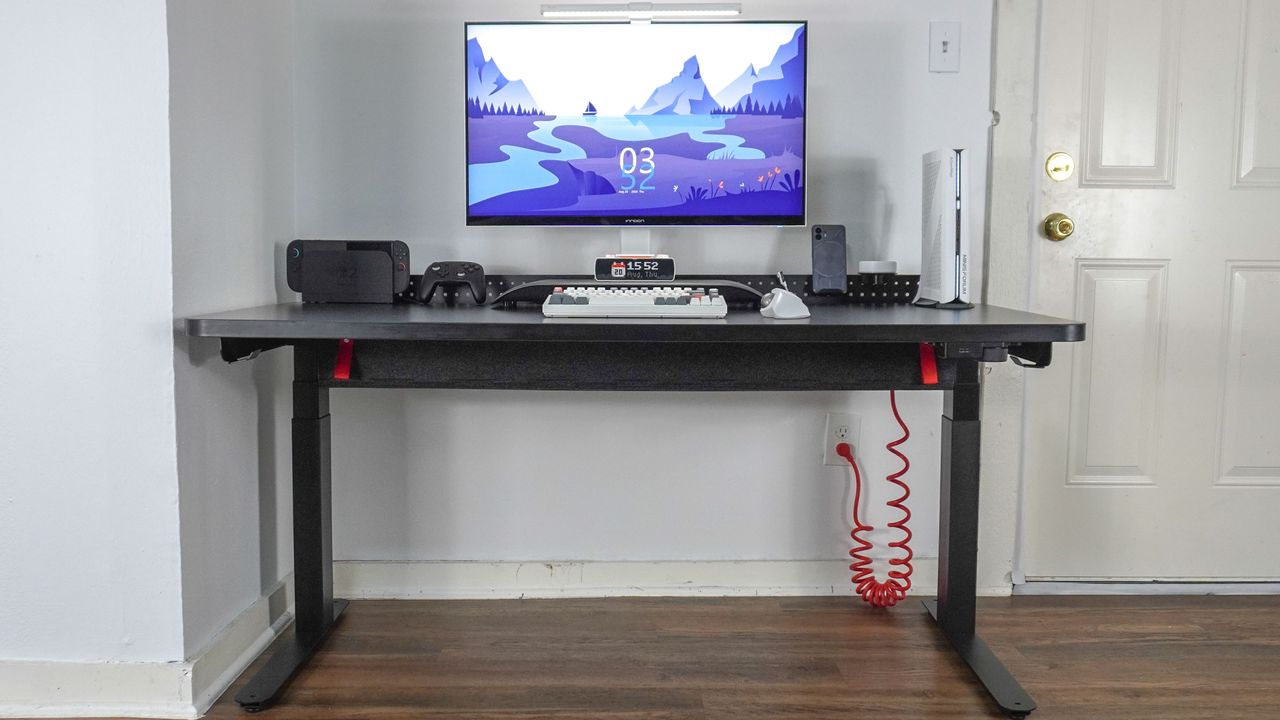
The Herman Miller Coyl Gaming Desk is a sophisticated, dual-motor electric standing desk built for gamers that feels right at home in a high-end home office. While not overly flashy, the subtle red accents on its signature coiled cable and cable management tray give away its gaming DNA.
Much like the Herman Miller Vantum gaming chair, the Coyl is the brand’s first desk engineered specifically for gamers. It features a customizable modular setup, and while you can buy the base desk on its own, adding the optional cable tray and metal shroud completes its signature aesthetic. The shroud also opens up a pegboard-style ecosystem for extra accessories like controller mounts.
I’ve been using the Coyl Gaming Desk as my daily driver for a month for both work and play. It offers a spacious work surface, rock-solid three-stage legs, and replaces standard height-adjustment buttons with a slick rotary dial. However, it only comes in a single size, and installing the shroud prevents you from clamping a monitor arm to the back.
My Herman Miller Coyl Gaming Desk review will help you decide if it deserves a spot among the best gaming desks as well as the best standing desks — and whether its unique features justify its premium price.
Coyl Gaming Desk: Cheat Sheet
- What is it?A premium, dual-motor electric standing desk.
- Who is it for?It’s designed for gamers but works just as well in a home office setup.
- What does it cost?The Herman Miller Coyl Gaming Desk costs $1,095, but you can also get it with a cable trough for $1,475 or with a cable trough and a shroud for $1,635. It’s worth noting that the desk is currently 25% off, which brings the price down significantly.
- What do we like?Using the rotary dial to adjust the desk’s height, the included surge protector’s coiled cable, the wide and easy-to-access cable management tray, and the three-stage legs.
- What don’t we like?The premium price, that the cable trough isn’t included with the base desk, that you can’t use a monitor arm with the shroud installed, that the desk only comes in one size, and how overpriced the accessories for the shroud are.
Coyl Gaming Desk: Specs
|
Black, white, walnut or ash laminate tabletop |
|
|
Felt-lined cable management trough (optional), Laser-cut steel shroud (optional) |
|
|
Tabletop (12-year), Base (7-year), Electrical components (5-year) |
Coyl Gaming Desk: The Ups
From its modular design to its unique control scheme, the Coyl Gaming Desk has a lot going for it. However, it’s how these separate systems come together that really makes this desk shine.
Just a splash of red
At 60 x 28.5 inches, the Coyl Gaming Desk offers more than enough room for one of the best gaming PCs, a giant monitor or a multi-display setup, and all of your accessories. While it’s also available in white, walnut, and ash, most gamers — myself included — will likely opt for the all-black version.
Even if you go with the base desk without any of Herman Miller’s optional accessories, you still get an under-desk surge protector to plug in all your devices, complete with that iconic red cable true to the desk’s namesake. It adds just a splash of color to let you know that yes, this is in fact a gaming desk. Plus, no matter which desktop finish you pick, that coiled cord always comes in red.
For the optional cable trough, the felt front is either dark or light gray, depending on the finish, and its handles match the power cable’s shade of red. It’s a small but welcome touch, though you won’t notice it much while seated. When the desk is raised to its max height of 48.5 inches, though, those red accents really pop.
It’s also worth noting that the Coyl’s red accents, while slightly darker, are a close match to those on Herman Miller’s Vantum gaming chair — perfect if you’re thinking of pairing the two as a set.
On its own, the Coyl looks fairly similar to many of the other standing desks I’ve reviewed. Adding the cable trough and shroud is what really elevates the desk’s aesthetic. They aren’t strictly necessary, but without them, the only extra hardware features you’re getting are the inward-facing cable hooks on either side and the rotary dial.
Speaking of which…
Dialed in
Most electric standing desks feature an edge-mounted control pad with up and down buttons alongside several preset keys, though I’ve tested some desks that opt for touch panels instead, like the Branch Four Leg Desk. With the Coyl Gaming Desk, Herman Miller’s Devin Tran went in an entirely different direction.
To adjust this desk’s height, you place a finger inside the designated groove of its spring-loaded rotary dial and turn it. When you hit your preferred height, you simply let go, and the desk does the rest.
A small black-and-white OLED screen displays the desk’s current height in inches. Pressing in on the dial acts as a button to bring up the menu. From there, you can save up to three height presets, switch measurement units, lock the desk’s height, or set custom upper and lower height limits.
If you’ve been using a standing desk as long as I have, you start to memorize your exact sitting and standing preferences. What I really like about the Coyl’s dial is how effortless it makes those tiny micro-adjustments. On other desks, I often struggle to lock in precisely 28.5 inches — but with the Coyl, fine-tuning down to a tenth of an inch comes much more naturally.
Soft front, industrial back
If there’s one accessory I consider an absolute must when using an electric standing desk, it’s a cable management tray. That way, you don’t have to worry about your computer or monitor coming unplugged if their cords get snagged when the desk moves up or down. While I would have liked to see a basic cable tray included with the base desk, Herman Miller went above and beyond with the design of its optional cable trough.
From the front, it’s very inviting with soft-touch felt and red fabric straps — which serve as handles — that attach magnetically. Inside, however, the cable trough’s frame is constructed from sturdy metal, making it exceptionally solid.
Another thing I really like about the cable trough is that it spans the entire width of the Coyl Gaming Desk. This gives you more than enough room for the included surge protector and several bulky power bricks. There are also cutouts on either side and in the middle, allowing that coiled red cable to route down cleanly and stay as close as possible to your nearest wall outlet.
Given how easy it is to open and close, along with all of the space it provides, you could even use the cable trough for extra storage. With a mini PC, a soundbar, a Nintendo Switch 2, and a monitor on top of the desk, I only used about a third of the cable trough’s total capacity for the surge protector and their power adapters. I could easily put that extra space to good use storing items I occasionally use, like a spare mechanical keyboard.
Just like the rest of the optional accessories for the Coyl, the cable trough comes at a premium. However, compared to the metal shroud at the back of the desk, I found it to be far more functional and less purely aesthetic.
Coyl Gaming Desk: The Downs
The Coyl is certainly well-designed, and a lot of thought went into making it a more subtle gaming desk. However, it’s not without its faults — which include having to drill a few extra holes during assembly and the shroud’s functional shortcomings.
Not entirely pre-drilled
The Coyl Gaming Desk arrived in three large boxes alongside a few smaller ones because I tested the desk alongside all of its optional accessories. Everything was exceptionally well-packaged.
Unboxing left me with the desktop, cable trough, metal shroud, two motorized legs, and all the hardware required for assembly. Building the desk was fairly straightforward — right up until I needed to route the cables connecting the rotary dial and leg motors to the control box at the center.
Herman Miller pre-drills most of the holes on the underside of the Coyl. However, I noticed there weren’t any pilot holes for the plastic cable management clips. On a budget desk, this is par for the course — but on a setup that can reach over $1,600 fully loaded, I expected every single screw location to be pre-drilled.
After mapping out my cable paths, I grabbed my power drill to drill a few pilot holes before screwing the clips in. Given Coyl’s price tag, I was also surprised to find a standard laminate desktop rather than solid wood or a premium veneer. In this case, though, the laminate worked in my favor — it’s one of the easiest materials to drill into, even if nobody buying a luxury desk expects to need power tools to finish the build.
A few pegs short
One trend gaining traction across both office and gaming desks is integrated pegboards for modular storage. However, unlike the Corsair Platform 4: Elevate — which features a tall, full-sized pegboard that extends well above your display — the Coyl’s metal shroud stops short. Very short.
I will give Herman Miller credit: installing the shroud is completely tool-free and ridiculously simple. You slide it over two metal mounting posts at the back of the desk and hand-tighten two bolts on either side. Once installed, however, it rises a mere three inches above the desk’s surface.
Beyond hiding cable clutter and serving as an aesthetic backdrop, the shroud is designed to host a line of proprietary plastic accessories that mount directly to its top edge. Herman Miller offers four options, ranging from a display stand to a round planter bowl.
The accessories function as advertised — I used one for the controller for my monitor light bar, one for my phone, and another for a gamepad. The issue is that on a 28.5-inch-deep desk, you really have to reach to access them while seated. Worse, they aren’t included with the shroud; they’re sold individually at a steep premium given their basic plastic construction.
You can use the shroud on its own, though, and I found its steel construction great for magnetic cable clips to keep charging cords within reach.
Then there’s the Coyl’s biggest dealbreaker: the shroud completely blocks rear-mounted monitor arms. Using one of the best monitor arms instead of the stand that comes in the box is standard practice for gamers and WFH professionals looking to free up desk space and give their screens that floating look.
While you can technically clamp an arm to the left or right side of the desk, doing so makes it almost impossible to center your monitor, as most arms lack the reach to extend all the way to the middle.
Coyl Gaming Desk: Verdict
The Coyl Gaming Desk is an exceptionally well-crafted piece of home office furniture with just the right amount of gamer flair for a subdued, modern battlestation. It offers rock-solid motor stability, sturdy three-stage legs, and a unique rotary control mechanism that makes fine-tuning your sitting or standing height effortless. While a single desktop size limits its appeal for smaller spaces, the finish options let it fit seamlessly into almost any room decor.
Where the Coyl falters is in its optional accessory ecosystem. The cable trough and shroud — alongside the signature coiled cable — are what give this desk its iconic look, robust cable management, and modular expansion. At a baseline price exceeding $1,000, it’s a tough pill to swallow that the cable tray isn’t included standard, and that adding the shroud prevents you from clamping a monitor arm to the back.
If you have the budget and want a luxury, design-forward standing desk that elevates your space, the Coyl is an impressive performer — especially if you already own a Herman Miller chair to match. However, if you rely heavily on monitor arms or want a fully feature-packed modular desk out of the box without paying extra for basic add-ons, you may be better served by more versatile alternatives like the Corsair Platform 4 or 6.
