

When my phone’s screen isn’t large enough for the task at hand, I often reach for a tablet instead. However, unless you charge yours religiously every night, picking one up usually means finding a dead battery and a digital paperweight.
Over the years, I’ve tested many of the best tablets — from a compact, gaming-focused slate to a massive 14-inch one that felt more like a clipboard than something you could easily slide into a bag. Yet of all the devices I’ve used, only one ever solved the constant battery-drain dilemma.
With its magnetic charging dock, I really felt like Google’s Pixel Tablet set a new standard that other companies would follow. Boy, was I wrong. Not only did Google recently discontinue the Pixel Tablet, but I’ve yet to see another manufacturer attempt a similar always-charged dock setup.
If you can’t keep a device permanently docked, the next best solution is a low-power, simplified approach that simply refuses to die. After testing out TCL’s full-featured NXTPAPER tablets, I recently got my hands on the new TCL Note A1. Unlike those general-purpose slates, this one is built entirely around reading, writing, and taking notes with its included T-Pen Pro stylus.
After using the Note A1 for the past three weeks, it’s become the only tablet I reach for at my desk — and the one I slip into my backpack whenever I leave the house. If you’ve had your eyes on a productivity-focused slate from reMarkable, Boox, or even Amazon’s Kindle Scribe, here’s why the TCL Note A1 deserves a spot on your shortlist.
Note A1: was $599 now $499
This ultra-slim 5.5mm Android slate features an 11.5-inch 120Hz NXTPAPER display, an 8,000 mAh battery, and an included T-Pen Pro stylus. Designed for distraction-free reading, writing, and digital note-taking, it combines the eye-comfort feel of paper with full Android productivity. View Deal
A display-first approach
The Note A1 that TCL sent over for me to check out arrived in a single box split in two. While the larger half held the tablet itself along with a stylus, some extra pen tips, and a charging cable, the smaller half held a magnetic flip cover.
Right from the start, I knew I was dealing with a very different type of tablet thanks to the quote printed on the inside of its box: “Knowledge grows by piling up facts, wisdom shines through simplicity.” I couldn’t sum up the design philosophy behind the Note A1 better myself.
At 10.24 x 7.74 x 0.22 inches, this 11.5-inch tablet gives you plenty of screen space to work with in an incredibly slim package. Meanwhile, at 500 grams or just over a pound, the Note A1 is designed to be easy to carry and take with you anywhere — because you never know when inspiration will strike.
Instead of going with thin bezels all the way around, the one on the left side of the device is a bit larger at roughly three-quarters of an inch wide, just like on the original Kindle Scribe. The larger size makes the device easier to hold in your left hand while you write, but that extra space is also used to house a home button with a built-in fingerprint scanner.
This is a bit different from the rest of TCL’s NXTPAPER tablets that lack a fingerprint scanner, but I found it to be a welcome addition — just like the one integrated into the power button on my NXTPAPER 70 Pro phone.
When you look around the sides of the Note A1, you won’t find much. There’s a power button on the top left, and then on the bottom right, there’s a USB-C port for charging. Given it wasn’t designed as a media consumption device like a lot of other tablets, there isn’t a physical volume rocker.
If you’re wondering why the USB-C port isn’t centered, I suspect this probably has to do with TCL’s optional keyboard case. When attached, you can plug a charging cable in cleanly on the bottom right without having it hanging awkwardly from the middle of the device. It’s a small but well-thought-out touch.
Around back, the Note A1 has small, circular magnets wrapped in soft-touch plastic on three of its corners along with a 13 MP rear camera and a trio of pogo pins for connecting the keyboard case. The tablet’s case is made from aerospace-grade aluminum, and in addition to letting you quickly snap on a cover, these round magnets prevent the back of the device from getting scratched.
TCL definitely went with a less-is-more approach with some parts of the Note A1, but the company didn’t skimp on its specs either. Powered by an older but very efficient MediaTek Helio G100 processor, the tablet ships with 8GB of RAM and 256GB of storage.
Despite being less than a quarter inch thick, the Note A1 still packs an 8,000 mAh battery with 33W fast charging. The display is the star of the show, though, and instead of an E-Ink screen, it’s equipped with an 11.5-inch NXTPAPER Pure display with a 3:2 aspect ratio and my personal favorite, matte anti-glare glass.
After adding my fingerprint and going through the rest of the setup process, it was time to see what the Note A1 was capable of.
Not your typical tablet
Instead of completely reinventing the wheel, TCL took many of the best aspects of its NXTPAPER tablets and incorporated them into the Note A1.
While you can’t switch between modes and instantly go from full color to black and white like with other NXTPAPER devices, you still get that matte, paper-like quality from the tablet, which makes reading ebooks and documents a very satisfying experience that’s also easy on the eyes.
The Note A1 isn’t entirely black and white, either. There are hints of color throughout its UI, and you can look at photos or watch YouTube videos like you would on any other tablet. Speaking of the display, it’s flicker-free and buttery smooth thanks to its 120Hz refresh rate. You won’t see any of the typical lag you do on an E-Ink screen here.
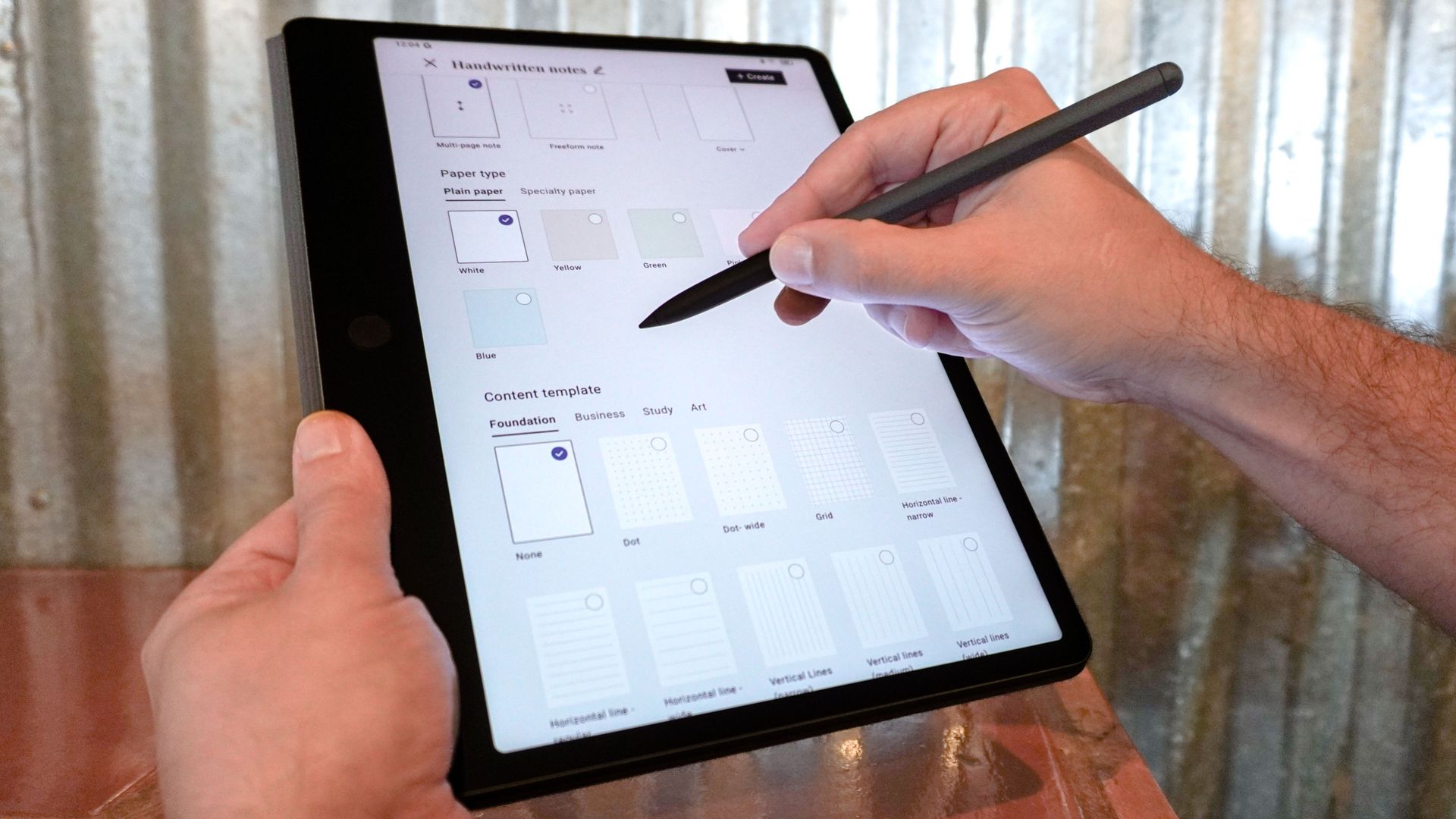
Besides its lack of volume buttons, the one thing that made me instantly realize the Note A1 isn’t just your typical tablet occurred the instant I turned it on for the first time. Instead of going to your standard Android home screen, the device’s main page is actually for notes. You can view all of your existing notes and documents or create new ones with a tap on the plus icon.
The Note A1 is powered by Android, and once you dive into the settings menu, this is immediately apparent. However, the Android version wasn’t listed there, and tapping on the build number didn’t unlock developer options like it does on other Android devices.
It did take me a bit to get used to, but now that I’ve become accustomed to the Note A1’s Android skin, I actually wouldn’t mind seeing it on one of TCL’s next Android phones. At a time when people are installing custom launchers to fight doom-scrolling, the company did an excellent job of equipping this tablet with a distraction-free UI.
Just like with its other recent tablets and phones, you also get access to all of TCL’s AI tools for transcription, translation, and more, but you can turn them off if you want. One AI feature I particularly liked is Inspiration Circle. When you long-press the button on the T-Pen Pro stylus, you can then circle a note or file to add it to a dedicated Inspiration Space.
In practice, this works a lot like the Essential Key and Essential Space on newer Nothing phones. It’s worth noting that if you do decide to use TCL’s AI features, many of them are handled locally on the Note A1, while more demanding ones are carried out over the cloud through a partnership with Microsoft Azure.
Although the Note A1 comes with Microsoft’s apps like Edge and Outlook pre-installed, you can download Google apps or pretty much any other app you like from the Play Store, unlike on reMarkable’s E-Ink tablets.
Just note that your mileage will vary from app to app. For instance, while I could download, log in, and use Reddit, I kept getting an error message that I was using an incorrect version of X when I tried to launch it. You can also sideload Android apps, but I wouldn’t recommend that unless you know what you’re doing and what you’ve downloaded for security reasons.
I tried reading a few graphic novels uploaded as PDF files right from the Note A1’s home screen, and while it worked, I just couldn’t get it to save my place. Then, after downloading and installing CDisplayEx, I was able to read Resident Alien and other digital comics with ease. In fact, they looked great on the Note A1’s 11.5-inch, 3:2 screen.
I’m sure there’s even more I can do with TCL’s latest tablet. However, after three weeks of taking notes, reading ebooks and graphic novels, checking my Gmail and Slack messages, and reading the news, I’m very impressed with the Note A1 and its simpler, more streamlined Android skin.
A tablet worth keeping handy
As I normally do when testing out a new tablet, I kept it right at the ready on my desk. Surprisingly, though, while I’d be constantly recharging other tablets, the Note A1’s battery life continued to wow me during the time I spent using it as my daily driver.
Over the course of three weeks, it never ran out of battery and flat-out died. In fact, after leaving it untouched for a few days, the lowest I saw its battery get was 30%.
Even now, as I’m writing this late on Friday, after charging it on Tuesday before heading out to take pics, it’s still at 70% battery life. In addition to its extra-large 8,000 mAh battery, I think a big part of its lengthy battery life comes down to how the Note A1 enters Standby Mode when not in use for extended periods.
Now, would I recommend this tablet for watching YouTube videos and playing games? Absolutely not, as one of the best cheap tablets would be better for the former, while a more powerful device like the RedMagic Astra 2 would be a better fit for the latter. You can certainly watch videos on the Note A1, but your fingers need to be quick on the draw to pull down its Quick Settings menu since you don’t have physical volume controls after all.
Instead, I think this tablet is a great fit for those who want something simpler that’s easy on the eyes while also being incredibly thin and light — without the premium price you’d pay for an iPad Air. The Note A1 is exactly what its name implies: a handy device that comes with a stylus in the box for taking notes, brainstorming, and jotting down ideas.
- I tried the TCL NXTPAPER 11 Plus and this budget tablet is easily my iPad killer
- I use these 3 tricks with all my tablets so they don’t just feel like a bigger phone
- I got tired of having a bad remote play experience so I used Wi-Fi 7 and this powerful gaming tablet to fix it for good
