Close Menu
MyAppsPlus

    Subscribe to Updates

    Get the latest creative news from FooBar about art, design and business.

    What's Hot

    iPhone Duo vs Samsung Galaxy Z Fold 8: Here’s what each phone does better

    November 28, 2026

    How to watch WWE Survivor Series: WarGames 2026: live streams, TV channels & preview

    November 28, 2026

    UK IPO Publishes AI Transparency Statement

    November 28, 2026
    Facebook X (Twitter) Instagram
    Facebook X (Twitter) Instagram
    MyAppsPlusMyAppsPlus
    Saturday, November 28
    • Home
    • Breaking Tech
    • Apps & Software
    • AI & Automation
    • Android
    • iPhone & iOS
    • More
      • Reviews
      • How-To Guides
      • Deals & Discounts
      • Shop
    MyAppsPlus
    Home»Apps & Software»How to use the new IRS mobile app: Digital accounts and tools moving to smartphones
    Apps & Software

    How to use the new IRS mobile app: Digital accounts and tools moving to smartphones

    myappsplusBy myappsplusOctober 13, 2026033 Mins Read
    Share Facebook Twitter Pinterest Copy Link LinkedIn Tumblr Email Telegram WhatsApp
    Follow Us
    Google News Flipboard
    How to use the new IRS mobile app: Digital accounts and tools moving to smartphones
    Share
    Facebook Twitter LinkedIn Pinterest Email Copy Link
    • What can taxpayers do with the new IRS app?
    • How to download and use the IRS mobile app

    The Internal Revenue Service (IRS) has launched a new mobile app that replaces IRS2Go and gives taxpayers access to more digital services from their smartphones. The free application allows users to check refund statuses, make payments, view tax records, and access selected features previously available through their online accounts.

    The app is available in the Apple App Store and Google Play. Existing IRS2Go users do not need to download a separate application if automatic updates are enabled on their devices.

    What can taxpayers do with the new IRS app?

    The application expands access to individual tax account services, allowing users to manage several tasks without having to navigate the IRS website for every transaction. Its main features include:

    • Check federal tax refund and amended-return statuses.
    • View available balance information and payment history.
    • Make payments toward outstanding tax balances
    • Read selected IRS notices and letters.
    • Access tax records, transcripts, and information return documents.
    • Manage certain profile and communication preferences.
    • Retrieve an Identity Protection PIN (IP PIN) to help protect against tax-related identity theft.

    Some features require users to sign in and verify their identity. The app does not replace IRS.gov, and services for business tax accounts and tax professionals remain available through the agency’s website.
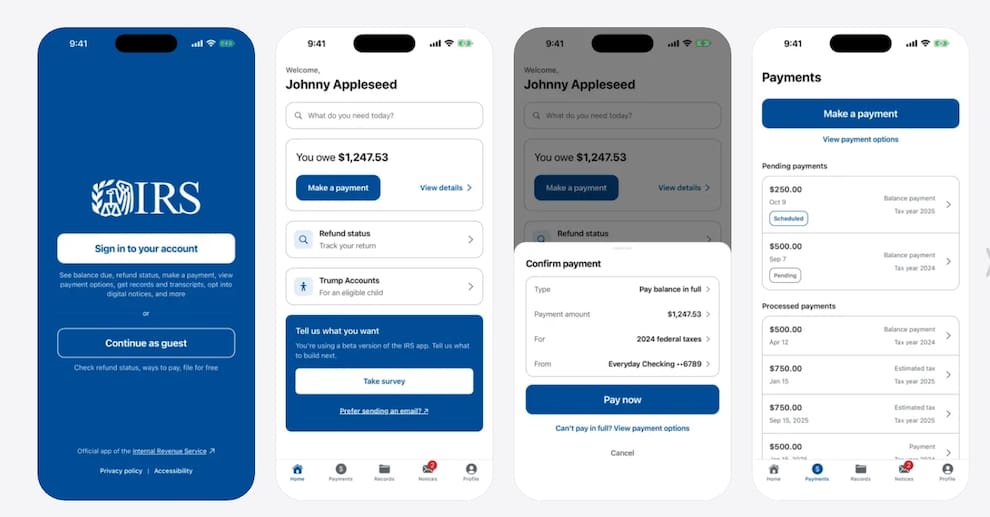
    The free application allows users to check refund statuses, make payments, view tax records, and access selected features previously available through their online accounts.
    The free application allows users to check refund statuses, make payments, view tax records, and access selected features previously available through their online accounts.IRS

    Taxpayers can follow these steps to access the application and its digital tools:

    1. Download or update the app: Search for the official IRS app in the Apple App Store or Google Play. Existing IRS2Go users with automatic updates enabled should receive the new version automatically.
    2. Open the application: Select the service you need, such as checking a refund or accessing your tax account.
    3. Sign in to your account: To use account-specific features, log in with your IRS Individual Online Account credentials and complete identity verification through ID.me if prompted.
    4. Choose a service:Review your balance, make a payment, access available tax records, or read IRS notices and letters.
    5. Check your information: Review the details displayed in the app and follow the instructions provided to complete the selected task.

    Taxpayers should download the application only through official IRS links or verified app store listings. The agency warns users to avoid look-alike apps and unsolicited messages requesting sensitive personal or financial information.

    For additional instructions and access to the official download links, visit the IRS’s mobile app page.

    accounts Digital Mobile Moving tools
    Follow on Google News Follow on Flipboard
    Share. Facebook Twitter Pinterest LinkedIn Tumblr Email Copy Link
    myappsplus
    • Website

    Related Posts

    I took two watches through a Spartan 10K, and now I understand the appeal of an ultralight smartwatch

    November 28, 2026

    Samsung Rolls Out First Software Update for Galaxy Buds On

    November 28, 2026

    TCL NXTPAPER displays look amazing, and they’re up to 38% off right now

    November 28, 2026
    Add A Comment
    Leave A Reply Cancel Reply

    Top Posts

    The pros and cons of using your phone as a mobile hotspot

    November 16, 202651 Views

    UiPath Launches AI Coding Agent, Integrates Claude Code and Codex to Target Development Automation

    November 16, 202646 Views

    Announcing Artificial Analysis Intelligence Index v5

    October 28, 202639 Views
    Latest Reviews

    I’ve seen 2027’s new robot vacuums — here are 3 major trends set to level-up their cleaning, from drop-down suction boosters to… steam?

    myappsplusSeptember 13, 2026

    Rest your new AirPods 5 with wireless charging case on this sleek charger for $18 (Reg. $25)

    myappsplusSeptember 13, 2026

    69% K8s Spend Cut [2026]

    myappsplusSeptember 13, 2026
    Stay In Touch
    • Facebook
    • YouTube
    • TikTok
    • WhatsApp
    • Twitter
    • Instagram

    Subscribe to Updates

    Get the latest tech news from FooBar about tech, design and biz.

    Most Popular

    How to watch Great North Run 2026: Live stream online from anywhere for FREE

    September 13, 20260 Views

    The first images of Meta’s Project Phoenix mixed reality headset have leaked — and there’s a reason it’s so thin and light

    September 13, 20260 Views

    Why your Roku keeps randomly turning off (and how to fix it)

    September 13, 20260 Views
    Our Picks

    iPhone Duo vs Samsung Galaxy Z Fold 8: Here’s what each phone does better

    November 28, 2026

    How to watch WWE Survivor Series: WarGames 2026: live streams, TV channels & preview

    November 28, 2026

    UK IPO Publishes AI Transparency Statement

    November 28, 2026

    Subscribe to Updates

    Subscribe to our newsletter and get the latest tech news, app updates, AI trends, smartphone reviews, and exclusive deals delivered straight to your inbox.

    Facebook X (Twitter) Instagram Pinterest
    • About Us
    • Get In Touch
    • Disclaimer
    • Privacy Policy
    • Terms & Conditions
    © 2026 MyAppsPlus. All Rights Reserved.

    Type above and press Enter to search. Press Esc to cancel.