Close Menu
MyAppsPlus

    Subscribe to Updates

    Get the latest creative news from FooBar about art, design and business.

    What's Hot

    Cohere says Alibaba’s Qwen model tried to send a file to Beijing

    October 27, 2026

    AI agents need limits on financial access

    October 27, 2026

    PyTorch opens the AI ecosystem to a new accelerator class

    October 27, 2026
    Facebook X (Twitter) Instagram
    Facebook X (Twitter) Instagram
    MyAppsPlusMyAppsPlus
    Tuesday, October 27
    • Home
    • Breaking Tech
    • Apps & Software
    • AI & Automation
    • Android
    • iPhone & iOS
    • More
      • Reviews
      • How-To Guides
      • Deals & Discounts
      • Shop
    MyAppsPlus
    Home»Reviews»How to Silence Your iPhone When There’s No Physical Switch
    Reviews

    How to Silence Your iPhone When There’s No Physical Switch

    myappsplusBy myappsplusOctober 27, 2026003 Mins Read
    Share Facebook Twitter Pinterest Copy Link LinkedIn Tumblr Email Telegram WhatsApp
    Follow Us
    Google News Flipboard
    How to Silence Your iPhone When There’s No Physical Switch
    Share
    Facebook Twitter LinkedIn Pinterest Email Copy Link

    Your hand reaches for the switch on the side of the phone. Nothing there. For anyone using an iPhone model without a <a href="https://support.apple.com/en-ge/105103″ rel=”nofollow noopener” target=”_blank”>Ring/Silent switch or Action button, that moment of muscle memory failure is real. The fix lives inside Control Center.

    Apple’s support documentation confirms that Silent Mode is accessible through software on supported iPhone models. Knowing where to find it before you need it is the difference between a silenced phone and one ringing through a meeting.
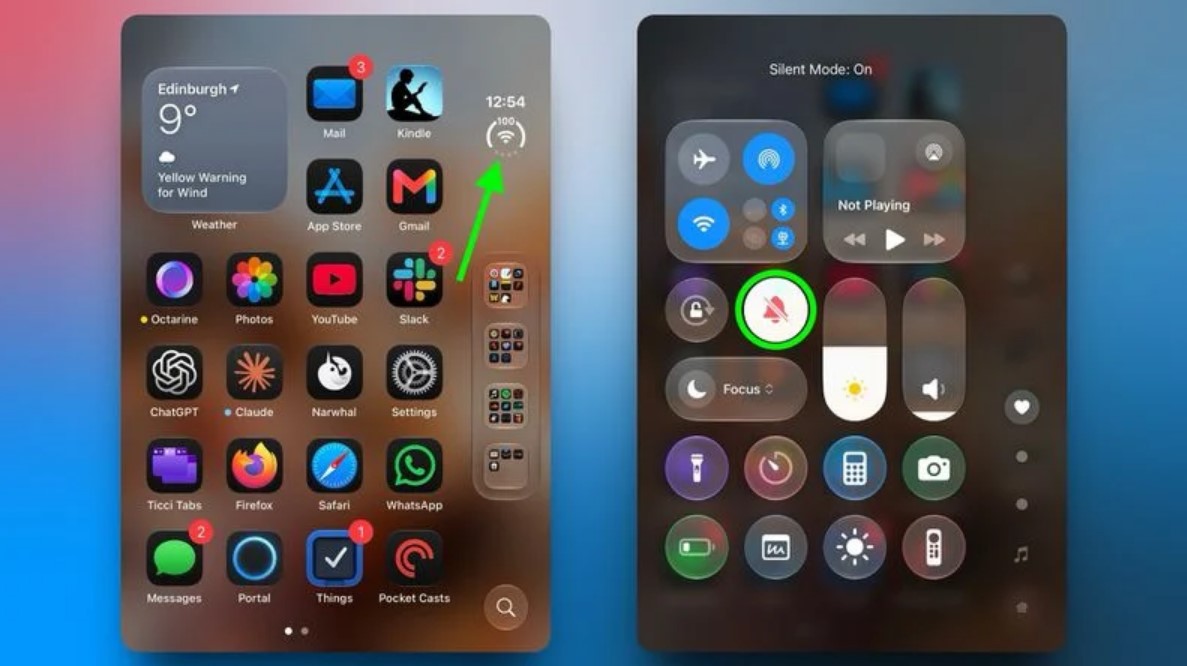
    Image: macrumors

    How to Reach Silent Mode Fast

    Two taps are all it takes to mute calls and alerts through Control Center.

    Silencing your iPhone takes two taps once Control Center is open. Open Control Center using the method for your iPhone model, then tap the bell icon labeled Silent Mode.

    According to Apple’s support documentation, a Silent Mode indicator appears in the status bar as soon as the feature activates. To hide it, go to Settings, then Sounds & Haptics, and turn off Show in Status Bar.
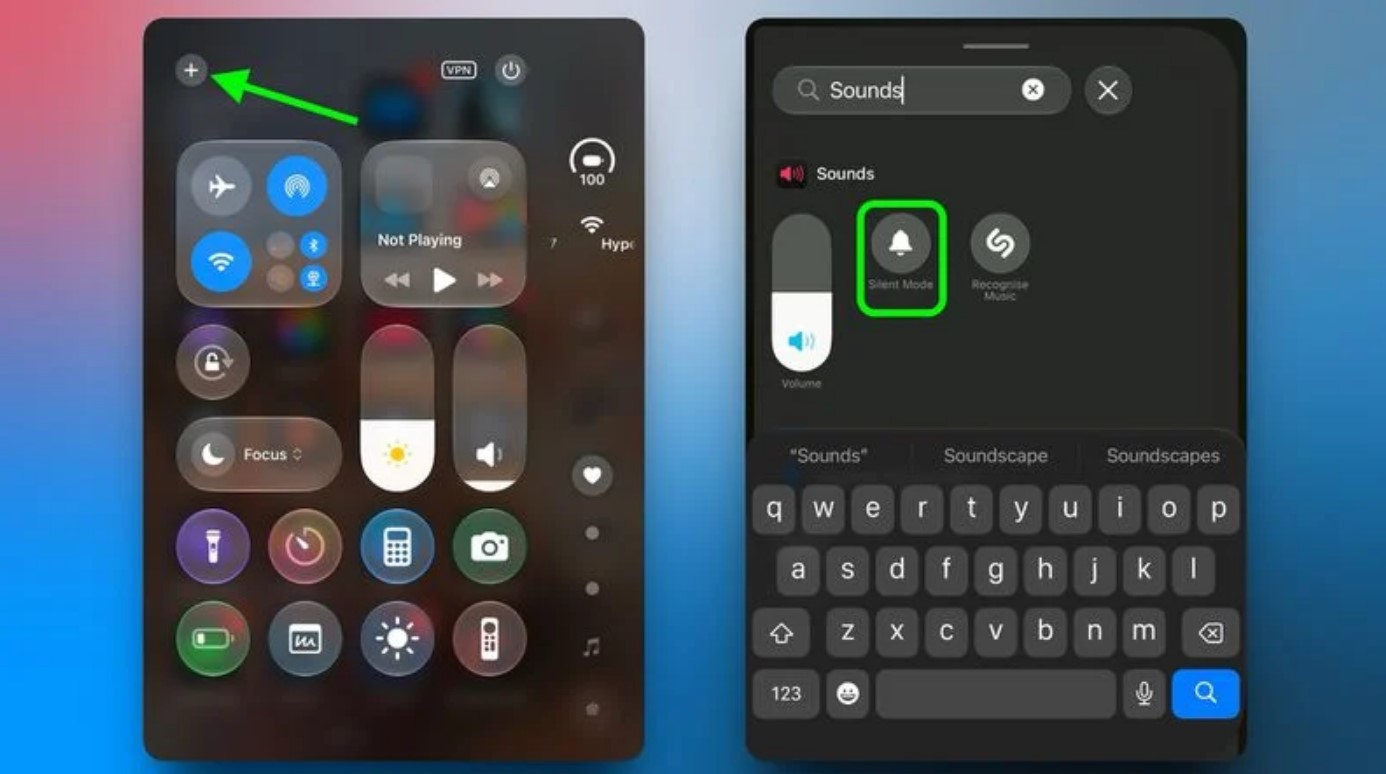
    Image: macrumors

    Silent Mode Is Not a Full Mute

    Silent Mode quiets calls and alerts, but it leaves alarms and media audio untouched.

    Here is the part most people discover at the worst possible time: Silent Mode does not silence everything. According to Apple’s support documentation, calls, notifications, alerts, and system sounds are muted, but alarms set in the Clock app continue to sound.

    Media audio, including music, videos, and games, can also keep playing through the speaker. Apple also notes that camera shutter sounds and Emergency Alert tones may still be audible depending on your region. For broader quiet, a Focus mode such as Do Not Disturb gives you more comprehensive control over which notifications get through and when.

    If the Button Is Missing from Control Center

    Silent Mode may not appear in Control Center by default, but adding it is straightforward.

    Silent Mode does not always appear in Control Center out of the box. To add it, open Control Center and tap the plus icon in the top-left corner of the screen.

    Tap Add a Control on the screen that follows. Scroll to the Sounds section or use the search field to find Silent Mode, then tap it to place it in your Control Center layout. From that point on, the control is available whenever you open Control Center, without digging through Settings each time.

    The Trade-Off Worth Knowing

    A software control works well once it is set up, but it requires a different habit than a physical switch.

    A software control adds steps that a physical switch never did. Unlike a Ring/Silent switch, which works without looking at your screen, Control Center requires you to open it first. Depending on your device settings, Control Center may be accessible from the Lock Screen, which reduces the friction somewhat.

    Add Silent Mode to your Control Center now, before you need it in a hurry. Once it is there, a single tap handles it, and that is close enough to muscle memory to work.

    iPhone Silence Theres When Your
    Follow on Google News Follow on Flipboard
    Share. Facebook Twitter Pinterest LinkedIn Tumblr Email Copy Link
    myappsplus
    • Website

    Related Posts

    AI agents need limits on financial access

    October 27, 2026

    iPhone Lockdown Mode: The pros and cons of enabling Apple’s security feature

    October 27, 2026

    NYT Connections hints and answers for Tuesday, October 27 (game #1234)

    October 27, 2026
    Add A Comment
    Leave A Reply Cancel Reply

    Top Posts

    Cathay Pacific tests Google AI that dramatically cuts airplane contrails — tiny altitude shifts slash environmental impact by 40% in early trials

    September 8, 2026137 Views

    Keep running out of mobile data? This new unlimited plan gets you up to 80Mbps 5G speeds for just AU$50/m

    October 8, 202615 Views

    Drone swarm tech valued by both defense and civilian sectors, industry platform says

    September 8, 202615 Views
    Latest Reviews

    Anthropic’s new Fable release is cheaper, less restrictive

    myappsplusSeptember 2, 2026

    iPhone 18 Pro vs. iPhone 17 Pro: Should you upgrade this year?

    myappsplusSeptember 2, 2026

    Enjoy low-and-slow BBQ with East Oak’s 30-inch electric smokers starting from $207

    myappsplusSeptember 2, 2026
    Stay In Touch
    • Facebook
    • YouTube
    • TikTok
    • WhatsApp
    • Twitter
    • Instagram

    Subscribe to Updates

    Get the latest tech news from FooBar about tech, design and biz.

    Most Popular

    Anthropic’s new Fable release is cheaper, less restrictive

    September 2, 20260 Views

    Enjoy low-and-slow BBQ with East Oak’s 30-inch electric smokers starting from $207

    September 2, 20260 Views

    NYC schools announce major classroom technology overhaul

    September 2, 20260 Views
    Our Picks

    Cohere says Alibaba’s Qwen model tried to send a file to Beijing

    October 27, 2026

    AI agents need limits on financial access

    October 27, 2026

    PyTorch opens the AI ecosystem to a new accelerator class

    October 27, 2026

    Subscribe to Updates

    Subscribe to our newsletter and get the latest tech news, app updates, AI trends, smartphone reviews, and exclusive deals delivered straight to your inbox.

    Facebook X (Twitter) Instagram Pinterest
    • About Us
    • Get In Touch
    • Disclaimer
    • Privacy Policy
    • Terms & Conditions
    © 2026 MyAppsPlus. All Rights Reserved.

    Type above and press Enter to search. Press Esc to cancel.