Close Menu
MyAppsPlus

    Subscribe to Updates

    Get the latest creative news from FooBar about art, design and business.

    What's Hot

    The FCC bans gadgets with ‘surveillance chips’ in — but Intel gets a waiver

    October 24, 2026

    I finally made Google Photos less annoying with these tweaks

    October 24, 2026

    This clever USB-C cable doubles as a stand for your phone [Gallery]

    October 24, 2026
    Facebook X (Twitter) Instagram
    Facebook X (Twitter) Instagram
    MyAppsPlusMyAppsPlus
    Saturday, October 24
    • Home
    • Breaking Tech
    • Apps & Software
    • AI & Automation
    • Android
    • iPhone & iOS
    • More
      • Reviews
      • How-To Guides
      • Deals & Discounts
      • Shop
    MyAppsPlus
    Home»Breaking Tech»How to improve your PC’s airflow for better cooling
    Breaking Tech

    How to improve your PC’s airflow for better cooling

    myappsplusBy myappsplusOctober 24, 2026004 Mins Read
    Share Facebook Twitter Pinterest Copy Link LinkedIn Tumblr Email Telegram WhatsApp
    Follow Us
    Google News Flipboard
    How to improve your PC’s airflow for better cooling
    Share
    Facebook Twitter LinkedIn Pinterest Email Copy Link

    Here’s how to think about your fans.

    When you’re building or upgrading a PC, chances are you’re thinking more about how to improve your machine’s performance than you are about where you’re going to put the fans. Improving airflow might not be as exciting as adding a new graphics card, but it’s essential to getting the most out of your rig. Fortunately, there are a few simple principles you can apply to any PC build to keep all your components running cool.

    It’s important to understand exactly what you’re trying to accomplish when improving your PC’s airflow. PC components generate heat as they run, which gets trapped in the case, degrading system performance if things get too hot. The point of fans is to draw cooler air from outside the case over those components and exhaust the hot air they generate outside. That means the first step should be placing your PC somewhere that already has decent airflow — not in a corner of the room, not shoved under your desk, and definitely not crowded in with other electronics.

    Fan placement and pressure are the keys to good airflow
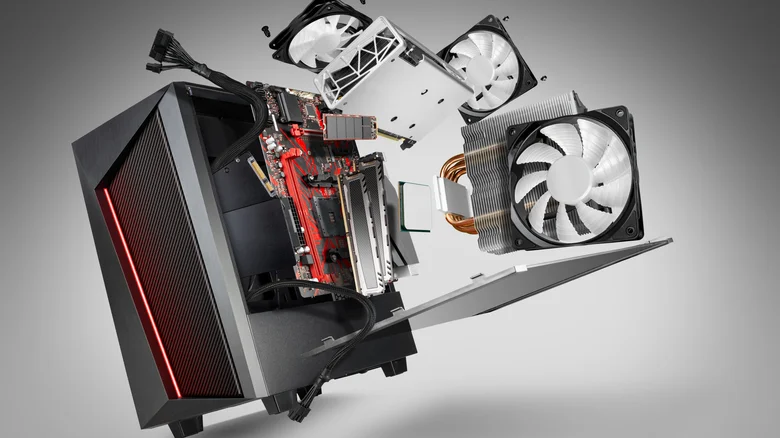
    PC case with fans and coolers flying out.

    Where you place your fans matters even more. Since hot air naturally rises and the hottest components in your case (the CPU and GPU) tend to be near the back, it’s best to pull cool air from the front and bottom and exhaust hot air out the top and back. Not every system needs fans on the top and bottom, but adding them is a good first step if you’re struggling to keep your PC cool with just the front and back fans.

    In addition to improving airflow, fans change the air pressure within your case. If the air pressure inside a case is higher than the air pressure outside (called positive pressure), air will naturally try to escape through any gaps it can. If case pressure is lower, it will instead draw air in through those gaps, bringing dust along with it. Completely optimized airflow will maintain neutral pressure, where cool air enters the case at the same rate that hot air exits. Precisely neutral pressure can be hard to achieve, though, so it’s usually best to aim for slightly positive pressure by ensuring that your case is drawing in a little more air than it’s exhausting to avoid drawing in excess dust.

    If you’re buying new fans, pay attention to their size and speed. The standard case fan size is 120mm, and anything larger than that will pull in more air but at a lower pressure. That’s important when considering that intake fans at the front and bottom of a case are usually pulling air through a mesh screen, which further reduces the pressure of the air coming in. Because of that, it’s usually better to run intake fans at a higher speed to increase their pressure if you have the option. Also keep in mind that larger fans are usually quieter than smaller ones, so they tend to be a better choice if noise is a concern. There’s no precise formula for optimal fan size and speed, so you may have to experiment with your setup to find what works for you.

    How to keep any PC running cool

    Purchasing a new case built for optimal airflow is also an option, but you can achieve good airflow in just about any case. Just avoid any cases that have a solid front panel and instead opt for one with a mesh panel in front of the intake fans. Practicing good cable management is important no matter what case you have. Remember that the goal is to ensure air can flow as freely as possible from the front of the case to the back and arrange your case accordingly.

    Airflow better Computing Improve Your
    Follow on Google News Follow on Flipboard
    Share. Facebook Twitter Pinterest LinkedIn Tumblr Email Copy Link
    myappsplus
    • Website

    Related Posts

    The FCC bans gadgets with ‘surveillance chips’ in — but Intel gets a waiver

    October 24, 2026

    Which services can you safely disable to improve PC gaming?

    October 24, 2026

    Google raised a generation on Chromebooks – now comes the hard part

    October 24, 2026
    Add A Comment
    Leave A Reply Cancel Reply

    Top Posts

    Cathay Pacific tests Google AI that dramatically cuts airplane contrails — tiny altitude shifts slash environmental impact by 40% in early trials

    September 8, 2026137 Views

    Drone swarm tech valued by both defense and civilian sectors, industry platform says

    September 8, 202615 Views

    Keep running out of mobile data? This new unlimited plan gets you up to 80Mbps 5G speeds for just AU$50/m

    October 8, 202614 Views
    Latest Reviews

    WD’s 6TB Elements portable hard drive drops to $260 for simple plug-and-play backups

    myappsplusSeptember 1, 2026

    Job postings show early signs of AI automation impact

    myappsplusSeptember 1, 2026

    iPhone 18 Pro Colors Apparently Include Black, But Skip Silver

    myappsplusSeptember 1, 2026
    Stay In Touch
    • Facebook
    • YouTube
    • TikTok
    • WhatsApp
    • Twitter
    • Instagram

    Subscribe to Updates

    Get the latest tech news from FooBar about tech, design and biz.

    Most Popular

    WD’s 6TB Elements portable hard drive drops to $260 for simple plug-and-play backups

    September 1, 20260 Views

    iPhone 18 Pro Colors Apparently Include Black, But Skip Silver

    September 1, 20260 Views

    The new Amazfit Cheetah 2 Pro falls to $399.99 in its first Amazon discount

    September 1, 20260 Views
    Our Picks

    The FCC bans gadgets with ‘surveillance chips’ in — but Intel gets a waiver

    October 24, 2026

    I finally made Google Photos less annoying with these tweaks

    October 24, 2026

    This clever USB-C cable doubles as a stand for your phone [Gallery]

    October 24, 2026

    Subscribe to Updates

    Subscribe to our newsletter and get the latest tech news, app updates, AI trends, smartphone reviews, and exclusive deals delivered straight to your inbox.

    Facebook X (Twitter) Instagram Pinterest
    • About Us
    • Get In Touch
    • Disclaimer
    • Privacy Policy
    • Terms & Conditions
    © 2026 MyAppsPlus. All Rights Reserved.

    Type above and press Enter to search. Press Esc to cancel.