
Close Menu
MyAppsPlus

    Subscribe to Updates

    Get the latest creative news from FooBar about art, design and business.

    What's Hot

    Vantrue Nexus 5S Review

    October 4, 2026

    ‘A meaningful risk’: Oracle’s massive 1.3 GW Wisconsin AI campus faces severe power delays as grid review restarts — pushing customer delivery past 2027

    October 4, 2026

    How to improve your iPhone’s call quality

    October 4, 2026
    Facebook X (Twitter) Instagram
    Facebook X (Twitter) Instagram
    MyAppsPlusMyAppsPlus
    Sunday, October 4
    • Home
    • Breaking Tech
    • Apps & Software
    • AI & Automation
    • Android
    • iPhone & iOS
    • More
      • Reviews
      • How-To Guides
      • Deals & Discounts
      • Shop
    MyAppsPlus
    Home»Breaking Tech»Here’s what you should do if only one of your AirPods is working
    Breaking Tech

    Here’s what you should do if only one of your AirPods is working

    myappsplusBy myappsplusOctober 4, 2026004 Mins Read
    Share Facebook Twitter Pinterest Copy Link LinkedIn Tumblr Email Telegram WhatsApp
    Follow Us
    Google News Flipboard
    Here’s what you should do if only one of your AirPods is working
    Share
    Facebook Twitter LinkedIn Pinterest Email Copy Link

    One AirPod not working is stranger than both earbuds malfunctioning, but it’s a fixable problem nonetheless.

    The convenience offered by AirPods’ simplified connection with other Apple products, in conjunction with the increasing rarity of the headphone jack, has all but secured the ubiquity of Apple’s wireless earbuds. Newer releases, like the recent AirPods 5, continue to impress. 

    With a higher price floor than their wired siblings (modern AirPods start at $129), you’ll expect these earbuds to last for a while. Nevertheless, even the the best AirPods can’t escape a few problems at times. One of the strangest ways your AirPods can run into trouble is when only one of your earbuds stops working. Thankfully, this is fixable.

    What to do if one AirPod isn’t producing sound

    AirPods outside of their charging case on a blue and pink background.

    If only one of your AirPods is producing sound, it’s probably a charging issue. Begin by cleaning the charging port of the AirPods’ case and making sure the case itself is fully charged. Since grime can build up inside the case, clean there too, especially at the bottom where the earbuds make contact to charge.

    Then, charge both AirPods for 30 seconds before opening the case near your iPhone, at which point a popup will appear showing the charge status of the case and AirPods. If you need to check this often, you can do so faster by adding a Batteries widget to your iPhone’s home screen. Assuming everything is charging correctly, test the malfunctioning AirPod (keeping the functioning one closed in the case). If it’s working, charge both AirPods another 30 seconds and test them again.

    In case it’s still not working, it’s time for a reset. This puts your AirPods’ settings back to their defaults, but should otherwise be painless. 

    If you have the AirPods 3, AirPods Pro 2, or older models of either: put your AirPods in their case with the lid closed, wait 30 seconds, then go to Settings > Bluetooth on your iPhone. Assuming your AirPods appear, tap the i icon next to them and choose Forget This Device. If they don’t, open the lid of the case, hold the circular setup button on the back for 15 seconds, then wait for the light on the front of the case to flash amber and white. At that point, follow the instructions on your device’s screen.

    If you’re using either model of the AirPods 5, any AirPods 4, or AirPods Pro 3, the reset process is similar. However, the input on the physical button is different. Instead of holding it, you’ll need to double-tap the front of the case while the status light is on, then double-tap again when that light flashes white, and do the same a third time when the light flashes faster. The same amber-to-white pattern should run, then instructions will appear onscreen.

    Fixing audio imbalance, and other solutions
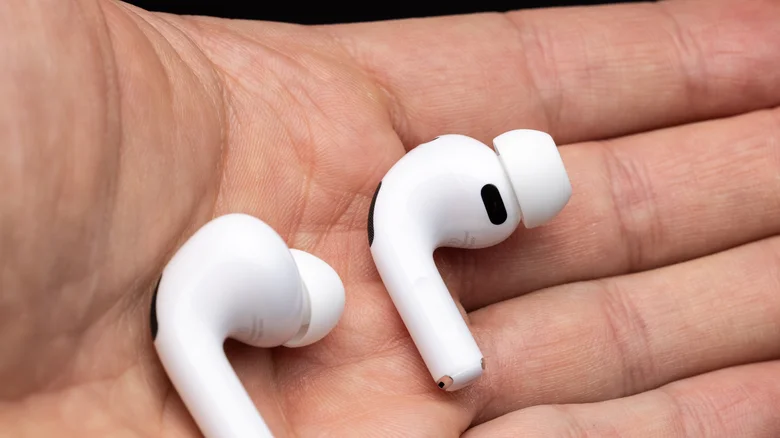
    Two AirPods Pro buds in a hand.

    In case you’re still having trouble, inspect the earbud that’s not playing and compare it to the other one. A quick cleaning of the individual AirPods doesn’t hurt — check the speaker mesh for debris and wipe it out with a soft cloth if needed. Consider replacing the ear tips if they are torn or otherwise don’t provide a good seal. 

    Let your AirPods get a good charge after cleaning them and the case, if you haven’t already. Finally, restart your iPhone to make sure it’s not a bug on the device’s side, and try another audio

    If you’re experiencing unbalanced audio in your AirPods rather than one bud not working at all, head to Settings > Accessibility > Audio & Visual on your iPhone. Here, make sure the Balance slider is in the middle to prevent audio favoring one ear or the other. 

    Apple Heres only should What
    Follow on Google News Follow on Flipboard
    Share. Facebook Twitter Pinterest LinkedIn Tumblr Email Copy Link
    myappsplus
    • Website

    Related Posts

    How to improve your iPhone’s call quality

    October 4, 2026

    What causes screen tearing and how can you fix it?

    October 4, 2026

    T-Mobile’s free Apple iPhone 18 Pro deal is dead

    October 4, 2026
    Add A Comment
    Leave A Reply Cancel Reply

    Top Posts

    Can reviews settle disputes that marked first two seasons?

    September 21, 20268 Views

    Experts call for leveraging AI, breaking key tech bottlenecks to propel advanced manufacturing

    September 19, 20266 Views

    What was the PSX? The souped-up PS2 rarely sold outside of Japan

    September 14, 20266 Views
    Latest Reviews

    SpaceX is building a $100 billion ‘Starbase’ launch site in Louisiana

    myappsplusAugust 26, 2026

    ‘If we stuck with the silent protagonist method, we wouldn’t be able to tell this story properly’ — Metro 2039 executive producer says making The Stranger a speaking protagonist ‘goes hand in hand with telling a personal story’

    myappsplusAugust 26, 2026

    Bill Gates says we’ve passed AI’s danger thresholds. Now what?

    myappsplusAugust 26, 2026
    Stay In Touch
    • Facebook
    • YouTube
    • TikTok
    • WhatsApp
    • Twitter
    • Instagram

    Subscribe to Updates

    Get the latest tech news from FooBar about tech, design and biz.

    Most Popular

    ‘If we stuck with the silent protagonist method, we wouldn’t be able to tell this story properly’ — Metro 2039 executive producer says making The Stranger a speaking protagonist ‘goes hand in hand with telling a personal story’

    August 26, 20260 Views

    Bill Gates says we’ve passed AI’s danger thresholds. Now what?

    August 26, 20260 Views

    AI gold rush draws crypto firms away from Bitcoin

    August 26, 20260 Views
    Our Picks

    Vantrue Nexus 5S Review

    October 4, 2026

    ‘A meaningful risk’: Oracle’s massive 1.3 GW Wisconsin AI campus faces severe power delays as grid review restarts — pushing customer delivery past 2027

    October 4, 2026

    How to improve your iPhone’s call quality

    October 4, 2026

    Subscribe to Updates

    Subscribe to our newsletter and get the latest tech news, app updates, AI trends, smartphone reviews, and exclusive deals delivered straight to your inbox.

    Facebook X (Twitter) Instagram Pinterest
    • About Us
    • Get In Touch
    • Disclaimer
    • Privacy Policy
    • Terms & Conditions
    © 2026 MyAppsPlus. All Rights Reserved.

    Type above and press Enter to search. Press Esc to cancel.