Close Menu
MyAppsPlus

    Subscribe to Updates

    Get the latest creative news from FooBar about art, design and business.

    What's Hot

    iPhone 18 Pro vs iPhone Duo vs iPhone Air: the key differences between Apple’s top models

    November 23, 2026

    Grok Bot to get local Computer Use and Dictation in any app

    November 23, 2026

    Samsung’s Switch 2-compatible Express microSD cards are nearly 50% off for Black Friday Week

    November 23, 2026
    Facebook X (Twitter) Instagram
    Facebook X (Twitter) Instagram
    MyAppsPlusMyAppsPlus
    Monday, November 23
    • Home
    • Breaking Tech
    • Apps & Software
    • AI & Automation
    • Android
    • iPhone & iOS
    • More
      • Reviews
      • How-To Guides
      • Deals & Discounts
      • Shop
    MyAppsPlus
    Home»How-To Guides»Grok Bot to get local Computer Use and Dictation in any app
    How-To Guides

    Grok Bot to get local Computer Use and Dictation in any app

    myappsplusBy myappsplusNovember 23, 2026002 Mins Read
    Share Facebook Twitter Pinterest Copy Link LinkedIn Tumblr Email Telegram WhatsApp
    Follow Us
    Google News Flipboard
    Grok Bot to get local Computer Use and Dictation in any app
    Share
    Facebook Twitter LinkedIn Pinterest Email Copy Link

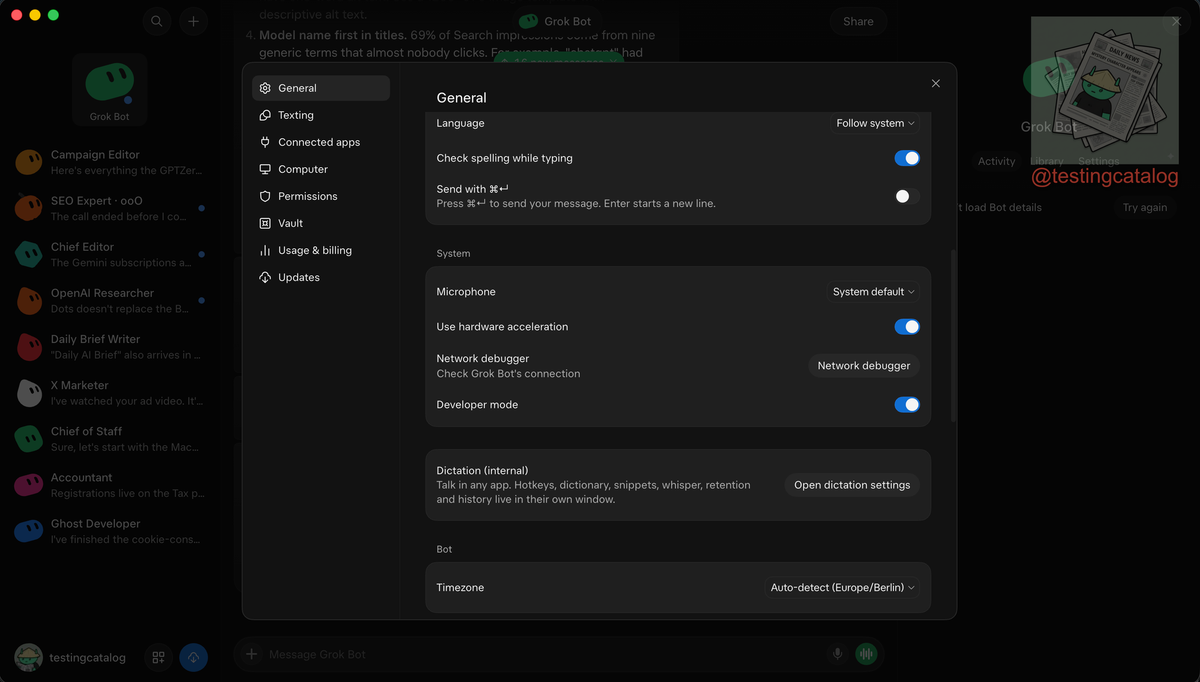
    SpaceXSI is preparing two new capabilities for the Grok Bot app on macOS: local Computer Use and system-level dictation. Both are still in development and not available to anyone yet. Today, Computer Use in Grok Bot runs through cloud VMs, where Bots work on a hosted computer that keeps going even when your laptop is closed. The upcoming local option would let Grok Bot operate apps directly on your desktop.

    The Computer tab in Settings now lists a separate “Grok Bot Computer Use” section, which says “Not available on this computer” for now. It sits apart from the “Bot’s computer” section, where users update or reset the cloud machine that all their Bots share, so the two modes look set to live side by side.

    “Dictation in any app” is in the works too. A new Dictation entry in General settings, marked as internal, reads “Talk in any app. Hotkeys, dictionary, snippets, whisper, retention and history live in their own window.” It includes an Open dictation settings button that points to a standalone voice input tool for the whole Mac.

    Grok Bot launched in August as a team of always-on AI agents, reached version 1.0 this month, and its Mac app recently gained access to Messages, Mail, Notes, Reminders, Calendar, Location and Contacts. Local Computer Use would extend that reach to any desktop app, something many users have asked for, while dictation would bring Grok Bot’s voice input to every text field on the Mac. For people who hand daily work to Bots, it means fewer trips between the cloud computer and their own machine. SpaceXSI has not shared any release timing.

    • Deploy Grok Bot to your organization (SpaceXSI Docs): Supports: The documentation says Bots do their work on a hosted Linux computer in the cloud, one per member, which users can rebuild from Settings, Computer, under Bot’s computer.
    • AI teammates that finish the work (Grok Bot): Related context: The product page explains that every Bot has its own computer and keeps working in parallel even when your laptop is closed.
    • Introducing Grok Bot 1.0 (SpaceXSI): Related context: The 1.0 announcement describes the current Grok Bot release, including faster and more reliable browser use on the Bot’s own computer.
    Computer Dictation Grok local
    Follow on Google News Follow on Flipboard
    Share. Facebook Twitter Pinterest LinkedIn Tumblr Email Copy Link
    myappsplus
    • Website

    Related Posts

    How to use auto drive in GTA 6? What does it do? Does it work with boats in the video game? All questions answered

    November 22, 2026

    Gemini Can Now Click and Type in Mac Apps While You Work

    November 21, 2026

    Google adds computer use capabilities to Gemini’s Mac app

    November 20, 2026
    Add A Comment
    Leave A Reply Cancel Reply

    Top Posts

    The pros and cons of using your phone as a mobile hotspot

    November 16, 202647 Views

    UiPath Launches AI Coding Agent, Integrates Claude Code and Codex to Target Development Automation

    November 16, 202646 Views

    Save on your groceries, gas, and holiday shopping with this $15 BJ’s membership (Reg. $60) 

    November 4, 202633 Views
    Latest Reviews

    Don’t buy Philips Hue’s new TV Screen Sync just yet — there’s a cheaper setup that also includes the light strip and, confusingly, is also by Philips

    myappsplusSeptember 11, 2026

    Where should Apple go after the iPhone Duo? Bring on smaller and larger foldables

    myappsplusSeptember 11, 2026

    This code cuts Bruno Marc’s business oxfords down to $25

    myappsplusSeptember 11, 2026
    Stay In Touch
    • Facebook
    • YouTube
    • TikTok
    • WhatsApp
    • Twitter
    • Instagram

    Subscribe to Updates

    Get the latest tech news from FooBar about tech, design and biz.

    Most Popular

    Where to preorder the Apple AirPods 5

    September 11, 20260 Views

    3 best new to Prime Video movies to binge-watch this weekend (Sept. 11-13) — including a steamy drama that should have won Margot Robbie an Oscar

    September 11, 20260 Views

    Lenovo Googlebook 15 specs leak, and this clearly isn’t your schoolhouse Chromebook

    September 11, 20260 Views
    Our Picks

    iPhone 18 Pro vs iPhone Duo vs iPhone Air: the key differences between Apple’s top models

    November 23, 2026

    Grok Bot to get local Computer Use and Dictation in any app

    November 23, 2026

    Samsung’s Switch 2-compatible Express microSD cards are nearly 50% off for Black Friday Week

    November 23, 2026

    Subscribe to Updates

    Subscribe to our newsletter and get the latest tech news, app updates, AI trends, smartphone reviews, and exclusive deals delivered straight to your inbox.

    Facebook X (Twitter) Instagram Pinterest
    • About Us
    • Get In Touch
    • Disclaimer
    • Privacy Policy
    • Terms & Conditions
    © 2026 MyAppsPlus. All Rights Reserved.

    Type above and press Enter to search. Press Esc to cancel.