Close Menu
MyAppsPlus

    Subscribe to Updates

    Get the latest creative news from FooBar about art, design and business.

    What's Hot

    Fleece-lined Crocs for $30? Walmart has the Baya Lined Clog at 50% off right now.

    October 25, 2026

    How to watch This City Is Ours — Watch season 2 for free online from anywhere

    October 25, 2026

    This Switch 2 sequel accessory was a few millimeters away from being good

    October 25, 2026
    Facebook X (Twitter) Instagram
    Facebook X (Twitter) Instagram
    MyAppsPlusMyAppsPlus
    Sunday, October 25
    • Home
    • Breaking Tech
    • Apps & Software
    • AI & Automation
    • Android
    • iPhone & iOS
    • More
      • Reviews
      • How-To Guides
      • Deals & Discounts
      • Shop
    MyAppsPlus
    Home»How-To Guides»Grok Bot Can Now Use Your iPhone’s Apps, but Not iMessage Yet
    How-To Guides

    Grok Bot Can Now Use Your iPhone’s Apps, but Not iMessage Yet

    myappsplusBy myappsplusOctober 25, 2026003 Mins Read
    Share Facebook Twitter Pinterest Copy Link LinkedIn Tumblr Email Telegram WhatsApp
    Follow Us
    Google News Flipboard
    Grok Bot Can Now Use Your iPhone’s Apps, but Not iMessage Yet
    Share
    Facebook Twitter LinkedIn Pinterest Email Copy Link

    Grok Bot can now reach into the built-in apps on your phone. The official Grok Bot account announced on October 22 that the assistant can use Calendar, Reminders, Contacts and “more apps,” and said the feature is rolling out now on iOS and Android. It arrives just days after Grok Bot picked up support for the iPhone Action Button.

    https://x.com/bot/status/2113393684209176718

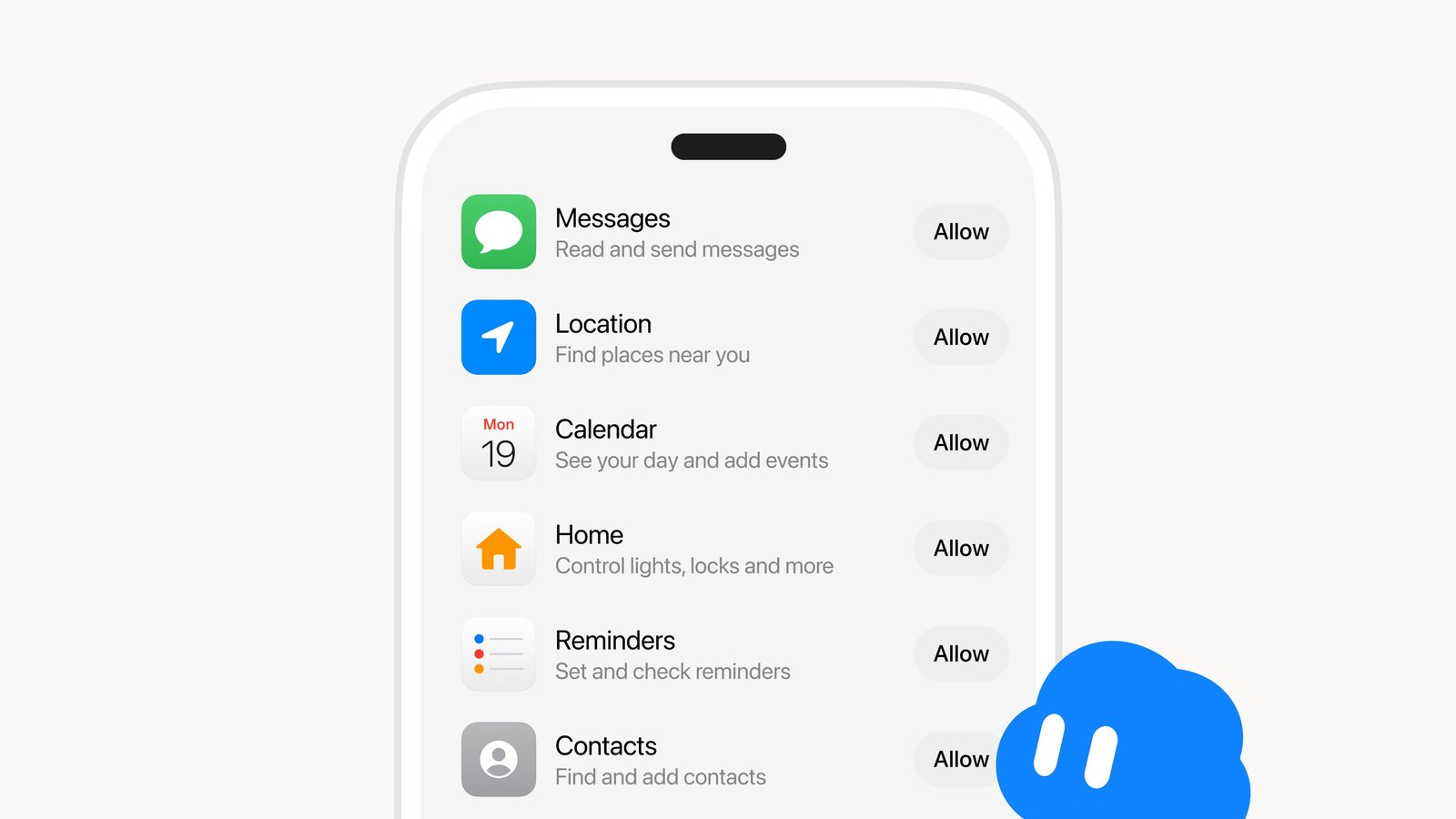
    The announcement graphic lists six apps, each with its own Allow button. Messages is described as “Read and send messages,” Location as “Find places near you,” Calendar as “See your day and add events,” Home as “Control lights, locks and more,” Reminders as “Set and check reminders” and Contacts as “Find and add contacts.” Nothing turns on until you tap Allow, so you decide which apps Grok Bot can touch.

    iPhone owners should temper expectations on Messages, though. When one user asked whether iMessage was included, the official Grok Bot account replied that “iMessage is not part of this update,” so don’t count on it handling your iPhone texts just yet.

    According to an X news summary of posts on the platform, people are using the feature to read messages, manage reminders, access contacts, find locations and control smart home devices like lights and locks. The new access arrives less than a week after a major Grok Bot update with X Chat support. Some users also say they have set alarms by voice, although alarms are not in the official graphic. Early results look mixed, too. One tester called the experience “flaky,” saying alarm setting wasn’t working and that the bot reported their iPhone as not connected.

    For now, this is a phone feature only. The announcement covers the iOS and Android apps, and there is no word yet on the same app permissions coming to the Mac. An October 20 leak shared by Kevin Logan showed text from an early build saying Grok Bot “can do more with your Mac and iPhone apps,” including searching Mail and adding Notes. Mail and Notes support remains rumoured and is not part of the official rollout. On the Mac, Meta’s Muse app for Mac already reaches Apple apps like Mail, Messages and Notes, and it can get full disk access if you allow it.

    Grok Bot’s Mac app does already offer its own kind of computer access. A setting called Execution on this computer lets Grok Bot open files and run tasks on your Mac, with Auto-review checking everything first, and you can choose to have it ask every time. Another toggle routes Grok Bot’s network traffic through your desktop computer instead of the cloud.

    Elon Musk gave the app a nudge on October 23, posting “Try Grok @Bot” while quoting a user who called it “the most useful tool in the past week.” His post did not mention the phone apps specifically.

    https://x.com/bot

    Nothing about this rollout is Canada-specific. It is a staged global release, so Canadians should see the new permissions as the update reaches their devices. The X summary also ties the launch to 1Password’s new sign-in platform for AI agents.

    Would you let Grok Bot into your messages and smart locks, or are you starting with Reminders and Calendar?

    Want to see more of our stories on Google?

    Add iPhone in Canada as a Preferred Source on Google

    P.S. Want to keep this site truly independent? Support us by buying us a beer, treating us to a coffee, or shopping through Amazon here. Links in this post are affiliate links, so we earn a tiny commission at no charge to you. Thanks for supporting independent Canadian media!

    apps Grok iMessage iPhones Your
    Follow on Google News Follow on Flipboard
    Share. Facebook Twitter Pinterest LinkedIn Tumblr Email Copy Link
    myappsplus
    • Website

    Related Posts

    Get the ultimate security for your MacBook by changing these privacy settings

    October 25, 2026

    Your first look at the Galaxy S27 Ultra and Pro batteries is here, sort of

    October 25, 2026

    How to Automate Your Content Workflow Without Risking Your Google Rankings

    October 25, 2026
    Add A Comment
    Leave A Reply Cancel Reply

    Top Posts

    Cathay Pacific tests Google AI that dramatically cuts airplane contrails — tiny altitude shifts slash environmental impact by 40% in early trials

    September 8, 2026137 Views

    Keep running out of mobile data? This new unlimited plan gets you up to 80Mbps 5G speeds for just AU$50/m

    October 8, 202615 Views

    Drone swarm tech valued by both defense and civilian sectors, industry platform says

    September 8, 202615 Views
    Latest Reviews

    Samsung is randomly deactivating some accounts for ‘security reasons’

    myappsplusSeptember 1, 2026

    ‘Sonos 27’ brings a refreshed UI to the app and lets AI agents control your system

    myappsplusSeptember 1, 2026

    Anthropic reveals its view of how AI agents should interact with the physical world

    myappsplusSeptember 1, 2026
    Stay In Touch
    • Facebook
    • YouTube
    • TikTok
    • WhatsApp
    • Twitter
    • Instagram

    Subscribe to Updates

    Get the latest tech news from FooBar about tech, design and biz.

    Most Popular

    Samsung is randomly deactivating some accounts for ‘security reasons’

    September 1, 20260 Views

    ‘Sonos 27’ brings a refreshed UI to the app and lets AI agents control your system

    September 1, 20260 Views

    Anthropic reveals its view of how AI agents should interact with the physical world

    September 1, 20260 Views
    Our Picks

    Fleece-lined Crocs for $30? Walmart has the Baya Lined Clog at 50% off right now.

    October 25, 2026

    How to watch This City Is Ours — Watch season 2 for free online from anywhere

    October 25, 2026

    This Switch 2 sequel accessory was a few millimeters away from being good

    October 25, 2026

    Subscribe to Updates

    Subscribe to our newsletter and get the latest tech news, app updates, AI trends, smartphone reviews, and exclusive deals delivered straight to your inbox.

    Facebook X (Twitter) Instagram Pinterest
    • About Us
    • Get In Touch
    • Disclaimer
    • Privacy Policy
    • Terms & Conditions
    © 2026 MyAppsPlus. All Rights Reserved.

    Type above and press Enter to search. Press Esc to cancel.