Close Menu
MyAppsPlus

    Subscribe to Updates

    Get the latest creative news from FooBar about art, design and business.

    What's Hot

    Chrome 156 for Googlebook rolling out with 14 updates across sites, shortcuts, more

    October 26, 2026

    GPT-6.1 Terra makes a strong case for being OpenAI’s best bang for your AI buck

    October 26, 2026

    Apple addressed 329 unique security vulnerabilities across today’s updates

    October 26, 2026
    Facebook X (Twitter) Instagram
    Facebook X (Twitter) Instagram
    MyAppsPlusMyAppsPlus
    Monday, October 26
    • Home
    • Breaking Tech
    • Apps & Software
    • AI & Automation
    • Android
    • iPhone & iOS
    • More
      • Reviews
      • How-To Guides
      • Deals & Discounts
      • Shop
    MyAppsPlus
    Home»Apps & Software»Gemini overlay gets bubble minimization and multitasking on Android
    Apps & Software

    Gemini overlay gets bubble minimization and multitasking on Android

    myappsplusBy myappsplusSeptember 4, 2026012 Mins Read
    Share Facebook Twitter Pinterest Copy Link LinkedIn Tumblr Email Telegram WhatsApp
    Follow Us
    Google News Flipboard
    Gemini overlay gets bubble minimization and multitasking on Android
    Share
    Facebook Twitter LinkedIn Pinterest Email Copy Link

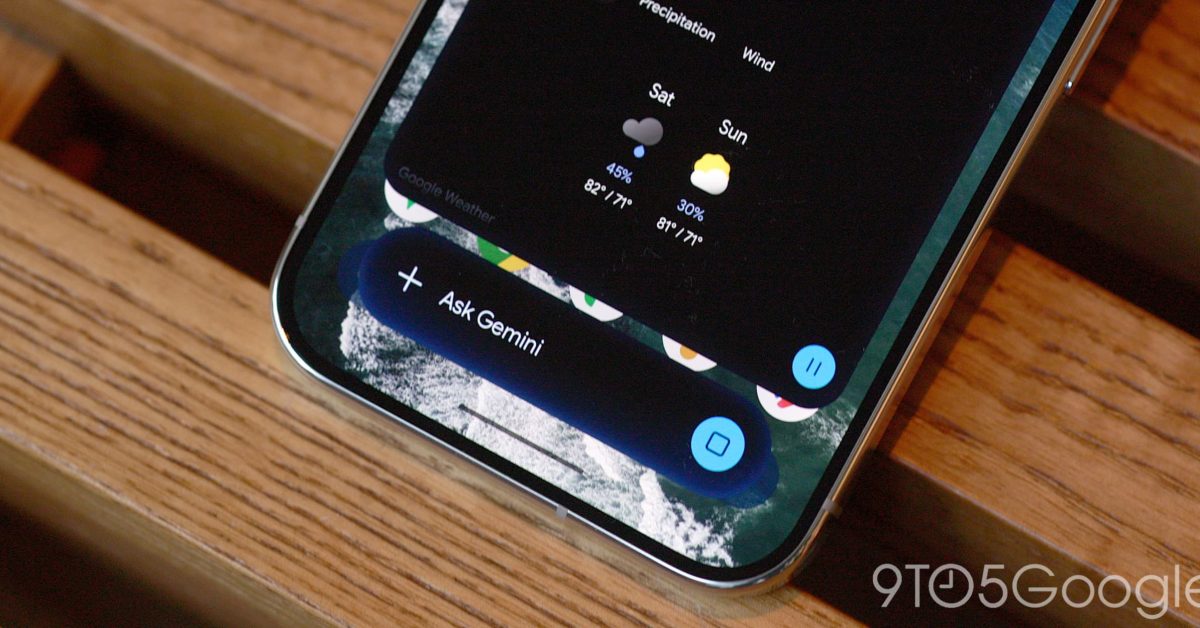
    The Gemini overlay on Android now has a multitasking option that gives you a floating bubble shortcut when you Minimize.

    The Gemini overlay now shows a “Minimize” button above the container. It’s centered immediately after you enter a prompt, while the pill-shaped container appears at the right after the response.

    This collapses the overlay into a bubble with the spark logo. Google explains how: “Gemini is still available while you multitask. Tap to expand. Drag to move or dismiss.”

    That said, the Gemini bubble is fixed to one of six positions and cannot be placed anywhere. Additionally, a bug appears to reset the bubble to the bottom-right corner after every minimization.


    After the response has loaded, you can tap outside the sheet to get back the bubble. Using the system back gesture will close the entire overlay, while you can also drag to dismiss.

    This shortcut is a bit faster than opening the Gemini app and then the side panel to return to a conversation. Another way to use it is asking a question and then minimizing to do something else instead of having to wait for the response. 

    Alternatively, you could use Android 17’s system Bubble option with the Gemini app for a richer experience.

    The Minimize button and Gemini bubble are widely rolling out on Android today.


    More on Gemini app:

    • Gemini Spark rolling out Google Photos control for automated editing, sharing, & more
    • Gemini 3.8 Flash rolling out three weeks after last release
    • Gemini Live gets productivity upgrade with Spark, Gmail, and other integrations 

    You’re reading 9to5Google — experts who break news about Google and its surrounding ecosystem, day after day. Be sure to check out our homepage for all the latest news, and follow 9to5Google on <a href="http://twitter.com/9to5google” rel=”nofollow noopener” target=”_blank”>Twitter, Facebook, and LinkedIn to stay in the loop. Don’t know where to start? Check out our exclusive stories, reviews, how-tos, and subscribe to our YouTube channel

    Bubble Gemini gets News overlay
    Follow on Google News Follow on Flipboard
    Share. Facebook Twitter Pinterest LinkedIn Tumblr Email Copy Link
    myappsplus
    • Website

    Related Posts

    Chrome 156 for Googlebook rolling out with 14 updates across sites, shortcuts, more

    October 26, 2026

    GPT-6.1 Terra makes a strong case for being OpenAI’s best bang for your AI buck

    October 26, 2026

    Apple addressed 329 unique security vulnerabilities across today’s updates

    October 26, 2026
    Add A Comment
    Leave A Reply Cancel Reply

    Top Posts

    Cathay Pacific tests Google AI that dramatically cuts airplane contrails — tiny altitude shifts slash environmental impact by 40% in early trials

    September 8, 2026137 Views

    Keep running out of mobile data? This new unlimited plan gets you up to 80Mbps 5G speeds for just AU$50/m

    October 8, 202615 Views

    Drone swarm tech valued by both defense and civilian sectors, industry platform says

    September 8, 202615 Views
    Latest Reviews

    Anthropic’s new Fable release is cheaper, less restrictive

    myappsplusSeptember 2, 2026

    iPhone 18 Pro vs. iPhone 17 Pro: Should you upgrade this year?

    myappsplusSeptember 2, 2026

    Enjoy low-and-slow BBQ with East Oak’s 30-inch electric smokers starting from $207

    myappsplusSeptember 2, 2026
    Stay In Touch
    • Facebook
    • YouTube
    • TikTok
    • WhatsApp
    • Twitter
    • Instagram

    Subscribe to Updates

    Get the latest tech news from FooBar about tech, design and biz.

    Most Popular

    Anthropic’s new Fable release is cheaper, less restrictive

    September 2, 20260 Views

    Enjoy low-and-slow BBQ with East Oak’s 30-inch electric smokers starting from $207

    September 2, 20260 Views

    NYC schools announce major classroom technology overhaul

    September 2, 20260 Views
    Our Picks

    Chrome 156 for Googlebook rolling out with 14 updates across sites, shortcuts, more

    October 26, 2026

    GPT-6.1 Terra makes a strong case for being OpenAI’s best bang for your AI buck

    October 26, 2026

    Apple addressed 329 unique security vulnerabilities across today’s updates

    October 26, 2026

    Subscribe to Updates

    Subscribe to our newsletter and get the latest tech news, app updates, AI trends, smartphone reviews, and exclusive deals delivered straight to your inbox.

    Facebook X (Twitter) Instagram Pinterest
    • About Us
    • Get In Touch
    • Disclaimer
    • Privacy Policy
    • Terms & Conditions
    © 2026 MyAppsPlus. All Rights Reserved.

    Type above and press Enter to search. Press Esc to cancel.