Close Menu
MyAppsPlus

    Subscribe to Updates

    Get the latest creative news from FooBar about art, design and business.

    What's Hot

    Apple @ Work: The three prongs of software updates in the AI era

    September 12, 2026

    Deepfakes are wrecking influencers’ credibility, one fake ad at a time

    September 12, 2026

    The Instax Mini 13 was made for taking selfies — and my friends have never been happier with the instant memories I’ve captured

    September 12, 2026
    Facebook X (Twitter) Instagram
    Facebook X (Twitter) Instagram
    MyAppsPlusMyAppsPlus
    Saturday, September 12
    • Home
    • Breaking Tech
    • Apps & Software
    • AI & Automation
    • Android
    • iPhone & iOS
    • More
      • Reviews
      • How-To Guides
      • Deals & Discounts
      • Shop
    MyAppsPlus
    Home»Breaking Tech»Common problems with Apple Wallet and how to fix them
    Breaking Tech

    Common problems with Apple Wallet and how to fix them

    myappsplusBy myappsplusSeptember 6, 2026004 Mins Read
    Share Facebook Twitter Pinterest Copy Link LinkedIn Tumblr Email Telegram WhatsApp
    Follow Us
    Google News Flipboard
    Common problems with Apple Wallet and how to fix them
    Share
    Facebook Twitter LinkedIn Pinterest Email Copy Link

    Apple Wallet is usually easy to use, but you can fix problems when they arise.

    Apple Wallet is a huge part of the convenience your iPhone offers. Not only can you store your credit and debit cards to easily make payments, but transit cards, concert tickets, boarding passes and much more are all kept ready for when you need them. There are many pros to using digital wallets, including how straightforward using Apple Wallet usually is. 

    But sometimes, you might run into problems. Maybe you can’t add your card to use with Apple Pay, or your payment was declined. Don’t worry if this happens; sometimes it can be as simple as removing your card and adding it again. And even when it’s not that easy, there are other ways to get Apple Wallet working again.

    When Apple Wallet isn’t working, try this first
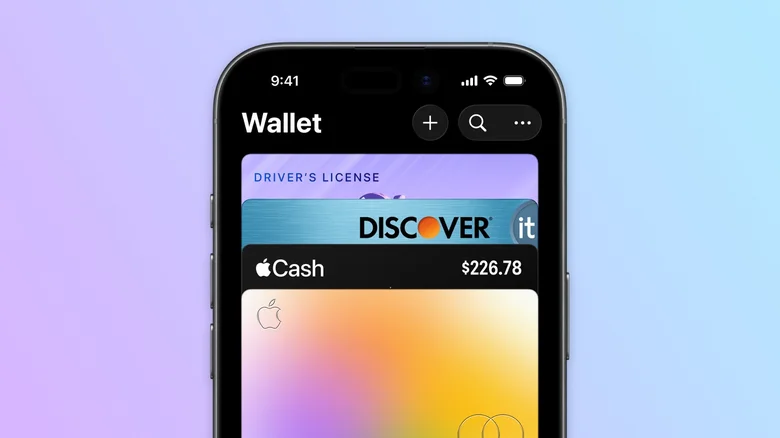
    iPhone's Apple Wallet app with multiple credit cards and a driver's license.

    Apple Pay cards randomly refusing to work is one of the most common complaints with the feature. You might see a message saying the service is unavailable or that your payment couldn’t go through. Usually, this is because the card expired or was reissued, and Wallet hasn’t caught up yet. 

    The fix to try is removing the card and adding it back. Open the Wallet app and select the card that’s giving you trouble. Tap the three-dot button, select Card Details, then scroll down and choose Remove Card. Add it again by tapping the Plus (+) button on Wallet’s main screen, followed by Debit or Credit Card. It’s a simple trick that should fix most minor issues. Just be aware that re-adding might require you to confirm with your bank or card provider through its app or a phone call. If the card hasn’t ever worked in the first place, make sure your bank supports Apple Pay.

    Having the wrong settings on your iPhone can also cause problems with the Wallet app. Outdated software can cause various features to misbehave, so try updating your device by going to Settings > General > Software Update. iOS updates often add new features to Wallet, which is another reason to keep your device updated.

    Also, features like Apple Pay and Apple Cash are limited to certain regions. There’s an Apple Support page listing every supported region and bank, which is worth checking out if you’re traveling or have recently moved to another country. To confirm your iPhone’s region, open Settings and go to General > Language& Region. Make sure the Region is set properly. 

    Additional Apple Wallet troubleshooting steps
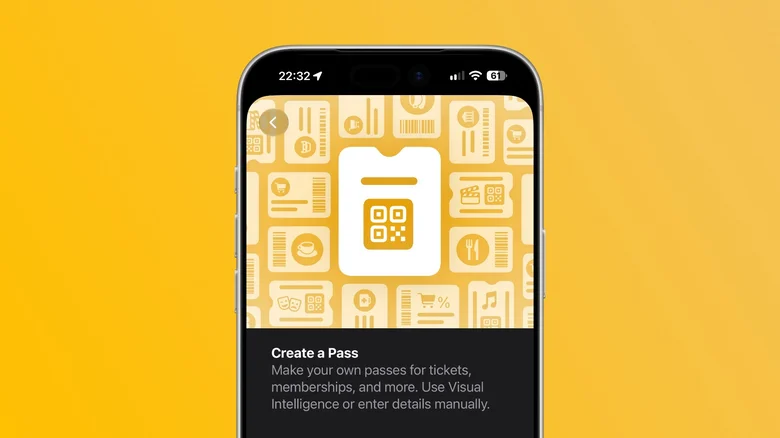
    The "Create a Pass" feature in Apple Wallet on iOS 27.

    If Apple Wallet is still acting up, make sure Face ID or Touch ID is enabled on your device. Many Apple Wallet features won’t work unless these security features are enabled. Check this under Settings > Face ID & Passcode, where you should enable Contactless & Payments if it’s turned off. The same goes adding two-factor authentication to your Apple Account, which is a key account security step to protect the sensitive info inside. Sign into the Apple Account webpage to enable this feature if it’s not already, following Apple’s 2FA support page if needed.

    Like with cards, not every ticket is compatible with the Wallet app. You might have a gym pass or a concert ticket from a provider that doesn’t offer the option to add it to Apple Wallet. If that’s the case, there’s a clever workaround thanks to apps like IntoWallet. These typically work by creating an Apple Wallet pass from an existing QR code. Thankfully, iOS 27 has this generation feature built in, eliminating the need to download apps to add passes manually.

    If you’re still having problems, don’t forget to restart your device. Also, the problem might not be on your end. Sometimes Apple services like iCloud and Wallet experience outages. Check Apple’s System Status page to see if everything is working as it should — if it’s not, make sure you have your physical card with you.

    Apple Common problems them Wallet
    Follow on Google News Follow on Flipboard
    Share. Facebook Twitter Pinterest LinkedIn Tumblr Email Copy Link
    myappsplus
    • Website

    Related Posts

    Apple @ Work: The three prongs of software updates in the AI era

    September 12, 2026

    IBC2026: Riedel Technology powers record-breaking Esports World Cup production in Paris

    September 12, 2026

    How Google Maps knows when a business is packed

    September 12, 2026
    Add A Comment
    Leave A Reply Cancel Reply

    Top Posts

    The 6 AI-free Linux distros I recommend most

    August 19, 20263 Views

    AI, automation, robot dogs ensure on-site nuclear safety

    September 7, 20262 Views

    This tiny AI box could save me from upgrading my perfectly good laptop

    September 6, 20262 Views
    Latest Reviews

    Apple Wallet driver’s licenses are coming to North Carolina, but there’s a catch

    myappsplusAugust 18, 2026

    3 Japanese AI Stocks Turning Automation Spending Into Real Revenue

    myappsplusAugust 18, 2026

    Apple: DOJ’s latest challenge in antitrust case ‘fails at every level’

    myappsplusAugust 18, 2026
    Stay In Touch
    • Facebook
    • YouTube
    • TikTok
    • WhatsApp
    • Twitter
    • Instagram

    Subscribe to Updates

    Get the latest tech news from FooBar about tech, design and biz.

    Most Popular

    Apple Wallet driver’s licenses are coming to North Carolina, but there’s a catch

    August 18, 20260 Views

    3 Japanese AI Stocks Turning Automation Spending Into Real Revenue

    August 18, 20260 Views

    Apple: DOJ’s latest challenge in antitrust case ‘fails at every level’

    August 18, 20260 Views
    Our Picks

    Apple @ Work: The three prongs of software updates in the AI era

    September 12, 2026

    Deepfakes are wrecking influencers’ credibility, one fake ad at a time

    September 12, 2026

    The Instax Mini 13 was made for taking selfies — and my friends have never been happier with the instant memories I’ve captured

    September 12, 2026

    Subscribe to Updates

    Subscribe to our newsletter and get the latest tech news, app updates, AI trends, smartphone reviews, and exclusive deals delivered straight to your inbox.

    Facebook X (Twitter) Instagram Pinterest
    • About Us
    • Get In Touch
    • Disclaimer
    • Privacy Policy
    • Terms & Conditions
    © 2026 MyAppsPlus. All Rights Reserved.

    Type above and press Enter to search. Press Esc to cancel.