Close Menu
MyAppsPlus

    Subscribe to Updates

    Get the latest creative news from FooBar about art, design and business.

    What's Hot

    I travelled to Taiwan to see the future tech that’ll power everyday life

    September 24, 2026

    Pixel Weather homescreen widget adds manual refresh button

    September 24, 2026

    Detachable deep cleaner headlines Anker’s eufy Omni E28 robot vac and mop down at a $630 low, more

    September 24, 2026
    Facebook X (Twitter) Instagram
    Facebook X (Twitter) Instagram
    MyAppsPlusMyAppsPlus
    Friday, September 25
    • Home
    • Breaking Tech
    • Apps & Software
    • AI & Automation
    • Android
    • iPhone & iOS
    • More
      • Reviews
      • How-To Guides
      • Deals & Discounts
      • Shop
    MyAppsPlus
    Home»Apps & Software»Chrome now saves scroll position, filled forms when sending tabs between devices
    Apps & Software

    Chrome now saves scroll position, filled forms when sending tabs between devices

    myappsplusBy myappsplusSeptember 24, 2026002 Mins Read
    Share Facebook Twitter Pinterest Copy Link LinkedIn Tumblr Email Telegram WhatsApp
    Follow Us
    Google News Flipboard
    Chrome now saves scroll position, filled forms when sending tabs between devices
    Share
    Facebook Twitter LinkedIn Pinterest Email Copy Link

    Google today announced a trio of new study-focused Chrome features, with the most notable being how the browser will now save scroll position when you send tabs between devices.

    When you send a page from mobile to laptop (or vice versa), Chrome will now save the “exact state of your tab when you send it over.” This includes the scroll position and partially filled-in forms: “if you’re halfway through a 50-page paper on behavioral economics, you can send it to your phone and pick up exactly where you left during your commute.”

    On desktop, you can do this from the three-dot overflow menu > Cast, Save, and Share > Send to Your Device. The shortcut can also be added to your toolbar from Customize Chrome (on the New Tab Page) > Toolbar. In Chrome for Android, open Chrome’s share menu for the carousel of options.


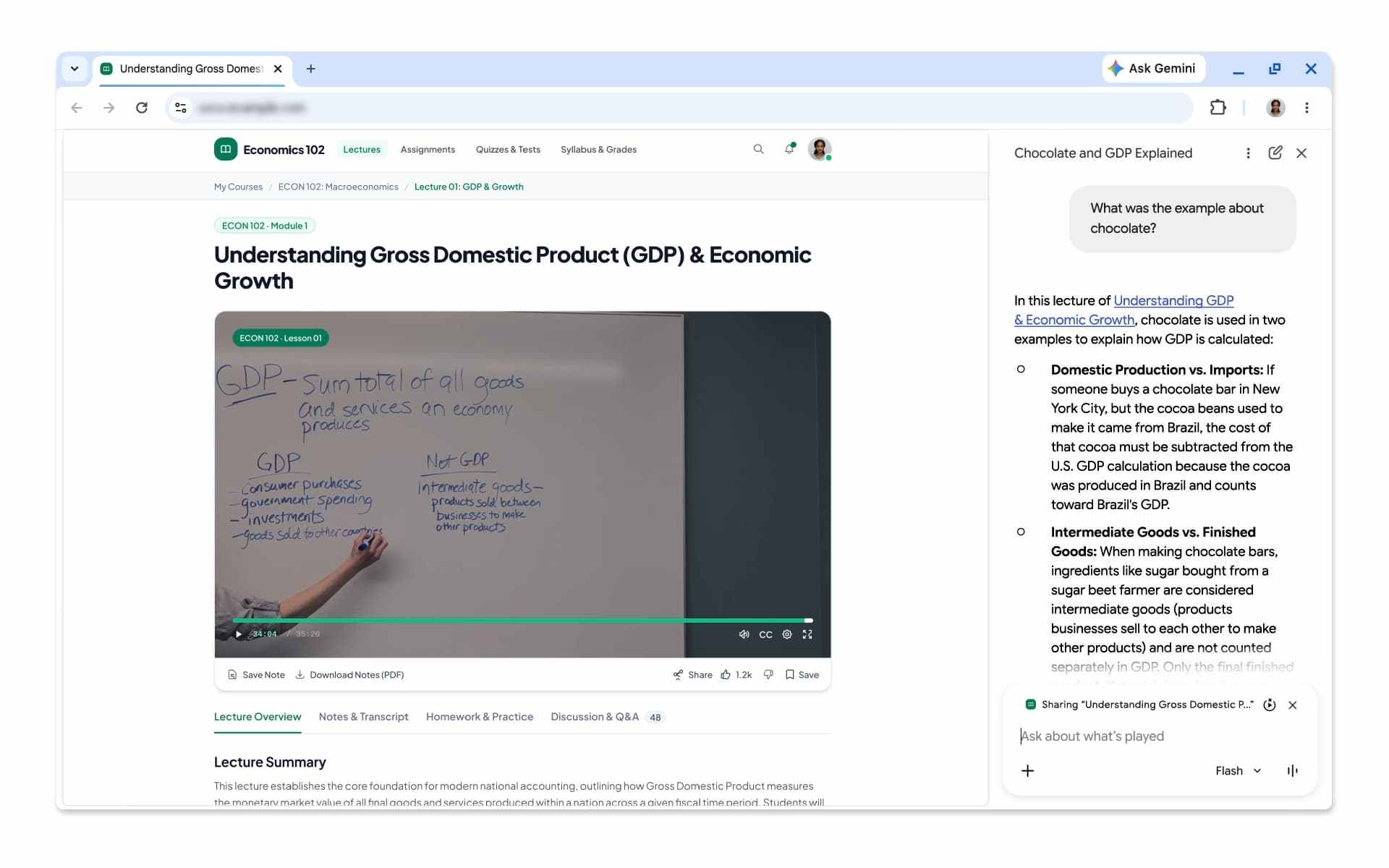
    Gemini in Chrome now lets you ask questions about videos, podcasts, recordings, and other types of media that aren’t on YouTube. Google touts how the side panel can now “identify key takeaways, find specific information, or clarify confusing moments for almost any audio or video file once you’ve played it through.”

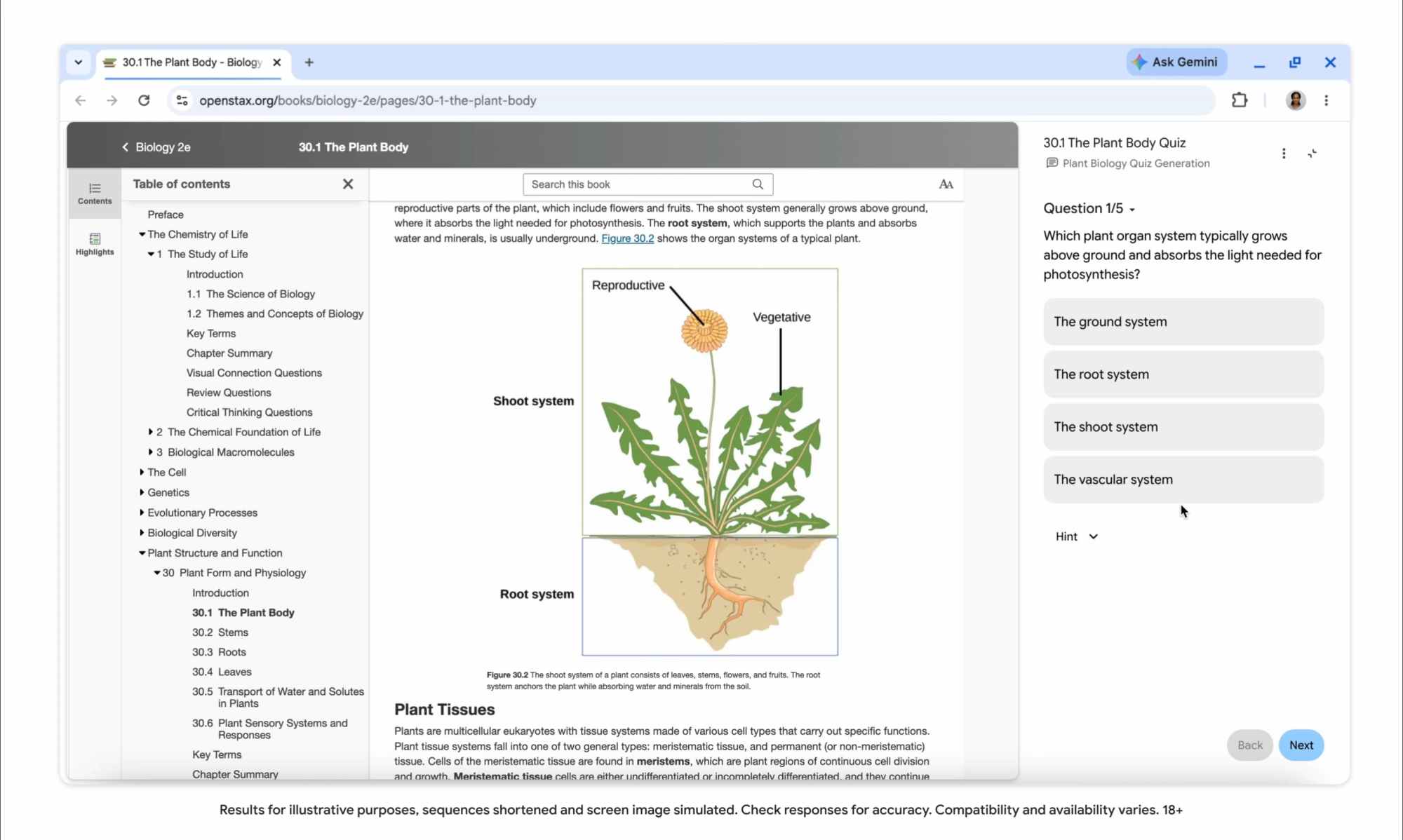
    Meanwhile, Gemini in Chrome can now generate interactive quizzes with the content of your current tab. This can include Google Docs, YouTube videos, research papers, and more. The tool will “highlight core concepts and help you check your understanding.” Quizzes are coming to English in the US and India on desktop and will come to more regions and mobile in the “coming months.”

    Google is highlighting other existing tools like vertical or horizontal tabs, Split View, and tab groups. There’s also immersive reading mode and read aloud. 

    You’re reading 9to5Google — experts who break news about Google and its surrounding ecosystem, day after day. Be sure to check out our homepage for all the latest news, and follow 9to5Google on Twitter, Facebook, and LinkedIn to stay in the loop. Don’t know where to start? Check out our exclusive stories, reviews, how-tos, and subscribe to our YouTube channel

    Chrome News position saves Scroll
    Follow on Google News Follow on Flipboard
    Share. Facebook Twitter Pinterest LinkedIn Tumblr Email Copy Link
    myappsplus
    • Website

    Related Posts

    Pixel Weather homescreen widget adds manual refresh button

    September 24, 2026

    Apple Sports adds real-time Grand Slam draws, expands soccer coverage

    September 24, 2026

    Big Pixel VIPs widget redesign starts rolling out

    September 24, 2026
    Add A Comment
    Leave A Reply Cancel Reply

    Top Posts

    Top 10 Best React Native App Development Companies in 2026

    September 12, 20263 Views

    This tiny AI box could save me from upgrading my perfectly good laptop

    September 6, 20263 Views

    Can reviews settle disputes that marked first two seasons?

    September 21, 20262 Views
    Latest Reviews

    Get up to 51% off fleeces from Patagonia, The North Face, Passenger, Adidas, and more — cosy and cool jackets for autumn

    myappsplusAugust 22, 2026

    Take-Two subpoenas Discord and Microsoft in hunt for GTA VI leaker

    myappsplusAugust 22, 2026

    Creality Falcon A1C review: I was instantly impressed with this compact, affordable, beginner-friendly laser engraver

    myappsplusAugust 22, 2026
    Stay In Touch
    • Facebook
    • YouTube
    • TikTok
    • WhatsApp
    • Twitter
    • Instagram

    Subscribe to Updates

    Get the latest tech news from FooBar about tech, design and biz.

    Most Popular

    Get up to 51% off fleeces from Patagonia, The North Face, Passenger, Adidas, and more — cosy and cool jackets for autumn

    August 22, 20260 Views

    Take-Two subpoenas Discord and Microsoft in hunt for GTA VI leaker

    August 22, 20260 Views

    Creality Falcon A1C review: I was instantly impressed with this compact, affordable, beginner-friendly laser engraver

    August 22, 20260 Views
    Our Picks

    I travelled to Taiwan to see the future tech that’ll power everyday life

    September 24, 2026

    Pixel Weather homescreen widget adds manual refresh button

    September 24, 2026

    Detachable deep cleaner headlines Anker’s eufy Omni E28 robot vac and mop down at a $630 low, more

    September 24, 2026

    Subscribe to Updates

    Subscribe to our newsletter and get the latest tech news, app updates, AI trends, smartphone reviews, and exclusive deals delivered straight to your inbox.

    Facebook X (Twitter) Instagram Pinterest
    • About Us
    • Get In Touch
    • Disclaimer
    • Privacy Policy
    • Terms & Conditions
    © 2026 MyAppsPlus. All Rights Reserved.

    Type above and press Enter to search. Press Esc to cancel.