Close Menu
MyAppsPlus

    Subscribe to Updates

    Get the latest creative news from FooBar about art, design and business.

    What's Hot

    Future pilots hope RAF will still need them in the cockpit

    November 29, 2026

    Samsung’s LTE Galaxy Watch 8 hits a record low of $249.99

    November 29, 2026

    Apple reportedly planning major Notification Center redesign in iOS 28

    November 29, 2026
    Facebook X (Twitter) Instagram
    Facebook X (Twitter) Instagram
    MyAppsPlusMyAppsPlus
    Sunday, November 29
    • Home
    • Breaking Tech
    • Apps & Software
    • AI & Automation
    • Android
    • iPhone & iOS
    • More
      • Reviews
      • How-To Guides
      • Deals & Discounts
      • Shop
    MyAppsPlus
    Home»Android»Chrome 155 for Googlebook brings expanded web app installs, integration
    Android

    Chrome 155 for Googlebook brings expanded web app installs, integration

    myappsplusBy myappsplusOctober 14, 2026072 Mins Read
    Share Facebook Twitter Pinterest Copy Link LinkedIn Tumblr Email Telegram WhatsApp
    Follow Us
    Google News Flipboard
    Chrome 155 for Googlebook brings expanded web app installs, integration
    Share
    Facebook Twitter LinkedIn Pinterest Email Copy Link

    With Chrome 155, Googlebooks now better support web apps by allowing for expanded installation and system integration.

    Previously, Chrome on Googlebooks (which is the Android version with desktop-level features) “only enabled the Install option for websites specifically configured as web apps.” As seen above, pages “without an installable web manifest” just opened as a browser tab.

    Google reiterates today how that was a “conscious design choice,” but it heard the community feedback.

    Chrome 155 this week lets you “manually install any webpage as an app directly from the Chrome browser so that it works as an app in its own window.” To do so:

    1. On your Googlebook, open Chrome.
    2. Go to a website you want to install.
    3. At the top right, open the Chrome menu > Save and share > Install and create shortcut…
      • On some websites, at the top right of the address bar, select Install.
    4. Select Install.
    5. To complete the web app installation, follow the on-screen instructions.

    Additionally, Google says: “If you previously created a browser-tab shortcut for a website prior to this update, remove the old shortcut first and re-install the page using the steps above.”

    Meanwhile, installed web apps that appear in the app launcher can now be “pinned to your taskbar or homescreen and run in Chrome.” They will benefit from “shared Google Account login, cookies, site permissions, and installed browser extensions.”

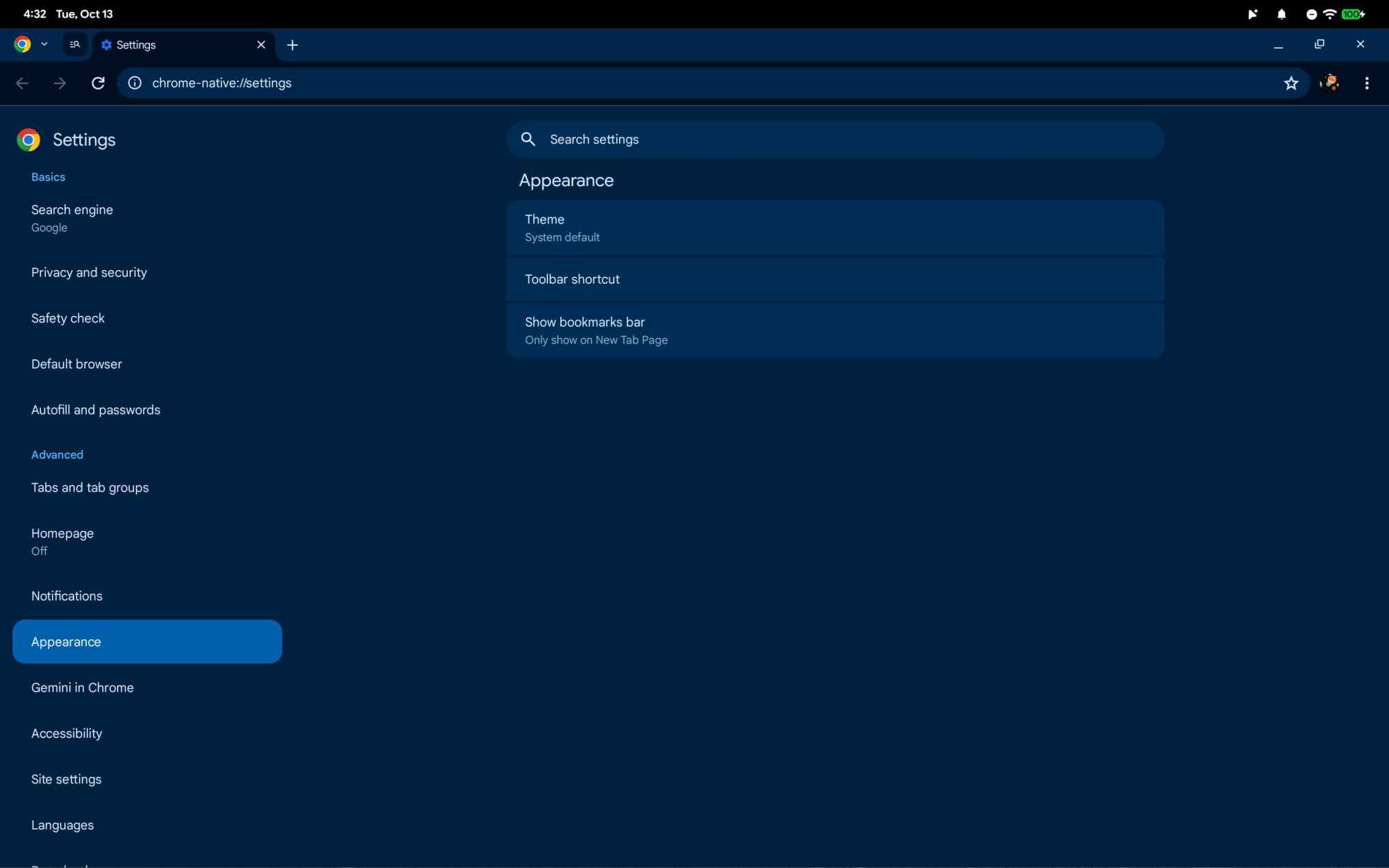
    With this release, Chrome Settings is no longer a fullscreen interface, which has been the case on mobile but not desktop platforms. As a separate tab, “you can more easily reference a web page while tweaking settings.”

    Version 155.0.8059.79 of Chrome is rolling outvices

    You’re reading 9to5Google — experts who break news about Google and its surrounding ecosystem, day after day. Be sure to check out our homepage for all the latest news, and follow 9to5Google on Twitter, Facebook, and LinkedIn to stay in the loop. Don’t know where to start? Check out our exclusive stories, reviews, how-tos, and subscribe to our YouTube channel

    brings Chrome expanded Googlebook News
    Follow on Google News Follow on Flipboard
    Share. Facebook Twitter Pinterest LinkedIn Tumblr Email Copy Link
    myappsplus
    • Website

    Related Posts

    Samsung’s LTE Galaxy Watch 8 hits a record low of $249.99

    November 29, 2026

    Storage is expensive right now, but these deals are worth it if you’re desperate for space

    November 29, 2026

    Sony WF-C510 earbuds drop to $41.95, their lowest in months

    November 29, 2026
    Add A Comment
    Leave A Reply Cancel Reply

    Top Posts

    The pros and cons of using your phone as a mobile hotspot

    November 16, 202651 Views

    UiPath Launches AI Coding Agent, Integrates Claude Code and Codex to Target Development Automation

    November 16, 202646 Views

    Announcing Artificial Analysis Intelligence Index v5

    October 28, 202640 Views
    Latest Reviews

    ‘I did not foresee at all the social-media application, nor its impact on society’: Inventor of the CMOS-based image sensor on how a technology designed to take photos in space has changed the way we view the world

    myappsplusSeptember 13, 2026

    Study says chatbots are misdiagnosing sleep apnea, so a doctor is sharing 4 symptoms you should never ignore

    myappsplusSeptember 13, 2026

    How to watch Big Brother UK 2026 online for FREE – stream season 23 from anywhere

    myappsplusSeptember 13, 2026
    Stay In Touch
    • Facebook
    • YouTube
    • TikTok
    • WhatsApp
    • Twitter
    • Instagram

    Subscribe to Updates

    Get the latest tech news from FooBar about tech, design and biz.

    Most Popular

    Why your Roku keeps randomly turning off (and how to fix it)

    September 13, 20260 Views

    External HDD vs. SSD: What are the pros and cons of each drive type?

    September 13, 20260 Views

    How to watch Man Utd vs Man City: Live streams, TV channels for Premier League 2026/27

    September 13, 20260 Views
    Our Picks

    Future pilots hope RAF will still need them in the cockpit

    November 29, 2026

    Samsung’s LTE Galaxy Watch 8 hits a record low of $249.99

    November 29, 2026

    Apple reportedly planning major Notification Center redesign in iOS 28

    November 29, 2026

    Subscribe to Updates

    Subscribe to our newsletter and get the latest tech news, app updates, AI trends, smartphone reviews, and exclusive deals delivered straight to your inbox.

    Facebook X (Twitter) Instagram Pinterest
    • About Us
    • Get In Touch
    • Disclaimer
    • Privacy Policy
    • Terms & Conditions
    © 2026 MyAppsPlus. All Rights Reserved.

    Type above and press Enter to search. Press Esc to cancel.