Close Menu
MyAppsPlus

    Subscribe to Updates

    Get the latest creative news from FooBar about art, design and business.

    What's Hot

    Insider warnings over AI fall flat with some in Silicon Valley

    September 12, 2026

    I rode Volkswagen’s ‘world’s safest e-bike’ at IFA 2026 — I love the glasses and radar, but the helmet looks a bit silly, doesn’t it?

    September 12, 2026

    Dell UltraSharp U3226Q 32 4K QD-OLED monitor review: A creator’s dream panel with a jarring price tag

    September 12, 2026
    Facebook X (Twitter) Instagram
    Facebook X (Twitter) Instagram
    MyAppsPlusMyAppsPlus
    Saturday, September 12
    • Home
    • Breaking Tech
    • Apps & Software
    • AI & Automation
    • Android
    • iPhone & iOS
    • More
      • Reviews
      • How-To Guides
      • Deals & Discounts
      • Shop
    MyAppsPlus
    Home»iPhone & iOS»Apple’s Calendar app in iOS 27 has brand new design for key features
    iPhone & iOS

    Apple’s Calendar app in iOS 27 has brand new design for key features

    myappsplusBy myappsplusSeptember 3, 2026002 Mins Read
    Share Facebook Twitter Pinterest Copy Link LinkedIn Tumblr Email Telegram WhatsApp
    Follow Us
    Google News Flipboard
    Apple’s Calendar app in iOS 27 has brand new design for key features
    Share
    Facebook Twitter LinkedIn Pinterest Email Copy Link

    iOS 27 adds a variety of new features for popular apps like Notes, Reminders, and Calendar—and the Calendar app gets some notable design changes too. Here’s what’s new.

    iOS 27 gives Apple Calendar new design for event details view and event creation and editing screens
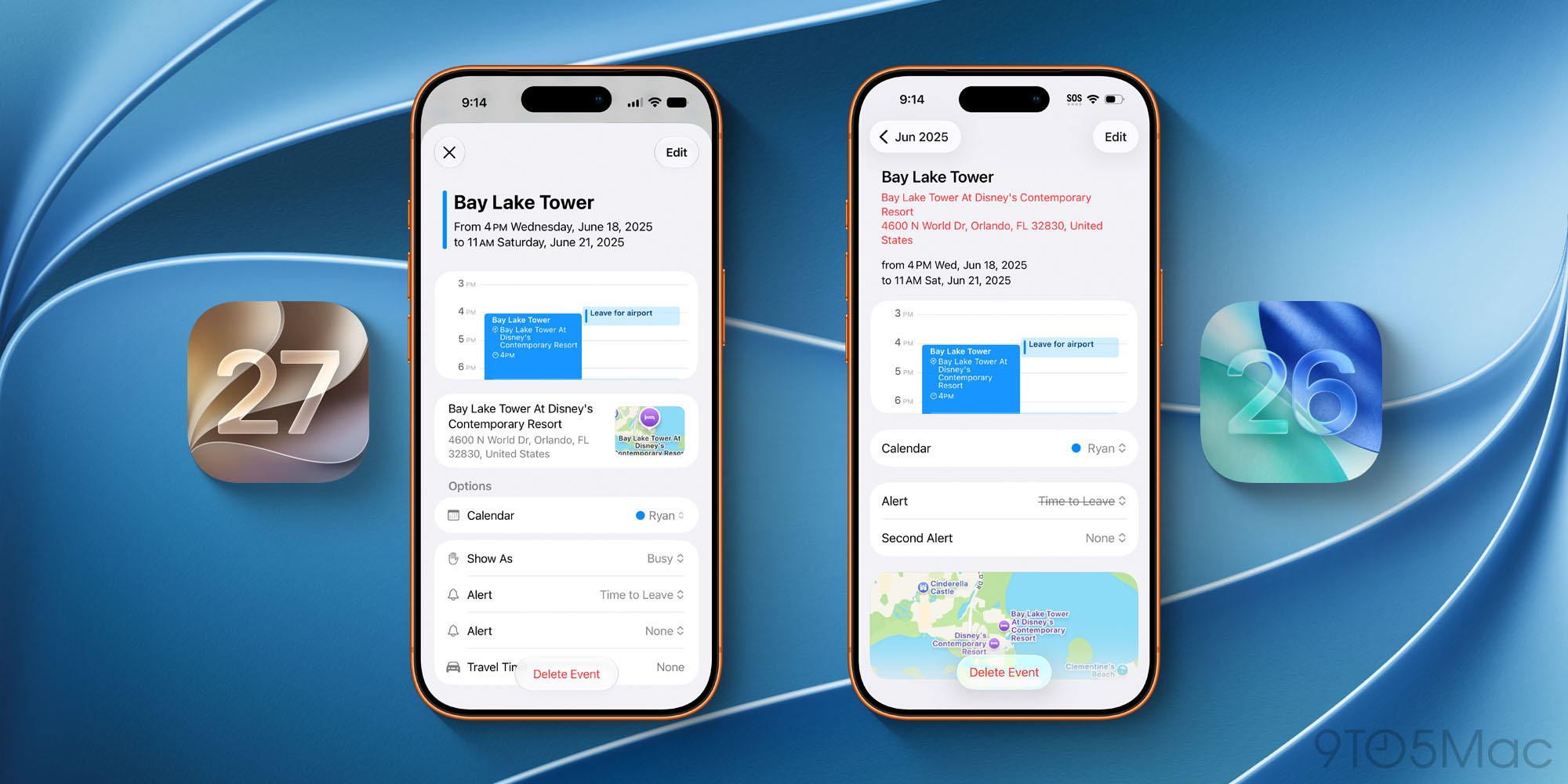

    Apple’s Calendar app has stayed remarkably consistent over the years. The app tends to get new features less often than other popular Apple apps. And its design has changed very little over the years, even looking largely the same after last year’s Liquid Glass update.

    But in iOS 27, Apple has notable design changes coming in two main areas:

    1. Event details view
    2. Event creation and editing

    As seen in the image above, when you tap on any calendar event, the details view has gotten a revamp.

    Information has been reorganized in a way that lets you view more details on-screen at a time. The addition of icons is a helpful visual cue that makes everything easier to parse. These changes, combined with smaller design updates, add up to a more modern overall feel.

    iOS 27 also brings similar design updates when creating or editing events in Calendar.


    As the image on the left shows, more information now fits on-screen and it’s all been reorganized and refreshed.

    Icons are put to good use here, just like in the event details view. And you’ll notice headings now organize event parameters in a way that makes everything easier to navigate.

    Beyond these two areas, the Calendar app also benefits from iOS 27’s systemwide enhancements to Liquid Glass. Overall, the update brings some of Calendar’s most noteworthy design changes in years.

    What do you think of Apple Calendar’s new design changes in iOS 27? Let us know in the comments.

    *Buy iPhone with 15% discount from Apple refurbished

    Best iPhone accessories

    You’re reading 9to5Mac — experts who break news about Apple and its surrounding ecosystem, day after day. Be sure to check out our homepage for all the latest news, and follow 9to5Mac on Twitter, Facebook, and LinkedIn to stay in the loop. Don’t know where to start? Check out our exclusive stories, reviews, how-tos, and subscribe to our YouTube channel

    Apples brand Calendar Design Features
    Follow on Google News Follow on Flipboard
    Share. Facebook Twitter Pinterest LinkedIn Tumblr Email Copy Link
    myappsplus
    • Website

    Related Posts

    Didn’t Pre-Order iPhone 18 Pro Yet? Here’s How Long the Wait is Now

    September 12, 2026

    Top Stories: Apple Event Recap With iPhone Duo, iPhone 18 Pro, Apple Watch, and AirPods

    September 12, 2026

    Apple nailed iPhone Duo split screen, even as iPad multitasking feels convoluted

    September 12, 2026
    Add A Comment
    Leave A Reply Cancel Reply

    Top Posts

    The 6 AI-free Linux distros I recommend most

    August 19, 20263 Views

    AI, automation, robot dogs ensure on-site nuclear safety

    September 7, 20262 Views

    This tiny AI box could save me from upgrading my perfectly good laptop

    September 6, 20262 Views
    Latest Reviews

    Apple Wallet driver’s licenses are coming to North Carolina, but there’s a catch

    myappsplusAugust 18, 2026

    3 Japanese AI Stocks Turning Automation Spending Into Real Revenue

    myappsplusAugust 18, 2026

    Apple: DOJ’s latest challenge in antitrust case ‘fails at every level’

    myappsplusAugust 18, 2026
    Stay In Touch
    • Facebook
    • YouTube
    • TikTok
    • WhatsApp
    • Twitter
    • Instagram

    Subscribe to Updates

    Get the latest tech news from FooBar about tech, design and biz.

    Most Popular

    Apple Wallet driver’s licenses are coming to North Carolina, but there’s a catch

    August 18, 20260 Views

    3 Japanese AI Stocks Turning Automation Spending Into Real Revenue

    August 18, 20260 Views

    Apple: DOJ’s latest challenge in antitrust case ‘fails at every level’

    August 18, 20260 Views
    Our Picks

    Insider warnings over AI fall flat with some in Silicon Valley

    September 12, 2026

    I rode Volkswagen’s ‘world’s safest e-bike’ at IFA 2026 — I love the glasses and radar, but the helmet looks a bit silly, doesn’t it?

    September 12, 2026

    Dell UltraSharp U3226Q 32 4K QD-OLED monitor review: A creator’s dream panel with a jarring price tag

    September 12, 2026

    Subscribe to Updates

    Subscribe to our newsletter and get the latest tech news, app updates, AI trends, smartphone reviews, and exclusive deals delivered straight to your inbox.

    Facebook X (Twitter) Instagram Pinterest
    • About Us
    • Get In Touch
    • Disclaimer
    • Privacy Policy
    • Terms & Conditions
    © 2026 MyAppsPlus. All Rights Reserved.

    Type above and press Enter to search. Press Esc to cancel.