
Close Menu
MyAppsPlus

    Subscribe to Updates

    Get the latest creative news from FooBar about art, design and business.

    What's Hot

    NYT Connections hints and answers for Saturday, November 7 (game #1245)

    November 7, 2026

    More Fun iPhone Duo Apps: 30 New Picks to Try

    November 7, 2026

    Anthropic IPO faces valuation cut after $2.5 trillion rout

    November 7, 2026
    Facebook X (Twitter) Instagram
    Facebook X (Twitter) Instagram
    MyAppsPlusMyAppsPlus
    Saturday, November 7
    • Home
    • Breaking Tech
    • Apps & Software
    • AI & Automation
    • Android
    • iPhone & iOS
    • More
      • Reviews
      • How-To Guides
      • Deals & Discounts
      • Shop
    MyAppsPlus
    Home»iPhone & iOS»Apple Notes adds a power user feature in iOS 27 that’s rare in other apps
    iPhone & iOS

    Apple Notes adds a power user feature in iOS 27 that’s rare in other apps

    myappsplusBy myappsplusSeptember 21, 2026012 Mins Read
    Share Facebook Twitter Pinterest Copy Link LinkedIn Tumblr Email Telegram WhatsApp
    Follow Us
    Google News Flipboard
    Apple Notes adds a power user feature in iOS 27 that’s rare in other apps
    Share
    Facebook Twitter LinkedIn Pinterest Email Copy Link

    Apple Notes in iOS 27 adds a variety of new features, including one that power users are sure to appreciate: section links.

    Apple Notes lets you link to specific sections of your note in iOS 27

    There’s no shortage of third-party notes apps on the App Store. You can find everything from barebones note-takers to powerhouse productivity suites.

    Apple Notes has long excelled at offering a minimalist, user-friendly interface while also providing tools that power users love.

    And in iOS 27, Notes has an exciting new addition in the latter category: section links.

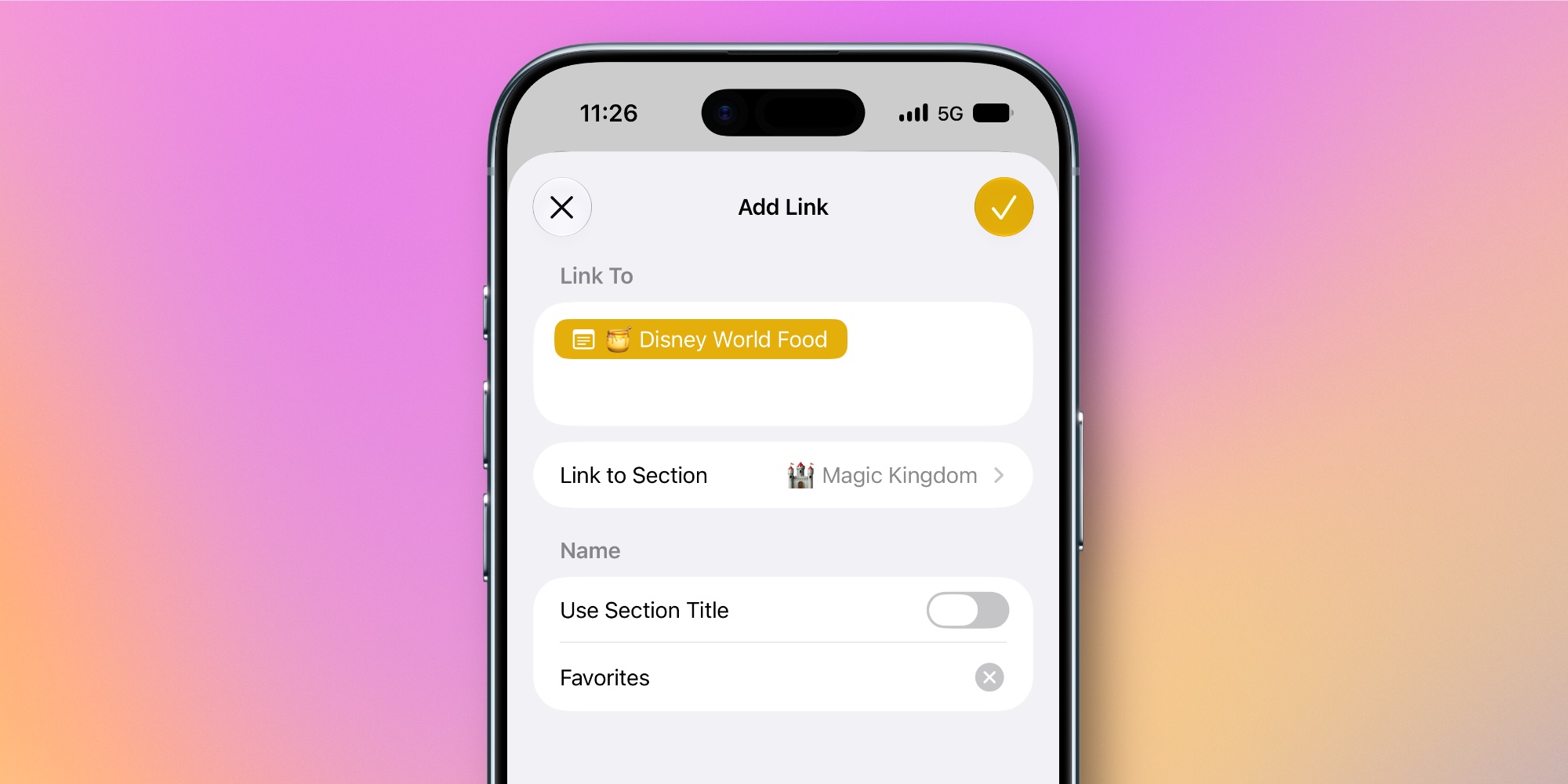
    Whenever you select some text inside a note in iOS 27 and open the edit menu, tapping ‘Add Link’ will reveal a new option: Link to Section.

    Inside this menu, you’ll find a full list of all the headings and subheadings in your note. Tap one, and Notes will create a link to that specific section. You can choose to use the section title as the link’s text, or your own custom text.
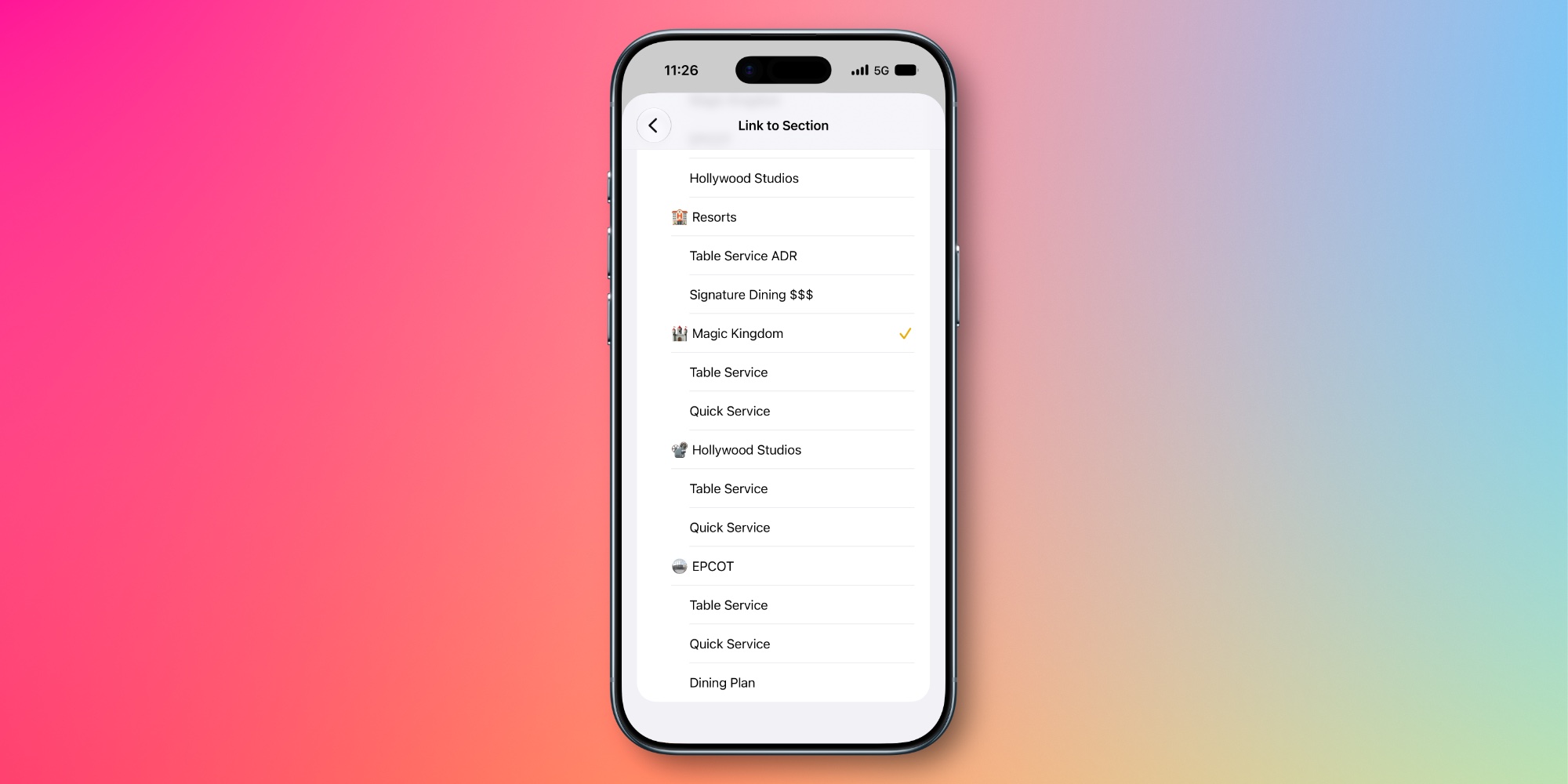

    Section links are great for navigating long notes, as they make it quick and easy to jump to a specific area.

    With section links you can create a full-blown table of contents at the top of your note, or just use them sparingly for sections you revisit a lot.

    Most iPhone owners probably won’t ever use the feature. But for power users who value more flexibility in their notes app, section links in Apple Notes are a welcome new addition.

    How will you use Apple Notes’ section links in iOS 27? Let us know in the comments.

    Best iPhone accessories

    You’re reading 9to5Mac — experts who break news about Apple and its surrounding ecosystem, day after day. Be sure to check out our homepage for all the latest news, and follow 9to5Mac on Twitter, Facebook, and LinkedIn to stay in the loop. Don’t know where to start? Check out our exclusive stories, reviews, how-tos, and subscribe to our YouTube channel

    adds Apple News Notes Power
    Follow on Google News Follow on Flipboard
    Share. Facebook Twitter Pinterest LinkedIn Tumblr Email Copy Link
    myappsplus
    • Website

    Related Posts

    More Fun iPhone Duo Apps: 30 New Picks to Try

    November 7, 2026

    Apple Says There Are Now 100,000 Apps Built for the iPhone Duo

    November 7, 2026

    November 6, 2026 – App Store changes, new MacBook Pro launch

    November 7, 2026
    Add A Comment
    Leave A Reply Cancel Reply

    Top Posts

    Cathay Pacific tests Google AI that dramatically cuts airplane contrails — tiny altitude shifts slash environmental impact by 40% in early trials

    September 8, 2026138 Views

    Save on your groceries, gas, and holiday shopping with this $15 BJ’s membership (Reg. $60) 

    November 4, 202627 Views

    Apple is making Creator Studio an even better deal with new AI features and creative tools

    October 28, 202619 Views
    Latest Reviews

    AirTag 2 4-Pack Drops to $79.99 on Amazon, Matching Record Low

    myappsplusSeptember 5, 2026

    Electrified Weekly – ENGWE E26 3.0 all-terrain e-bike $699 off launch deal + Labor Day sales on EVs, power stations, more

    myappsplusSeptember 5, 2026

    There’s much more to the TCL P80 Ultra than standout screen tech

    myappsplusSeptember 5, 2026
    Stay In Touch
    • Facebook
    • YouTube
    • TikTok
    • WhatsApp
    • Twitter
    • Instagram

    Subscribe to Updates

    Get the latest tech news from FooBar about tech, design and biz.

    Most Popular

    Forrester says $1M B2B deals are going self-serve, and alignment breaks first

    September 5, 20260 Views

    Indie App Spotlight: ‘KeyAlarm’ turns your most important calendar events into alarms

    September 5, 20260 Views

    How to watch Argentina vs Australia 2nd Test for FREE: Live streams & TV channels for the rugby international

    September 5, 20260 Views
    Our Picks

    NYT Connections hints and answers for Saturday, November 7 (game #1245)

    November 7, 2026

    More Fun iPhone Duo Apps: 30 New Picks to Try

    November 7, 2026

    Anthropic IPO faces valuation cut after $2.5 trillion rout

    November 7, 2026

    Subscribe to Updates

    Subscribe to our newsletter and get the latest tech news, app updates, AI trends, smartphone reviews, and exclusive deals delivered straight to your inbox.

    Facebook X (Twitter) Instagram Pinterest
    • About Us
    • Get In Touch
    • Disclaimer
    • Privacy Policy
    • Terms & Conditions
    © 2026 MyAppsPlus. All Rights Reserved.

    Type above and press Enter to search. Press Esc to cancel.