Close Menu
MyAppsPlus

    Subscribe to Updates

    Get the latest creative news from FooBar about art, design and business.

    What's Hot

    Why we’re watching these climate tech companies

    October 11, 2026

    Save $926 Off the Lenovo Legion Pro Gaming Laptop With OLED Display and GeForce 5070 Ti Graphics

    October 11, 2026

    Amazon switches to Android on new tablets

    October 11, 2026
    Facebook X (Twitter) Instagram
    Facebook X (Twitter) Instagram
    MyAppsPlusMyAppsPlus
    Sunday, October 11
    • Home
    • Breaking Tech
    • Apps & Software
    • AI & Automation
    • Android
    • iPhone & iOS
    • More
      • Reviews
      • How-To Guides
      • Deals & Discounts
      • Shop
    MyAppsPlus
    Home»iPhone & iOS»Apple Mail added four convenient new features in iOS 27
    iPhone & iOS

    Apple Mail added four convenient new features in iOS 27

    myappsplusBy myappsplusOctober 11, 2026003 Mins Read
    Share Facebook Twitter Pinterest Copy Link LinkedIn Tumblr Email Telegram WhatsApp
    Follow Us
    Google News Flipboard
    Apple Mail added four convenient new features in iOS 27
    Share
    Facebook Twitter LinkedIn Pinterest Email Copy Link

    iOS 27 brings new features to Apple Wallet, Maps, Notes, Messages, and more—and it packs key upgrades for the Mail app too. Here’s everything new for Apple Mail in iOS 27.

    Upgraded search
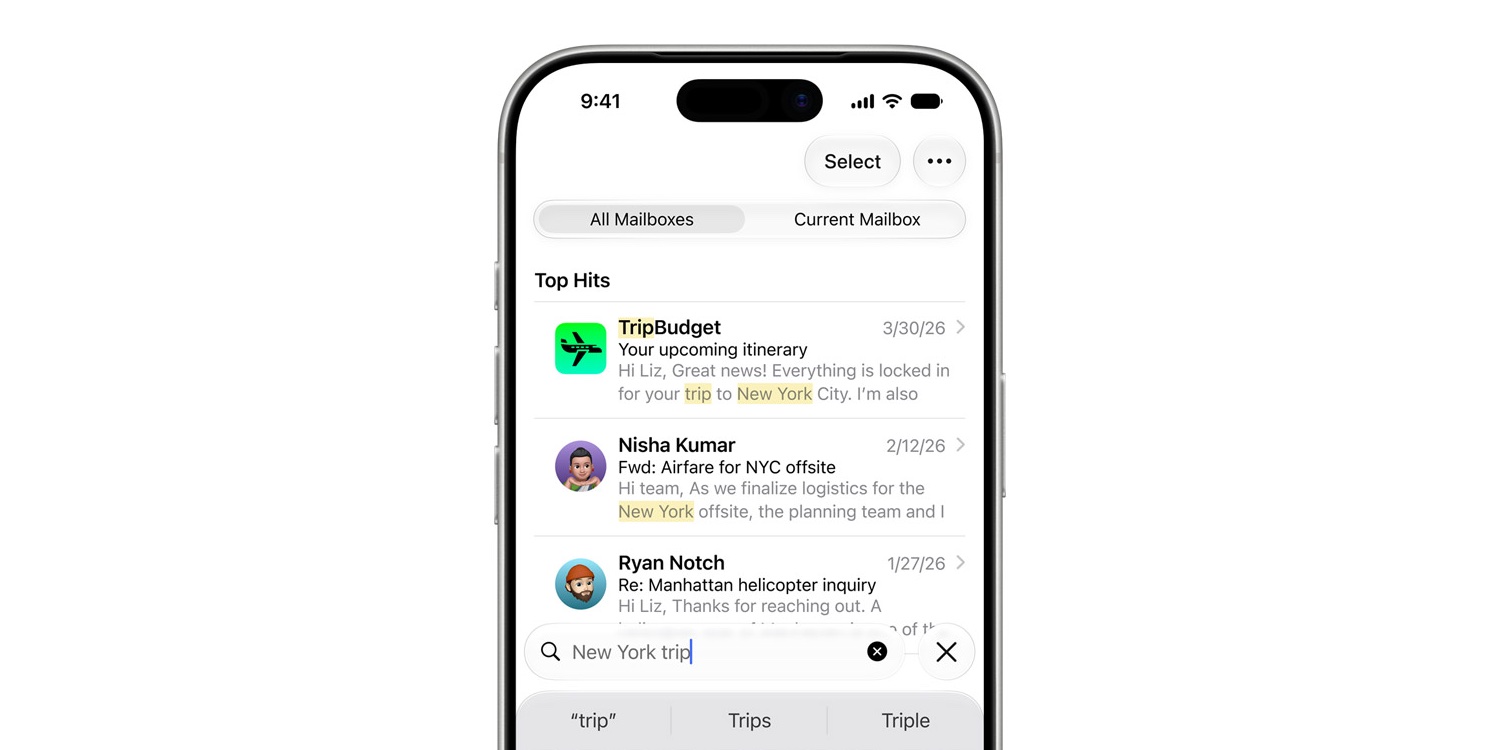

    If you have much history using Apple Mail, you’ll know that its search feature hasn’t always been the best. But in iOS 27, search has gotten a big upgrade.

    More relevant search in Mail. A new ranking system brings the most relevant results to the top to help you find what you need right away — even if it’s buried deep in your inbox.

    I can’t count the number of times search has previously failed to find messages that I knew existed. So far in my testing, iOS 27 seems to have fixed that.

    New suggestions that include third-party apps
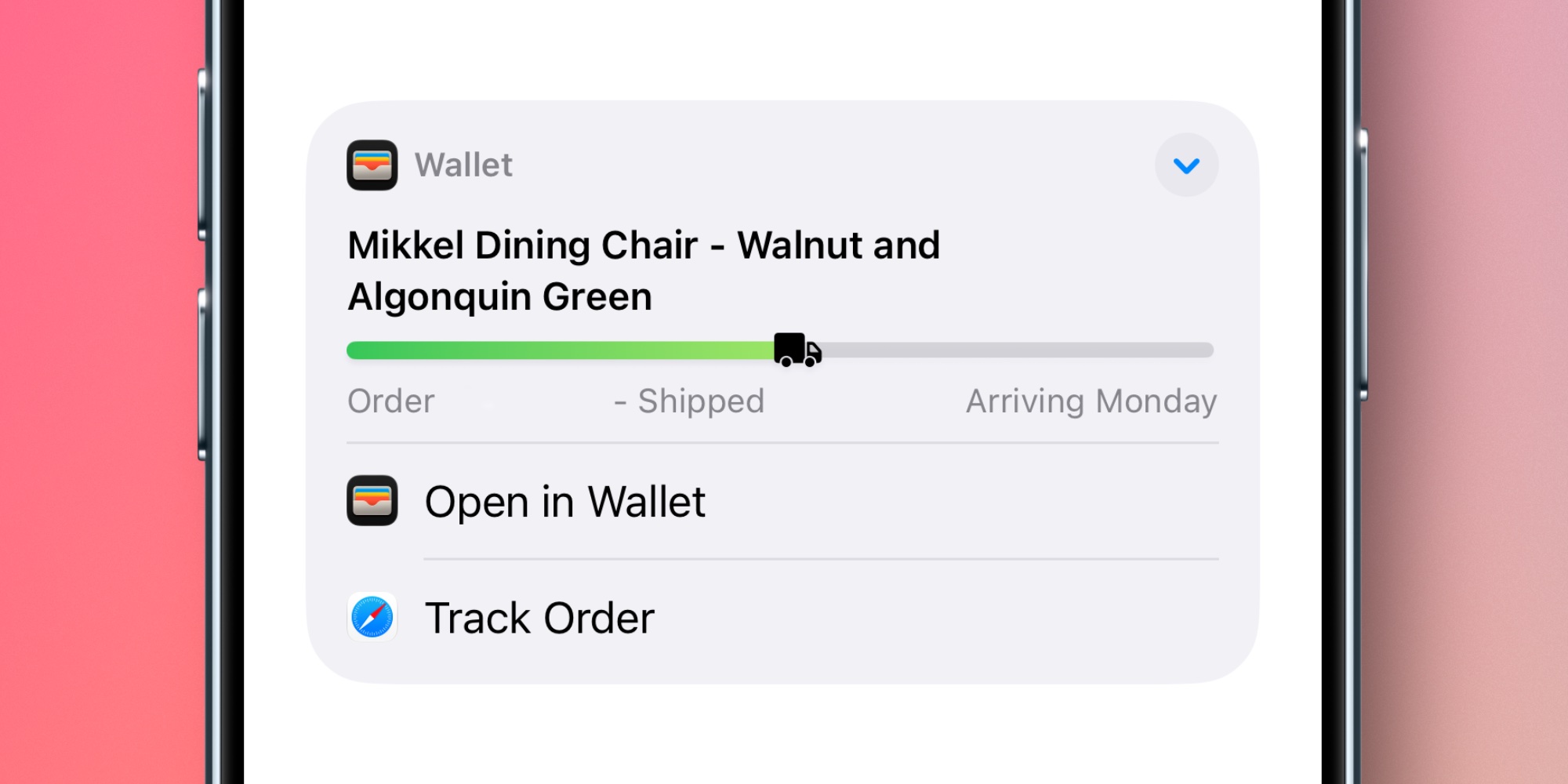

    Suggestions at the top of messages have been in Apple Mail for years. But in iOS 27, they get a new, more flexible design and expand to support third-party apps.

    When Mail detects that you might want to take action on the contents of an email, a suggestion might appear at the top of the message. These include: directions in Maps, creating events in Calendar, tracking a shipment with Apple Wallet, and more.

    In iOS 27, third-party apps can offer suggestions too. And when multiple apps are available with suggested actions, there’s a drop-down menu to show you all available options.

    Smart Reply improvements


    Smart Reply is a keyboard feature that automatically surfaces reply options you can utilize with a single tap.

    In iOS 27, the next generation of Apple Intelligence comes with improvements to Smart Reply.

    Apple says that Smart Reply “can now draw on a user’s personalized writing style.” Essentially, rather than offering fairly generic reply options, now Smart Reply suggestions will actually sound a lot more like you.

    Siri AI capabilities

    Apple has added ‘Ask Siri’ buttons throughout Apple Mail, just like the rest of its system apps. And Siri AI brings a bunch of new powers for Mail users.

    One example I’ve seen several times on social media already is that you can ask Siri to delete all messages from a specific sender that’s spamming you.

    Bug fixes

    Beyond new features, Apple also says that iOS 27 makes the Mail app run better than ever thanks to bug fixes and performance improvements. Here are some specific examples given:

    • Faster message loading in Mail
    • More reliable search indexing in Mail
    • Improved list formatting in Mail
    • Improved unread badge accuracy in Mail

    Which new Apple Mail features in iOS 27 are most exciting to you? Let us know in the comments.

    Best <a href="https://myappsplus.com/how-to-reduce-mobile-data-usage-on-your-iphone/” title=”How to reduce mobile data usage on your iPhone”>iPhone accessories

    You’re reading 9to5Mac — experts who break news about Apple and its surrounding ecosystem, day after day. Be sure to check out our homepage for all the latest news, and follow 9to5Mac on Twitter, Facebook, and LinkedIn to stay in the loop. Don’t know where to start? Check out our exclusive stories, reviews, how-tos, and subscribe to our YouTube channel

    added Apple four Mail News
    Follow on Google News Follow on Flipboard
    Share. Facebook Twitter Pinterest LinkedIn Tumblr Email Copy Link
    myappsplus
    • Website

    Related Posts

    Samsung Galaxy Smart Tag 3 vs Apple AirTag: What’s the difference?

    October 11, 2026

    How to enable Live Activities on iPhone and CarPlay

    October 11, 2026

    How to use the parental controls on iOS 27

    October 11, 2026
    Add A Comment
    Leave A Reply Cancel Reply

    Top Posts

    What was the PSX? The souped-up PS2 rarely sold outside of Japan

    September 14, 20269 Views

    Can reviews settle disputes that marked first two seasons?

    September 21, 20268 Views

    Experts call for leveraging AI, breaking key tech bottlenecks to propel advanced manufacturing

    September 19, 20267 Views
    Latest Reviews

    OpenAI renews push to get Apple’s trade secret theft lawsuit tossed

    myappsplusAugust 27, 2026

    5 Android Phones That Outperform The OnePlus 15

    myappsplusAugust 27, 2026

    My housemate keeps losing their keys, so I bought them these AirTag dupes that are better value

    myappsplusAugust 27, 2026
    Stay In Touch
    • Facebook
    • YouTube
    • TikTok
    • WhatsApp
    • Twitter
    • Instagram

    Subscribe to Updates

    Get the latest tech news from FooBar about tech, design and biz.

    Most Popular

    OpenAI renews push to get Apple’s trade secret theft lawsuit tossed

    August 27, 20260 Views

    5 Android Phones That Outperform The OnePlus 15

    August 27, 20260 Views

    My housemate keeps losing their keys, so I bought them these AirTag dupes that are better value

    August 27, 20260 Views
    Our Picks

    Why we’re watching these climate tech companies

    October 11, 2026

    Save $926 Off the Lenovo Legion Pro Gaming Laptop With OLED Display and GeForce 5070 Ti Graphics

    October 11, 2026

    Amazon switches to Android on new tablets

    October 11, 2026

    Subscribe to Updates

    Subscribe to our newsletter and get the latest tech news, app updates, AI trends, smartphone reviews, and exclusive deals delivered straight to your inbox.

    Facebook X (Twitter) Instagram Pinterest
    • About Us
    • Get In Touch
    • Disclaimer
    • Privacy Policy
    • Terms & Conditions
    © 2026 MyAppsPlus. All Rights Reserved.

    Type above and press Enter to search. Press Esc to cancel.