


Coding and agentic workloads are asking more of AI models than ever: refactor a repository spanning hundreds of files, sustain a multi-hour agentic workflow without losing context, and reason through complex systems problems with tool use at every step. Meeting those demands with open-weight models has historically meant provisioning and operating your own inference infrastructure.
GLM 5.3 from Z.ai (Zhipu AI) is now available on Amazon Bedrock. GLM 5.3, as published on Hugging Face Hub, is a 753B-parameter mixture-of-experts model optimized for coding and long-horizon agentic tasks. In particular, Z.ai has reported the model shows notable cyber security capabilities. On Amazon Bedrock, you can now use it through fully managed APIs with cross-Region inference, prompt caching, and service tiers. You don’t manage any infrastructure. Access to GLM 5.3 on Bedrock is available to eligible enterprise customers.
In this post, we show you how to invoke GLM 5.3 on Amazon Bedrock using the OpenAI-compatible APIs and reduce cost and latency with prompt caching. We then put the model to work in a realistic agentic workflow: running an authorized security test of your own application with Strix, an open-
What’s new compared to GLM 5
GLM 5 arrived on Amazon Bedrock earlier this year. GLM 5.3 builds on the same lineage, with a range of important gains:
- Stronger coding:Z.ai claims competitive performance on a range of coding benchmarks including DeepSWE, Terminal Bench 3.0, and FrontierSWE. They also report a 50% improvement over GLM 5.2 on their own internal coding benchmark. Direct comparisons to GLM 5 were not reported, because the magnitude of improvements led to updating the benchmark tests themselves since the GLM 5.1 announcement.
- Emergent cyber security capabilities: Reported benchmark performance on security tasks stands out, which makes the model a natural fit for defensive security workflows. For example, Z.ai measured a leading score of 84.5 on the CyberGym benchmark at release.
- Broader Amazon Bedrock integration: Cross-Region inference profiles, implicit and explicit prompt caching, and improved feature parity of the OpenAI-compatible Responses and Chat Completions APIs alongside Invoke and Converse.
Key capabilities
- Frontier coding and agentic performance. GLM 5.3 is designed for complex systems engineering and long-horizon agentic tasks. These include multi-step reasoning, tool-augmented workflows, and sustained context across large code bases.
- Flexible API access. You can invoke GLM 5.3 through the OpenAI-compatible Responses and Chat Completions APIs, or the Amazon Bedrock Invoke and Converse APIs.
- Prompt caching. GLM 5.3 supports implicit (automatic) prompt caching by default, and explicit cache controls (recommended) on the Responses and Chat Completions APIs. For agentic workloads that resend large system prompts or repository context every turn, caching reduces both latency and input cost.
- Cross-Region inference. GLM 5.3 is available through US cross-Region inference (
us.zai.glm-5.3) and Global cross-Region inference (global.zai.glm-5.3) profiles. You send requests to the “source” AWS Region of your choice, and Amazon Bedrock securely routes each request for processing. Refer to the Amazon Bedrock User Guide for more details. - Service tiers. Choose Flex to optimize cost for less-time-sensitive workloads, Priority to prioritize latency-critical requests in return for a higher price, or Standard for the default balance between price and speed.
Prerequisites
For the following usage examples, you need:
- An AWS account with access to Amazon Bedrock.
- AWS Identity and Access Management (IAM) permissions to call the base model and the target inference profile:
bedrock:InvokeModel,bedrock:InvokeModelWithResponseStream, andbedrock:CallWithBearerToken. - (For the code-based demos) Python 3.10 or later.
- (For the optional security-testing demo only) install Docker and Strix with the bedrock extra.
Try GLM 5.3 on the Amazon Bedrock console
You can start sending prompts to GLM 5.3 on the AWS Management Console, with no need to write code or install developer tools. To get started, navigate to Amazon Bedrock and then choose Test > Playground from the left sidebar menu.
From this playground interface you can select GLM 5.3 from the model list and send your first prompts through the chat UI, as shown in the following screenshot:
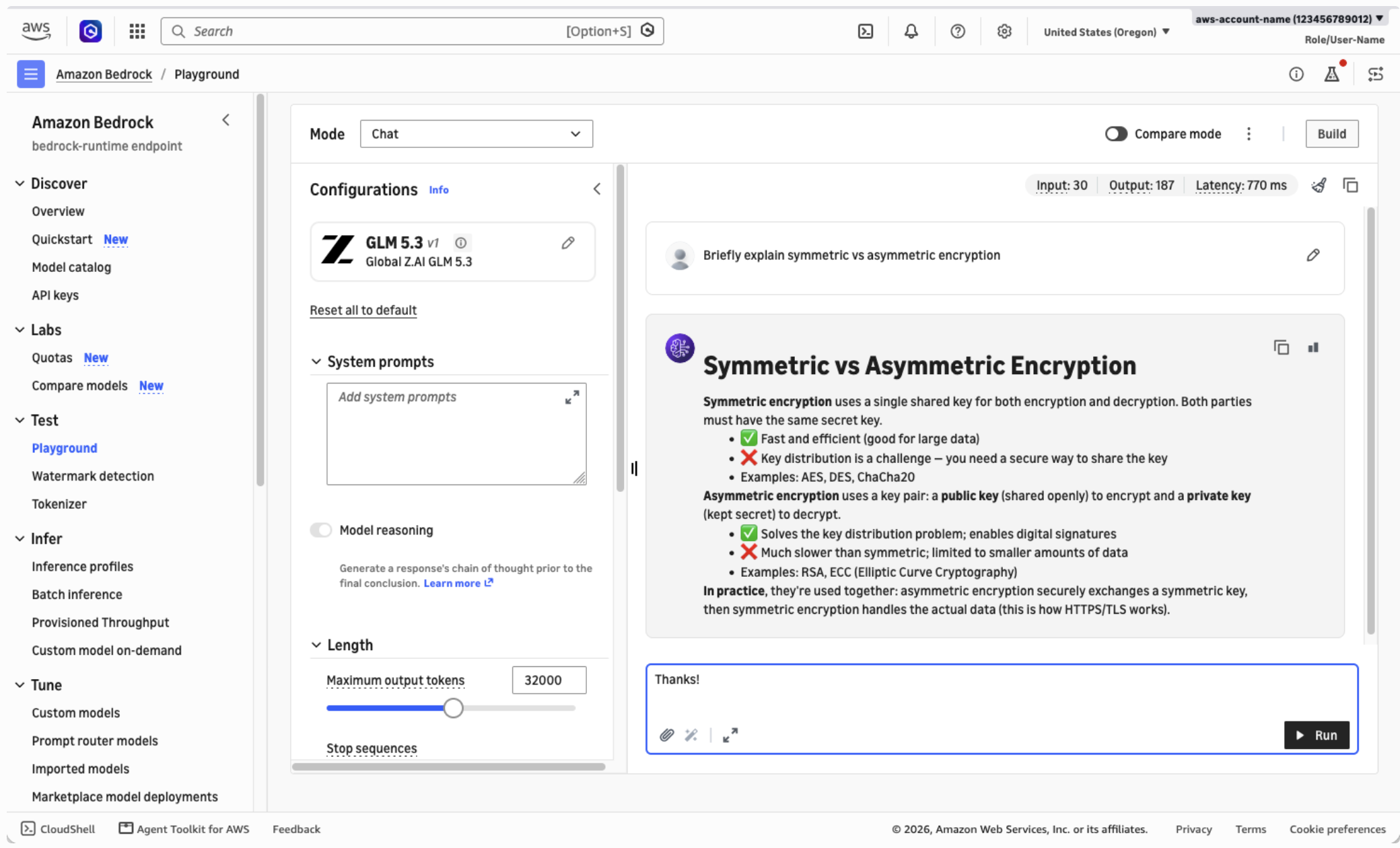
Figure 1: Chatting with GLM 5.3 on the Amazon Bedrock console
Get started with the Responses API
Programmatically, you can call the model through the bedrock-runtime endpoint. This supports both the OpenAI-compatible Responses and Chat Completions APIs, and the Amazon Bedrock Invoke and Converse APIs for GLM 5.3. For new applications the OpenAI-compatible APIs are recommended as they support a more complete set of features.
Amazon Bedrock does support generating API keys for OpenAI-compatible integrations that require them. However, we strongly recommend preferring short-lived credentials over long-lived API keys where possible.
In the following example, we will call the Responses API from Python using the OpenAI Python SDK, and the aws-bedrock-token-generator library to generate short-term tokens from your standard AWS Command Line Interface (AWS CLI) credentials.
- Install the required packages.
pip install -U openai aws-bedrock-token-generator - Save the following code as
bedrock-request.py.from aws_bedrock_token_generator import provide_token from openai import OpenAI region = "us-west-2" # Your source AWS Region client = OpenAI( api_key=provide_token(region=region), base_url=f"https://bedrock-runtime.{region}.amazonaws.com/openai/v1", ) resp = client.responses.create( input="Refactor this Python function to be iterative instead of recursive: ...", model="global.zai.glm-5.3", ) print(resp.output_text) - Run the script, which will display the model’s output.
python bedrock-request.py
Optimize inference with explicit prompt caching
Long-running coding and knowledge workflows often resend stable context across multiple conversation turns, such as system prompts, tool definitions, or repository files.
GLM 5.3 on Amazon Bedrock supports implicit prompt caching by default, which helps reduce response latency and input token costs for repeated calls sharing the same initial prompt prefix.
With explicit prompt caching mode you specifically identify the reusable prompt prefixes, which can further improve cache hit rate (and therefore latency and cost savings) over implicit caching.
To use explicit prompt caching with GLM 5.3, as shown in the following example:
- Select the explicit caching mode through
prompt_cache_optionson your request. - Add one or more
prompt_cache_breakpointmarkers on input content blocks to indicate the end (inclusive) of reusable prompt prefixes. Each breakpoint must contain at least 1,024 tokens to be eligible for caching.
resp = client.responses.create(
    model="global.zai.glm-5.3",
    # Enable explicit caching mode:
    extra_body={"prompt_cache_options": {"mode": "explicit"}},
    input=[
        {
            "type": "message",
            "role": "system",
            "content": [
                {
                    "type": "input_text",
                    "text": SYSTEM_PROMPT,
                    # A long, static system prompt is a great target for caching:
                    "prompt_cache_breakpoint": {"mode": "explicit"},
                },
            ]
        },
        {
            "type": "message",
            "role": "user",
            "content": [
                {
                    "type": "input_text",
                    "text": USER_INPUT,
                    # Multiple breakpoints can also be defined, for layered cache:
                    "prompt_cache_breakpoint": {"mode": "explicit"},
                },
            ],
        },
    ],
)

if resp.usage.input_tokens_details.cached_tokens:
    print("Hit cache!")
For more information, refer to the prompt caching section of the Amazon Bedrock User Guide.
One workload that benefits directly from GLM 5.3’s strengths is automated security testing of your own applications. Strix is an open-source AI penetration testing agent that runs your code dynamically, finds vulnerabilities, and validates them with proof-of-concept tests. As of this writing, the Strix documentation uses GLM 5.3 as its default model. You can configure Strix to use GLM 5.3 on Amazon Bedrock instead of a third-party inference provider, so model inference runs under your AWS account’s controls.
Only test applications you own or have explicit written permission to test. Unauthorized security testing of systems you don’t own is illegal in most jurisdictions and violates the AWS Acceptable Use Policy. In this walkthrough, the target is OWASP Juice Shop, a deliberately vulnerable sample application running locally on your machine.
If you want fully managed, continuous security testing beyond running open-n testing and other security analyses as a managed service. The two approaches are complementary: open-d deeply customizable testing against local builds, while AWS Continuum runs managed assessments at scale
To run an authorized security test
- Start the example Juice Shop target application locally.
docker run --rm -p 3000:3000 bkimminich/juice-shop - Configure Strix to use GLM 5.3 on Amazon Bedrock. Strix uses LiteLLM under the hood so (as described in their documentation for Amazon Bedrock) your AWS CLI credentials will be picked up automatically. This means no API key is required, but you might want to set environment variables like
AWS_PROFILEandAWS_REGIONto configure your connection. At the time of writing, LiteLLM does not yet resolvebedrock/global.zai.glm-5.3. Until this is fixed, you can explicitly specify the Converse API route and the inference profile Amazon Resource Name (ARN) as shown in the following snippet:# Fill in the REGION and ACCOUNT_ID placeholders below before running! export STRIX_LLM="bedrock/converse/arn:aws:bedrock:{AWS_REGION}:{AWS_ACCOUNT_ID}:inference-profile/global.zai.glm-5.3" - Run Strix against the local target.
strix --target http://localhost:3000 - Wait for the root Strix agent to complete, then review the findings.
Strix spins up a team of sub-agents to map the threat surface, explore a range of potential vulnerability categories, and attempt to validate each finding with a working proof of concept. This helps minimize time spent triaging false positives. A successful run will generate a report including severity, evidence, and remediation guidance for each finding.
The following video shows the end-to-end journey of setting up and running Strix against the example application, and exploring the results:
Figure 2: Running an example security test with GLM 5.3 and Strix
Clean up
Stop the Juice Shop container with Ctrl+C in the terminal where it’s running, or run docker ps to find the container ID and stop it with docker stop <container-id>. Amazon Bedrock inference is pay-per-token with no persistent resources, so there are no further charges after your requests complete. If you generated an Amazon Bedrock API key for this walkthrough and no longer need it, delete it on the Amazon Bedrock console.
Availability
Give GLM 5.3 a try on the Amazon Bedrock console, use it through coding assistants like OpenCode as shown in our recent post with Kimi K3, or connect your custom applications through the supported APIs.
Interested in how Amazon Bedrock can support your team?Connect with usto start the conversation.
