Close Menu
MyAppsPlus

    Subscribe to Updates

    Get the latest creative news from FooBar about art, design and business.

    What's Hot

    Gemini could soon let you create your own custom voice from scratch

    November 24, 2026

    4 Android Phones To Consider Instead Of The Motorola Signature 27

    November 24, 2026

    iOS 27.3 adds new features in six iPhone apps, details here

    November 24, 2026
    Facebook X (Twitter) Instagram
    Facebook X (Twitter) Instagram
    MyAppsPlusMyAppsPlus
    Tuesday, November 24
    • Home
    • Breaking Tech
    • Apps & Software
    • AI & Automation
    • Android
    • iPhone & iOS
    • More
      • Reviews
      • How-To Guides
      • Deals & Discounts
      • Shop
    MyAppsPlus
    Home»iPhone & iOS»How to use HomeView as a mirror with ring light
    iPhone & iOS

    How to use HomeView as a mirror with ring light

    myappsplusBy myappsplusNovember 24, 2026002 Mins Read
    Share Facebook Twitter Pinterest Copy Link LinkedIn Tumblr Email Telegram WhatsApp
    Follow Us
    Google News Flipboard
    How to use HomeView as a mirror with ring light
    Share
    Facebook Twitter LinkedIn Pinterest Email Copy Link

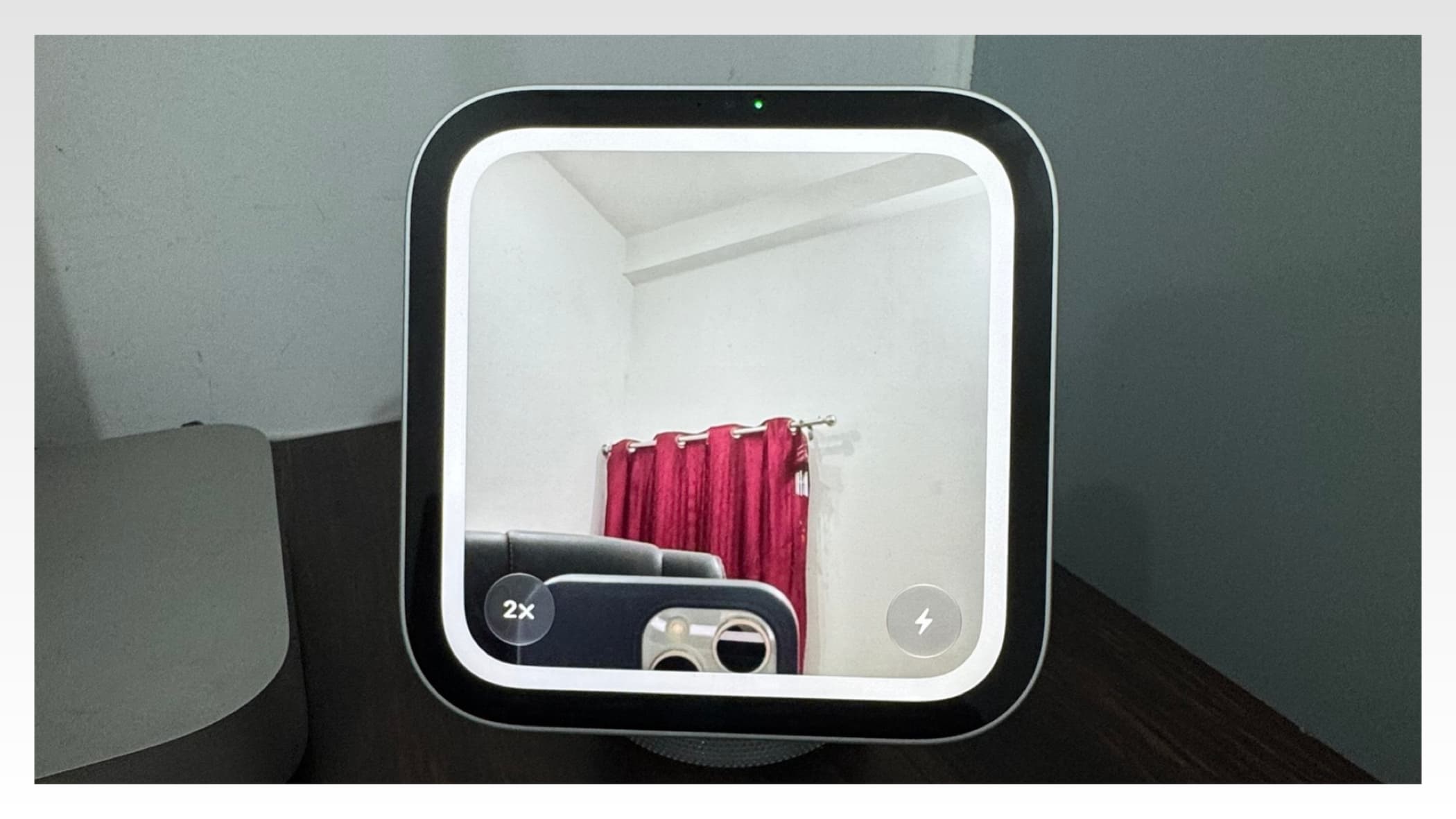
    In this brief tutorial, we show you how to use the new Apple HomeView smart home device as a mirror for quick makeup or to check yourself before you head out or join a call.

    iPhone has a Camera app, iPad has both the Camera and Photo Booth apps, and MacBook also has a Photo Booth app to check and fix yourself before you join a FaceTime, Zoom, or other video call.

    HomeView has a FaceTime app to make calls but no camera app (even though it has a front camera that it uses for face recognition and video calls). To make sure you don’t join a call with your hair messed up, or to take a quick look at yourself before you head out, HomeView has a mirror feature tucked away in its Control Center. Here’s how to activate and use it.

    Use the mirror feature on your HomeView

    1) Open Control Center on your HomeView by swiping down from the top right corner of the screen.
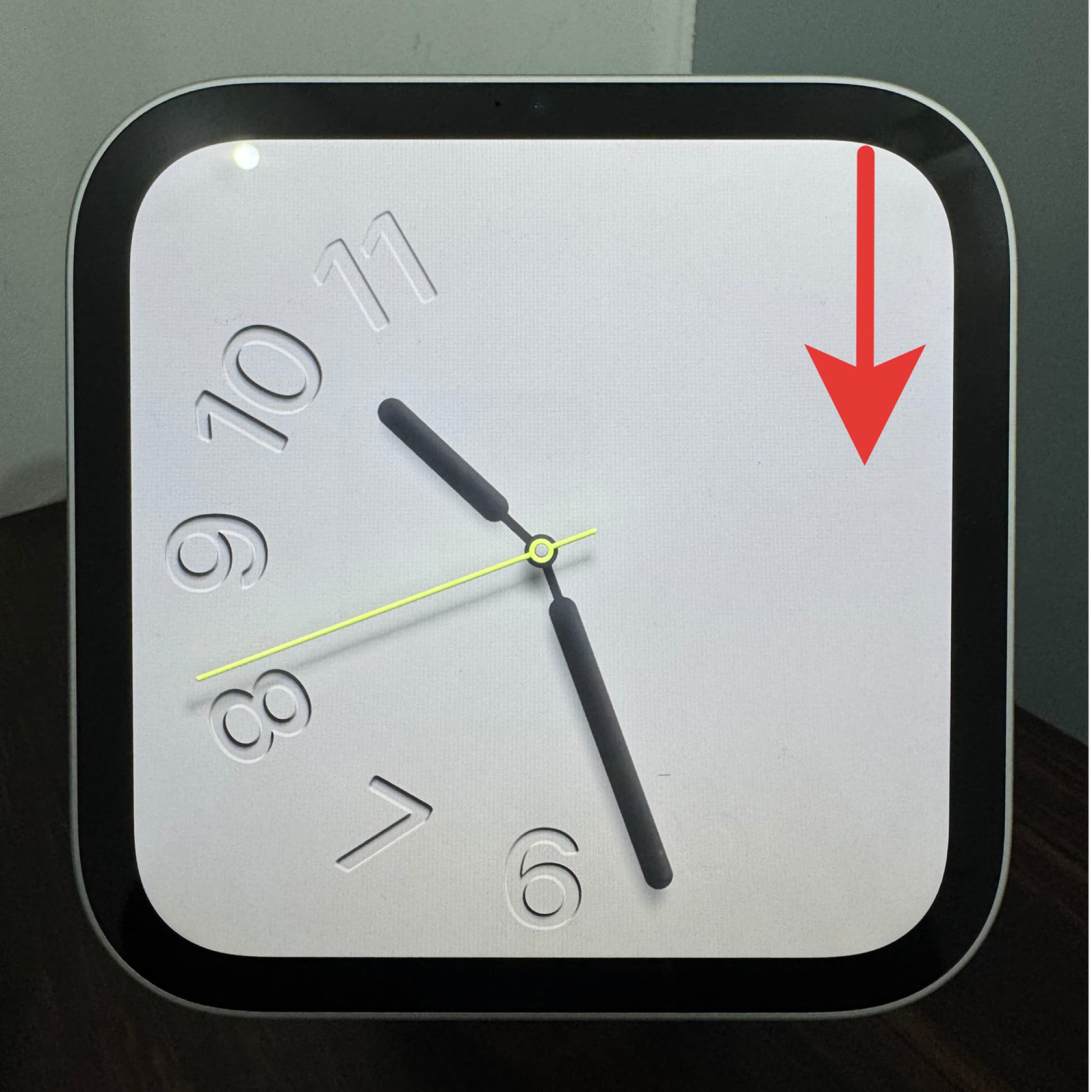
    Swiping down from top right corner of HomeView to open Control Center

    2) Tap the mirror icon to bring up the front camera view, as shown in the image below.
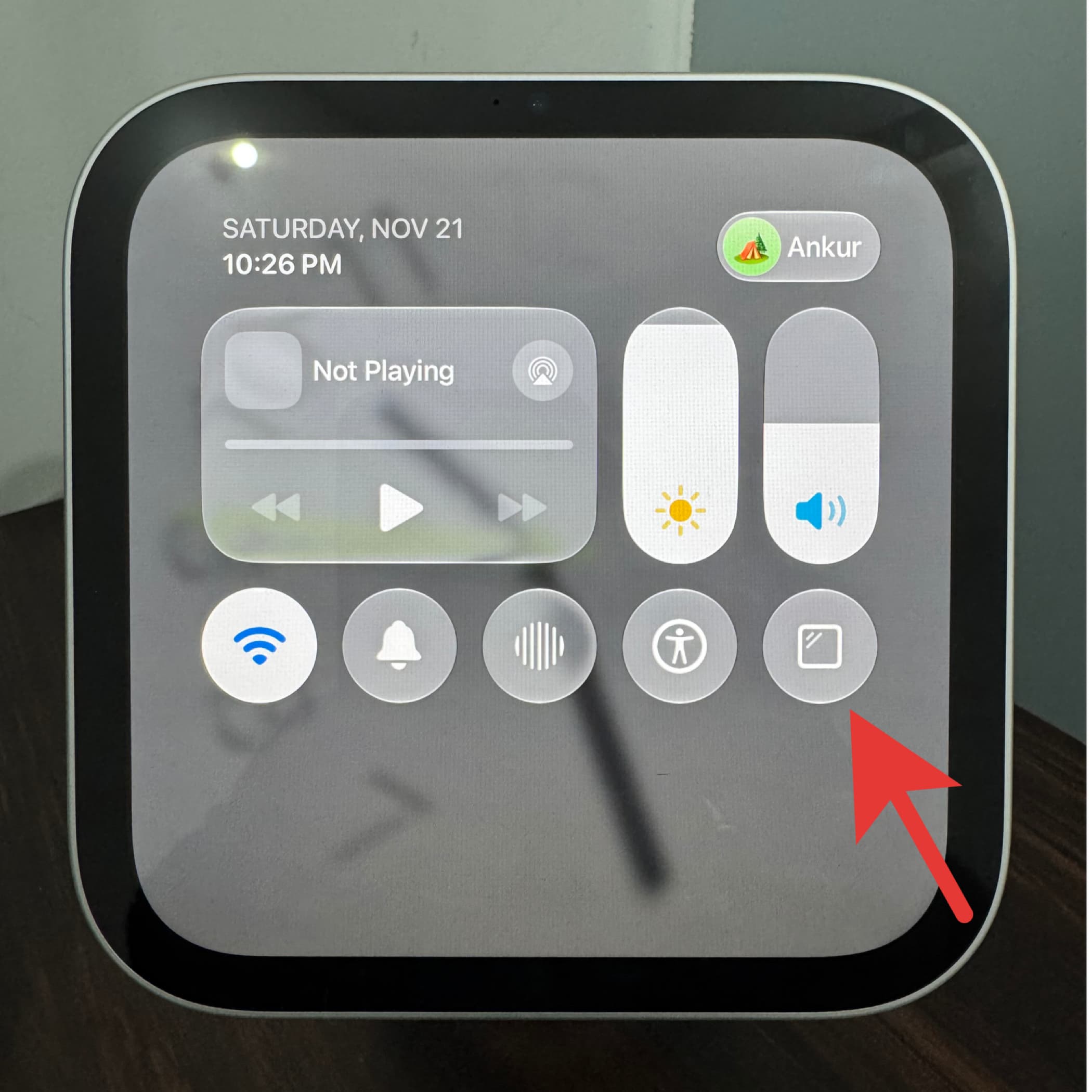
    Tapping mirror icon in HomeView Control Center

    3) Tap the 1x or 2x button to zoom in and out. You cannot use pinch-to-zoom, so use these buttons or move closer or farther as needed.

    4) If the room isn’t lit properly, tap the Edge Light flash icon to add a ring light around the HomeView screen.

    5) Once you’re done, swipe up to exit the camera view.
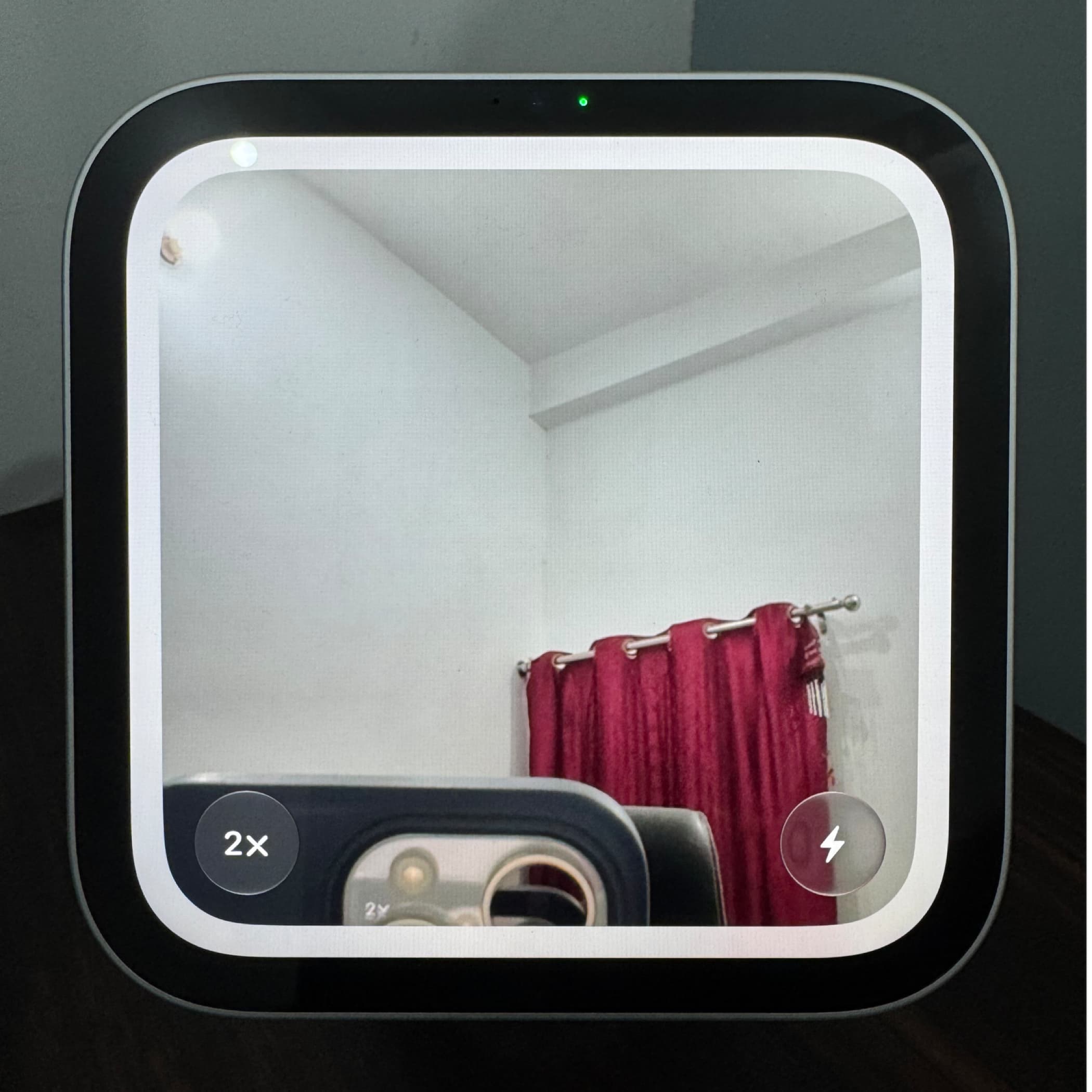
    Mirror with Edge Light on Apple HomeView

    This is a small but thoughtful feature which I like. In future updates, I would like Apple to add Photo Booth-like effects so kids can have some fun; after all, HomeView is a family device.

    Unlike FaceTime, Messages, and some other features, opening and using the HomeView mirror doesn’t require Personal Content or face recognition; anyone with access to your HomeView can see themselves on the screen.

    Secondly, the HomeView Edge Light feature isn’t unique to it. It’s also available on Apple silicon Macs and the inner screen of the foldable iPhone Duo during video calls.

    • How to block incoming calls on HomeView
    • Official HomeView modular face wallpapers
    Camera Featured HomeView How to News Push Tips Tutorial Tutorials
    Follow on Google News Follow on Flipboard
    Share. Facebook Twitter Pinterest LinkedIn Tumblr Email Copy Link
    myappsplus
    • Website

    Related Posts

    Gemini could soon let you create your own custom voice from scratch

    November 24, 2026

    iOS 27.3 adds new features in six iPhone apps, details here

    November 24, 2026

    Nvidia Has Incredible News for Artificial Intelligence (AI) Investors. Here Is My Top Stock to Buy Before It Is Too Late

    November 24, 2026
    Add A Comment
    Leave A Reply Cancel Reply

    Top Posts

    The pros and cons of using your phone as a mobile hotspot

    November 16, 202647 Views

    UiPath Launches AI Coding Agent, Integrates Claude Code and Codex to Target Development Automation

    November 16, 202646 Views

    Save on your groceries, gas, and holiday shopping with this $15 BJ’s membership (Reg. $60) 

    November 4, 202633 Views
    Latest Reviews

    iPhone price hike ‘better than feared,’ Duo to drive cycle demand

    myappsplusSeptember 11, 2026

    Fairbuds 2 leak gives us an early look at a very different design

    myappsplusSeptember 11, 2026

    Intel says it has already passed a million High-NA EUV wafers – more than the rest of the industry combined

    myappsplusSeptember 11, 2026
    Stay In Touch
    • Facebook
    • YouTube
    • TikTok
    • WhatsApp
    • Twitter
    • Instagram

    Subscribe to Updates

    Get the latest tech news from FooBar about tech, design and biz.

    Most Popular

    Ford CEO hits back at government ‘mistruths’ about China —as its $28K electric truck prepares to take on Slate and Chinese rivals

    September 12, 20260 Views

    Monitoring production agent lifecycle with AWS DevOps Agent and AgentCore Evaluations

    September 12, 20260 Views

    You can still shop these robot vacuums

    September 12, 20260 Views
    Our Picks

    Gemini could soon let you create your own custom voice from scratch

    November 24, 2026

    4 Android Phones To Consider Instead Of The Motorola Signature 27

    November 24, 2026

    iOS 27.3 adds new features in six iPhone apps, details here

    November 24, 2026

    Subscribe to Updates

    Subscribe to our newsletter and get the latest tech news, app updates, AI trends, smartphone reviews, and exclusive deals delivered straight to your inbox.

    Facebook X (Twitter) Instagram Pinterest
    • About Us
    • Get In Touch
    • Disclaimer
    • Privacy Policy
    • Terms & Conditions
    © 2026 MyAppsPlus. All Rights Reserved.

    Type above and press Enter to search. Press Esc to cancel.