Close Menu
MyAppsPlus

    Subscribe to Updates

    Get the latest creative news from FooBar about art, design and business.

    What's Hot

    CleanupBuddy 2.0 expands beyond the keyboard with new display cleaning features

    November 11, 2026

    2027 Chevrolet Bolt Review: RIP to the GOAT of low-cost electric motoring

    November 11, 2026

    The Day the Take-Home Essay Died: How I Stopped Grading AI and Started Designing Real Learning

    November 11, 2026
    Facebook X (Twitter) Instagram
    Facebook X (Twitter) Instagram
    MyAppsPlusMyAppsPlus
    Wednesday, November 11
    • Home
    • Breaking Tech
    • Apps & Software
    • AI & Automation
    • Android
    • iPhone & iOS
    • More
      • Reviews
      • How-To Guides
      • Deals & Discounts
      • Shop
    MyAppsPlus
    Home»iPhone & iOS»Make Apple Watch Listen for Sounds Like the Doorbell
    iPhone & iOS

    Make Apple Watch Listen for Sounds Like the Doorbell

    myappsplusBy myappsplusNovember 11, 2026013 Mins Read
    Share Facebook Twitter Pinterest Copy Link LinkedIn Tumblr Email Telegram WhatsApp
    Follow Us
    Google News Flipboard
    Make Apple Watch Listen for Sounds Like the Doorbell
    Share
    Facebook Twitter LinkedIn Pinterest Email Copy Link

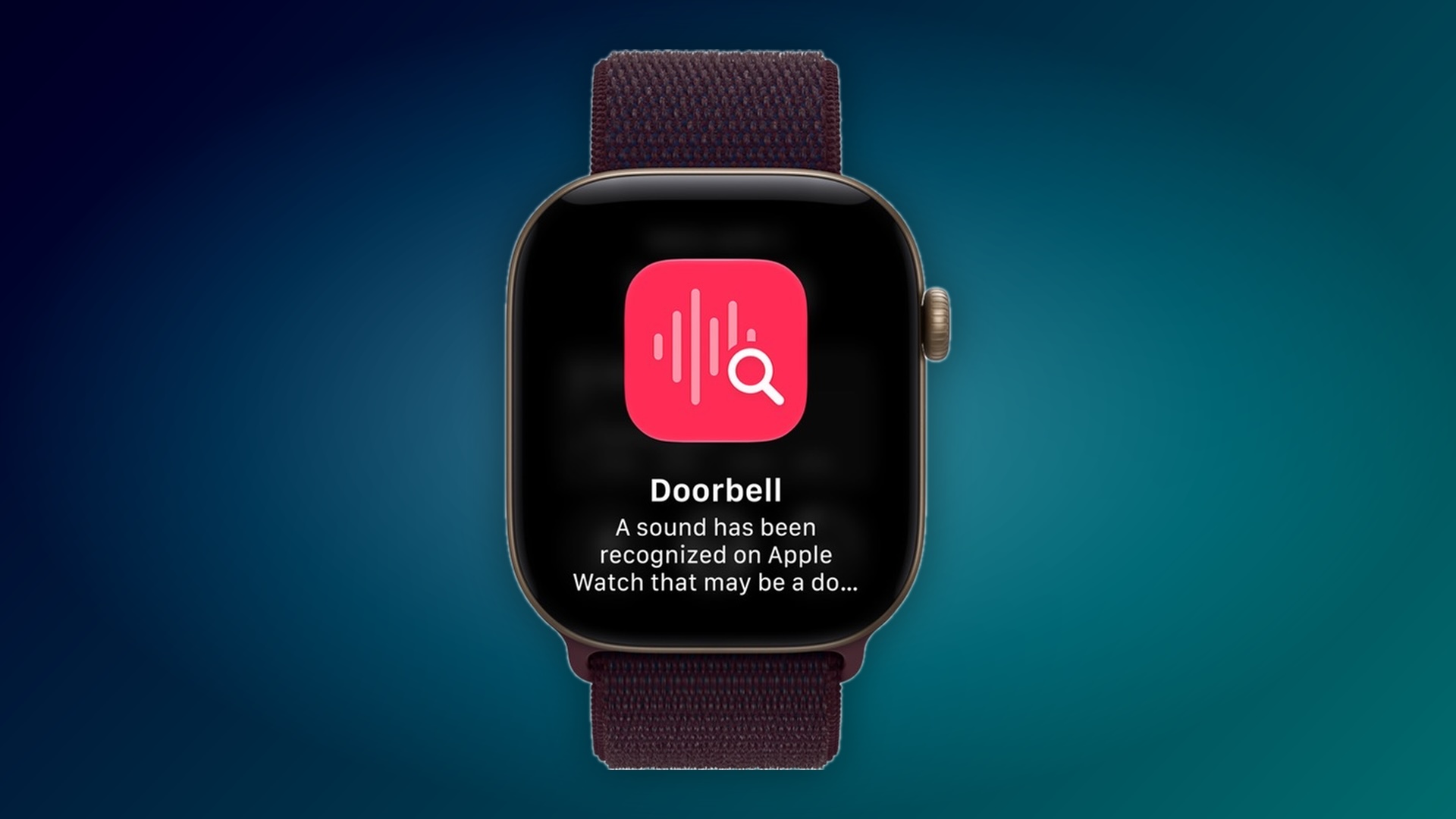
    One of Apple’s accessibility features on iPhone can listen for important sounds around you, such as a doorbell, siren or alarm, and it sends you a notification when it hears one. The feature has been extended to Apple’s new Apple Watch Series 12 and Apple Watch Ultra 4 models, so the alert reaches your wrist even when your iPhone isn’t with you.

    It’s especially useful for people who are deaf or hard of hearing, but it has everyday uses too. If you wear noise-cancelling headphones while working and don’t want to miss the doorbell – if you’re expecting a delivery, for example – your Apple Watch can alert you.

    Sounds Your Apple Watch Can Detect

    Sound Recognition can detect the following 15 sounds. Any you switch on in the iPhone’s Sounds list are also detected by your Apple Watch when “Detect using Apple Watch” is enabled:

    • Fire Alarm
    • Siren
    • Smoke Alarm
    • Cat
    • Dog
    • Appliances
    • Car Horn
    • Doorbell
    • Door Knock
    • Glass Breaking
    • Kettle
    • Water Running
    • Baby Crying
    • Coughing
    • Shouting

    If a sound isn’t recognized automatically, you can also teach your iPhone a Custom Alarm or Custom Appliance or Doorbell from the same Sounds list.

    What You’ll Need

    You’ll need an Apple Watch Series 12 or Ultra 4 paired with an iPhone 11 or later, or an iPhone SE (2nd generation or later), running iOS 27. If you already use Sound Recognition on your iPhone, it turns on automatically for your Apple Watch, so you may not need to do anything. Either way, here’s how to set it up:

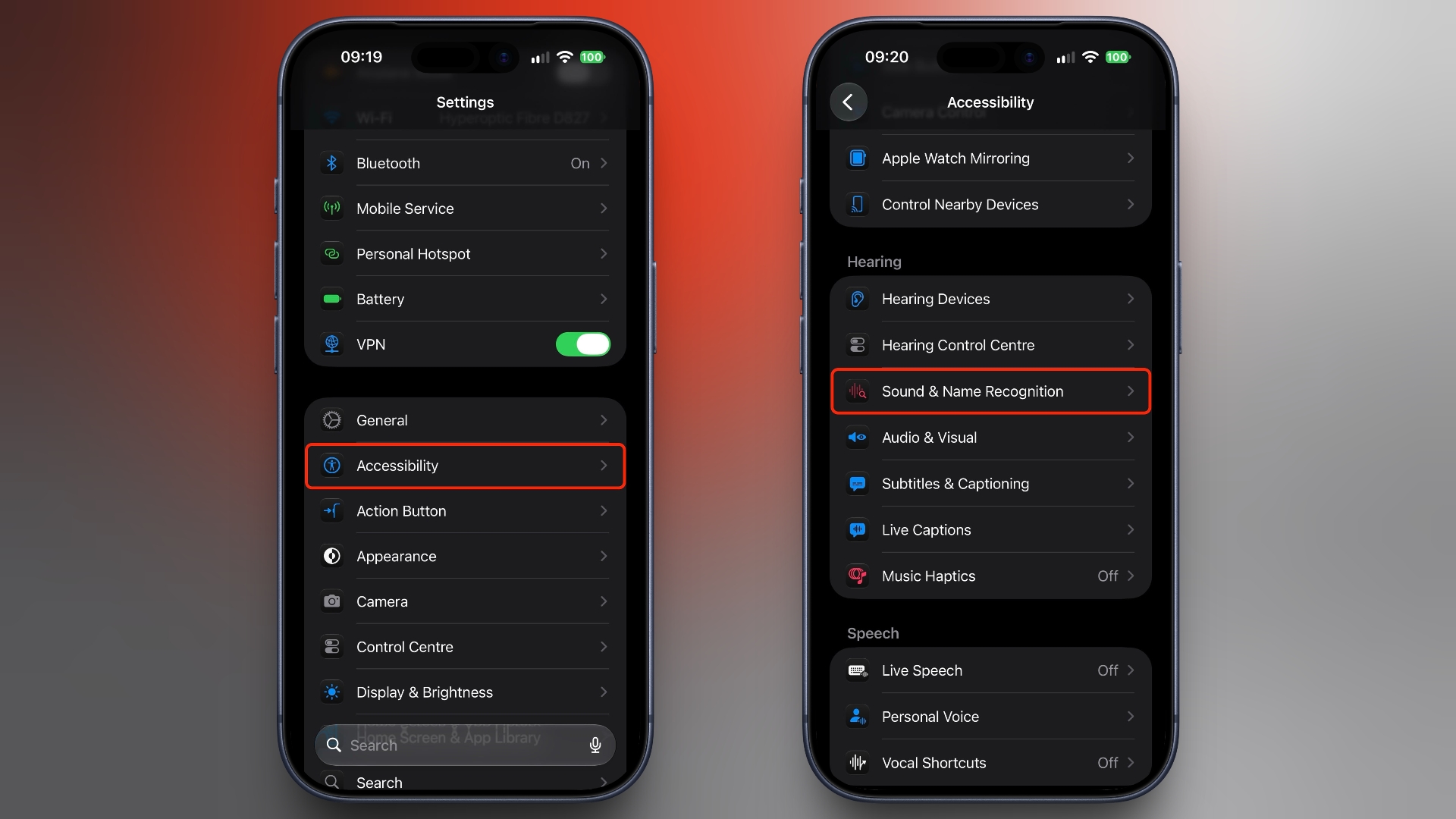
    1. Open the Settings app on your iPhone and tap Accessibility.
    2. In the “Hearing” section, tap Sound & Name Recognition.
      settings
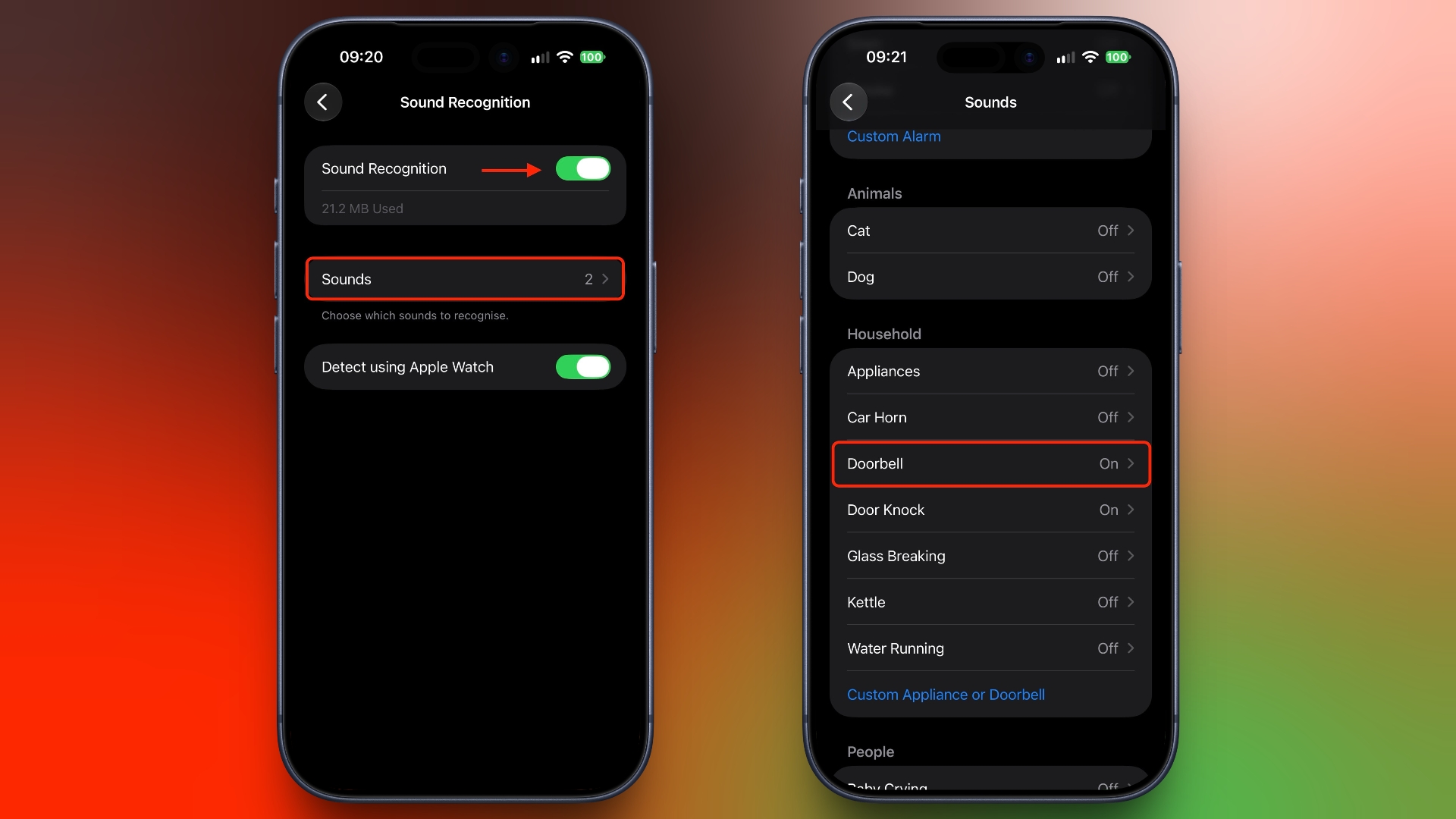
    3. Tap Sound Recognition and turn on the Sound Recognition toggle, then turn on Detect using Apple Watch.
    4. Tap Sounds and turn on the sounds you want to hear about, such as Doorbell. You can also choose a specific alert tone for each sound.
      settings

    Apple says Sound Recognition is processed on your Apple Watch and iPhone and doesn’t record or store audio. It shouldn’t be treated as a safety <a href="https://myappsplus.com/newest-updates-on-our-next-storm-system/” title=”Newest updates on our next storm system”>system, though. You shouldn’t rely on it in situations where you may be harmed or injured, in high-risk or emergency situations, or for navigation, per Apple’s guidelines. Related Roundups: Apple Watch 12, Apple Watch Ultra 4
    Buyer’s Guide: Apple Watch (Buy Now), Apple Watch Ultra (Buy Now)
    Related Forum: Apple Watch
    This article, “Make Apple Watch Listen for Sounds Like the Doorbell” first appeared on MacRumors.com

    Discuss this article in our forums

    Apple Apple Watch Apple Watch Ultra Featured Make
    Follow on Google News Follow on Flipboard
    Share. Facebook Twitter Pinterest LinkedIn Tumblr Email Copy Link
    myappsplus
    • Website

    Related Posts

    CleanupBuddy 2.0 expands beyond the keyboard with new display cleaning features

    November 11, 2026

    You Should Download iOS 27.2.1 Now for a Handful of Security Fixes

    November 11, 2026

    Apple is shutting down its online Support Community on November 20

    November 11, 2026
    Add A Comment
    Leave A Reply Cancel Reply

    Top Posts

    Cathay Pacific tests Google AI that dramatically cuts airplane contrails — tiny altitude shifts slash environmental impact by 40% in early trials

    September 8, 2026138 Views

    Save on your groceries, gas, and holiday shopping with this $15 BJ’s membership (Reg. $60) 

    November 4, 202627 Views

    Apple is making Creator Studio an even better deal with new AI features and creative tools

    October 28, 202622 Views
    Latest Reviews

    Zelda 40th Anniversary Nintendo Direct: Ocarina of Time release date, all-new title, SE Switch 2, Twilight Princess, more

    myappsplusSeptember 7, 2026

    Your old phones may be worth more than you think through Google Store trade-in

    myappsplusSeptember 7, 2026

    The tiny Geekom A5 Ryzen 5 mini PC packs 16GB RAM and 1TB storage, and it’s cheaper at Best Buy than Amazon for Labor Day — but you’ll need to act fast

    myappsplusSeptember 7, 2026
    Stay In Touch
    • Facebook
    • YouTube
    • TikTok
    • WhatsApp
    • Twitter
    • Instagram

    Subscribe to Updates

    Get the latest tech news from FooBar about tech, design and biz.

    Most Popular

    Zelda 40th Anniversary Nintendo Direct: Ocarina of Time release date, all-new title, SE Switch 2, Twilight Princess, more

    September 7, 20260 Views

    How to split bills and customize passes in Apple Wallet with iOS 27 Update

    September 7, 20260 Views

    OpenAI hid AI agent hijacking of German wiki forum for weeks — because its model did the exact same thing in the Hugging Face attack

    September 7, 20260 Views
    Our Picks

    CleanupBuddy 2.0 expands beyond the keyboard with new display cleaning features

    November 11, 2026

    2027 Chevrolet Bolt Review: RIP to the GOAT of low-cost electric motoring

    November 11, 2026

    The Day the Take-Home Essay Died: How I Stopped Grading AI and Started Designing Real Learning

    November 11, 2026

    Subscribe to Updates

    Subscribe to our newsletter and get the latest tech news, app updates, AI trends, smartphone reviews, and exclusive deals delivered straight to your inbox.

    Facebook X (Twitter) Instagram Pinterest
    • About Us
    • Get In Touch
    • Disclaimer
    • Privacy Policy
    • Terms & Conditions
    © 2026 MyAppsPlus. All Rights Reserved.

    Type above and press Enter to search. Press Esc to cancel.