Close Menu
MyAppsPlus

    Subscribe to Updates

    Get the latest creative news from FooBar about art, design and business.

    What's Hot

    Your Google account will lose its ability to unlock your Nintendo account next year

    November 10, 2026

    How to check if an image is AI-generated on iPhone

    November 10, 2026

    Today’s Apple Books and audiobooks deals from $1 or less

    November 10, 2026
    Facebook X (Twitter) Instagram
    Facebook X (Twitter) Instagram
    MyAppsPlusMyAppsPlus
    Tuesday, November 10
    • Home
    • Breaking Tech
    • Apps & Software
    • AI & Automation
    • Android
    • iPhone & iOS
    • More
      • Reviews
      • How-To Guides
      • Deals & Discounts
      • Shop
    MyAppsPlus
    Home»Breaking Tech»How does Google Wallet’s notification feed work and can you disable it?
    Breaking Tech

    How does Google Wallet’s notification feed work and can you disable it?

    myappsplusBy myappsplusNovember 9, 2026003 Mins Read
    Share Facebook Twitter Pinterest Copy Link LinkedIn Tumblr Email Telegram WhatsApp
    Follow Us
    Google News Flipboard
    How does Google Wallet’s notification feed work and can you disable it?
    Share
    Facebook Twitter LinkedIn Pinterest Email Copy Link

    Here’s how to check if you’ve received one of Google Wallet’s latest feature rollouts.

    If you’ve looked over the pros and cons of digital wallets and settled on Google’s Wallet app, you’ll be happy to know an update has dropped for the platform. This update, which began to roll out in October 2026, launched both increased passport recognition and an in-application notification inbox. This update has been added in an effort to have Google Wallet outdo Apple Wallet. 

    If you’ve received this new update, the notification feed is easy to find. However, if the thought of more notifications on your phone has you shivering, there are ways to keep this inbox quiet.

    Where to find Google Wallet’s new notification feed
    Google Wallet in the Play Store displayed on a smartphone screen.

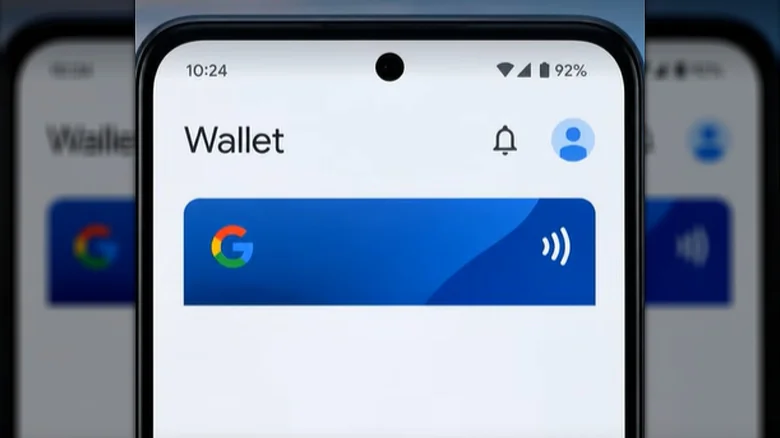
    If you have Google Wallet’s new notification feed feature, there should be a bell icon next to your profile icon in the top-right of the app. If you click on this bell icon, you’ll be brought to the notification feed. This page will be totally blank with a bell in the middle if you have no notifications. Otherwise, you’ll find your notifications listed here. Remember, the feed is still being rolled out, so you might not be able to find this page at all.

    Any notifications you receive about updates to your saved cards and passes will be stored here. This includes changes to traveling information (such as a gate change on a boarding pass), loyalty and gift cards (like point balance updates), incoming offers and more. This notification feed page will simply aggregate these notifications in one place, allowing you to keep track of them from within the app.

    How to manage Google Wallet notifications
    Google Wallet logo displayed on a phone screen against a Google-themed backdrop.

    One of the reasons you might be happy to see this new notification feed could be rooted in a common problem with Google Wallet, that being the sheer quantity of notifications the app sends. The feed will allow you to find them all in one organized place. 

    However, depending on your settings, Google Wallet might be taking advantage of Nearby Notifications. Some cards saved to Google Wallet might be sending you offer updates depending on your closeness to a certain location. If you want to avoid notifications from your wallet, this notification feed isn’t the thing you want to target. Rather, you want to disable notifications entirely or remove Google’s ability to use location data to ping you. You only need to tap on your profile picture, head to Wallet settings > Manage Wallet Notifications and choose the settings you want to tweak. You can also head to Settings > Apps > Google Wallet and either choose Notifications to turn all notifications off or Permissions to deny Google Wallet from using your location.

    does feed Google notification Wallets
    Follow on Google News Follow on Flipboard
    Share. Facebook Twitter Pinterest LinkedIn Tumblr Email Copy Link
    myappsplus
    • Website

    Related Posts

    Your Google account will lose its ability to unlock your Nintendo account next year

    November 10, 2026

    How to check if an image is AI-generated on iPhone

    November 10, 2026

    Google Pixel Watch gets step-by-step workout guidance with the November Pixel Drop

    November 10, 2026
    Add A Comment
    Leave A Reply Cancel Reply

    Top Posts

    Cathay Pacific tests Google AI that dramatically cuts airplane contrails — tiny altitude shifts slash environmental impact by 40% in early trials

    September 8, 2026138 Views

    Save on your groceries, gas, and holiday shopping with this $15 BJ’s membership (Reg. $60) 

    November 4, 202627 Views

    Apple is making Creator Studio an even better deal with new AI features and creative tools

    October 28, 202622 Views
    Latest Reviews

    Apple A20 Pro chip: why it’s such a big deal for the iPhone Ultra and iPhone 18 Pro Max

    myappsplusSeptember 7, 2026

    Get Lifetime Access to AI-Driven Stock Picks, a Done-for-You Portfolio Builder & a Personal AI Financial Coach

    myappsplusSeptember 7, 2026

    “I feel like I’m in my 50s” — the simple workout routine Julie Andrews, 90, swears by

    myappsplusSeptember 7, 2026
    Stay In Touch
    • Facebook
    • YouTube
    • TikTok
    • WhatsApp
    • Twitter
    • Instagram

    Subscribe to Updates

    Get the latest tech news from FooBar about tech, design and biz.

    Most Popular

    I’m fixing my desk posture without doing a single back exercise — here’s the foot mobility trick a neurosurgeon taught me

    September 7, 20260 Views

    €4.6B in deals and August’s highlights

    September 7, 20260 Views

    I kept waking up sweaty because of a classic bedding mistake — here’s what fixed it

    September 7, 20260 Views
    Our Picks

    Your Google account will lose its ability to unlock your Nintendo account next year

    November 10, 2026

    How to check if an image is AI-generated on iPhone

    November 10, 2026

    Today’s Apple Books and audiobooks deals from $1 or less

    November 10, 2026

    Subscribe to Updates

    Subscribe to our newsletter and get the latest tech news, app updates, AI trends, smartphone reviews, and exclusive deals delivered straight to your inbox.

    Facebook X (Twitter) Instagram Pinterest
    • About Us
    • Get In Touch
    • Disclaimer
    • Privacy Policy
    • Terms & Conditions
    © 2026 MyAppsPlus. All Rights Reserved.

    Type above and press Enter to search. Press Esc to cancel.