

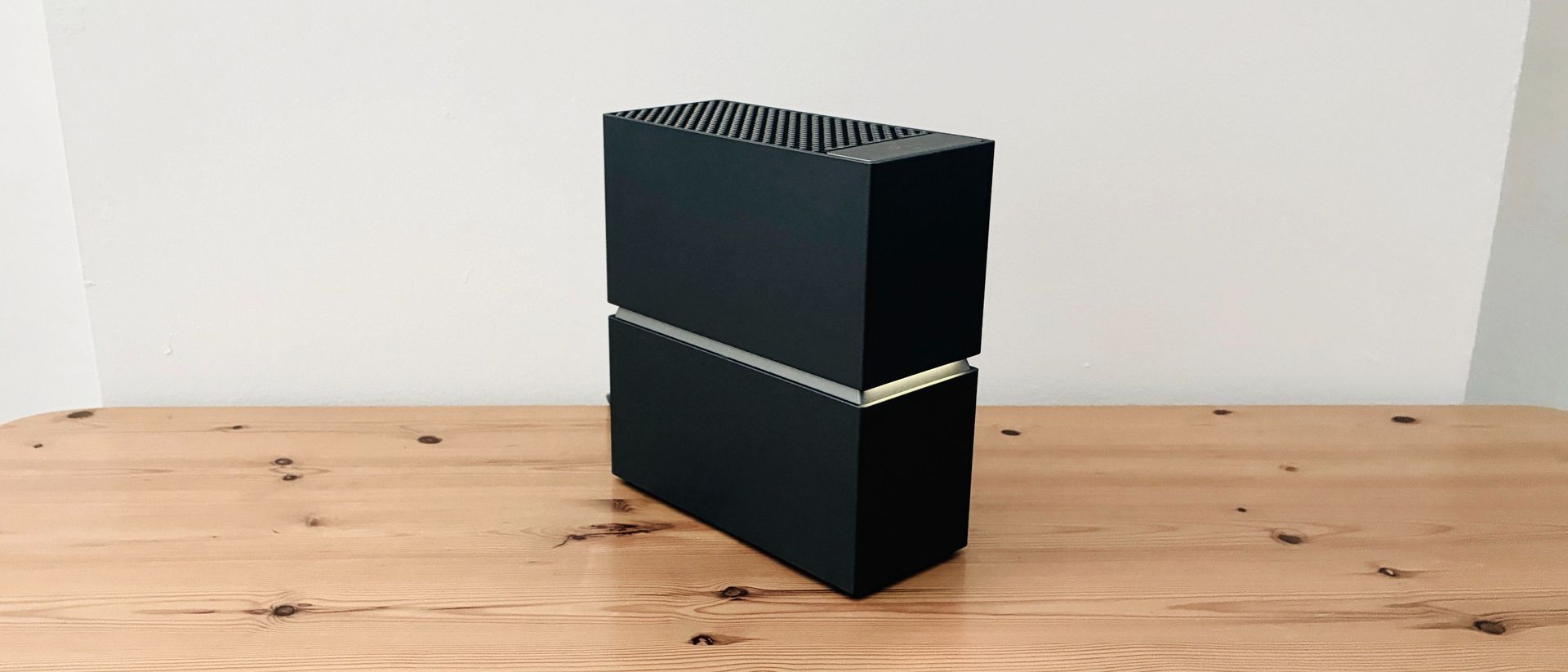
Link Archer 8 Ultra: One-minute review
It’s taken quite a while for Wi-Fi 7to become a mainstream technology – even Apple hasn’t adopted it right across its product range yet – but TP-Link has just launched the first Wi-Fi 8 router in the somewhat imposing form of its new Archer 8 Ultra.
In fact, the final technical details for Wi-Fi 8 probably won’t be announced until 2028, but the key features of the new standard are well known, allowing TP-Link and other manufacturers to prepare new products that will introduce the new technology over the next couple of years. It’s also planning to release a number of mesh routers and range extenders that will use Wi-Fi 8 in 2027 as well.
It’s safe to say that a state-of-the-art router with Wi-Fi 8 will be massive overkill for most home users – after all, the Archer’s tri-band Wi-Fi and top speed of 19Gbps will leave most home broadband services trailing in its wake.
And, of course, it comes with a state-of-the art price tag too. However, the Archer 8 Ultra is a good opportunity to look at the new features that will shape the next generation of Wi-Fi technology.
TP-Link Archer 8 Ultra review: Price & release date
- How much does it cost?Pre-order for £699 (around $950), then £899.99 (around $1,199)
- When is it available?Released on November 15, 2026
- Where can you get it?Available in US, EU, UK
The Archer 8 Ultra is currently available for pre-order from TP-Link’s website, and will be officially launched on November 15, 2026.
The US pricing hasn’t been confirmed at the time of writing, but there’s a special offer for pre-orders in the UK for £699 (around $950), with the price rising to £899.99 (approx. $1,199) following the launch in November. There are currently no rival Wi-Fi 8 routers to compare it with, but that pricing makes the Archer 8 Ultra twice as expensive as a high-end, current-gen Wi-Fi 7 model.
TP-Link Archer 8 Ultra review: Specs
|
Wi-Fi 8 (2.4GHz, 5.0GHz, 6.0GHz) |
|
|
2x 10Gbps (WAN/LAN), 4x 2.5Gbps (LAN), 1x 1Gbps (LAN) |
|
TP-Link Archer 8 Ultra review: Design
- Solid build quality
- Very good selection of ports
- App is easy to use
Wi-Fi 8 focuses on extending range and signal power in order to improve reliability.
This means that the Archer 8 Ultra needs to provide some pretty heavyweight hardware. It’s built like a tank, consisting of a matte-black obelisk that stands 245mm high, 98mm wide and 226mm deep, and it houses no less than 18 internal antennae to help beam the Wi-Fi signal far and wide.
It also provides an impressive set of ports and connectors, including two 10Gbps ports that can handle the latest high-speed fibre broadband, and also double up for a wired network connection (LAN) for devices such as a PC or gaming console that needs maximum performance.
There are also four additional 2.5Gbps ports for additional wired connections and, somewhat oddly, a single 1Gbps port as well.
TP-Link’s Tether app is also well designed, allowing you to scan a QR code in order to quickly connect to the router’s new network. By default, the app creates two separate networks, with one network reserved for the high-speed 6.0GHz band that is supported by newer computers and mobile devices.
The second network combines the 2.4GHz and 5.0GHz bands in order to provide compatibility with older computers and mobile devices. That setup should suit most users, but more advanced users can connect to the Archer 8 Ultraour network settings
TP-Link Archer 8 Ultra review: Features
The new Wi-Fi 8 standard is a big step forward, and is awash with jargon and buzzwords, such as MAPC (multi-access point co-ordination), ELR (enhanced long range), and DRU (distributed resource units), and you can find out more about these on the TP-Link website.
But the TLDR version is that Wi-Fi 8 shifts the focus away from sheer speed and instead concentrates on improving both range and reliability for larger homes and offices, as well as public and outdoor venues that may have dozens or even hundreds of connected devices spread over a very wide area.
Of course, the 19Gbps speed of the Archer 8 Ultra certainly sounds impressive, but it’s not actually any faster than the top speed of 46Gbps that is already possible with current-generation Wi-Fi 7 devices.
Wi-Fi 8 also uses the same frequency bands – 2.4GHz, 5.0GHz and 6.0GHz – that are available with Wi-Fi 7 as well. This ensures that the Archer 8 Ultra will be backwards-compatible with existing computers and mobile devices that use Wi-Fi 7.
However, those buzzwords that we just mentioned are designed to improve the range and reliability of the Archer 8 Ultra, so that a single router can cover an area of 3,600sq.ft (although some regions may quote this as 3,000sq.ft due to differences in local regulations).
It’s also designed to support up to 200 connected devices, and includes a Multi-Floor Mode that can automatically configure the Archer network to work efficiently within homes, offices, and other buildings where people and devices may be spread across multiple floors and levels. Suffice it to say that if you live in a modest two-bedroom house or apartment, then the Archer 8 Ultra will definitely be what The Sisters Of Mercy refer to as ‘a slight case of overbombing’.
TP-Link Archer 8 Ultra review: Performance
- Tri-band Wi-Fi 8
- Very few – if any – Wi-Fi 8 devices yet
- Still fantastic performance with Wi-Fi 7 devices
Ookla Speed Test – 2.4GHz/5.0GHz (download/upload)
Within 5ft, no obstructions: 150Mbps/150Mbps
Within 30ft, three partition walls: 150Mbps/150Mbps
20GB Steam Download – 2.4GHz/5.0GHz
Within 5ft, no obstructions: 150Mbps
Within 30ft, three partition walls: 150Mbps
Ookla Speed Test – 6.0GHz (download/upload)
I’ve not come across any PCs or mobile devices that currently support Wi-Fi 8 but, as mentioned, Wi-Fi 8 does use the same frequency bands as Wi-Fi 7, so I was able to get some idea of the performance offered by the Archer 8 Ultra using an existing laptop with Wi-Fi 7.
The extended range and reliability of Wi-Fi 8 makes it a good option in my office, as I have a deadspot in one particular office at the back of the building. Unsurprisingly, both of the Wi-Fi networks set up by the Archer 8 Ultra were easily able to cruise along at the maximum 150Mbps provided by my office network when running the Ookla SpeedTest and for downloading large game files from Steam while connected to nearby devices in the same room.
And it didn’t bat an eyelid as I picked up my laptop and walked along the corridor to the Wi-Fi deadspot in the furthest back office.
The one disadvantage of the high-speed 6GHz band is that it has a shorter range than the 2.4GHz and 5.0GHz bands – which is why those bands are still used even on next-gen routers such as this.
However, the range and reliability of Wi-Fi 8 ensured that the 6.0GHz band was able to reach my back office and maintain full speed with no trouble at all.
Of course, it’s still early days for Wi-Fi 8, so the Archer 8 Ultra won’t be an essential purchase for many people right now, but it’s a fascinating look at a future world where we will be surrounded by Wi-Fi all around us, both at home and in the wider world outside (more so than we currently are).
Should I buy the TP-Link Archer 8 Ultra?
|
Wi-Fi 8 introduces many new features designed to improve range and reliability |
||
|
It’s incredibly fast, but Wi-Fi 8 also provides big improvements in range and reliability |
||
|
It’s big and bulky, but packed with high-end hardware. |
||
|
A state-of-the-art price for a state-of-the-art router |
Buy it if…
You’re an early adopter
Wi-Fi 8 won’t officially be launched until 2028, so there won’t be many PCs or mobile devices that support it before then.View Deal
You have an enormous home
Wi-Fi 8 is all about range and reliability, and the Archer 8 Ultra can cover areas of up to 3,600sq.ft. It’ll be great if you own your own football pitch.View Deal
You’re a business user
Public venues such as hotels or sports venues that need to provide reliable Wi-Fi for hundreds of visitors will find that Wi-Fi 8 is a big improvement over previous versions.View Deal
Don’t buy it if…
You’re on a budget
The Archer 8 Ultra is one of the most expensive routers we’ve ever come across, and there are plenty of Wi-Fi 7 routers that will provide good performance at half the price.View Deal
You have a modest home
Most smaller and medium-size homes simply won’t need the extended range of Wi-Fi 8, or its blazing Wi-Fi speeds.View Deal
You just want to watch Netflix
A top speed of 19Gbps means that the Archer 8 Ultra is dozens of times faster than most home broadband connections, so it’s massive overkill for simple streaming services.View Deal
Also consider
D-Link Aquila Pro AI R95
Few of us can actually use Wi-Fi 8 at the moment, so an affordable Wi-Fi 7 model such as the Aquila Pro is a more mainstream option, providing a top speed of 9.5Gbps at a competitive price.
Read our full D-Link Aquila Pro AI R95 reviewView Deal
Netgear Orbi 373
Its dual-band Wi-Fi 7 runs at a relatively modest 5Gbps, but the Orbi’s three mesh routers can easily cover very large areas up to 6,000sq.ft.
Read our full Netgear Orbi 373 reviewView Deal
- Read TechRadar’s reviews guarantee
- First reviewed: November 2026
