Close Menu
MyAppsPlus

    Subscribe to Updates

    Get the latest creative news from FooBar about art, design and business.

    What's Hot

    Apple’s First Touchscreen Mac is Now Arriving to Customers

    November 5, 2026

    Making Henry Hoovers Battle for AI Education

    November 5, 2026

    How to watch The Assassin season 2 online – stream the Keeley Hawes series from anywhere for free

    November 5, 2026
    Facebook X (Twitter) Instagram
    Facebook X (Twitter) Instagram
    MyAppsPlusMyAppsPlus
    Thursday, November 5
    • Home
    • Breaking Tech
    • Apps & Software
    • AI & Automation
    • Android
    • iPhone & iOS
    • More
      • Reviews
      • How-To Guides
      • Deals & Discounts
      • Shop
    MyAppsPlus
    Home»Breaking Tech»Xbox is testing two new controller options for Cloud Gaming
    Breaking Tech

    Xbox is testing two new controller options for Cloud Gaming

    myappsplusBy myappsplusNovember 4, 2026022 Mins Read
    Share Facebook Twitter Pinterest Copy Link LinkedIn Tumblr Email Telegram WhatsApp
    Follow Us
    Google News Flipboard
    Xbox is testing two new controller options for Cloud Gaming
    Share
    Facebook Twitter LinkedIn Pinterest Email Copy Link

    The Nano Controller is adopting a Google Stadia trick.

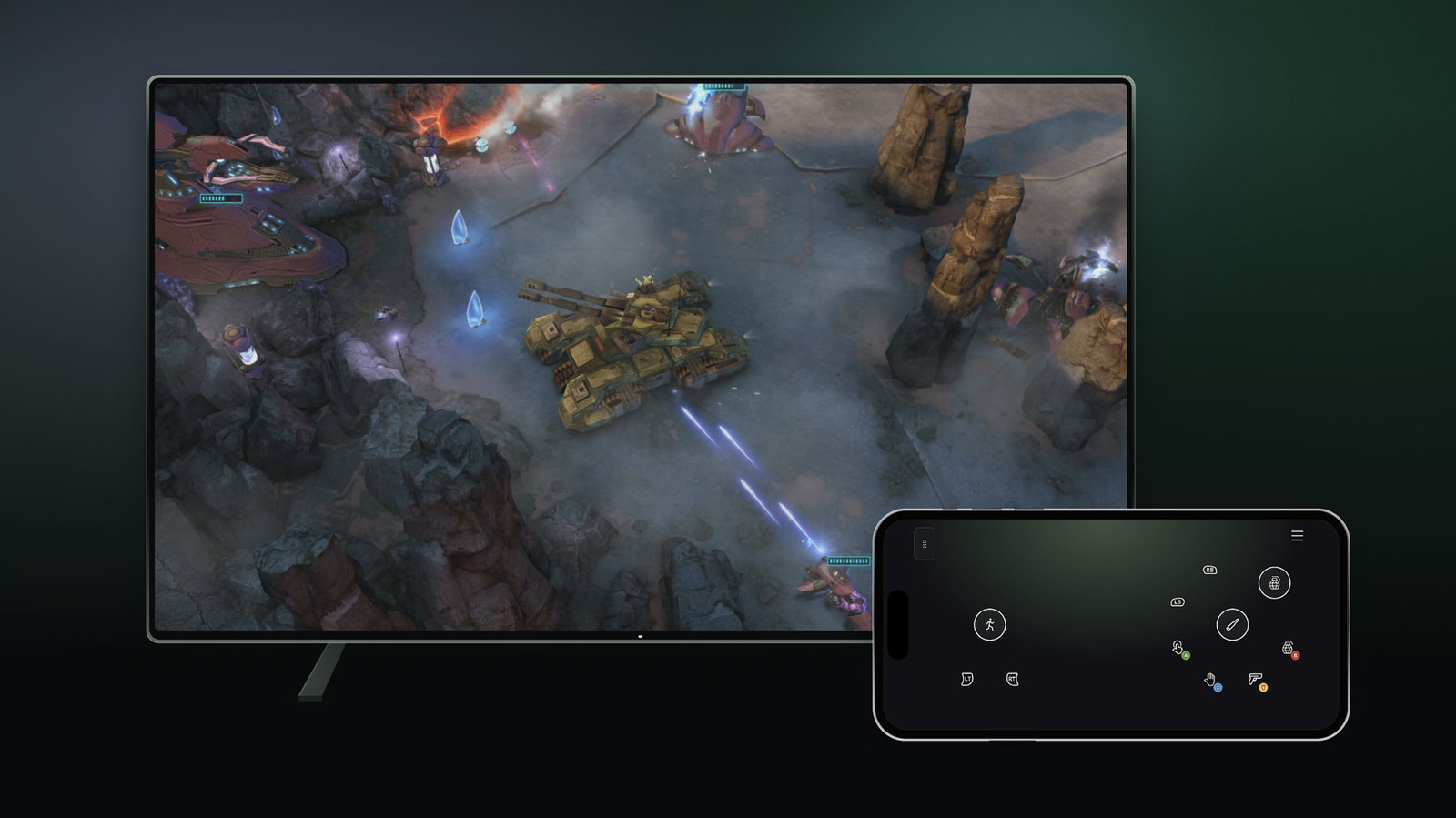
    Just ahead of new Xbox Cloud Gaming time limits kicking in this month, Microsoft is letting folks try two new controller options for the service. If you stream Xbox games on a supported smart TV, you’ll be able to use your phone as a controller. The interface opens in a browser, so you won’t need to download a dedicated app. Some games have custom controller layouts, Microsoft said.

    The company is making this option available today on select TVs. To try it, go to Settings > Account in the Cloud Gaming interface on your TV and enable Preview Features.

    Other companies with game-streaming services let you use your phone as a controller, including Netflix. It’s maybe not the best option for games that are fast paced or have complex controls, but for the likes of turn-based titles, your phone could be a useful way to play if you don’t have a controller nearby.

    In addition, folks in the US can connect the new Nano Controller directly to Xbox Cloud Gaming

    After you set up the gamepad using the Xbox beta app on <a href="https://myappsplus.com/your-android-can-get-hacked-without-you-doing-anything-at-all/” title=”Your Android Can Get Hacked Without You Doing Anything at All”>Android or Xbox Accessories app on PC, you can follow directions to connect your Nano Controller to Wi-Fi. (Note that if you’re going through the PC app, you’ll need to be enrolled in the Xbox Insider testing program to try out Wi-Fi connectivity.) Then, when you access Xbox Cloud Gaming through the same account you used to set up the controller, the gamepad will connect

    This is a smart way to try to reduce input lag, but again, it’s not the first time we’ve seen a controller that can connect to Wi-Fi. The gamepad for Google’s defunct Stadia cloud gaming service was able to do that too. (Stadia let players use phones as controllers for TV use as well.)

    Microsoft said both of these controller options are in preview. It noted that availability, and the supported devices and games, may be limited for now. For instance, Nano Controller Wi-Fi connectivity only works on smart TVs and the web for the time being.

    cloud Controller options testing Xbox
    Follow on Google News Follow on Flipboard
    Share. Facebook Twitter Pinterest LinkedIn Tumblr Email Copy Link
    myappsplus
    • Website

    Related Posts

    Blue Origin’s New Glenn launch delay will continue into 2027

    November 5, 2026

    Airbnb says it’s launching an AI travel agent in the first half of 2027

    November 5, 2026

    Bose recalls S1 Pro battery packs due to fire and overheating risks

    November 5, 2026
    Add A Comment
    Leave A Reply Cancel Reply

    Top Posts

    Cathay Pacific tests Google AI that dramatically cuts airplane contrails — tiny altitude shifts slash environmental impact by 40% in early trials

    September 8, 2026138 Views

    Apple is making Creator Studio an even better deal with new AI features and creative tools

    October 28, 202619 Views

    Keep running out of mobile data? This new unlimited plan gets you up to 80Mbps 5G speeds for just AU$50/m

    October 8, 202618 Views
    Latest Reviews

    Plug-in solar shone at IFA 2026 —here are the 5 best products we saw, from Anker to DJI and EcoFlow

    myappsplusSeptember 5, 2026

    I rode in a self-driving powered wheelchair that avoids obstacles and people, and can be summoned when you need it — it’s like Tesla’s Autopilot for personal mobility

    myappsplusSeptember 5, 2026

    What is the release date for The Paper season 2 on Peacock?

    myappsplusSeptember 5, 2026
    Stay In Touch
    • Facebook
    • YouTube
    • TikTok
    • WhatsApp
    • Twitter
    • Instagram

    Subscribe to Updates

    Get the latest tech news from FooBar about tech, design and biz.

    Most Popular

    Plug-in solar shone at IFA 2026 —here are the 5 best products we saw, from Anker to DJI and EcoFlow

    September 5, 20260 Views

    What is the release date for The Paper season 2 on Peacock?

    September 5, 20260 Views

    I just tried Ecovacs’ robot vacuum of the future — and as a pet owner, I’m beyond floored

    September 5, 20260 Views
    Our Picks

    Apple’s First Touchscreen Mac is Now Arriving to Customers

    November 5, 2026

    Making Henry Hoovers Battle for AI Education

    November 5, 2026

    How to watch The Assassin season 2 online – stream the Keeley Hawes series from anywhere for free

    November 5, 2026

    Subscribe to Updates

    Subscribe to our newsletter and get the latest tech news, app updates, AI trends, smartphone reviews, and exclusive deals delivered straight to your inbox.

    Facebook X (Twitter) Instagram Pinterest
    • About Us
    • Get In Touch
    • Disclaimer
    • Privacy Policy
    • Terms & Conditions
    © 2026 MyAppsPlus. All Rights Reserved.

    Type above and press Enter to search. Press Esc to cancel.