
Close Menu
MyAppsPlus

    Subscribe to Updates

    Get the latest creative news from FooBar about art, design and business.

    What's Hot

    Veterans Day Apple Watch Activity Challenge Launches November 11

    November 4, 2026

    Build a semantic layer for agentic AI with EDB Postgres AI and Amazon Bedrock AgentCore

    November 4, 2026

    Every big action movie streaming this November, ranked by Rotten Tomatoes score

    November 4, 2026
    Facebook X (Twitter) Instagram
    Facebook X (Twitter) Instagram
    MyAppsPlusMyAppsPlus
    Wednesday, November 4
    • Home
    • Breaking Tech
    • Apps & Software
    • AI & Automation
    • Android
    • iPhone & iOS
    • More
      • Reviews
      • How-To Guides
      • Deals & Discounts
      • Shop
    MyAppsPlus
    Home»Breaking Tech»Here’s how to adjust Apple AirPods for small ears
    Breaking Tech

    Here’s how to adjust Apple AirPods for small ears

    myappsplusBy myappsplusNovember 4, 2026004 Mins Read
    Share Facebook Twitter Pinterest Copy Link LinkedIn Tumblr Email Telegram WhatsApp
    Follow Us
    Google News Flipboard
    Here’s how to adjust Apple AirPods for small ears
    Share
    Facebook Twitter LinkedIn Pinterest Email Copy Link

    Adjusting AirPods for smaller ears improves the user experience, but may require external accessories.

    Your ears are as unique as your fingerprint, with very little chance that two people share the same ear shape. In fact, sometimes even your own two ears aren’t the same shape, and might require a different ear tip size in each ear. AirPods users in particular should seek the best available fit, because a tight fit will help you get the most out of them. A good fit optimizes music playback, bass and noise cancellation performance, while a poor fit means you’ll experience more external noise and a higher chance of your AirPods falling out during workouts.

    Apple currently sells two different AirPods models: AirPods 5, which are solid earbuds without ear tips, and AirPods Pro 3, which offer active noise cancellation (not the same as passive noise cancellation) and come with ear tips in multiple sizes. Of course, when trying to decide on the best wireless earbuds to buy, it’s better to choose a set that fits your ears best, even if they’re not made by Apple. However, if you have your heart set on AirPods, there are ways to adjust the fit and improve performance.

    How to adjust your AirPods
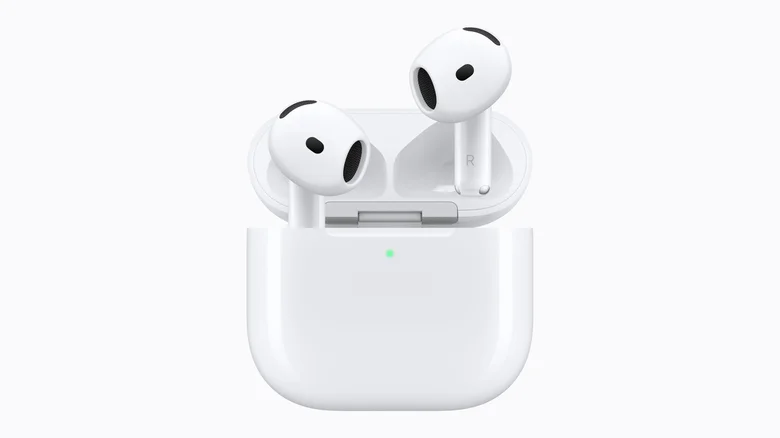
    AirPods 5 poking out of their carry case, a green light shows they are connected.

    With AirPods that have no ear tips, getting the best fit is limited to pushing them into your ears and rotating the stem toward your face until they lock in place. People with small ear canals may find it difficult to get the tight fit they need, and if that’s the case, these might not be the best AirPods option for you. However, there are third-party AirPods hooks which loop around your ear to hold the earbuds in place from manufacturers such as KeyBudz and AhaStyle. These cost between $10 and $15. Ultimately, some users may achieve a better fit by upgrading to AirPods Pro.

    How to adjust the fit with AirPods Pro

    AirPods Pro offer ear tips in three to five sizes, depending on the model: the first generation has S, M and L; the second generation has XS, S, M and L; and the third generation has XXS, XS, S, M and L. Out of the box, you’ll find the medium-sized ear tips installed by default, but you should try other sizes to find the tight fit you need. 

    Remove the current tip by pulling it firmly away from the connector until it snaps off. Align your new tip to the oval base and push until it clicks in place. Try using different sizes in each ear — it’s not unusual to need a small tip in one ear and a medium tip in the other, for example. You can check the seal to make sure you have the appropriate tips by playing bass-heavy music or using Apple’s ear tip test. 

    Apple’s ear tip test checks your fit
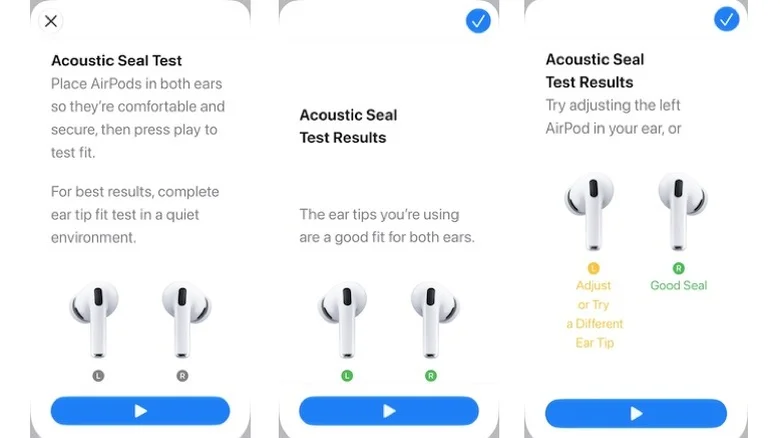
    Screen shots from Apple's Acoustic Seal Test showing typical results.

    Apple has built an Acoustic Seal Test (an earlier test called Ear Tip Fit Test is available on AirPods Pro 1 or 2) to help you find the best-fitting ear tip. To use it, put your AirPods Pro in your ears, open Settings > [Your AirPods] > Test Acoustic Seal or Ear Tip Fit Test, tap Continue, then Play. You’ll hear a little music, and the test results will tell you if you have a Good Seal or if you need to Adjust or Try a Different Size.

    You can also use foam ear tips

    Most AirPods Pro ship with ear tips made of silicone, which, if treated correctly, should last as long as the earbuds. The snag is that some people find they aren’t as comfortable or snug-fitting as foam ear tips. Apple has introduced foam-infused tips with AirPods Pro 3, but pure foam tips may still work better for some.

    Typically, soft, pliable foam ear tips are compressed before you put them in your ear. Once in place, they expand with your body heat to mold tightly — and comfortably — in your ear canal. The tight seal can help get a good fit even with smaller ears. The drawback is that foam ear tips must be replaced more frequently.

    Third-party manufacturers, including Comply and Foam Masters, sell foam ear tips for AirPods Pro for between $25 and $30 per set. When purchasing them, please note that Apple redesigned the ear tip connector used in third-generation AirPods Pro, so make sure you choose tips that are compatible with your model.

    adjust AirPods Apple Heres Small
    Follow on Google News Follow on Flipboard
    Share. Facebook Twitter Pinterest LinkedIn Tumblr Email Copy Link
    myappsplus
    • Website

    Related Posts

    Veterans Day Apple Watch Activity Challenge Launches November 11

    November 4, 2026

    Reddit is testing in-app search ads as traffic from Google declines

    November 4, 2026

    Reddit tests ads in search results as traffic declines and growth concerns mount

    November 4, 2026
    Add A Comment
    Leave A Reply Cancel Reply

    Top Posts

    Cathay Pacific tests Google AI that dramatically cuts airplane contrails — tiny altitude shifts slash environmental impact by 40% in early trials

    September 8, 2026138 Views

    Liene PixCut S1 Photo Printer and Sticker Cutter Review

    October 31, 202617 Views

    Apple is making Creator Studio an even better deal with new AI features and creative tools

    October 28, 202617 Views
    Latest Reviews

    A court ban for smart glasses and AI watermarks: eight tech stories you might have missed

    myappsplusSeptember 5, 2026

    The best Labor Day 2026 laptop deals: Apple, Lenovo, Dell, and more

    myappsplusSeptember 5, 2026

    There are hundreds of luxury mattresses on sale this Labor Day, but this is the only hotel-style hybrid I’d buy

    myappsplusSeptember 5, 2026
    Stay In Touch
    • Facebook
    • YouTube
    • TikTok
    • WhatsApp
    • Twitter
    • Instagram

    Subscribe to Updates

    Get the latest tech news from FooBar about tech, design and biz.

    Most Popular

    Taiwan tech sector should shift to ‘made with Taiwan’ model: Industry leaders

    September 5, 20260 Views

    Amazon drops the new Blink Mini 2K Plus to $21.99 with a 45% discount

    September 5, 20260 Views

    Apple September event preview — all the new products to expect at iPhone 18 Pro launch (and beyond)

    September 5, 20260 Views
    Our Picks

    Veterans Day Apple Watch Activity Challenge Launches November 11

    November 4, 2026

    Build a semantic layer for agentic AI with EDB Postgres AI and Amazon Bedrock AgentCore

    November 4, 2026

    Every big action movie streaming this November, ranked by Rotten Tomatoes score

    November 4, 2026

    Subscribe to Updates

    Subscribe to our newsletter and get the latest tech news, app updates, AI trends, smartphone reviews, and exclusive deals delivered straight to your inbox.

    Facebook X (Twitter) Instagram Pinterest
    • About Us
    • Get In Touch
    • Disclaimer
    • Privacy Policy
    • Terms & Conditions
    © 2026 MyAppsPlus. All Rights Reserved.

    Type above and press Enter to search. Press Esc to cancel.