

Affiliate links on Android Authority may earn us a commission. Learn more.
Here are the easiest ways to share your live location on Android
Chances are you already have one of these apps, even if you didn’t realize you could use it for location sharing.
By
•
•
•
Megan Ellis / Android Authority
Add Android Authority on Google:
Preferred SourceGoogle Discover
There are a variety of reasons you might want to share your live location with a contact on your Android phone. Maybe you’re meeting up in a crowded area with few visual landmarks. Maybe someone wants to track your journey home to see that you arrive safely. Or you might be on your way to visit someone, and you want them to see your progress as it happens.
Whatever the reason, there are a few ways to share your live location on Android. The feature is often buried in apps that you already use. Here’s a look at the easiest ways you can share your real-time location.
How do you share your live location with contacts on Android?
Google Maps
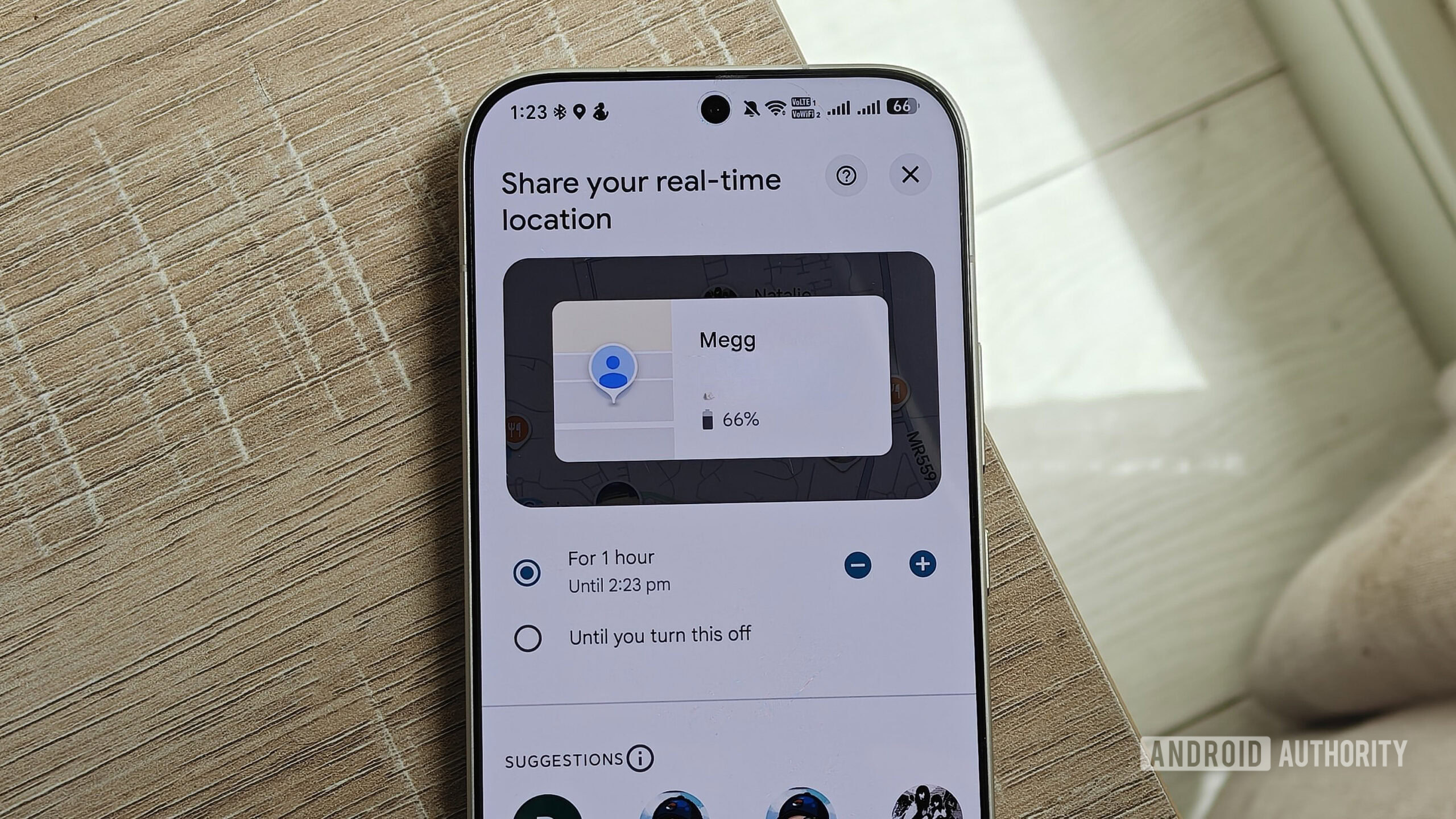
Megan Ellis / Android Authority
Most of us already have Google Maps on our phones since it’s the most used navigation app out there. But even if you use the app regularly, you may not realize you can share your live location.
To access the location-sharing features in Maps:
- Tap on your profile icon > Location sharing > New share. You will need to allow Maps to access your contacts.
- You can choose how long to share your location. The default is one hour, but you can increase this by using the plus or minus icons.
- You can also select Until you turn this off to share your location indefinitely.
- Choose the contact you want to share your location with. Then select Share.
- If you want to stop sharing your location, tap the contact and select Stop.
In your Location sharing menu, you will see that the contact can see your location. This gives you an idea of who currently has access to your location.
Google Messages
Joe Maring / Android Authority
Google Messages is another app that most Android users already have on their phones. It also has a somewhat buried location-sharing feature. Since it is a more recent addition to the app, added in March 2026, you’d be forgiven for missing it.
Google Messages is a good option for sharing your location if you use another app for navigation or just want a simplified interface. It doesn’t require you to have the other person’s Google account, which makes it a good alternative to Find Hub.
- Open a chat with your contact, then tap the plus icon > Real-time Location.
- First-time users will need to accept the privacy terms, so tap I accept to continue.
- Use the dropdown menu to select the time you’d like to share the location for and then select Send.
- To stop sharing your location, tap the preview and then Stop.
This will share your location right within the chat. When I tested the feature, I noticed that the recipient received a link instead of the live preview. This seems to depend on whether the recipient is using Google Messages with RCS, so what they see may differ. You should note that if this link is copied and shared, other people will be able to see your location.
The differing previews are a bit of a drawback, since they give you the impression that your contact can see the same interactive view that you can. However, the benefit is that when sharing is link-based, it doesn’t require the other person to use Google Messages or have RCS enabled — it works regardless of which default messaging app or protocol they use.
Find Hub
Adamya Sharma / Android Authority
While most people associate Find Hub with locating their lost devices and Bluetooth trackers, it has expanded its functionality over time. Not only does it now include a handy Remembered tab, but it also includes a tab specifically for live location sharing. It works best with contacts who have Google accounts.
- To share your location in Find Hub, switch to the People tab and select the plus icon.
- Choose the duration you’d like to share your location, select a contact, and then select Share.
- To stop sharing your location, tap the contact and then Stop sharing your location.
If the person doesn’t have Find Hub installed on their device, they will receive a notification in Maps instead. They’ll receive an email with a link to your location in Maps if they have neither app’s notifications turned on. This means that you can benefit from the organized sharing of Find Hub without requiring your contacts to also download the app.
You can also choose the option to share with a link, which is helpful if you don’t have the person’s email address. However, using this method means that anyone with this link can access your location and other personal data.
Third-party messaging services
Robert Triggs / Android Authority
Long before I actually used any of Google’s solutions for real-time location sharing, I used WhatsApp. Quite a few third-party messaging apps support the feature, including Telegram and Facebook Messenger. Meanwhile, Signal allows you to share location pins rather than your live location.
The exact method for sharing will depend on the app that you’re using. But most allow you to add your live location as a message attachment.
- Open a chat with your contact.
- Tap the paper clip icon > Location > Share live location.
- Choose how long you’d like to share your location, then tap Send.
The drawback of this method? Sharing through third-party apps requires the other user to also have that app. That isn’t a hassle when an app has a large market share in your country, but becomes more inconvenient with smaller apps.
My favorite way to share is Find Hub, which has replaced my usual method of using WhatsApp. The best app will depend on your situation and the contact details that you have saved. Google’s options are the most seamless, but a third-party app makes sense when the person you’re sharing with already lives in it.
