

Affiliate links on Android Authority may earn us a commission. Learn more.
Can’t get Pixel VIPs? Here’s how to create a similar experience on your Android phone
You can have an informative contacts hub without needing a Pixel.
By
•
•
•
Megan Ellis / Android Authority
Add Android Authority on Google:
Preferred SourceGoogle Discover
A while back, I started using Pixel VIPs and became hooked on the way the feature’s hub-like widget made it easy to keep in touch with my most important contacts. But since I use a different, non-Pixel device as my daily driver, I became curious whether I could replicate the experience on other Android phones.
While you can’t get a one-to-one replication of the Pixel-exclusive feature, I was surprised by just how close I got by using my phone’s settings, Find Hub, and Google Contacts. Here’s how you can also get a Pixel VIPs experience on your device.
Do you think that Pixel VIPs should be expanded to all Google Contacts users?
Create a Do Not Disturb exception list
Megan Ellis / Android Authority
One thing that Pixel VIPs does that is pretty easy to replicate is adding contacts to your Do Not Disturb exception list. You don’t even have to use Google Contacts to do this — you can also do it in your phone’s settings.
If you’re using Google Contacts, setting someone as a Favorite will automatically add them to your exception list. Otherwise, you can access the Do Not Disturb settings on your phone.
Android phones allow you to tweak your Do Not Disturb settings so that certain contacts can bypass it.
The exact steps will vary depending on the phone you use, but you’ll usually find your Do Not Disturb settings in your sound or notification settings. You can also hold down on the Do Not Disturb toggle in your quick settings — which is one of my favorite buried Android tricks.
In these settings, access the allow options and set the contacts you want to be able to bypass the mode. You can usually select specific contact categories for your allow list, such as favorites. However, on some phones, like Samsung Galaxy devices, you can also select individual contacts to allow.
Use Find Hub or Google Contacts for location sharing
Find Hub does more than track your Android devices. You can also use it to share your location with and keep track of your loved ones. I recently did this with my parents while they were on a road trip so that I could keep an eye on their journey.
Pixel VIPs has a location-tracking feature built into the contact page that also provides details such as the weather and time at your contact’s location. Between Find Hub and the Google Contacts app, you can get some of this functionality on your non-Pixel device.
Find Hub is a useful app for sharing your location, and it’s my preferred method. But if you have a contact’s Gmail address saved, you can also initiate location sharing from within the Google Contacts app. Once a contact has shared their location (through Find Hub or Contacts), you will see a map on the Google Contacts page for that person.
If you don’t want to share your location in real time, you can still get weather and time information in Google Contacts. Simply add their address (even just adding the suburb works), and the contact’s page updates with this information. You can add an address by clicking on the pen icon on the contact page, scrolling down, and selecting the Address option.
The UI isn’t quite as polished as Pixel VIPs, but it gives you the details you’re looking for.
Add the Google Contacts Favorites widget to your home screen
Megan Ellis / Android Authority
While Pixel VIPs is described as a Pixel feature, it’s more accurate to say it’s a Google Contacts feature available on Pixels. So when I sought to recreate the hub that VIPs makes with its widget, I explored the widgets available for Google Contacts.
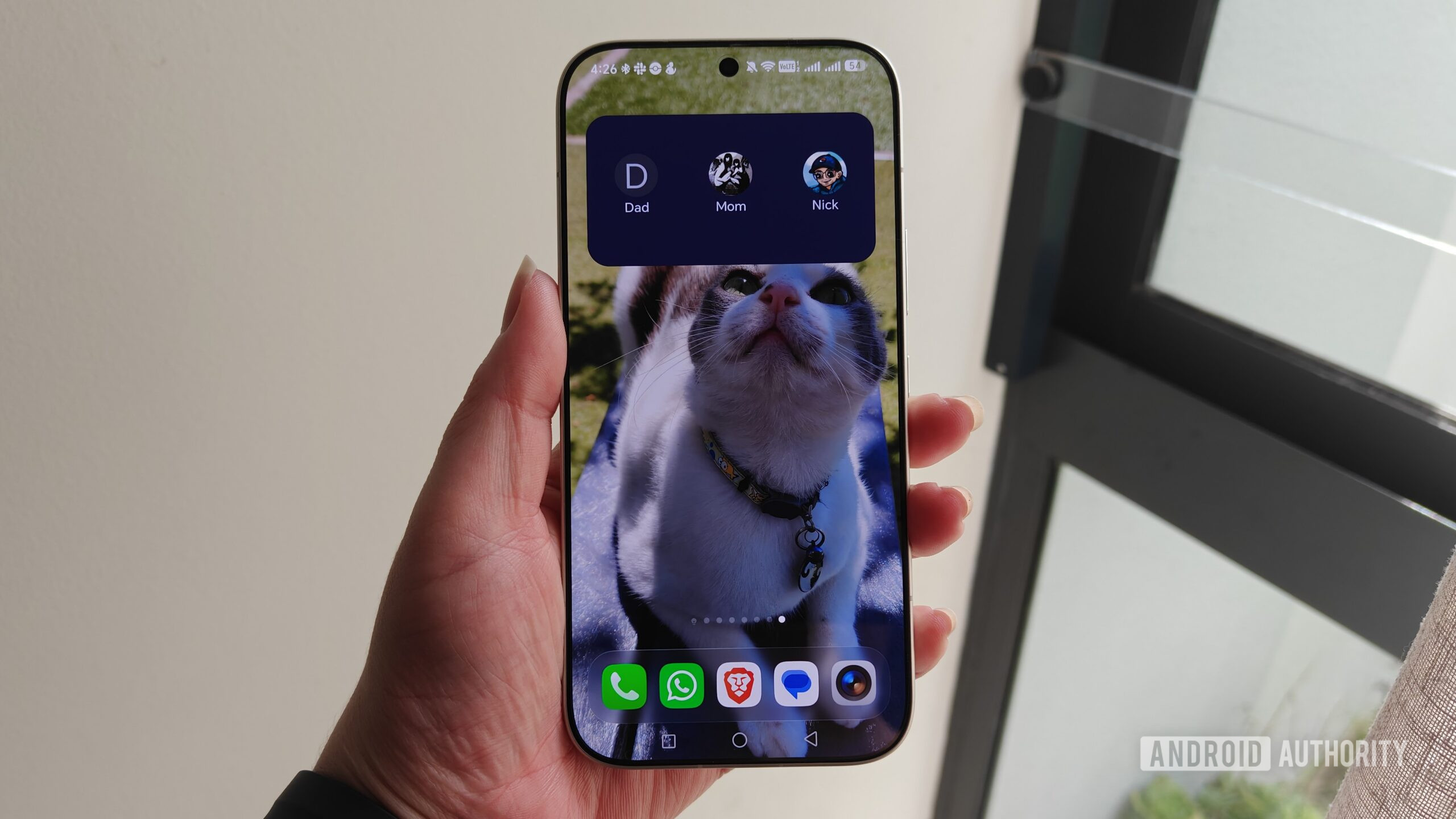
While the widgets aren’t quite as sleek as the one Pixel VIPs gives you, Google Contacts has a widget for your favorite contacts. This widget displays your contact icons and allows you to easily access contact pages with a tap.
The Favorites widget from Google Contacts gave me a hub of my most important contacts on my home screen.
You can make these contact pages more useful by adding important details, such as the person’s address and key dates to remember. Google Contacts then populates the page with these details and adds things like birthdays and anniversaries to your calendar. You will also receive a reminder in the Contacts app on the day.
The widget is what brings this all together to create the VIPs-like experience. You can easily access contact pages, which include location information, birthday reminders, and more.
The main thing missing from this hub and contacts page is the ability to link to WhatsApp, which Pixel VIPs allows. I do miss this feature since I use the messaging app for all my chats. However, if you primarily use Google Messages, this won’t be a problem for you.
I miss the ability to link to WhatsApp, since this is where the majority of my chats happen.
While my experiment couldn’t perfectly replicate Pixel VIPs, I was able to recreate the most important features. Most of the differences come down to design and an integration with WhatsApp. My aim was to build out a similar experience that keeps my most important contacts front-and-center on my device, which helps me check in with them more often.
However, at the end of the day, I think that VIPs should have a wider rollout as a Google Contacts or Android feature, rather than being limited to Pixel devices.
Features
AndroidGoogle ContactsGoogle Pixel
