Close Menu
MyAppsPlus

    Subscribe to Updates

    Get the latest creative news from FooBar about art, design and business.

    What's Hot

    Blink debuts first-time 4K, spotlight, pan-tilt cameras + expands outdoor XR series

    October 22, 2026

    Xbox is previewing paid cloud gaming for players without Game Pass

    October 22, 2026

    I finally pressed the one Roku button I always ignored, and I’m kicking myself

    October 22, 2026
    Facebook X (Twitter) Instagram
    Facebook X (Twitter) Instagram
    MyAppsPlusMyAppsPlus
    Thursday, October 22
    • Home
    • Breaking Tech
    • Apps & Software
    • AI & Automation
    • Android
    • iPhone & iOS
    • More
      • Reviews
      • How-To Guides
      • Deals & Discounts
      • Shop
    MyAppsPlus
    Home»Reviews»How to unlock Apple’s new dynamic Readiness Score on your Apple Watch
    Reviews

    How to unlock Apple’s new dynamic Readiness Score on your Apple Watch

    myappsplusBy myappsplusOctober 22, 2026004 Mins Read
    Share Facebook Twitter Pinterest Copy Link LinkedIn Tumblr Email Telegram WhatsApp
    Follow Us
    Google News Flipboard
    How to unlock Apple’s new dynamic Readiness Score on your Apple Watch
    Share
    Facebook Twitter LinkedIn Pinterest Email Copy Link

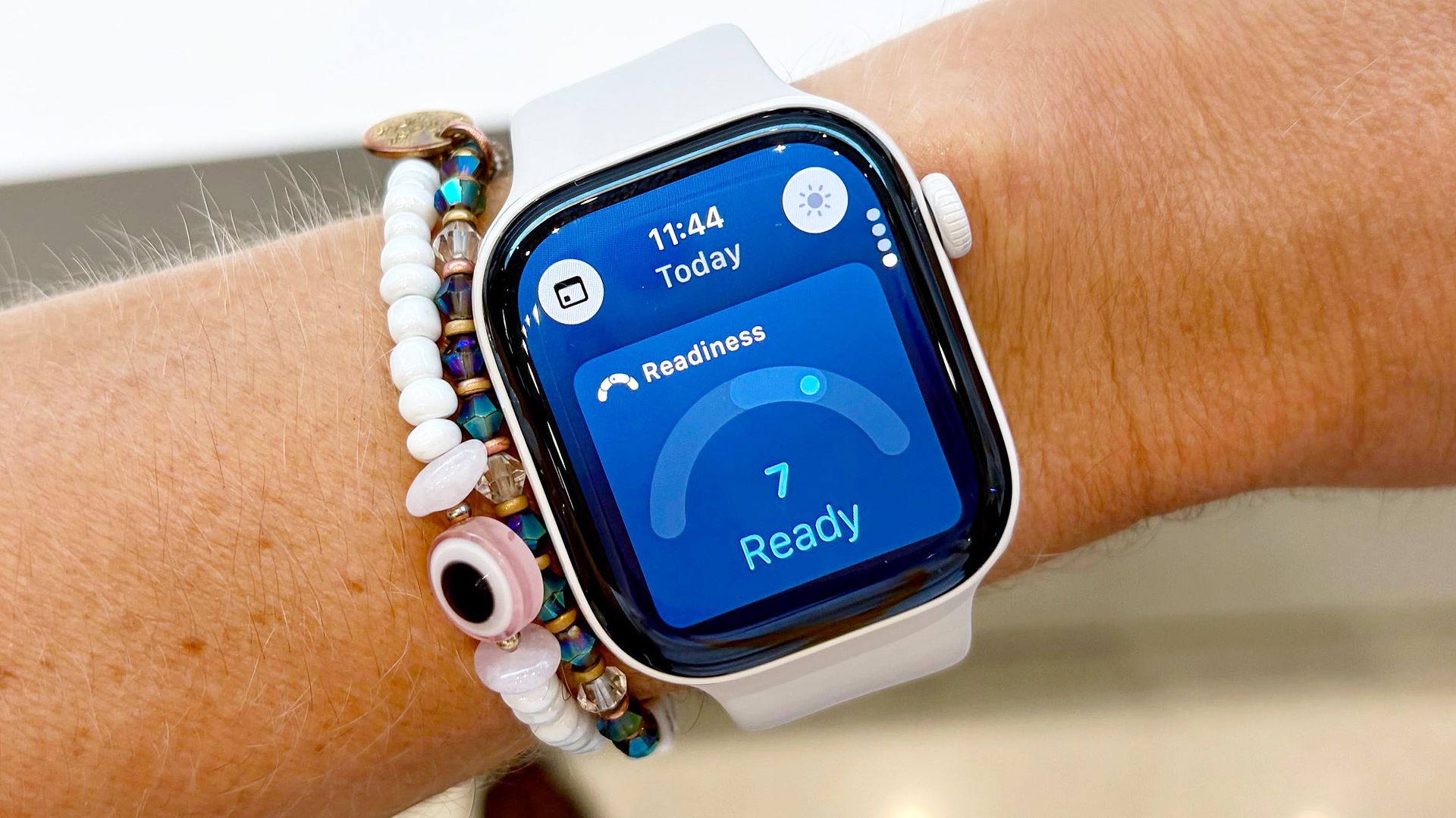
    The Apple Watch finally has a dynamic Readiness Score. Based on a scale from zero to ten, the score takes into account your recent sleep quality, physical activity, and vital trends.

    Unlocking your dynamic Readiness Score on Apple Watch is fairly straightforward, though you will need to wear the device for seven nights to see your first one.

    Apple’s Readiness Score is just one of the cool, new features found in the best Apple Watch models in 2026. Others include support for a vastly improved AI-powered Siri, real-time dynamic step count data, an impressively comprehensive at-home wellness assessment, and Live Rewind, an AI tool that transcribes live audio around you.

    Of course, I’ve already covered all of the above at length; here’s how to unlock Apple’s new dynamic Readiness Score on your Apple Watch in four easy steps.

    How to unlock the Readiness Score on your Apple Watch

    1. Make sure you have a compatible Apple Watch model
    2. Enter your height, weight, and age in the Apple Fitness app
    3. Wear your Apple Watch to bed for seven consecutive nights; ensure you get at least four hours of sleep per night
    4. After seven nights logged, open the Readiness app on your Apple Watch to see your dynamic score

    Read on to see full illustrated instructions for each step.

    1. Make sure you have a compatible Apple Watch model

    (Image: © Tom’s Guide)

    Before we dive into the Readiness Score setup process, first make sure you have a compatible Apple Watch model.Unfortunately, only those with Apple’s latest S11 chip have access to the feature for now. That list includes only the Apple Watch Series 12 and Apple Watch Ultra 4, though other models may be added down the road.

    2. Enter your height, weight, and age in the Apple Fitness app

    (Image: © Apple)

    Next, open the Fitness app on your companion <a href="https://myappsplus.com/land-iphone-duo-ready-apple-pencil-usb-c-as-low-as-61-at-amazon/” title=”Land iPhone Duo-ready Apple Pencil (USB-C) as low as $61 at Amazon”>iPhone, tap “Summary,” and then tap the icon in the top-right corner of the screen; it should either be a small photo of you or your initials. Next, scroll down and tap “Health Details,” and enter your age, weight, and height.

    You’ll also want toensure that you have daily activity, vitals, andsleep trackingturned on (they should be on by default). Double-check by opening each app on your Apple Watch; if tracking is on, you’ll see recent data. If it’s not, you’ll be prompted to turn it on.

    3. Wear your Apple Watch to bed for seven consecutive nights

    (Image: © Tom’s Guide)

    With all your health details entered, the only thing you’ll need to do to generate your first Readiness Score iswear your Apple Watch for seven consecutive nights, ensuring you get at least four hours of sleep per night. You’ll also want to wear it during the day to ensure accurate activity data.

    4. Open the Readiness app on your Apple Watch to see your dynamic score

    (Image: © Tom’s Guide)

    After seven nights, your first Readiness Score should be, well, ready! To view it, open the new Readiness app on your Apple Watch. It’s a blue circle with a pink and green scale in it (shown in the bottom left of the image above).

    Readiness Scores break down into four categories: “Recover” (0-1), “Pace Yourself” (2-4), “Ready” (5-7), and “Go for it” (8-10).

    Keep in mind, after your initial Readiness Score is generated, it will dynamically update throughout the day as you go about your business. Workouts, movement, naps, and heart rate can all have an impact on your real-time score.

    And for easy viewing, there’s even a Readiness Score widget you can add to your watch’s home screen, right alongside the new Siri AI and dynamic step count widgets.

    • I walked 5,000 steps with the Apple Watch 12 vs Garmin Forerunner 170 — here’s the winner
    • I tested the Apple Watch 12’s heart rate accuracy vs a chest strap for running, cycling, HIIT and strength workouts — here’s my verdict
    • Apple Watch Series 12 vs Apple Watch Ultra 4: Which new Apple Watch should you buy?
    Apples Dynamic Smartwatches Unlock Wellness
    Follow on Google News Follow on Flipboard
    Share. Facebook Twitter Pinterest LinkedIn Tumblr Email Copy Link
    myappsplus
    • Website

    Related Posts

    I finally pressed the one Roku button I always ignored, and I’m kicking myself

    October 22, 2026

    How to watch The Flores Massacre online: stream the true crime docuseries from anywhere

    October 22, 2026

    Time is running out to watch Olivia Colman in ‘Broadchurch’ before Netflix loses it next month

    October 22, 2026
    Add A Comment
    Leave A Reply Cancel Reply

    Top Posts

    Cathay Pacific tests Google AI that dramatically cuts airplane contrails — tiny altitude shifts slash environmental impact by 40% in early trials

    September 8, 2026137 Views

    Drone swarm tech valued by both defense and civilian sectors, industry platform says

    September 8, 202614 Views

    Best Gaming TV 2026: High refresh rates and stunning visuals

    September 8, 202614 Views
    Latest Reviews

    The 2026 list of malicious Android and iPhone apps

    myappsplusAugust 31, 2026

    Polymarket reportedly raises $300 million from Donald Trump Jr.’s investment fund

    myappsplusAugust 31, 2026

    Today I learned that F-35 pilots get $400,000 helmets with ‘X-ray vision’ – but the Pentagon almost ditched them

    myappsplusSeptember 1, 2026
    Stay In Touch
    • Facebook
    • YouTube
    • TikTok
    • WhatsApp
    • Twitter
    • Instagram

    Subscribe to Updates

    Get the latest tech news from FooBar about tech, design and biz.

    Most Popular

    The 2026 list of malicious Android and iPhone apps

    August 31, 20260 Views

    Polymarket reportedly raises $300 million from Donald Trump Jr.’s investment fund

    August 31, 20260 Views

    Google TV Streamer gets $50 price increase 

    September 1, 20260 Views
    Our Picks

    Blink debuts first-time 4K, spotlight, pan-tilt cameras + expands outdoor XR series

    October 22, 2026

    Xbox is previewing paid cloud gaming for players without Game Pass

    October 22, 2026

    I finally pressed the one Roku button I always ignored, and I’m kicking myself

    October 22, 2026

    Subscribe to Updates

    Subscribe to our newsletter and get the latest tech news, app updates, AI trends, smartphone reviews, and exclusive deals delivered straight to your inbox.

    Facebook X (Twitter) Instagram Pinterest
    • About Us
    • Get In Touch
    • Disclaimer
    • Privacy Policy
    • Terms & Conditions
    © 2026 MyAppsPlus. All Rights Reserved.

    Type above and press Enter to search. Press Esc to cancel.