Close Menu
MyAppsPlus

    Subscribe to Updates

    Get the latest creative news from FooBar about art, design and business.

    What's Hot

    Kylie Minogue songs already used to train AI as tech firms ‘strong-arm’ Australian government, music body warns

    October 19, 2026

    Here’s how iPhone Duo’s battery capacity compares to other iPhones

    October 19, 2026

    PermitAI™: Using Artificial Intelligence to Accelerate Environmental Reviews and Permitting

    October 19, 2026
    Facebook X (Twitter) Instagram
    Facebook X (Twitter) Instagram
    MyAppsPlusMyAppsPlus
    Monday, October 19
    • Home
    • Breaking Tech
    • Apps & Software
    • AI & Automation
    • Android
    • iPhone & iOS
    • More
      • Reviews
      • How-To Guides
      • Deals & Discounts
      • Shop
    MyAppsPlus
    Home»Breaking Tech»What does the orange dot on your Samsung Galaxy Watch mean?
    Breaking Tech

    What does the orange dot on your Samsung Galaxy Watch mean?

    myappsplusBy myappsplusOctober 19, 2026003 Mins Read
    Share Facebook Twitter Pinterest Copy Link LinkedIn Tumblr Email Telegram WhatsApp
    Follow Us
    Google News Flipboard
    What does the orange dot on your Samsung Galaxy Watch mean?
    Share
    Facebook Twitter LinkedIn Pinterest Email Copy Link

    We have the answer.

    Whether you’re getting into digital watches for the first time, or transitioning to Galaxy watches from another brand (such as from the Apple Watch Ultra 4 to the Galaxy Watch Ultra 2), Samsung‘s wrist-worn tech has its fair share of unique attributes. One such feature is the little orange dot that appears to the far left of your watch screen. While it might be a strange quirk if you’re not used to it, it’s pretty <a href="https://myappsplus.com/is-that-image-real-how-to-verify-meta-ai-images-in-4-simple-steps/” title=”Is that image real? How to verify Meta AI images in 4 simple steps”>simple to explain.

    Throughout the history of the Galaxy Watch, one little orange dot has been a constant. In fact, the dot is present on the latest watch models (including both the Galaxy Watch 8 and the Galaxy Watch 9, as well as the Ultra 2). This little dot is a minimalist way for the Galaxy Watch to display some important information.

    The meaning of the Samsung Galaxy Watch’s orange dot
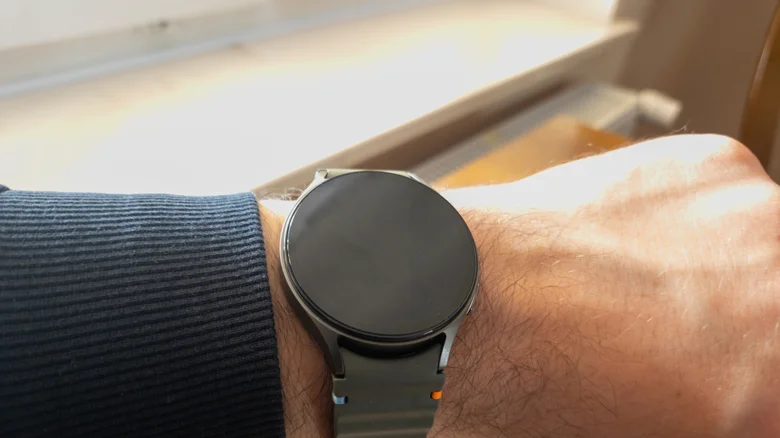
    Galaxy Watch 7 worn on a wrist.

    The orange dot on Galaxy Watches is a notification indicator — specifically for unread notifications. This dot will remain on your watch’s face until you’ve read all of those outstanding notifications, at which point it will then scurry off. If the dot on your screen is red instead of orange, that means you have an urgent message that you ought to check as soon as possible.

    An orange dot is nonetheless common and harmless, but it can be toggled off if it doesn’t suit your fancy. Simply head to Settings > Notifications > Advanced Settings and toggle off New notification indicator on watch face. You can also turn the indicator offed to go to the Wearable app and head Watch Settings > Notifications > Advanced notification settings and toggle off New notification indicator on watch face

    Other symbols on the Galaxy Watch
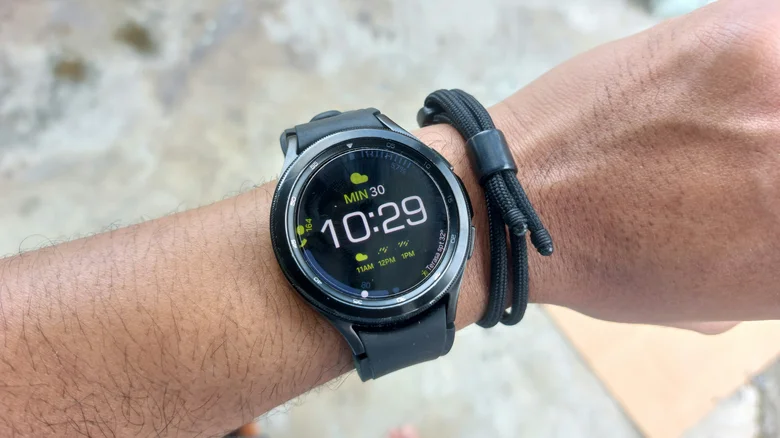
    Samsung Galaxy Watch 4 worn on a wrist.

    This dot isn’t the only symbol of its kind on Galaxy Watches; like with all the best smartwatches, saving space on such a small screen is key to making a solid wearable. While an orange or red dot can be found on the far left of your watch face, other symbols can appear at the top and bottom of the watch. At the top, you might see a phone icon with a slash through it (meaning your watch has lost its Bluetooth connection with your phone), a rectangle with a cloud in the middle (indicating that your watch is connected to your phone with mobile data or Wi-Fi instead of Bluetooth), or a padlock (which means the watch is locked and you’ll need your password or PIN to open it). 

    At the bottom, a blue music note may appear, which tells you whether any app is playing music, as well as if that music is paused — and you can tap the icon to control that audio. Alternatively, a green phone icon could show up in that same spot. This appears when the watch or a connected phone is being used for a call.

    does Orange Samsung Wearables What
    Follow on Google News Follow on Flipboard
    Share. Facebook Twitter Pinterest LinkedIn Tumblr Email Copy Link
    myappsplus
    • Website

    Related Posts

    Kylie Minogue songs already used to train AI as tech firms ‘strong-arm’ Australian government, music body warns

    October 19, 2026

    How to use Google’s SynthID AI detection website

    October 19, 2026

    Does the Heat Help?

    October 19, 2026
    Add A Comment
    Leave A Reply Cancel Reply

    Top Posts

    Cathay Pacific tests Google AI that dramatically cuts airplane contrails — tiny altitude shifts slash environmental impact by 40% in early trials

    September 8, 202670 Views

    Pricing, Benchmarks vs Claude 5.5

    October 12, 202612 Views

    What was the PSX? The souped-up PS2 rarely sold outside of Japan

    September 14, 202610 Views
    Latest Reviews

    Apple Arcade just got this retro-inspired gem

    myappsplusAugust 30, 2026

    Last chance for Anker’s hybrid Prime Power Bank wall charger down at $70

    myappsplusAugust 30, 2026

    What is the release date for Reacher season 4 episode 6 on Prime Video?

    myappsplusAugust 30, 2026
    Stay In Touch
    • Facebook
    • YouTube
    • TikTok
    • WhatsApp
    • Twitter
    • Instagram

    Subscribe to Updates

    Get the latest tech news from FooBar about tech, design and biz.

    Most Popular

    I use Google Chrome every day, and these are my 10 favorite tips and tricks

    August 30, 20260 Views

    How to check if your TV is playing in 4K or not

    August 30, 20260 Views

    Things to know before using your MacBook outside

    August 30, 20260 Views
    Our Picks

    Kylie Minogue songs already used to train AI as tech firms ‘strong-arm’ Australian government, music body warns

    October 19, 2026

    Here’s how iPhone Duo’s battery capacity compares to other iPhones

    October 19, 2026

    PermitAI™: Using Artificial Intelligence to Accelerate Environmental Reviews and Permitting

    October 19, 2026

    Subscribe to Updates

    Subscribe to our newsletter and get the latest tech news, app updates, AI trends, smartphone reviews, and exclusive deals delivered straight to your inbox.

    Facebook X (Twitter) Instagram Pinterest
    • About Us
    • Get In Touch
    • Disclaimer
    • Privacy Policy
    • Terms & Conditions
    © 2026 MyAppsPlus. All Rights Reserved.

    Type above and press Enter to search. Press Esc to cancel.