

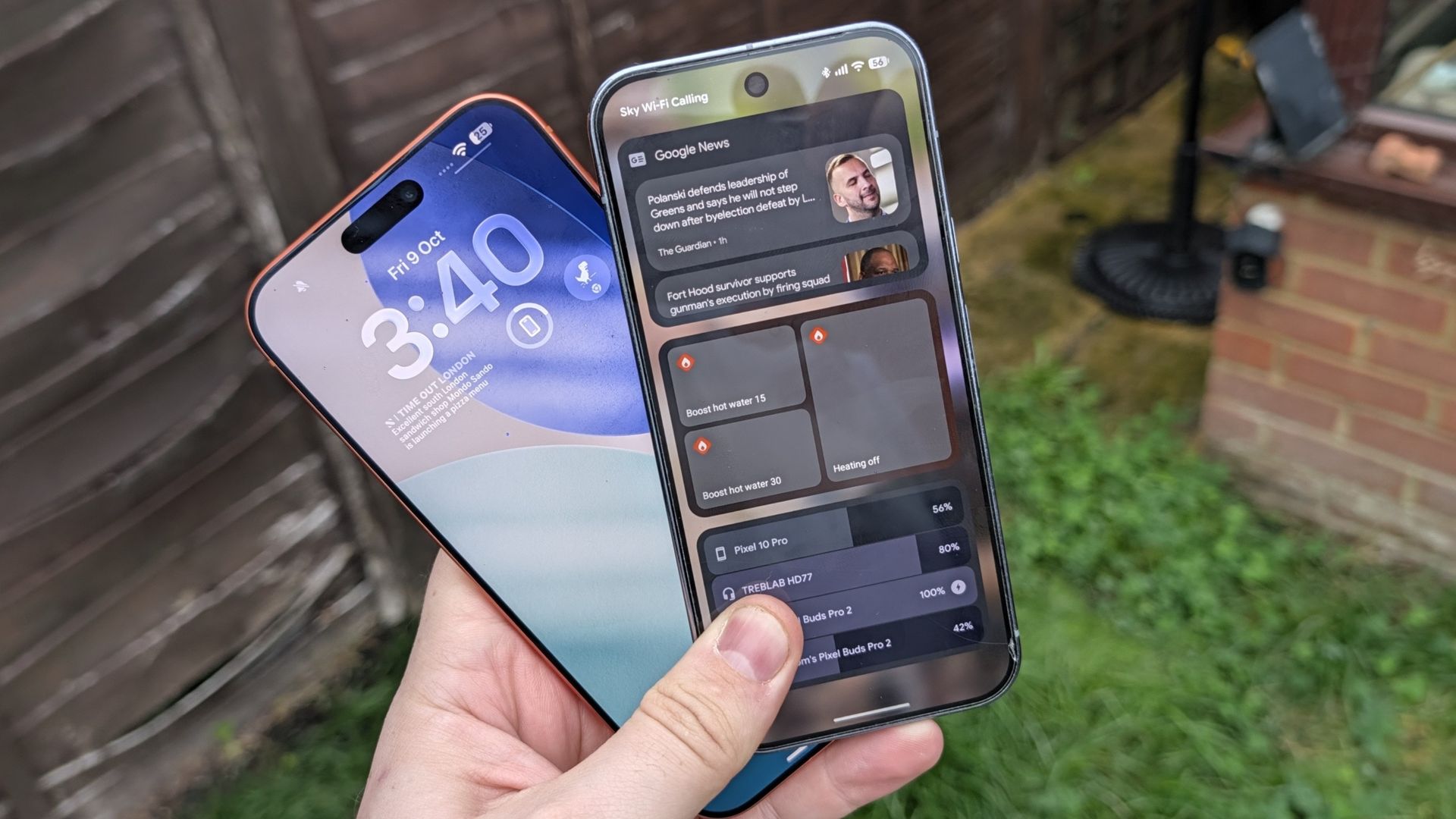
Android may have been the king of widgets for a very long time, beating Apple to the punch by several years, but the same can’t be said about offering them on the lock screen. Lock screen widgets were available until Android 5, at which point they were unceremoniously removed with no word on when they would come back.
iOS, meanwhile, added the feature back in 2022 with iOS 16, prompting many an Android user to ask when the feature would make a comeback on Google-powered phones — myself included. Google eventuallyrestored lock screen widgets on Android 16 last year, a move that I’d completely forgotten about by the time it reached myPixel 10 Pro.
I have since fixed that glaring oversight and have been getting to grips with lock screen widgets on Android, and my mind naturally started drawing comparisons to iOS.
While similar, both platforms treat lock screen widgets very differently. So which of them actually does a better job?
On Android, the easiest way to set up lockscreen widgets is to lock your phone, then swipe from the right side of the screen. You’ll see a large box informing you that lock screen widgets are available, and you need to tap the Add widgets button to continue.
From there the setup is almost identical to that of adding home screen widgets. Select the app of your choice and choose one of the widget designs on offer.
On iOS, you will need to press and hold on your lock screen, then tap the Customize option when the lock screen editor shows up.
Once that’s done press Add widgets in the bar at the bottom of your screen, and choose the app and widget style you want to add to your widget bar.
Apple’s lock screen widgets are right in your face, sitting on your locks creen where you can see them. However they are fairly limited, in that Apple only gives you a single line of the screen to work with. This means you can’t just overload your lock screen with whatever widgets you like, forcing you to be more selective about what you use.
Apple does let you make full use of that line, with equivalent space for four different tiles — or less if you select the larger widgets that take up the equivalent of two tiles. But once that line is full, you don’t get any extra space to work with.
Most of the widgets seem to be for displaying information at a glance, whether that’s time, calendar events, health metrics and other such features. There are a few other options that act as shortcuts to certain app features, including Chrome’s dinosaur minigame for some reason, but I couldn’t find anything that let me perform actions on my home screen.
It’s unclear whether it is dependent on the apps you have installed, so maybe I missed something out. What I do know is that everything I have was limited to visible information or the aforementioned shortcuts. Apple also seems to limit which third party apps are allowed to offer lock screen widgets, and it seems as though my smart home apps didn’t make the cut.
That means I don’t get to turn on my water heater without unlocking my phone first.
One more thing to note is that iOS lets you choose whether your lock screen’s widget bar sits at the top of the screen (under the clock) or at the bottom. There’s no in-between option, so make sure to pick the one that works best for you.
The funny thing about Android lock screen widgets is that it reminds of how Apple used to do widgets before iOS 14. If you think back to those days, you’ll remember that iPhones had a separate page that stored all your widgets, accessible by swiping from the left side of the home screen.
That is essentially how Android’s lock screen widgets work. You swipe from the right side of your lock screen, and all your widgets will be accessible without unlocking your phone. But rather than being a continuously scrolling feed of widgets, Android limits you to three lock screen widgets per page.
You can have multiple pages, of course, and if there’s a limit to that I haven’t managed to find it yet. So far I’ve added five pages worth of lock screen widgets, which is already more than I know what to do with.
You are limited to three widgets per page, however, and it doesn’t actually matter how big the widgets actually are. The smallest widget takes up the exact same amount of space as the largest, and you need to use up all the space before moving on.
Much like Android’s home screen widgets, there’s a surprising amount of variety when it comes to widget design. You get multiple choices for each widget, and the designs are similar to those you’d expect to see on your phone itself. To the point where it feels a lot like the usual Android widget experience, but accessible when your phone is still locked.
You can only see things at a glance, though. Some widgets let you access and control certain phone features, including smart home devices, accessing anything more sensitive prompts you to unlock the phone. If I want to access my calendar, emails or even something as simple as Shazam, I’ll need to unlock my phone first. While that does limit the usefulness of some widgets, I can understand why this is the case for a lot of things.
Except Shazam, not sure what that’s about — perhaps it’s something to do with microphone access?
Who does it best?
Both Android and iOS do lock screen widgets rather differently. Android gives you the option to have as many widgets as you like, with the added ability to perform certain actions without needing to unlock your phone.
Meanwhile iOS is a lot more limited, but seems focused on offering shortcuts to key apps, or offering important information in a way that doesn’t require you to unlock your phone to see it — potentially saving you time and battery life in the process.
With that in mind, it seems Android definitely offers more freedom and productive use of its lock screen widgets. Sadly it’s let down by the fact that it’s so easy to forget about the widgets, and end up unlocking your phone anyway. While limited in scale, iOS’s lock screen widgets are positioned front and center — making them very difficult to miss.
As feature-rich as Android lock screen widgets are, they’re a bit pointless if you keep forgetting that they’re there — and so far they haven’t been around long enough to properly integrate themselves into my day-to-day phone use. Then again, it’s not worth having in-your-face widgets if you can’t do much with them.
Honestly, it would be much better if both platforms offered a hybrid approach. More feature-rich widgets on and around the lock screen, and displayed in a way that you can’t really miss them. Keep Android’s extra pages around too, so you have plenty of space to access the widgets you need when you need them.
- Don’t rush into a new phone plan without checking their service first — these phone carriers offer free trials
- iPhone Duo — I ranked the 9 biggest reasons to buy Apple’s first foldable
- Fairphone 6+ review: Prioritizing repairability over performance
