Close Menu
MyAppsPlus

    Subscribe to Updates

    Get the latest creative news from FooBar about art, design and business.

    What's Hot

    Prime Day 2 deals – Last chance: Galaxy Tab S12 up to $650 off w/ trade, S11 $355 off, Galaxy Z Fold 8 all-time low, more

    October 7, 2026

    Google Photos has a new button to let you start editing videos with a single tap

    October 7, 2026

    Apple Watch Series 12, Ultra 4 Owners Report Skin Irritation

    October 7, 2026
    Facebook X (Twitter) Instagram
    Facebook X (Twitter) Instagram
    MyAppsPlusMyAppsPlus
    Wednesday, October 7
    • Home
    • Breaking Tech
    • Apps & Software
    • AI & Automation
    • Android
    • iPhone & iOS
    • More
      • Reviews
      • How-To Guides
      • Deals & Discounts
      • Shop
    MyAppsPlus
    Home»Android»Google starts rolling out its upgraded Pixel screen savers to the Pixel 9
    Android

    Google starts rolling out its upgraded Pixel screen savers to the Pixel 9

    myappsplusBy myappsplusOctober 7, 2026002 Mins Read
    Share Facebook Twitter Pinterest Copy Link LinkedIn Tumblr Email Telegram WhatsApp
    Follow Us
    Google News Flipboard
    Google starts rolling out its upgraded Pixel screen savers to the Pixel 9
    Share
    Facebook Twitter LinkedIn Pinterest Email Copy Link

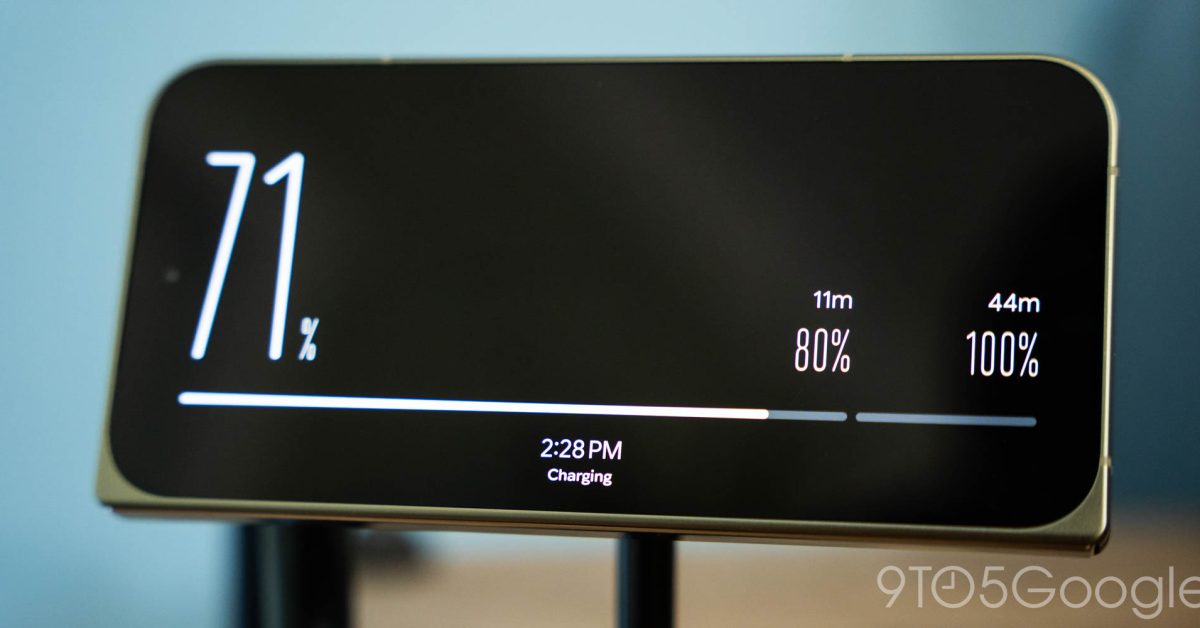
    When Google added Pixelsnap to the Pixel 10 series, it wasn’t just building in support for all kinds of magnetic accessories — it was also adding in some excellent software functionality, like upgraded screensavers for when your phone is docked and charging. After gaining some new styles and features alongside the launch of the Pixel 11, Google is finally bringing these upgraded styles to older hardware, despite the lack of magnets.

    A select group of users are starting to spot these screensavers being added to older Pixels, beginning with the Pixel 9, as reported by <a href="https://www.androidauthority.com/pixel-11-screen-saver-on-pixel-9-pro-3720016/” rel=”nofollow noopener” target=”_blank”>Android Authority. Earlier Pixels did have support for a basic screensaver tool, but with this upgrade, every option available on Google’s latest releases have finally been backported to its 2024 hardware. The update appears to include a pop-up demo of these new options, along with everything currently available as of the Pixel 11’s launch. Clock, Charge, Weather, Photos, and Home Controls are all available, and can be swiped through at will. And speaking of Charge, it too seems to be headed to the Pixel 10 series, after having been exclusive to the Pixel 11 for the past two months.

    Unfortunately, it does seem like this is one of Google’s classic slow rollouts. There aren’t a massive amount of reports from Pixel 9 users that these styles are live on their devices, implying it might take a few weeks before reaching everyone. The same goes for Charge on the Pixel 10, with plenty of Redditors confirming they have yet to see that specific style arrive.

    More on Pixel:

    • Android 17 October update rolling out with three Pixel fixes
    • Pixel VIPs 2.0 redesign starts rolling out with fullscreen look 
    • Google Pixel turns 10 years old today, and we’re still talking about it

    You’re reading 9to5Google — experts who break news about Google and its surrounding ecosystem, day after day. Be sure to check out our homepage for all the latest news, and follow 9to5Google on Twitter, Facebook, and LinkedIn to stay in the loop. Don’t know where to start? Check out our exclusive stories, reviews, how-tos, and subscribe to our YouTube channel

    Google News rolling starts upgraded
    Follow on Google News Follow on Flipboard
    Share. Facebook Twitter Pinterest LinkedIn Tumblr Email Copy Link
    myappsplus
    • Website

    Related Posts

    Prime Day 2 deals – Last chance: Galaxy Tab S12 up to $650 off w/ trade, S11 $355 off, Galaxy Z Fold 8 all-time low, more

    October 7, 2026

    Google Photos has a new button to let you start editing videos with a single tap

    October 7, 2026

    watchOS 27 adds three new apps to your Apple Watch

    October 7, 2026
    Add A Comment
    Leave A Reply Cancel Reply

    Top Posts

    Can reviews settle disputes that marked first two seasons?

    September 21, 20268 Views

    Experts call for leveraging AI, breaking key tech bottlenecks to propel advanced manufacturing

    September 19, 20266 Views

    What was the PSX? The souped-up PS2 rarely sold outside of Japan

    September 14, 20266 Views
    Latest Reviews

    Apple’s iPhone Event Tagline is Different in Every Country

    myappsplusAugust 27, 2026

    Samsung unveils Galaxy Quantum 7 with 6 years of updates, but without QRNG chip

    myappsplusAugust 27, 2026

    Developers beware: When apps add AI, it risks hacking

    myappsplusAugust 27, 2026
    Stay In Touch
    • Facebook
    • YouTube
    • TikTok
    • WhatsApp
    • Twitter
    • Instagram

    Subscribe to Updates

    Get the latest tech news from FooBar about tech, design and biz.

    Most Popular

    Samsung unveils Galaxy Quantum 7 with 6 years of updates, but without QRNG chip

    August 27, 20260 Views

    Developers beware: When apps add AI, it risks hacking

    August 27, 20260 Views

    Stream your favorite shows for life while avoiding geo-restrictions with this $40 VPN (Reg. $600)

    August 27, 20260 Views
    Our Picks

    Prime Day 2 deals – Last chance: Galaxy Tab S12 up to $650 off w/ trade, S11 $355 off, Galaxy Z Fold 8 all-time low, more

    October 7, 2026

    Google Photos has a new button to let you start editing videos with a single tap

    October 7, 2026

    Apple Watch Series 12, Ultra 4 Owners Report Skin Irritation

    October 7, 2026

    Subscribe to Updates

    Subscribe to our newsletter and get the latest tech news, app updates, AI trends, smartphone reviews, and exclusive deals delivered straight to your inbox.

    Facebook X (Twitter) Instagram Pinterest
    • About Us
    • Get In Touch
    • Disclaimer
    • Privacy Policy
    • Terms & Conditions
    © 2026 MyAppsPlus. All Rights Reserved.

    Type above and press Enter to search. Press Esc to cancel.