Close Menu
MyAppsPlus

    Subscribe to Updates

    Get the latest creative news from FooBar about art, design and business.

    What's Hot

    Rare early fall Prime Day deals hit latest Apple Magic Mouse, black model back at Amazon low (Nearly 25% off)

    October 4, 2026

    Department of Health launches mobile app to help Hawaiʻi quit tobacco

    October 4, 2026

    How to use Android’s Motion Assist feature to help with motion sickness

    October 4, 2026
    Facebook X (Twitter) Instagram
    Facebook X (Twitter) Instagram
    MyAppsPlusMyAppsPlus
    Sunday, October 4
    • Home
    • Breaking Tech
    • Apps & Software
    • AI & Automation
    • Android
    • iPhone & iOS
    • More
      • Reviews
      • How-To Guides
      • Deals & Discounts
      • Shop
    MyAppsPlus
    Home»Breaking Tech»Customizing your Samsung Galaxy phone is a bit easier with One UI 9
    Breaking Tech

    Customizing your Samsung Galaxy phone is a bit easier with One UI 9

    myappsplusBy myappsplusOctober 4, 2026003 Mins Read
    Share Facebook Twitter Pinterest Copy Link LinkedIn Tumblr Email Telegram WhatsApp
    Follow Us
    Google News Flipboard
    Customizing your Samsung Galaxy phone is a bit easier with One UI 9
    Share
    Facebook Twitter LinkedIn Pinterest Email Copy Link

    Now more than ever, your Samsung device can be tailored to your liking, all thanks to One UI 9.

    Samsung One UI 9 is, for a great many phones across the world, here — and it’s got quite the inventory of handy features. The most eye-catching among them have been One UI 9’s new toys, such as Samsung’s new My Fancam feature, which makes you the main character in your videos. However, some of the best parts of this patch are the updates to the UI and customizability, as they have granted users far more control over the look and feel of their Samsung phones.

    One UI 9 might not be totally reinventing the Samsung wheel, but the little changes more than add up. Whether that’s a few new toggles or the slate of changes to Good Lock and Quick Panel, you can take advantage of One UI 9’s myriad improvements to completely customize your device. Thanks to this latest update, you can make your Samsung device more your own than ever before.

    The new customization features in Home Up
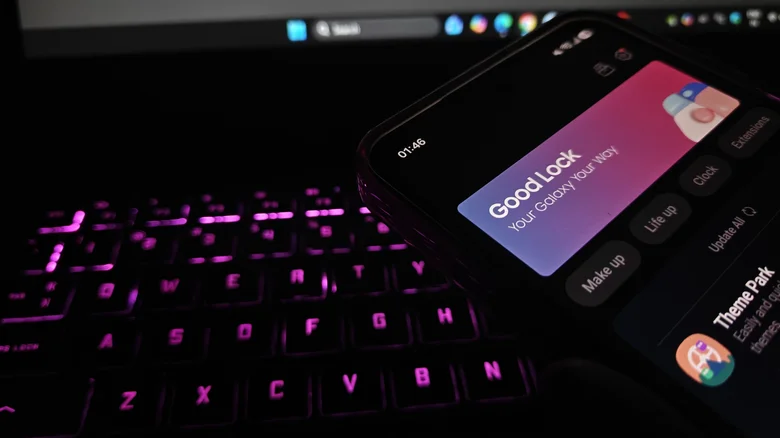
    Good Lock on a Samsung phone held near in a keyboard.

    To properly get started with all the customization available, make sure you have Samsung’s official Good Lock suite and its associated Home Up application; Samsung has added a great deal to this area of your phone, and it’s what opens up much of the new customization. One of the most notable new tools here is the Favorites Background, which can be toggled on in the Home Screen area of Home Up. Once activated, you can tap the option to access the settings for Favorites Background — which does what it promises: You can add blur and shadow effects, change the image and color, and completely remodel the look of the background to your Favorites area. You can access a similar fleet of options for the Edge Panel by tapping, fittingly, Edge Panel in Home Up.

    That’s not all that’s available in Home Up. Ever since Samsung’s One UI 9 betas began to release, users have been messing with more and more of these customization options, including new multi-finger gestures in the Gesture settings, which allow you to assign swipes or pinches with a certain number of fingers to certain actions, such as assigning a two-finger swipe down to taking a screenshot or increasing volume. You can get incredibly granular here, with a suite of motions and actions to associate with them for two-, three-, four-, and five-finger gestures.

    Customizing the Quick Panel with One UI 9
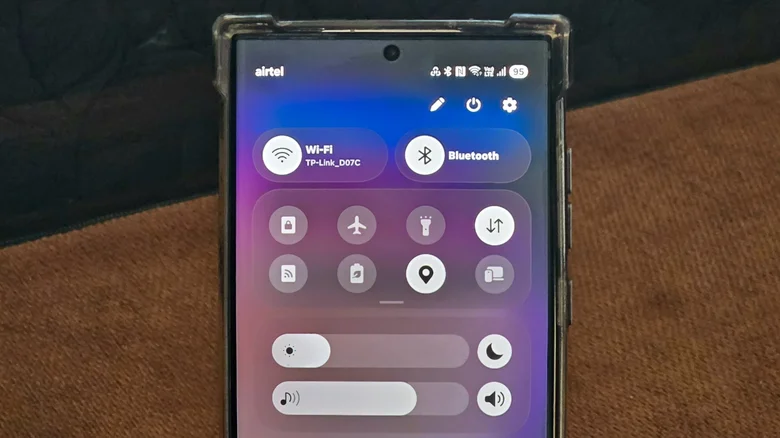
    Quick Panel on a Samsung phone.

    Customization in One UI 9 goes even further. If you have one of the Samsung phones that have received the One UI 9 update, you might want to look at the changes to the Quick Panel. Now, you can tap the Edit icon in the Quick Panel to access a lot of customization options.

    When editing your Quick Panel layout, you can drag any of the elements in the area to a different position, tap and drag their right corner to resize them, or delete them entirely. You can tap Add a control to bring deleted toggles back and place them where you like, or go to Panel Settings > Together via the Edit menu to change the different toggles from separated panels into a unified shade. Moreover, sizing caps have been removed entirely, so you can resize individual elements on the Quick Panel as much as you like.

    Customizing Galaxy Samsung Smartphones Your
    Follow on Google News Follow on Flipboard
    Share. Facebook Twitter Pinterest LinkedIn Tumblr Email Copy Link
    myappsplus
    • Website

    Related Posts

    What is infill in 3D printing and is it necessary?

    October 4, 2026

    How much does DDR5 RAM speed matter for gaming?

    October 4, 2026

    Your Samsung Gallery app finally syncs with Google Photos

    October 4, 2026
    Add A Comment
    Leave A Reply Cancel Reply

    Top Posts

    Can reviews settle disputes that marked first two seasons?

    September 21, 20268 Views

    Experts call for leveraging AI, breaking key tech bottlenecks to propel advanced manufacturing

    September 19, 20266 Views

    Here’s what happens to your old computer parts you donate to Goodwill

    September 28, 20264 Views
    Latest Reviews

    SpaceX is building a $100 billion ‘Starbase’ launch site in Louisiana

    myappsplusAugust 26, 2026

    ‘If we stuck with the silent protagonist method, we wouldn’t be able to tell this story properly’ — Metro 2039 executive producer says making The Stranger a speaking protagonist ‘goes hand in hand with telling a personal story’

    myappsplusAugust 26, 2026

    Bill Gates says we’ve passed AI’s danger thresholds. Now what?

    myappsplusAugust 26, 2026
    Stay In Touch
    • Facebook
    • YouTube
    • TikTok
    • WhatsApp
    • Twitter
    • Instagram

    Subscribe to Updates

    Get the latest tech news from FooBar about tech, design and biz.

    Most Popular

    ‘If we stuck with the silent protagonist method, we wouldn’t be able to tell this story properly’ — Metro 2039 executive producer says making The Stranger a speaking protagonist ‘goes hand in hand with telling a personal story’

    August 26, 20260 Views

    Bill Gates says we’ve passed AI’s danger thresholds. Now what?

    August 26, 20260 Views

    AI gold rush draws crypto firms away from Bitcoin

    August 26, 20260 Views
    Our Picks

    Rare early fall Prime Day deals hit latest Apple Magic Mouse, black model back at Amazon low (Nearly 25% off)

    October 4, 2026

    Department of Health launches mobile app to help Hawaiʻi quit tobacco

    October 4, 2026

    How to use Android’s Motion Assist feature to help with motion sickness

    October 4, 2026

    Subscribe to Updates

    Subscribe to our newsletter and get the latest tech news, app updates, AI trends, smartphone reviews, and exclusive deals delivered straight to your inbox.

    Facebook X (Twitter) Instagram Pinterest
    • About Us
    • Get In Touch
    • Disclaimer
    • Privacy Policy
    • Terms & Conditions
    © 2026 MyAppsPlus. All Rights Reserved.

    Type above and press Enter to search. Press Esc to cancel.