

Affiliate links on Android Authority may earn us a commission. Learn more.
I turned my old Pixel into a TV box and security camera — and only one was worth it
Getting the most out of my 8-year-old Pixel 3 XL.
By
•
•
•
Add Android Authority on Google:
Preferred SourceGoogle Discover
My Google Pixel 3 XL’s hardware has aged pretty well. To this day, it can still handle messaging, web browsing, and most of my other basic tasks — just at a noticeably lower speed.
That’s why I wanted to push it beyond what it was designed to do, making it useful in a different way. I know smartphones work best as smartphones, yet giving my eight-year-old Pixel a second wind is far better than simply watching it limp to the finish line.
I’ve attempted to turn my aging Android phone into both a surveillance camera and a replacement for an Android TV box. These two experiments turned out to be more interesting than I’d imagined. After all, what should you repurpose your old Android for?
What would you do with your old Android phone?
A security camera on demand: Easy setup, low latency, but what’s the catch?
First up is the security camera experiment. I used my Google Pixel 3 XL as the camera node and my Samsung Galaxy Z Fold 6 as the viewer. They were connected through AlfredCamera, and the setup was straightforward: I configured the Pixel as the camera, and my Z Fold 6 was automatically recognized as the viewer upon logging in.
The near-zero latency of this setup is far better than what you can get with most conventional security cameras. In both bright and low-light conditions, the camera isn’t great, but it’s enough to see what’s going on. The app also offers motion detection, power-saving mode, two-way audio, and a range of other settings you can adjust to your needs.
That all sounds great, so what’s the trade-off?
The video is compressed for bandwidth and storage reasons, with a fixed field of view much narrower than that of conventional surveillance cameras. The app is quite power-hungry, and constant charging risks overheating, battery swelling, and app freezes. Android phones aren’t designed to stay plugged in all day anyway.
That said, the simplicity of the setup sparked an idea: why not use my Pixel as a mobile surveillance camera rather than a fixed-position one, particularly when it’s a one-time setup?
You can take this setup with you virtually everywhere — it’s just a phone and sometimes a tripod — and place it in front of a small area you want to keep an eye on for a bit. It helps you watch your pets while on a picnic, your sleeping kids in the bedroom, or your belongings while you run downstairs from a cafe to grab a delivery (if you’re not afraid of losing both on a bad day). Content creators and DIYers can track the progress of a time-lapse, a rendering job, or a 3D print, or use the phone as a B-cam to monitor a filming angle.
As for the mentioned risks and issues, you can use a smart plug to control charging times and attach a clip-on wide-angle lens for a wider field of view.
Using an old phone as a dedicated security camera still feels forced, but I feel comfortable knowing I have a portable surveillance setup in my bag. My Google Pixel 3 XL may fail as a 24/7, plugged-in camera, yet it’s a good on-demand backup for temporary monitoring.
A dedicated media player: It’s good for me, but is it good for everyone?
The security camera option is a lot more viable than I expected, but what about turning my Pixel into a media player? Well, that’s a bit of a different story.
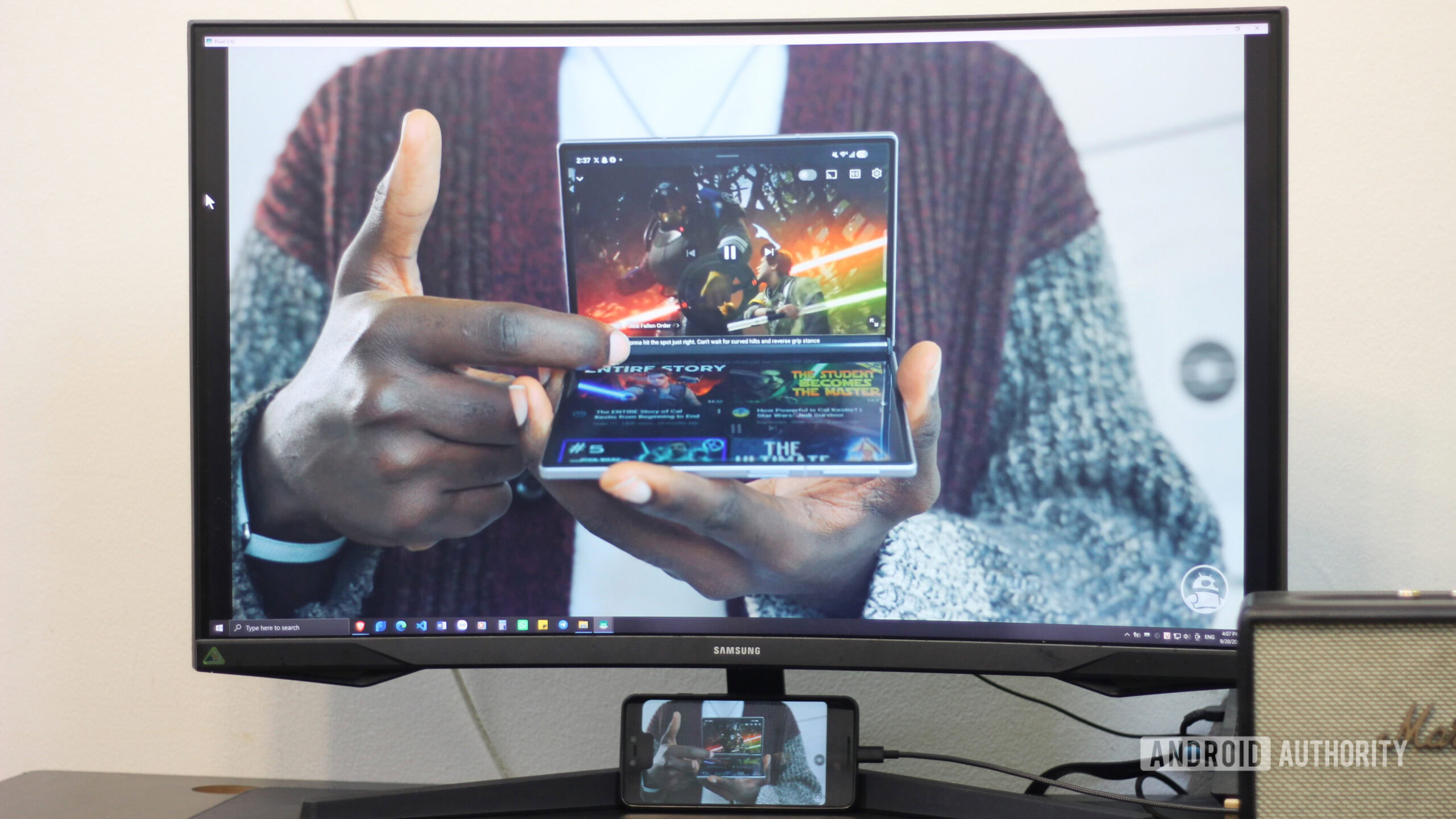
The hardware for this setup was already complicated: my Pixel (as the media player, of course), a Bluetooth mouse and keyboard, an external display (a 32-inch 2K Samsung Odyssey G5), a speaker (Marshall Acton II), and a laptop (I’ll explain why the laptop was there later if this confuses you). I chose SquareHome launcher for a mouse-friendly leanback UI with quick access to media apps like YouTube, SmartTube, and Spotify.
It turned out that mirroring the Pixel screen to an external display via a laptop was the most effortless, cost-effective method — assuming you have a laptop and a display at home. The Pixel 3 XL doesn’t support native USB-C video output, making a direct wired connection impossible, while a DisplayLink adapter felt like a luxury for the project. Greedy as I am, despite not having a smart TV or a Chromecast, I wanted deep control over the Pixel-to-monitor pipeline to get the exact visual output I had in mind.
If you find yourself in the same situation, you can try my setup: I connected my laptop (an NEC Nextreme Infinity) to a Samsung Odyssey monitorthe Odyssey using scrcpy
You may be thinking of the difference in aspect ratios (18.5:9 on my Pixel and 16:9 on my Odyssey) that could cause letterboxing. Here’s the workaround I came up with, if you’d like to take a look:
adb shell wm size 1440×2560
I used this command to change the Pixel’s display resolution to 1440×2560 and enabled the “Corner cutout” display option in Developer Options to avoid another layer of pillarboxing caused by the notch. Pushing the capture area below the notch using scrcpy –crop=1440:2560:0:180 is also possible, but it cuts off important on-screen details in landscape mode, such as the battery percentage, and you have to rerun the code every time you start scrcpy.
What sounded like a cumbersome configuration actually took me less than a minute to deploy: after the initial setup, I just needed to plug the phone in. My Pixel was locked to 16:9, and all the peripherals were connected to my laptoplowed me to cast the display and charge the phone simultaneously — saving me the cost of a hub and leaving behind the worry that it would run out of battery halfway through
For input, I initially tried remote-controlling the Pixel screen from my Z Fold 6, but high latency and awkward touch controls made it feel clunky. In most situations, physical mouse-and-keyboard input proved superior for both horizontal and vertical scrolling, as the mouse pointer replicates how a finger interacts with the screen. The most satisfying experience during this experiment was rather simple: I could use all the buttons on my mouse to go back or forward, or click on a video and scrub through it. The playback was smooth with barely any latency or thermal throttling, especially with SmartTube and Spotify.
As a tech nerd, I found this experiment interesting, but I doubt that it’s worth recommending to most people.
However, my satisfaction wasn’t complete. The cables weren’t too much of a mess, but the setup clearly involved more hardware and accessories than necessary. As a tech nerd, I found this experiment interesting, but I doubt that it’s worth recommending to most people. After all, you can pay for a proper TV Box with all the ports and functions you need, and without having to fix the letterboxing.
With all that said, will I ever use it again? Yes.
I view this as a makeshift solution rather than a fixed setup. I have all the devices for it, my gear is all connected, and I don’t bother taking my laptop on a trip. If the resort has a big screen, I’m good to go.
Which one is actually worth it?
I’ve gotten used to both setups, and both have proven worthwhile stopgap solutions for me. If I must recommend one, a mobile surveillance setup is more flexible and straightforward for most users, as long as the goal is simply knowing what’s happening.
It’s not that the media player approach fails to prove its worth. It’s just that adding an old phone to an already good setup with a laptop and a dedicated monitor feels unnecessarily cluttered. Yet a niche audience may want it: those who want an independent entertainment hub that won’t disrupt their workflow, or those who want to enjoy mobile-native apps on a larger display with sharp image quality and fairly smooth performance.
Ultimately, whether it’s my Google Pixel 3 XL or your old Android, upcycling it doesn’t mean replacing a dedicated, single-purpose device. Sometimes it’s about having a backup in your back pocket just in case.
Features
Google PixelSecurity Camera
Follow
Thank you for being part of our community. Read our Comment Policy before posting.
