
Close Menu
MyAppsPlus

    Subscribe to Updates

    Get the latest creative news from FooBar about art, design and business.

    What's Hot

    These are Amazon’s 16 best-selling tablets — and which ones are worth buying

    September 23, 2026

    Improve your Apple CarPlay experience by doing these simple things

    September 23, 2026

    Motorola Signature 27 is a proper flagship with Snapdragon 8 Elite Extreme Gen 6

    September 23, 2026
    Facebook X (Twitter) Instagram
    Facebook X (Twitter) Instagram
    MyAppsPlusMyAppsPlus
    Wednesday, September 23
    • Home
    • Breaking Tech
    • Apps & Software
    • AI & Automation
    • Android
    • iPhone & iOS
    • More
      • Reviews
      • How-To Guides
      • Deals & Discounts
      • Shop
    MyAppsPlus
    Home»Breaking Tech»iOS 27: How to hide or replace the audio button in iMessages
    Breaking Tech

    iOS 27: How to hide or replace the audio button in iMessages

    myappsplusBy myappsplusSeptember 22, 2026003 Mins Read
    Share Facebook Twitter Pinterest Copy Link LinkedIn Tumblr Email Telegram WhatsApp
    Follow Us
    Google News Flipboard
    iOS 27: How to hide or replace the audio button in iMessages
    Share
    Facebook Twitter LinkedIn Pinterest Email Copy Link

    You can make that button actually useful.

    Have you accidentally tapped the audio button inside iMessage’s text input bar when sending a message? Justin Bieber went viral with an Insta post complaining about how frequently it happened to him.

    The problem is that tapping the button launches a voice recording session, during which your iPhone will stop playing music so it can record the message it thinks you want to send. 

    Bieber became frustrated enough at how often this accidentally happened to him while texting that he wrote, “The send button should not have multiple functions in the same spot,” and joked that he would put everyone at Apple in a “choke hold” until it got fixed. 

    His post generated thousands of likes, reposts and reactions. We don’t know if Apple was responding to Bieber or not, but it has made a change to ease the problem. iOS 27 now gives you a choice, permitting you to choose between continuing to display the default waveform-like record icon, a microphone icon for quick access to dictation, or even nothing at all.

    iMessages text entry mastery
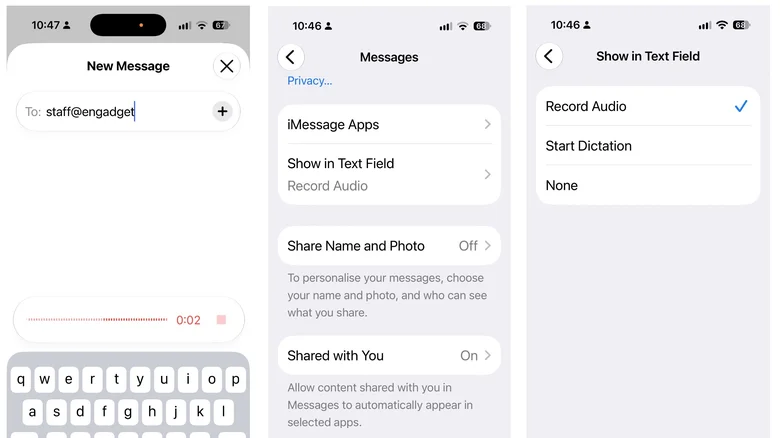
    Three screen shots show the problem and solution in Messages Settings.

    Screenshots by Jonny Evans (Apple)

    Starting with iOS 27, new choices are available in Settings > Apps> Messages > Show in Text Field. You can select one of three options:

    • Record Audio: You may want to retain this if you regularly send voice messages.
    • Start Dictation: Useful if you dictate texts rather than typing them.
    • None: The “Bieber” option for those who don’t dictate or record audio frequently enough to need these controls.

    When you return to iMessages, you should see your choice appear in the text entry field. If it doesn’t, then force quit the app, open it again, and the change should appear.

    Now even Bieber should no longer have this problem.

    How do you access these functions in future?

    A woman in white holds an iPhone at an Apple Store in London.

    You don’t lose any functionality when you remove these buttons from iMessage; all the options remain

    You just need to know where to look:

    • To record voice messages, just tap the + (plus) button to the left of the text entry box and tap Audio from the list that appears.
    • To dictate a message, tap the microphone icon you see just under the keyboard on the lower right. (This should be on by default, but if you can’t see it, you can re-enable it in Settings > General > Keyboard > Enable Dictation.)

    Apple made several improvements in iMessage with iOS 27. One nice enhancement (possibly introduced in preparation for the larger display available on the iPhone Duo) is a new Drawing app that lets you send sketches and handwritten notes, and it provides markup tools within iMessage. 

    Apple also introduced a new AI tool that suggests useful words and phrases and can automate tasks within a conversation, such as adding items to Reminders or Notes. It is also now possible to use one number across two separate iPhones. Finally, Apple’s messaging app now offers improved RCS support, including the ability to edit and unsend messages.

    Apple apps Big Tech Mobile News Smartphones
    Follow on Google News Follow on Flipboard
    Share. Facebook Twitter Pinterest LinkedIn Tumblr Email Copy Link
    myappsplus
    • Website

    Related Posts

    Improve your Apple CarPlay experience by doing these simple things

    September 23, 2026

    Motorola Signature 27 is a proper flagship with Snapdragon 8 Elite Extreme Gen 6

    September 23, 2026

    Public beta debuts for iPadOS 27.2 and more, here’s what’s new

    September 23, 2026
    Add A Comment
    Leave A Reply Cancel Reply

    Top Posts

    This tiny AI box could save me from upgrading my perfectly good laptop

    September 6, 20263 Views

    New Target ad delivers look at upcoming deals in one of Nintendo’s ‘largest promotions ever’

    September 13, 20262 Views

    Top 10 Best React Native App Development Companies in 2026

    September 12, 20262 Views
    Latest Reviews

    I tested this game-changing, sub-$100 Godox flash kit — and it’s the best portrait photography upgrade I’ve tried all year

    myappsplusAugust 21, 2026

    OK, can we actually cool data centers with our pee?

    myappsplusAugust 21, 2026

    TCL QM8L vs QM7L: Which SQD Mini-LED TV tested better in our lab?

    myappsplusAugust 21, 2026
    Stay In Touch
    • Facebook
    • YouTube
    • TikTok
    • WhatsApp
    • Twitter
    • Instagram

    Subscribe to Updates

    Get the latest tech news from FooBar about tech, design and biz.

    Most Popular

    I tested this game-changing, sub-$100 Godox flash kit — and it’s the best portrait photography upgrade I’ve tried all year

    August 21, 20260 Views

    OK, can we actually cool data centers with our pee?

    August 21, 20260 Views

    TCL QM8L vs QM7L: Which SQD Mini-LED TV tested better in our lab?

    August 21, 20260 Views
    Our Picks

    These are Amazon’s 16 best-selling tablets — and which ones are worth buying

    September 23, 2026

    Improve your Apple CarPlay experience by doing these simple things

    September 23, 2026

    Motorola Signature 27 is a proper flagship with Snapdragon 8 Elite Extreme Gen 6

    September 23, 2026

    Subscribe to Updates

    Subscribe to our newsletter and get the latest tech news, app updates, AI trends, smartphone reviews, and exclusive deals delivered straight to your inbox.

    Facebook X (Twitter) Instagram Pinterest
    • About Us
    • Get In Touch
    • Disclaimer
    • Privacy Policy
    • Terms & Conditions
    © 2026 MyAppsPlus. All Rights Reserved.

    Type above and press Enter to search. Press Esc to cancel.