
Close Menu
MyAppsPlus

    Subscribe to Updates

    Get the latest creative news from FooBar about art, design and business.

    What's Hot

    Bungie leaders now say the studio’s ‘not done with Destiny’

    September 21, 2026

    A new lithium-ion battery breakthrough could lead to cells that deliver more power for longer — they might be useful for everything from EVs to gaming laptops to robots to drones

    September 21, 2026

    Bought an iPhone 2 years ago? Don’t forget to claim your piece of Apple’s settlement

    September 21, 2026
    Facebook X (Twitter) Instagram
    Facebook X (Twitter) Instagram
    MyAppsPlusMyAppsPlus
    Monday, September 21
    • Home
    • Breaking Tech
    • Apps & Software
    • AI & Automation
    • Android
    • iPhone & iOS
    • More
      • Reviews
      • How-To Guides
      • Deals & Discounts
      • Shop
    MyAppsPlus
    Home»iPhone & iOS»Apple Notes adds a power user feature in iOS 27 that’s rare in other apps
    iPhone & iOS

    Apple Notes adds a power user feature in iOS 27 that’s rare in other apps

    myappsplusBy myappsplusSeptember 21, 2026002 Mins Read
    Share Facebook Twitter Pinterest Copy Link LinkedIn Tumblr Email Telegram WhatsApp
    Follow Us
    Google News Flipboard
    Apple Notes adds a power user feature in iOS 27 that’s rare in other apps
    Share
    Facebook Twitter LinkedIn Pinterest Email Copy Link

    Apple Notes in iOS 27 adds a variety of new features, including one that power users are sure to appreciate: section links.

    Apple Notes lets you link to specific sections of your note in iOS 27


    There’s no shortage of third-party notes apps on the App Store. You can find everything from barebones note-takers to powerhouse productivity suites.

    Apple Notes has long excelled at offering a minimalist, user-friendly interface while also providing tools that power users love.

    And in iOS 27, Notes has an exciting new addition in the latter category: section links.

    Whenever you select some text inside a note in iOS 27 and open the edit menu, tapping ‘Add Link’ will reveal a new option: Link to Section.

    Inside this menu, you’ll find a full list of all the headings and subheadings in your note. Tap one, and Notes will create a link to that specific section. You can choose to use the section title as the link’s text, or your own custom text.
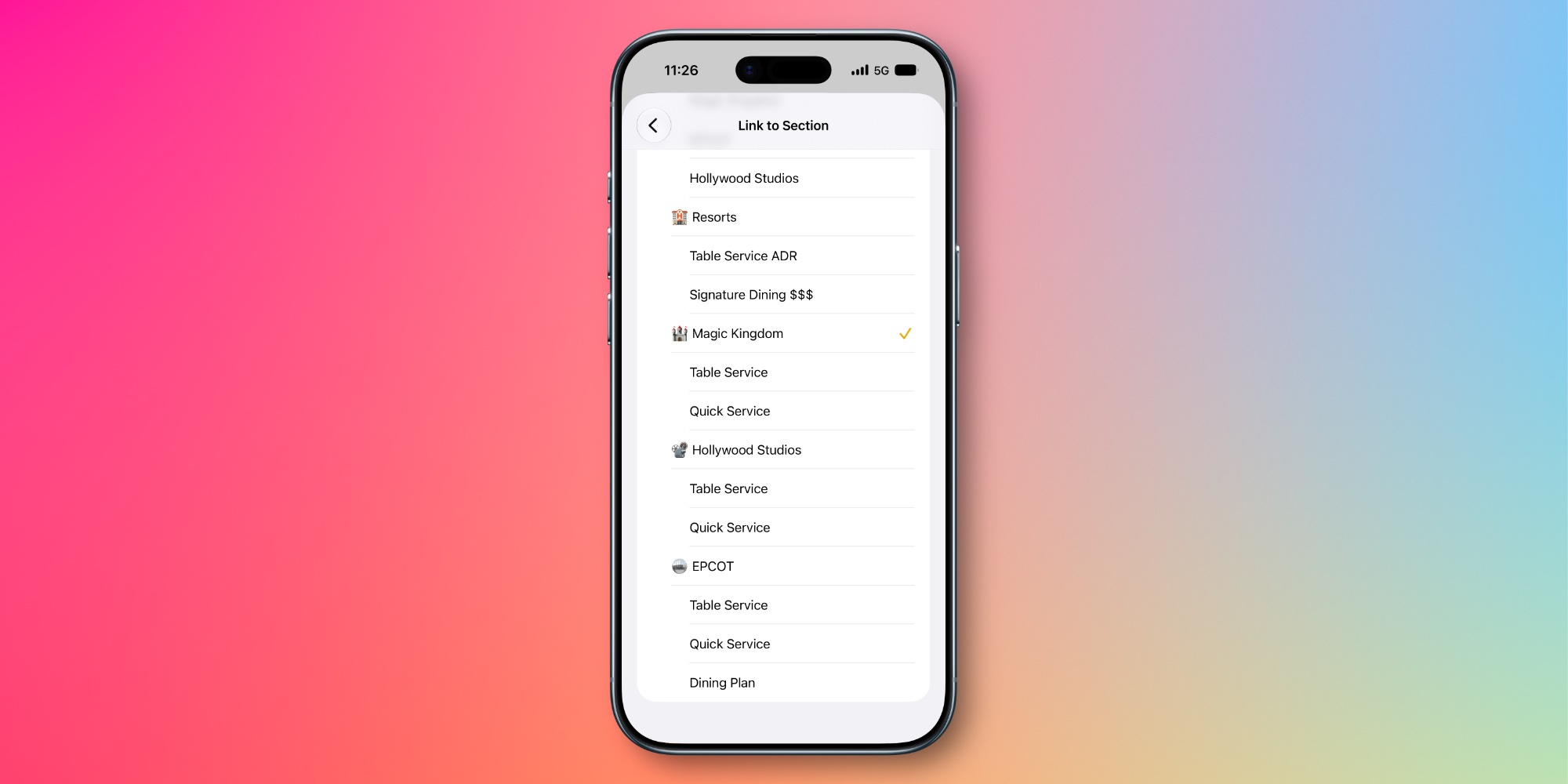

    Section links are great for navigating long notes, as they make it quick and easy to jump to a specific area.

    With section links you can create a full-blown table of contents at the top of your note, or just use them sparingly for sections you revisit a lot.

    Most iPhone owners probably won’t ever use the feature. But for power users who value more flexibility in their notes app, section links in Apple Notes are a welcome new addition.

    How will you use Apple Notes’ section links in iOS 27? Let us know in the comments.

    Best iPhone accessories

    You’re reading 9to5Mac — experts who break news about Apple and its surrounding ecosystem, day after day. Be sure to check out our homepage for all the latest news, and follow 9to5Mac on Twitter, Facebook, and LinkedIn to stay in the loop. Don’t know where to start? Check out our exclusive stories, reviews, how-tos, and subscribe to our YouTube channel

    adds Apple News Notes Power
    Follow on Google News Follow on Flipboard
    Share. Facebook Twitter Pinterest LinkedIn Tumblr Email Copy Link
    myappsplus
    • Website

    Related Posts

    Bought an iPhone 2 years ago? Don’t forget to claim your piece of Apple’s settlement

    September 21, 2026

    Bitrig adds iPhone Duo support with interactive 3D simulator

    September 21, 2026

    Apple didn’t give up on stylus support for iPhone Duo; Samsung’s Galaxy Z Fold should take notes

    September 21, 2026
    Add A Comment
    Leave A Reply Cancel Reply

    Top Posts

    This tiny AI box could save me from upgrading my perfectly good laptop

    September 6, 20263 Views

    New Target ad delivers look at upcoming deals in one of Nintendo’s ‘largest promotions ever’

    September 13, 20262 Views

    Top 10 Best React Native App Development Companies in 2026

    September 12, 20262 Views
    Latest Reviews

    Google posts Pixel Watch 5 factory images with one unified build

    myappsplusAugust 21, 2026

    Pixel 11 Gboard Writing tools offer ‘Personalized suggestions’ with Gemini Intelligence

    myappsplusAugust 21, 2026

    Learn what VCs actually want, from a founder who’s raised $1B

    myappsplusAugust 21, 2026
    Stay In Touch
    • Facebook
    • YouTube
    • TikTok
    • WhatsApp
    • Twitter
    • Instagram

    Subscribe to Updates

    Get the latest tech news from FooBar about tech, design and biz.

    Most Popular

    Google posts Pixel Watch 5 factory images with one unified build

    August 21, 20260 Views

    Pixel 11 Gboard Writing tools offer ‘Personalized suggestions’ with Gemini Intelligence

    August 21, 20260 Views

    Learn what VCs actually want, from a founder who’s raised $1B

    August 21, 20260 Views
    Our Picks

    Bungie leaders now say the studio’s ‘not done with Destiny’

    September 21, 2026

    A new lithium-ion battery breakthrough could lead to cells that deliver more power for longer — they might be useful for everything from EVs to gaming laptops to robots to drones

    September 21, 2026

    Bought an iPhone 2 years ago? Don’t forget to claim your piece of Apple’s settlement

    September 21, 2026

    Subscribe to Updates

    Subscribe to our newsletter and get the latest tech news, app updates, AI trends, smartphone reviews, and exclusive deals delivered straight to your inbox.

    Facebook X (Twitter) Instagram Pinterest
    • About Us
    • Get In Touch
    • Disclaimer
    • Privacy Policy
    • Terms & Conditions
    © 2026 MyAppsPlus. All Rights Reserved.

    Type above and press Enter to search. Press Esc to cancel.