Close Menu
MyAppsPlus

    Subscribe to Updates

    Get the latest creative news from FooBar about art, design and business.

    What's Hot

    4 emerging issues around AI ownership

    September 21, 2026

    OpenAI forms math advisory group as its AI resolves more than 100 open problems

    September 21, 2026

    Affordably upgrade your car with ROVE’s R3 3-channel dash cam and $132 savings for $168, more from $100

    September 21, 2026
    Facebook X (Twitter) Instagram
    Facebook X (Twitter) Instagram
    MyAppsPlusMyAppsPlus
    Monday, September 21
    • Home
    • Breaking Tech
    • Apps & Software
    • AI & Automation
    • Android
    • iPhone & iOS
    • More
      • Reviews
      • How-To Guides
      • Deals & Discounts
      • Shop
    MyAppsPlus
    Home»Android»Xiaomi 18 Pro has a Privacy Display that does more than Galaxy S26 Ultra, launches this week [Video]
    Android

    Xiaomi 18 Pro has a Privacy Display that does more than Galaxy S26 Ultra, launches this week [Video]

    myappsplusBy myappsplusSeptember 21, 2026002 Mins Read
    Share Facebook Twitter Pinterest Copy Link LinkedIn Tumblr Email Telegram WhatsApp
    Follow Us
    Google News Flipboard
    Xiaomi 18 Pro has a Privacy Display that does more than Galaxy S26 Ultra, launches this week [Video]
    Share
    Facebook Twitter LinkedIn Pinterest Email Copy Link

    Xiaomi has confirmed support for the Galaxy S26 Ultra’s Privacy Display on the upcoming Xiaomi 18 Pro, and it apparently does a lot more than Samsung’s implementation of the feature.

    The Privacy Display on Galaxy S26 Ultra is a hardware feature that can help hide the contents of your display from onlookers by physically altering how the light of the display shines outward. It’s a very clever feature which, despite some trade-offs, has been very well-received.

    Now, it’s coming to a Xiaomi flagship.

    In a teaser posted to Weibo, Xiaomi confirms that the Xiaomi 18 Pro will ship with a “smart privacy screen” that looks virtually identical to the Galaxy S26 Ultra’s Privacy Display. When activated, content is obfuscated at an angle, only allowing you as the person looking at the display straight-on to clearly see everything.

    Similar to Samsung, Xiaomi looks to be allowing this to work in specific apps or on only certain parts of the display, like a notification, instead of being an all-or-nothing option.

    Notably, though, Xiaomi also shows the feature working on a floating app window, in split screen, and even on specific notifications on the lockscreen. While Samsung is working on improvements, Xiaomi seems to be delivering quite a bit more versatility right out of the gate.
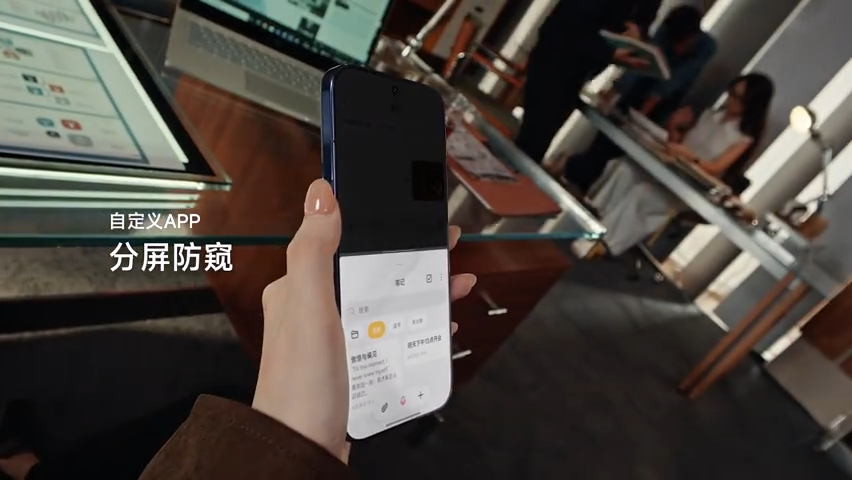


    You can see everything in action in the video below:


    Xiaomi 18 Pro is officiallyset to debut on September 23 – just two days from now – with some key details already confirmed including battery sizes up to 8,500 mAh, another rear-facing display, and more

    More on Xiaomi:

    • Xiaomi Pad 9 Pro Max has a 13.3-inch display, Android 17, and a 12,000 mAh battery
    • Xiaomi 18 Fold goes on sale with full specs and a Galaxy Z Fold 8 comparison [Gallery]
    • Xiaomi wants to release new versions of its Google Tensor-like chip every year, globally

    Follow Ben: Twitter/X, Threads, Bluesky, and Instagram

    You’re reading 9to5Google — experts who break news about Google and its surrounding ecosystem, day after day. Be sure to check out our homepage for all the latest news, and follow 9to5Google on Twitter, Facebook, and LinkedIn to stay in the loop. Don’t know where to start? Check out our exclusive stories, reviews, how-tos, and subscribe to our YouTube channel

    Display News Privacy That Xiaomi
    Follow on Google News Follow on Flipboard
    Share. Facebook Twitter Pinterest LinkedIn Tumblr Email Copy Link
    myappsplus
    • Website

    Related Posts

    Apple Notes adds a power user feature in iOS 27 that’s rare in other apps

    September 21, 2026

    OnePlus 16’s glowing rear lights look even cooler in action

    September 21, 2026

    iOS 27 adds an all-new app to your iPhone’s Home Screen

    September 21, 2026
    Add A Comment
    Leave A Reply Cancel Reply

    Top Posts

    This tiny AI box could save me from upgrading my perfectly good laptop

    September 6, 20263 Views

    New Target ad delivers look at upcoming deals in one of Nintendo’s ‘largest promotions ever’

    September 13, 20262 Views

    Top 10 Best React Native App Development Companies in 2026

    September 12, 20262 Views
    Latest Reviews

    Google posts Pixel Watch 5 factory images with one unified build

    myappsplusAugust 21, 2026

    Pixel 11 Gboard Writing tools offer ‘Personalized suggestions’ with Gemini Intelligence

    myappsplusAugust 21, 2026

    Learn what VCs actually want, from a founder who’s raised $1B

    myappsplusAugust 21, 2026
    Stay In Touch
    • Facebook
    • YouTube
    • TikTok
    • WhatsApp
    • Twitter
    • Instagram

    Subscribe to Updates

    Get the latest tech news from FooBar about tech, design and biz.

    Most Popular

    Google posts Pixel Watch 5 factory images with one unified build

    August 21, 20260 Views

    Pixel 11 Gboard Writing tools offer ‘Personalized suggestions’ with Gemini Intelligence

    August 21, 20260 Views

    Learn what VCs actually want, from a founder who’s raised $1B

    August 21, 20260 Views
    Our Picks

    4 emerging issues around AI ownership

    September 21, 2026

    OpenAI forms math advisory group as its AI resolves more than 100 open problems

    September 21, 2026

    Affordably upgrade your car with ROVE’s R3 3-channel dash cam and $132 savings for $168, more from $100

    September 21, 2026

    Subscribe to Updates

    Subscribe to our newsletter and get the latest tech news, app updates, AI trends, smartphone reviews, and exclusive deals delivered straight to your inbox.

    Facebook X (Twitter) Instagram Pinterest
    • About Us
    • Get In Touch
    • Disclaimer
    • Privacy Policy
    • Terms & Conditions
    © 2026 MyAppsPlus. All Rights Reserved.

    Type above and press Enter to search. Press Esc to cancel.