

Most of us open the Play Store, search for a few big names, and call it a day. We install what’s popular and what’s trending on the internet, be it photo editors, music players, or maybe a shopping app. However, most of the popular apps are either paid or have the most useful features locked behind a paywall. The good thing about Android as an OS is that you do not have to rely on paid apps or subscription-based apps for your needs. Some of the most useful apps never show up on the first page of the Google Play Store. In fact, some of the best apps aren’t even on the Play Store.
They are made by small teams, or even one person, but the idea is to provide paid app features for free, and a few have no ads at all. Some of the best unheard-of apps do not always come with a big marketing budget. They focus on providing features and utility, and making sure you don’t have to pay a dime to use them.
To make this easy for you, we’ve picked nine free apps that give you access to features that you get with paid apps. Some apps are available to download directly from the Play Store, while for others, you have to explore GitHub. The best part, you don’t have to be an expert to start using them.
Dextop
Imagine you are on a train or waiting at the airport with only your phone, but you need to check a spreadsheet while a chat stays open and your notes sit in another app. Getting such a desktop-level task on a small screen seems like a lot. This also means a lot of tapping back and forth. Dextop fixes that by giving your phone a desktop of its own. You get the option to pick a screen size, the Start menu, and apps that open in windows you can move around, just like on a laptop.
You don’t need a computer or a monitor to use DexTop, as you would need for similar apps like <a href="https://myappsplus.com/this-iphone-duo-rival-will-give-the-samsung-galaxy-z-fold-9-a-run-for-its-money/” title=”This iPhone Duo rival will give the Samsung Galaxy Z Fold 9 a run for its money”>Samsung DeX. You have to set up Wireless debugging, a setting that you will find inside Developer Options. Once your layout feels right, you can save it as a workspace and bring it back later. This works well on a foldable like the Galaxy Z Fold8, as the inner screen becomes the desktop and the other half can house a keyboard and mouse.
You can control it by touch, with a virtual touchpad, or connect a mouse and keyboard. A three-finger swipe from the edge opens a control panel, letting you change volume, brightness, or input mode without closing anything.
NectarLink
You are working on your laptop when your phone buzzes. You pick it up to read one message, and 10 minutes later you are still on it, doomscrolling. That habit eats a lot of time. NectarLink helps you skip the detour by connecting your Android phone to a Windows PC. This brings your texts, call alerts, and notifications straight to your computer screen. You can read them and reply from your keyboard, without touching the phone.
Linking a phone and a PC can sound complicated if you go the usual way of connecting an Android device to a PC. With NectarLink, you can pair with a QR code, a six-digit code, or a USB cable. After that, the PC shows your phone’s notifications, shows a call banner with the caller’s name, and more. You can even drag files across devices at Wi-Fi speed. Phone apps can be opened in their own windows, or you can use your phone’s camera as a webcam. The best thing is that it doesn’t ask you to log in to any account.
While the app is new, I did not come across any bugs during my time with it. You can get the NectarLink APK file from GitHub, as it is not available on the Google Play Store. A word of caution: Google Play Protect may block it in some countries. So, you have to manually pause Play Protect to install the app on your phone. On the PC side, you need Windows 11.
LocalSend
Cross-device file sharing has always been a mess. Though there are options, they often don’t work, or most people don’t know about them. LocalSend is built for exactly that mess. Install it on each device, open it, and the others show up in a list. Pick the files, tap a device name, and send your files without any fuss. You don’t have to worry about which OS your device and the receiving device run on.
LocalSend is an offline file-sharing app that works over your local Wi-Fi or LAN. So no internet is needed, and files are protected with TLS encryption. You can use it on Android, iOS, Windows, macOS, and Linux. It collects no data and has no ads. When you first install it, you are assigned a funny fruit or animal name. When someone wants to send you a file, they will see your device name.
Using it takes three steps. Open the app on both devices, pick the files, and tap the other device’s name. The receiver taps Accept, and the transfer begins. You need to ensure that both devices are on the same network. iPhones are usually where file sharing gets awkward. You can use AirDrop to send files from Android to iOS, but I found LocalSend much easier. The app is available for free and has been a staple on my phone for quite some time.
PaperKnife
We deal with a lot of PDFs in our day-to-day lives. It may be a rent agreement, a medical report, a flight ticket, or a bank statement. Sometimes, the PDF is so big that you simply upload it to the first free PDF shrinker website. The FBI’s Denver office has warned that some free online converters hide malware Even a safe website often needs your file to be uploaded to its server first
PaperKnife works the other way around. Everything happens on your device, locally, so your files never leave it. There are no servers involved and no tracking. It lets you merge and split pages, shrink a file, lock it with a password, add a signature, or turn pages into pictures, which are tasks most websites charge money for. You can add watermarks and page numbers, and clean hidden details from a file’s information.
Interestingly, the GitHub project now points Android users to PaperKnife+, a native version that is faster and requires no internet at all. You can still download the original Android build, which is for people who want offline text scanning, known as OCR. There is a web version as well. Paying a fee just to merge two PDFs feels silly, and PaperKnife takes that away. It also highlights how free apps can replace paid ones. PaperKnife is free, ad-free, tracker-free, and open for anyone to inspect.
Key Launcher
Remember pressing number 2 three times on your phone to type a C? Key Launcher brings that habit back, and it is more useful than it sounds. Instead of a page full of icons, you get a numpad where you tap digits to open the app you want to open. Over time, it learns which apps you open the most and puts them first.
The launcher does more than search. You can assign shortcuts that call a contact, open a certain WhatsApp chat, or load a website straight from the home screen. There is a Quick Glance view, which shows key notifications and your to-do list. Plus, it has a built-in Pomodoro timer that turns the phone into a small desk clock. You can also put certain apps behind a passkey. The core T9 search is free, but for extra customization options, you need a paid plan, either yearly or a one-time purchase.
If you like tweaking your phone layout, then you can swap the default launcher for a third-party app whenever you like. Trying Key Launcher costs nothing, and the home keypad can be turned into a calculator as well. Lyrics from your favorite music player show up on the minimal home screen.
Next Player
Many people love downloading movies and taking them on their phones on a flight. But imagine a situation where the downloaded movie just won’t play because your phone doesn’t recognize the format. Or the video plays, but the sound is missing. It happens more often than it should, and it is annoying, and the reason for this is the video player you are using. Next Player is a simple video player made to fix this. It supports a wide range of formats, including H.265, VP9, and AV1 for video, and FLAC, Opus, and AAC for audio.
You can swipe up or down on the left side of the screen to change brightness, and on the right side to change volume. Swipe sideways to seek through the video. You can also pinch to zoom, pick a playback speed, or boost the volume when a clip is too quiet. Next Player lets you pick audio tracks, load a subtitle file from your phone, and use picture-in-picture to keep watching while you reply to a message. There is also a lock button that stops accidental taps.
Yes, there are other Android video player apps available that are a bit popular. But Next Player is free, openip: its subtitle support covers SRT and VTT files, so most downloaded subtitles will load without trouble
Echo Equalizer
If your earphones sound muddy, or the bass feels thin, turning the volume knob up and down will not help. You need an equalizer to tweak the audio frequencies to match your audio listening profile. Echo Equalizer puts sliders on your phone’s sound, allowing you to raise the bass, soften sharp highs, or bring voices forward. The best part is that it works across apps like Spotify, YouTube, and games, and it does not need root access.
With each slider, you can control one range of sound, from deep bass to sharp treble, and trust me, changing your phone’s equalizer settings would really change your listening experience. Echo Equalizer’s free version has a 10-band equalizer, a bass booster, a volume booster, and presets such as Rock, Jazz, and Hip-Hop. You also get a 60-second hearing test, which lets you hear as per the changes you’ve made. Upgrading to Pro adds Auto EQ for more than 6,000 headphone models, plus a limiter and compressor.
Echo has a Safe Hearing mode that softens high tones during long sessions to protect your ears. Since the World Health Organization advises keeping volume below 60% of the maximum, you should use any sound booster with caution. You do need to keep the notifications turned on to keep the app running.
Joplin
Evernote is a decent note-taking app, but over the years, it has become less about note-taking and more about ads and pushing people to buy its paid plans. When you think of noting down groceries or a quick idea, Evernote takes you through a series of ads until you forget your train of thought. Joplin removes all of that and gives you a clean interface to write what you want. You can write notes, sort them into notebooks, add tags, and set to-dos with reminders.
You can also add photos, PDFs, tables, code, math, and turn speech into text. Joplin shines in search. Thanks to OCR, it can find words inside photos and PDFs, so you can find specifics in a scanned bill or a lecture slide. Your notes work offline, and they sync when you reconnect. You choose where they sync, like Joplin Cloud, Dropbox, and OneDrive. Notes are end-to-end encrypted, and it has no ads or tracking.
Joplin makes sure that your notes stay in your hands instead of being locked inside one company’s app or server. It is one of the best note-taking apps for Android, and honestly, I’ve never looked back at other apps after using Joplin.
Solid Explorer
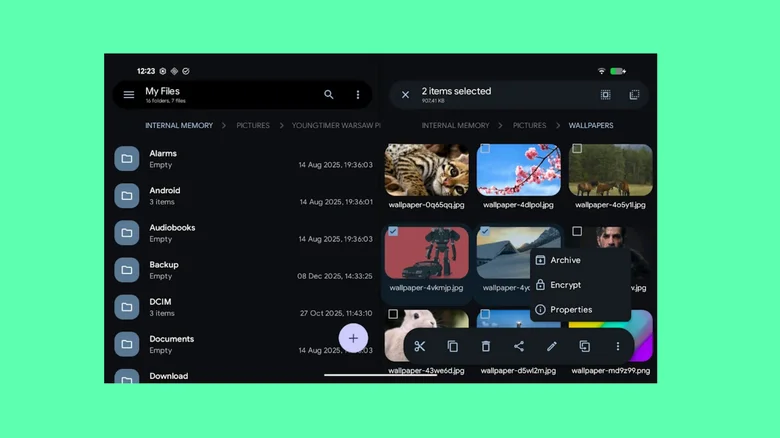
Most of us rely on the default file manager for moving files on a phone. The tasks involve selecting one folder, copying, backing out, and opening another. Solid Explorer skips all that with two panels on one screen. Open a folder on the left and another on the right, then easily drag and drop files between them. It is the same idea as a desktop file manager, and it makes moving files on a phone much faster.
The dual panels can show more than your phone. Upon connecting to cloud storage like Google Drive, OneDrive, Dropbox, or a home server, you can move files from cloud to phone or SD card to server in one drag. There’s a built-in web server that lets another phone or computer on your network grab files using only a browser. You can even lock files with AES-256 encryption behind a password or fingerprint, and they stay protected even if you uninstall the app. You can also create and extract ZIP, 7ZIP, RAR, and TAR files inside Solid Explorer.
Solid Explorer also helps you free up space. Its storage analyzer finds large files, duplicates, and junk, doubling as a cleaner app and eliminating the need to install a separate cleaner app. It is not fully free, and you will see a few ads in the free version. To remove them, you need to get the full version of the app.
