Close Menu
MyAppsPlus

    Subscribe to Updates

    Get the latest creative news from FooBar about art, design and business.

    What's Hot

    Nebius tests the neocloud playbook with $40 billion in planned spending

    November 12, 2026

    Google rolling out Android 17 QPR3 Beta 4 for Pixel

    November 12, 2026

    Google and Samsung’s vision for Android XR glasses is 20/20

    November 12, 2026
    Facebook X (Twitter) Instagram
    Facebook X (Twitter) Instagram
    MyAppsPlusMyAppsPlus
    Thursday, November 12
    • Home
    • Breaking Tech
    • Apps & Software
    • AI & Automation
    • Android
    • iPhone & iOS
    • More
      • Reviews
      • How-To Guides
      • Deals & Discounts
      • Shop
    MyAppsPlus
    Home»iPhone & iOS»How to disable the touchscreen on new MacBook Pro
    iPhone & iOS

    How to disable the touchscreen on new MacBook Pro

    myappsplusBy myappsplusNovember 12, 2026003 Mins Read
    Share Facebook Twitter Pinterest Copy Link LinkedIn Tumblr Email Telegram WhatsApp
    Follow Us
    Google News Flipboard
    How to disable the touchscreen on new MacBook Pro
    Share
    Facebook Twitter LinkedIn Pinterest Email Copy Link

    In this quick tutorial, we show you how to disable the touchscreen on the new 2026 MacBook Pro with a PROLED XDR display if you only use the trackpad or want to lock the screen while cleaning.

    If you got the latest MacBook Pro for its lightweight design, powerful M5 Pro or M5 Max chip, or the incredible notchless PROLED XDR display but not so much for its touchscreen, then macOS offers an option to disable touch input completely.

    Deactivating the touchscreen also makes sense because, unlike most touchscreen Windows laptops, the new MacBook’s screen does not go fully flat (180°). So if you poke your finger on the display, it leads to wobble.

    Secondly, while macOS 27 Golden Gate is a bit friendlier for touchscreen on MacBook Pro, it’s not a fully touch-first operating system. So beyond normal swipes and taps, you may not be able to use the touchscreen comfortably for anything precise, as you can on iPad or iPhone.

    Whatever your reason, turning off the touchscreen is pretty straightforward.

    Scrolling Mac App Store on iPad during Sidecar

    Remember, macOS Golden Gate supports touch input when your iPad is connected to your Mac as a secondary display using Sidecar. But if you disable the touchscreen on the new MacBook Pro, it will also turn off the Sidecar touch input. You can still move the Mac pointer to the iPad and control it that way.

    Disable touchscreen on MacBook Pro

    1. Open System Settings on your MacBook Pro.
    2. Select Accessibility in the left sidebar.
    3. Click Touch under the Physical and Motor heading.
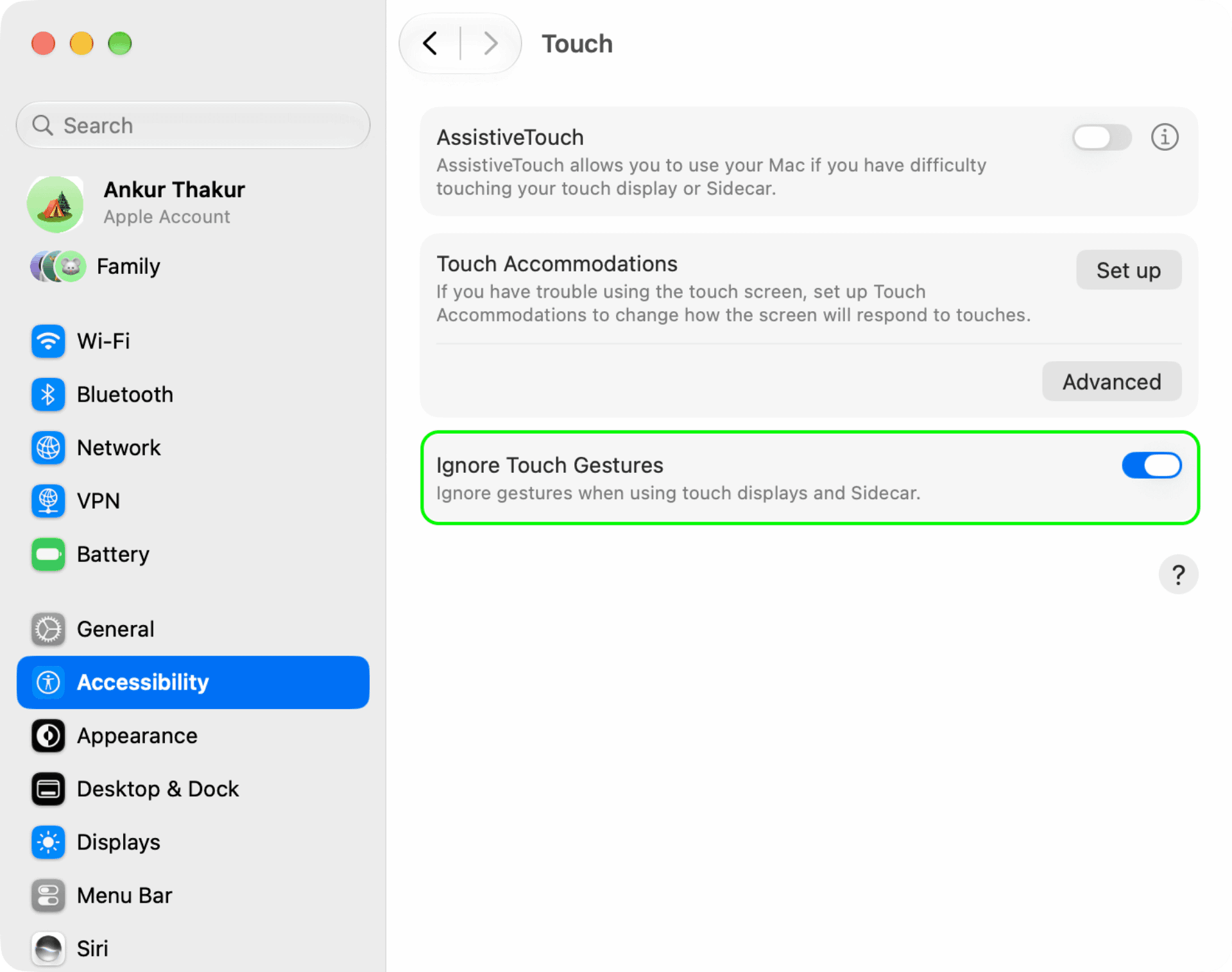
    4. Turn on ‘Ignore Touch Gestures.’

    Ignore Touch Gestures in touchscreen MacBook Pro settings

    Touch your MacBook Pro screen or the iPad screen if using Sidecar, and it will no longer respond to finger taps, swipes, gestures, etc.

    If you change your mind and want to restore touchscreen functionality, return to Touch accessibility settings and turn off Ignore Touch Gestures.

    Use the Cleanbuddy app to lock the screen when cleaning

    When it’s time to clean your MacBook screen to get rid of fingerprints and smudges, you can follow the above steps to block touch input and clean it.

    Or, if you clean the screen frequently, you can get the CleanupBuddy app ($2.99) by Guilherme Rambo, which locks the keyboard, mouse/trackpad, and touch screen so you can clean your computer without worrying about accidental touch and key input.

    • How to see when your Mac was manufactured in macOS 27
    • How to turn off AI file name suggestions in macOS 27 Golden Gate
    Featured How to MacBook Pro macOS 27 News Push touchscreen Tutorial Tutorials
    Follow on Google News Follow on Flipboard
    Share. Facebook Twitter Pinterest LinkedIn Tumblr Email Copy Link
    myappsplus
    • Website

    Related Posts

    Google rolling out Android 17 QPR3 Beta 4 for Pixel

    November 12, 2026

    Opera One for iOS adds Data Saver feature, cutting browsing data usage by up to 80%

    November 12, 2026

    Grand Theft Auto VI deliveries arriving today, secure a boxed copy now for your collection

    November 12, 2026
    Add A Comment
    Leave A Reply Cancel Reply

    Top Posts

    Cathay Pacific tests Google AI that dramatically cuts airplane contrails — tiny altitude shifts slash environmental impact by 40% in early trials

    September 8, 2026138 Views

    Save on your groceries, gas, and holiday shopping with this $15 BJ’s membership (Reg. $60) 

    November 4, 202627 Views

    Apple is making Creator Studio an even better deal with new AI features and creative tools

    October 28, 202623 Views
    Latest Reviews

    Ryzen AI Max+ PRO 495 mini PCs with 192GB RAM emerge — Acemagic, GMKtek, Framework debut ultra-expensive ‘supercomputers’ that can handle 300B-parameter

    myappsplusSeptember 7, 2026

    You don’t need to spend more than $500 on a great queen mattress and we’ve got the lab data to prove it

    myappsplusSeptember 7, 2026

    AI, automation and delivery apps: What food-tech layoffs mean for Canada

    myappsplusSeptember 7, 2026
    Stay In Touch
    • Facebook
    • YouTube
    • TikTok
    • WhatsApp
    • Twitter
    • Instagram

    Subscribe to Updates

    Get the latest tech news from FooBar about tech, design and biz.

    Most Popular

    Ryzen AI Max+ PRO 495 mini PCs with 192GB RAM emerge — Acemagic, GMKtek, Framework debut ultra-expensive ‘supercomputers’ that can handle 300B-parameter

    September 7, 20260 Views

    You don’t need to spend more than $500 on a great queen mattress and we’ve got the lab data to prove it

    September 7, 20260 Views

    WhatsApp will soon let users chat with third-party AI agents

    September 7, 20260 Views
    Our Picks

    Nebius tests the neocloud playbook with $40 billion in planned spending

    November 12, 2026

    Google rolling out Android 17 QPR3 Beta 4 for Pixel

    November 12, 2026

    Google and Samsung’s vision for Android XR glasses is 20/20

    November 12, 2026

    Subscribe to Updates

    Subscribe to our newsletter and get the latest tech news, app updates, AI trends, smartphone reviews, and exclusive deals delivered straight to your inbox.

    Facebook X (Twitter) Instagram Pinterest
    • About Us
    • Get In Touch
    • Disclaimer
    • Privacy Policy
    • Terms & Conditions
    © 2026 MyAppsPlus. All Rights Reserved.

    Type above and press Enter to search. Press Esc to cancel.