

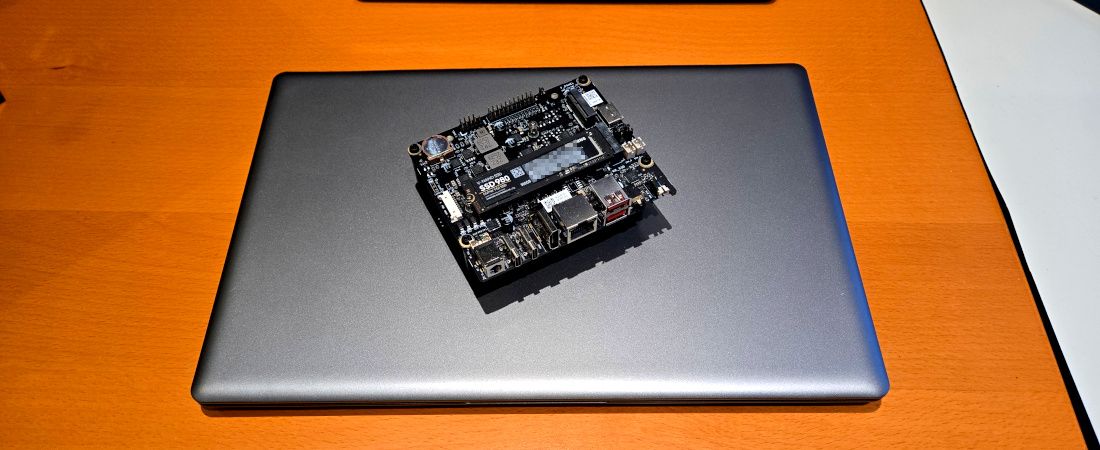
LattePanda’s latest x86 compute module, the Mu Ultra, is highly integrated and features a Core Ultra 7 256V octa-core CPU, 16GB of LPDDR5 RAM, an NPU, and a GPU.
LattePanda Mu Ultra: Specifications
CPU: Octa-Core Core Ultra 7 256V
GPU: Intel Arc 140V, 8 Xe cores at 1.95GHz
Display: 1 x eDP internal, 2 x DP
Interfaces: 2 x 4 lanes PCIe 4.0, 2 x USB-C 20Gbps with DP, 2 x USB 3.2 Gen 2 at 10Gbps, 6 x USB 2.0
Low-speed Interfaces: 3 x UART, 3 x I2C, 14 x GPIOs
Power Consumption: 17W, 37W in short bursts
Module Size: 70mm x 60mm x 32mm
The Ultra 7 processor is more than twice as fast as the Raspberry Pi 5 compute module on Geekbench 7, with more high-speed interfaces but fewer general-purpose I/O pins.
The Mu Ultra CPU board is tiny, about the size of a credit card. Its edge connector borrows from a DDR SODIMM but doesn’t reuse the same pin assignment. The Ultra’s standout feature is its abundance of high-speed ports, including eight PCIe lanes and two USB 3.2 ports. The carrier board includes a 2.5GbE connector and an OcuLink port, making the Mu Ultra ideal for an edge embedded platform.
The Mu Ultra with a Core Ultra 7 256V CPU and 16GB of RAM costs $783, while the medium-tier module with an Intel Core Ultra 5 226V and 16GB of RAM costs $683. The minimum hardware required to experiment with the Mu Ultra is the Mini carrier board, which costs $69. The higher-end Full-Function carrier board adds a second 2.5GbE port and more expansion for $89. The Mu Ultra also requires a heatsink, which costs from $5 to $12.
LattePanda Mu Ultra: Design
The LattePanda Mu Ultra is small, measuring 70 x 60 mm. Two mounting holes secure the module to a carrier board. On one side, the SODIMM edge connector provides all high-speed interfaces, while the opposite side holds one eDP and a touch panel connector. The board requires a heatsink to work properly and doesn’t include one.
The Intel Core Ultra 7 256V CPU has all the key ingredients to appeal to PC enthusiasts. Eight cores, split into four speedy and four power-efficient, share 12MB of cache, and dissipate 17W with 37W bursts. The Ultra 7 256V platform supports a fixed amount of RAM: 16GB of LPDDR5 in this case. The CPU excels at connectivity, and the Mu Ultra takes full advantage by offering eight high-speed Gen 4 PCIe lanes. The CPU also includes additional high-speed ports that function as USB 3.2 or DisplayPort.
The Mu Ultra does not offer on-board storage memory. All networking capability, such as an Ethernet port or Wi-Fi, comes from external peripherals on the carrier board. The system supports up to three displays: one HDMI and two DPXe cores at 1.95GHz, making the Mu Ultra an entry-level gaming platform
The Mu Ultra module only makes sense with a carrier board. The Mini carrier measures 11 cm x 10 cm x 3cm and has multiple connectors on the front, making it suitable for a small mini ITX case. The CPU can also access 14 GPIOs to control relays or LEDs. The Mini carrier board has three PCIe connectors: an M.2 E key, an M.2 M key, and an OcuLink port connecting to a 4x PCIe link.
LattePanda Mu Ultra: In Use
You can power the Mu Ultra and the Mini boardith a keyboard, mouse, and USB storage, we recommend at least a 50W Type-C adapter. This requirement reaches 100W for anything that hosts a PCIe card. The carrier has a power button and an audio jack. It also includes a small CR1220 battery holder for timekeeping when the unit is powered down
The mini carrier offers two USB 3.2 Type-A ports and two Type-C ports for peripherals/displays, and a single HDMI output supporting up to 4K at 60Hz. The module and carrier consume about 10W when idle on Windows 11 and up to 55W during the Geekbench 7 benchmark. The Core Ultra 7 256V achieves a single-core score of 2260 and a multi-core score of 10200. The CPU fan is noisy, hitting 50dB at one meter while running the benchmark.
Products developed by LattePanda are community-supported. A GitHub repository hosts design files, including the schematic and mechanical drawings for carrier boards. You can also get BIOS updates for the Mu Ultra from GitHub. LattePanda engineers actively engage in discussions on their Discord channel.
The Ultra 7 platform is well-suited for local LLMs and VLMs based on INT4. The processor is ideal for YOLO-class models, where an always-on NPU can detect and trigger the GPU to handle heavier loads. With hardware acceleration for video decode and encode, the Mu Ultra suits applications where edge processing is critical.
LattePanda Mu Ultra: Competition
The LattePanda Mu Ultra directly competes with the Nvidia Jetson Orin NX, with the LattePanda board having an edge on price. That said, the Mu Ultra also offers x86 compatibility and access to more peripherals. The Mu Ultra has eight PCIe lanes, three high-speed display interfaces, and two USB 3.2 interfaces. In contrast, the Orin NX offers two display interfaces and has one PCIe lane less than the Mu Ultra.
LattePanda Mu Ultra: Final Verdict
The LattePanda Mu Ultra offers something uncommon: a premium x86 platform with AI acceleration in a credit card format. The module requires a carrier board, such as the Mini, to function fully. The product’s strength is the number of communication ports it provides, both high-speed (PCIe, DP, and OcuLink) and lower-speed but with a higher-voltage range (14 GPIOs). The platform is designed for low power, idling at around 10W, and priced at $683 for the cheapest model.
Get the LattePanda Mu Ultra if you have AI loads that require processing on-board.
Don’t get the Mu Ultra ifyou’ll place it in an office setting, as the fan is loud.
Best mini PCs: Compact desktop power for business, creative, and gaming setups.
