Close Menu
MyAppsPlus

    Subscribe to Updates

    Get the latest creative news from FooBar about art, design and business.

    What's Hot

    The Amazon Alexa Photo Frame made me cry — in a good way

    November 10, 2026

    First deal on NVIDIA RTX Spark Copilot+ PC: Save a whopping $1,300 on Lenovo’s Yoga 9n 3K OLED touchscreen 2-in-1

    November 10, 2026

    Annual conference celebrates 10 years of Tufts Women in Tech

    November 10, 2026
    Facebook X (Twitter) Instagram
    Facebook X (Twitter) Instagram
    MyAppsPlusMyAppsPlus
    Tuesday, November 10
    • Home
    • Breaking Tech
    • Apps & Software
    • AI & Automation
    • Android
    • iPhone & iOS
    • More
      • Reviews
      • How-To Guides
      • Deals & Discounts
      • Shop
    MyAppsPlus
    Home»Reviews»The Amazon Alexa Photo Frame made me cry — in a good way
    Reviews

    The Amazon Alexa Photo Frame made me cry — in a good way

    myappsplusBy myappsplusNovember 10, 2026004 Mins Read
    Share Facebook Twitter Pinterest Copy Link LinkedIn Tumblr Email Telegram WhatsApp
    Follow Us
    Google News Flipboard
    The Amazon Alexa Photo Frame made me cry — in a good way
    Share
    Facebook Twitter LinkedIn Pinterest Email Copy Link

    I never thought a gadget would make me want to cry — least of all one from Amazon.

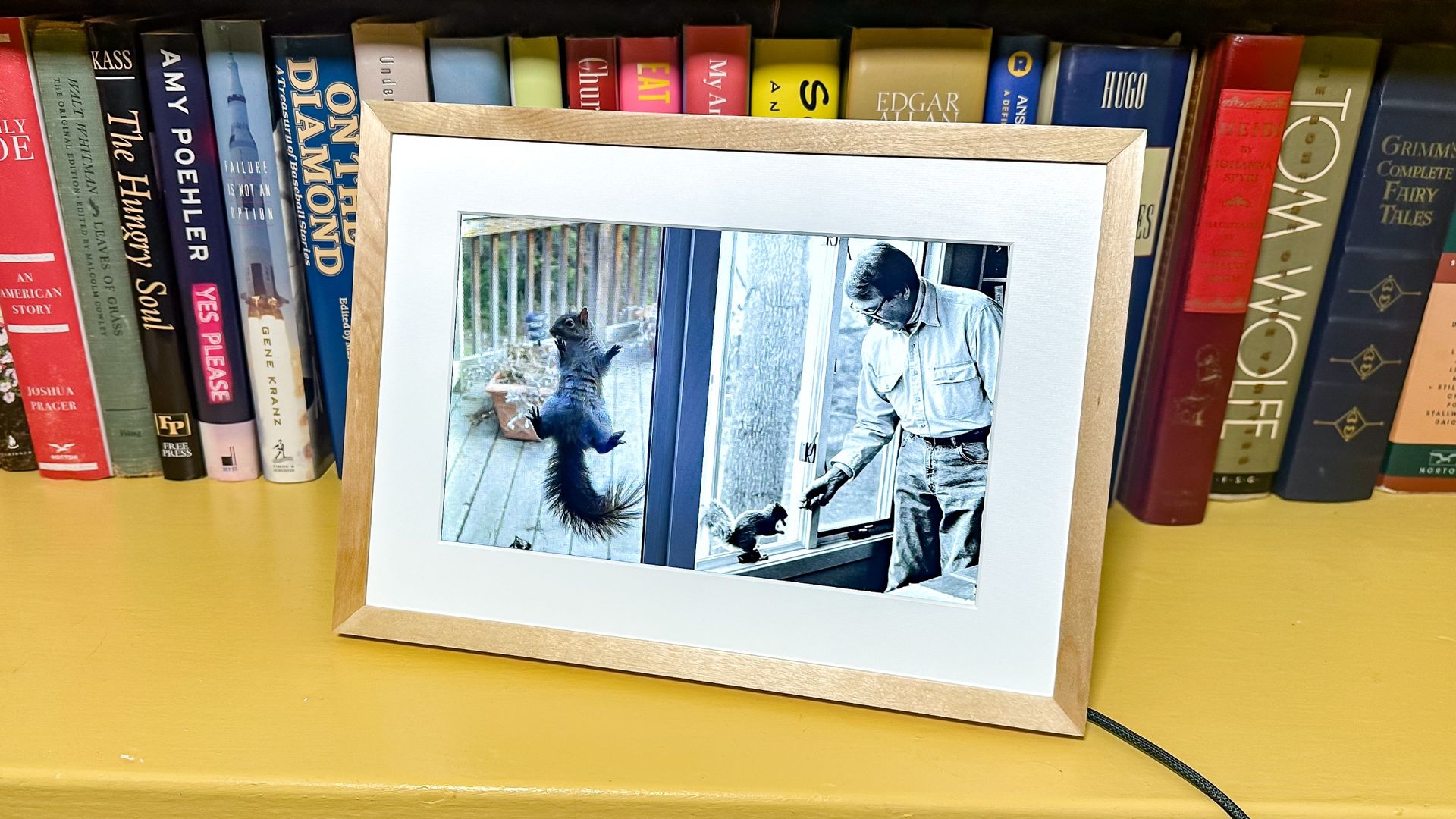
    After unboxing and setting up the Alexa Photo Frame, one of the first images it displayed was a black-and-white picture of my father, who has been deceased for 16 years, feeding a squirrel.

    I remember having the photo stored digitally somewhere, but it’s been several years since I last saw it. But the Alexa Photo Frame pulled it up, and juxtaposed it next to another picture of a squirrel clinging to a screen door. The Photo Frame also wasted no time digging up scores of photos of our family cat, who also died around the same time as my dad.

    It was a very emotional first few minutes with this device.

    But the Alexa Photo Frame also went on to deliver photos of my child playing, vacations and other happy occasions, which brought back more pleasant emotions.

    While I have plenty of criticisms of AI and its use, this is one instance where I feel like it delivers something positive, and makes this one of the best photo frames I’ve ever used.

    Alexa inside

    This might be stating the obvious, but if you want to get the most out of the Alexa Photo Frame, you’re going to need either an Alexa+ ($19/month) or an Amazon Prime subscription ($149/year), so you can use Amazon’s AI to its fullest.

    The Alexa Photo Frame uses Amazon’s AI in one of the smartest ways yet. It combs through your entire library of images, and then pulls them up based on criteria such as the time of year, themes, objects, and events.

    So, during the fall, you might be served pictures of pumpkins and leaves falling; in the summer, it might be photos of you at the beach.

    While the Alexa Photo Frame only works in landscape mode, it does a clever thing with all the portrait photos in your library. If, for instance, you have photos of your child blowing out birthday candles over the years, it might put two of those images side by side, to show you the changes over the years. The photos of my dad and the squirrel was one example; another was two pictures of my kid potty training.

    Or, if you want to go the more direct route, you can also ask Alexa to “show me photos of cats and kids,” and it will create a curated slideshow of all those images from your library.

    Alexa+ isn’t perfect; when I asked it to create a slideshow of my daughter, a number of the pictures were of old ladies and some other random kids. However, it’s smart enough so that when one of these images showed up, I said “Alexa, that’s not my daughter,” and it went back through and edited the collection so those mismatched photos were no longer there.

    It’s a smart speaker, too

    Of course, the Photo Frame can act as a smart speaker. You definitely wouldn’t want to use it to play music, but you can use Alexa+ on it as you would any other Amazon smart speaker. And, should you not want it to listen, you can press the microphone mute button on the back.

    Another trick with the Alexa Photo Frame is that you can attach short audio files to pictures, so if you’re gifting it to your parents, you can add a photo of your kids around a Christmas tree, with a voice note wishing them happy holidays. You have to tap the photo on the screen to hear the note, so it’s a nice extra, but I’m not sure how much it will be used.

    Bottom line

    Specs-wise, the Alexa Photo Frame isn’t the most impressive when compared to the best digital photo frames. The $229 Aura Aspen, for example, has a 12-inch screen with a much higher resolution of 1600 x 1200, and can be set up in portrait or landscape mode. The Lexar Pexarhas an even crisper 2000 x 1200 display, and costs even less, at $179. And, the Alexa Photo Frame can’t play videos, which also make up a good portion of my phone’s library.

    But neither makes curating all your photos as effortless — or as ingenious — as what Amazon does with Alexa+. For me, it’s solved the biggest issue I’ve had with digital photo frames and my massive photo library. How do I rediscover those old photos, and how do I make them show up on my photo frame without spending hours combing through everything?

    Alexa Amazon Home photo Smart Home
    Follow on Google News Follow on Flipboard
    Share. Facebook Twitter Pinterest LinkedIn Tumblr Email Copy Link
    myappsplus
    • Website

    Related Posts

    Breville’s iconic bean-to-cup espresso machine has 22,000 5-star reviews on Amazon — and it’s $200 off before Black Friday

    November 10, 2026

    ‘I see zero reason to have a touchscreen on my MacBook Pro’: Tom’s Guide readers and followers share their honest thoughts about the new MacBook Pro OLED — things get spicy!

    November 10, 2026

    I tried the viral ‘hand in frame’ iPhone hack — and it actually made my photos more colorful

    November 10, 2026
    Add A Comment
    Leave A Reply Cancel Reply

    Top Posts

    Cathay Pacific tests Google AI that dramatically cuts airplane contrails — tiny altitude shifts slash environmental impact by 40% in early trials

    September 8, 2026138 Views

    Save on your groceries, gas, and holiday shopping with this $15 BJ’s membership (Reg. $60) 

    November 4, 202627 Views

    Apple is making Creator Studio an even better deal with new AI features and creative tools

    October 28, 202621 Views
    Latest Reviews

    Apple A20 Pro chip: why it’s such a big deal for the iPhone Ultra and iPhone 18 Pro Max

    myappsplusSeptember 7, 2026

    Get Lifetime Access to AI-Driven Stock Picks, a Done-for-You Portfolio Builder & a Personal AI Financial Coach

    myappsplusSeptember 7, 2026

    “I feel like I’m in my 50s” — the simple workout routine Julie Andrews, 90, swears by

    myappsplusSeptember 7, 2026
    Stay In Touch
    • Facebook
    • YouTube
    • TikTok
    • WhatsApp
    • Twitter
    • Instagram

    Subscribe to Updates

    Get the latest tech news from FooBar about tech, design and biz.

    Most Popular

    I’m fixing my desk posture without doing a single back exercise — here’s the foot mobility trick a neurosurgeon taught me

    September 7, 20260 Views

    €4.6B in deals and August’s highlights

    September 7, 20260 Views

    I kept waking up sweaty because of a classic bedding mistake — here’s what fixed it

    September 7, 20260 Views
    Our Picks

    The Amazon Alexa Photo Frame made me cry — in a good way

    November 10, 2026

    First deal on NVIDIA RTX Spark Copilot+ PC: Save a whopping $1,300 on Lenovo’s Yoga 9n 3K OLED touchscreen 2-in-1

    November 10, 2026

    Annual conference celebrates 10 years of Tufts Women in Tech

    November 10, 2026

    Subscribe to Updates

    Subscribe to our newsletter and get the latest tech news, app updates, AI trends, smartphone reviews, and exclusive deals delivered straight to your inbox.

    Facebook X (Twitter) Instagram Pinterest
    • About Us
    • Get In Touch
    • Disclaimer
    • Privacy Policy
    • Terms & Conditions
    © 2026 MyAppsPlus. All Rights Reserved.

    Type above and press Enter to search. Press Esc to cancel.