
Close Menu
MyAppsPlus

    Subscribe to Updates

    Get the latest creative news from FooBar about art, design and business.

    What's Hot

    NYT Connections hints and answers for Sunday, November 8 (game #1246)

    November 8, 2026

    SSC Integrates ‘Forsatcom’ Platform into Upgraded Mobile App, Expands to Huawei Gallery

    November 8, 2026

    The built-in iPhone app for creativity you may be ignoring (but shouldn’t)

    November 8, 2026
    Facebook X (Twitter) Instagram
    Facebook X (Twitter) Instagram
    MyAppsPlusMyAppsPlus
    Sunday, November 8
    • Home
    • Breaking Tech
    • Apps & Software
    • AI & Automation
    • Android
    • iPhone & iOS
    • More
      • Reviews
      • How-To Guides
      • Deals & Discounts
      • Shop
    MyAppsPlus
    Home»iPhone & iOS»The built-in iPhone app for creativity you may be ignoring (but shouldn’t)
    iPhone & iOS

    The built-in iPhone app for creativity you may be ignoring (but shouldn’t)

    myappsplusBy myappsplusNovember 8, 2026004 Mins Read
    Share Facebook Twitter Pinterest Copy Link LinkedIn Tumblr Email Telegram WhatsApp
    Follow Us
    Google News Flipboard
    The built-in iPhone app for creativity you may be ignoring (but shouldn’t)
    Share
    Facebook Twitter LinkedIn Pinterest Email Copy Link

    Apple’s free digital whiteboard lets you organize messy ideas, sketch plans and work with others without another <a href="https://myappsplus.com/what-does-apple-one-family-come-with-and-which-subscription-is-best-for-you/” title=”What does Apple One Family come with and which subscription is best for you?”>subscription.

    Your iPhone is great for capturing screenshots you’ll likely never revisit. So organizing all that mess into something coherent might be just what you need. Apple’s Freeform app has been available on iPhones since 2022, giving you room to spread out ideas instead of adding them to another list.

    It’s a digital whiteboard with an infinite canvas, so you can organize photos, sketches, links, and PDFs in any way you want. From there, you can connect them and change your mind without having to rewrite everything. The Freeform app is good for visual plans that are easier to show than explain, and others can participate too.

    Now, Freeform isn’t some miracle app that can organize your life, but it could be just the thing that makes your next messy project less of a headache. Best of all, the app is free.

    What you can do with Freeform’s infinite canvas on iPhone
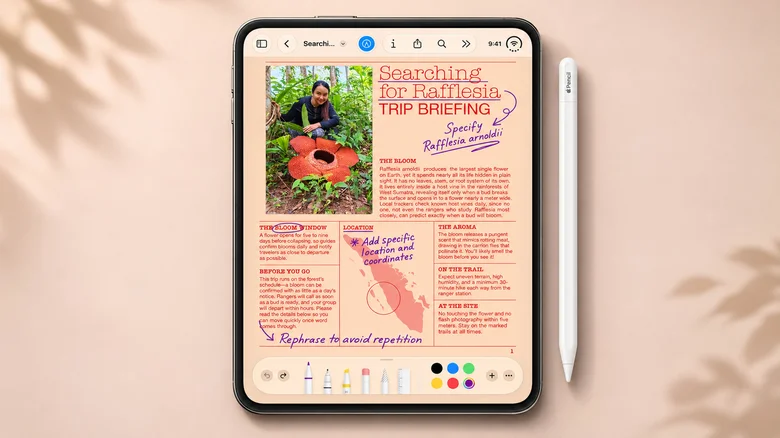
    An iPhone Duo displays a Freeform board with an Apple Pencil beside it.

    When you open a new Freeform board, you’re presented with a blank canvas that expands as you add to it. You can use your finger to scribble on the board, add a photo or sticky note, and drag items around until they begin to make sense. It also lets you draw arrows between related items, zoom out to see the bigger picture or zoom in to work on smaller details. An Apple Pencil isn’t required, either, although iPhone Duo owners running iOS 27.2 or later can use the Apple Pencil (USB-C) to sketch directly in Freeform.

    It also allows for videos, PDFs, website links, and text boxes. Photos app and Safari can also send images and links directly to a board from the Share menu, without copying and pasting.

    You could storyboard a video by laying out reference images and notes for each shot, then shuffle the scenes around as your ideas evolve. Or sketch out a DIY project on the canvas, where drawings and measurements are right where you need them. But things like your grocery list, for instance, probably don’t need an infinite whiteboard.

    Since its introduction with iOS 16.2, Freeform has gained Dark Mode and folders in iOS 27. On compatible iPhones, Image Playground can also create illustrations for boards, but Freeform itself doesn’t require Apple Intelligence.

    Freeform sharing is simple, until Android joins the conversation
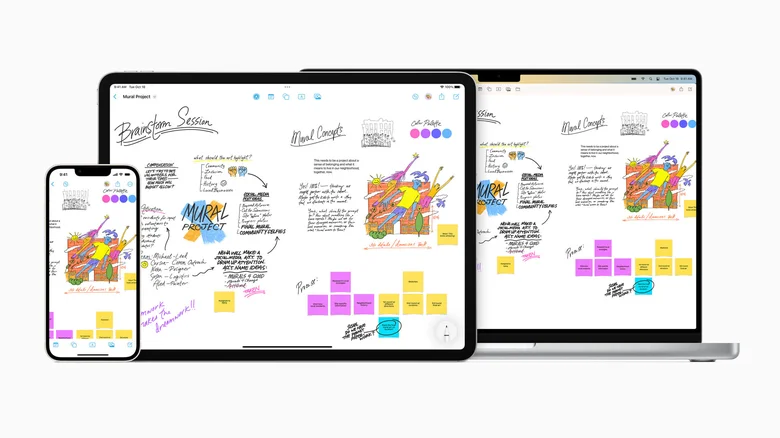
    An iPhone, iPad, and Mac display a Freeform board.

    You can also invite others to a Freeform board and see their changes in real time. That means a group can plan a vacation or collaborate on a project without having to search through message threads. Boards are syncedoard, you’ll be glad to have the larger screen on an iPad or Mac

    There is one tiny hiccup, though. Everyone on the board needs a compatible Apple device, an Apple Account with two-factor authentication, and Freeform turned on in iCloud. There’s no Android app or browser-based editor, so a cross-platform whiteboard like Miro would be more appropriate for mixed-device groups. Alternatively, if someone just needs to view the final product, the board can be exported as a PDF.

    There are downsides to the expanding canvas, as well. Bigger boards can be hard to maneuver, particularly on the smaller screen of an iPhone, but maybe this is a problem for the iPhone Duo to solve.

    Board creation and sharing are still free. You don’t need Apple’s optional Creator Studio subscription, which costs $12.99 per month in the U.S., to do basic brainstorming, but it does provide access to premium assets, plus advanced AI image-generation tools on compatible iPhones. If you previously deleted Freeform thinking it was some Samsung-like bloatware, you can reinstall it from the App Store.

    builtin creativity ignoring iPhone shouldnt
    Follow on Google News Follow on Flipboard
    Share. Facebook Twitter Pinterest LinkedIn Tumblr Email Copy Link
    myappsplus
    • Website

    Related Posts

    Why you shouldn’t remove the screen protector film on your Nintendo Switch 2

    November 8, 2026

    Chromagraph Camera is exactly the camera app I’ve been looking for on iPhone

    November 7, 2026

    What is System Data on an iPhone’s storage, and how much is normal?

    November 7, 2026
    Add A Comment
    Leave A Reply Cancel Reply

    Top Posts

    Cathay Pacific tests Google AI that dramatically cuts airplane contrails — tiny altitude shifts slash environmental impact by 40% in early trials

    September 8, 2026138 Views

    Save on your groceries, gas, and holiday shopping with this $15 BJ’s membership (Reg. $60) 

    November 4, 202627 Views

    Apple is making Creator Studio an even better deal with new AI features and creative tools

    October 28, 202619 Views
    Latest Reviews

    iPhone Duo?

    myappsplusSeptember 5, 2026

    From eating the elderly to selling kids, Afterworld gives you the freedom to do terrible things in the post-apocalypse — ‘We shouldn’t judge the player’ says director

    myappsplusSeptember 5, 2026

    This Dell 16 laptop is ideal for university, especially at the lowest price we’ve seen

    myappsplusSeptember 5, 2026
    Stay In Touch
    • Facebook
    • YouTube
    • TikTok
    • WhatsApp
    • Twitter
    • Instagram

    Subscribe to Updates

    Get the latest tech news from FooBar about tech, design and biz.

    Most Popular

    iPhone Duo?

    September 5, 20260 Views

    From eating the elderly to selling kids, Afterworld gives you the freedom to do terrible things in the post-apocalypse — ‘We shouldn’t judge the player’ says director

    September 5, 20260 Views

    I just went hands-on with the Odyss N1 — a sleek AI necklace that automatically tracks everything you eat

    September 5, 20260 Views
    Our Picks

    NYT Connections hints and answers for Sunday, November 8 (game #1246)

    November 8, 2026

    SSC Integrates ‘Forsatcom’ Platform into Upgraded Mobile App, Expands to Huawei Gallery

    November 8, 2026

    The built-in iPhone app for creativity you may be ignoring (but shouldn’t)

    November 8, 2026

    Subscribe to Updates

    Subscribe to our newsletter and get the latest tech news, app updates, AI trends, smartphone reviews, and exclusive deals delivered straight to your inbox.

    Facebook X (Twitter) Instagram Pinterest
    • About Us
    • Get In Touch
    • Disclaimer
    • Privacy Policy
    • Terms & Conditions
    © 2026 MyAppsPlus. All Rights Reserved.

    Type above and press Enter to search. Press Esc to cancel.