

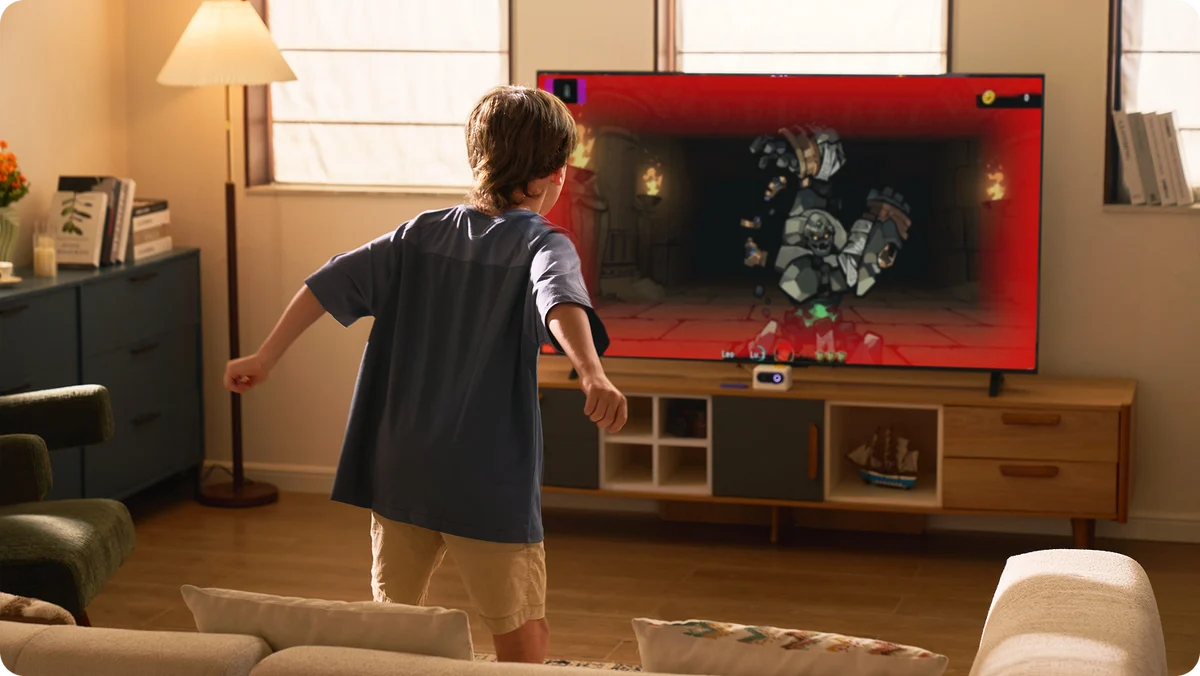
The HUUCH Motion Bundle is a great way to get kids off the couch and moving by turning their bodies into video game controllers. And when it works, it’s genuinely fun. My three kids, ages 5, 9 and 12, enjoyed playing together, something that’s not always easy to find in a video game.
Honestly, finding something that entertains all three of my kids at once is practically a sport in itself. They aren’t big on screens or video games to begin with (they would much rather be outside), so, I was all-in when it came to finding an indoor activity that would keep them entertained on rainy days or in the evenings as it gets darker earlier now.
The HUUCH Motion Bundle caught my attention, and I couldn’t wait for my kids to try it. Like the Nex Playground, it uses a camera to track players’ movements and translate them into on-screen actions. Instead of holding controllers, kids can jump, reach, dodge and move their bodies to play.
My kids had a blast smashing desserts, racing and playing soccer together. But getting the system running was harder than it should have been, and once we started playing, the motion tracking didn’t always cooperate.
We’ve also been using the Nex Playground at home, which we love. Having that experience made the differences between the two systems especially noticeable.
After spending time with the HUUCH, I can see the appeal. I just wish the experience lived up to the idea.
The HUUCH Motion Bundle turns screen time into active play with AI-powered motion tracking that lets kids control games using their bodies instead of traditional controllers. Designed for ages 3 and up, the compact console connects to your TV and supports up to four players. It includes 10 games, with more available through an optional subscription. My three kids had a blast playing together, although setup was frustrating and motion tracking wasn’t always reliable. It’s a fun option for getting kids moving indoors.View Deal
The games are fun when everything works
https://www.instagram.com/p/DfYCoaBhE2u/
The good news is that my kids took to the HUUCH almost immediately. Their first favorite was a dessert-smashing game that had them moving their arms and trying to hit treats on the screen. It was simple, silly and exactly the kind of thing that works well with kids of different ages.
They were laughing, competing and genuinely enjoying themselves. It was great to see them playing so well together and encouraging each other throughout the game.
With such a wide age range, that doesn’t always happen. Games that entertain my 12-year-old can be too complicated for my 5-year-old, while games designed for younger children don’t always hold the older kids’ attention.
The HUUCH managed to find some common ground. Naturally, the kids also noticed all the games that were locked and immediately wanted to try them.
After unlocking the additional games, though, we ran into another frustrating delay. The console needed to update before we could play them, and that process took about 30 minutes. Thirty minutes might not sound like much, but when three excited kids are standing in front of a television waiting to play, it feels considerably longer.
Once the update finished, we explored more of the library, including racing games, soccer and other interactive activities. Soccer was a particular point of disappointment. My kids were excited to play, but the game we tried focused on being a goalkeeper rather than letting them run around and play an actual match.
Setup was surprisingly frustrating
I expected the HUUCH to be a relatively simple plug-and-play experience. After all, it’s designed for children as young as 3, and there aren’t traditional controllers to pair or configure. Unfortunately, getting everything connected was our first obstacle and I had to contact the company for assistance.
The included cables are so short that we couldn’t use the HUUCH with our wall-mounted television. There simply wasn’t a practical way to position the camera where it needed to be while keeping everything connected.
We eventually moved it to my youngest son’s bedroom, where the TV sits on a stand. That worked much better, and there was enough open floor space for the kids to move around safely.
But even after finding a suitable location, the setup process wasn’t particularly intuitive. The instructions could have been clearer, especially when it came to preparing the motion-tracking camera. There’s a protective cover over the lens, and it wasn’t immediately obvious that we needed to remove it or even that it was there.
That might sound like a small detail, but it’s exactly the kind of thing that can leave parents wondering why a new device isn’t working properly. Once everything was connected and positioned correctly, we were finally ready to play. Or so we thought.
Price and availability
The HUUCH Motion Bundle launched in the U.S. in October 2026 with a discounted retail price of $179, making it considerably less expensive than the Nex Playground, which currently sells for $299.
The console connects to a TV using HDMI and comes with a motion-tracking camera, a haptic feedback accessory and a carrying case. The bundle also includes the necessary cables and power adapter.
HUUCH advertises 10 included games, although its launch announcement specifies that three featured titles were offered free to customers who activated and registered the system between October 15 and November 6, 2026. The other seven are permanently free.
Additional games are available through HUUCH Game Pass, which costs $9.90 per month or $99 per year. The subscription opens access to more than 30 games, with the company promising new titles each month. HUUCH is also offering two years of Game Pass for the price of one through December 31, 2026.
That’s an important cost to consider. While the console is relatively affordable, families who want more than the included games will likely find themselves paying for a subscription.
For comparison, the Nex Playground’s annual Play Pass costs $89 and unlocks more than 60 games including licensed ones featuring Bluey, Kung Fu Panda, Barbie, Elmo and more.
Motion tracking needs work
For us, the HUUCH’s biggest weakness is also the technology that makes it interesting. The console uses AI-powered camera tracking to detect players’ movements, eliminating the need for traditional handheld controllers.
In theory, that makes gaming easier for younger children. They don’t have to learn which buttons to press or worry about holding a controller correctly. They simply move their bodies.
In practice, the tracking was inconsistent enough to frustrate my kids. Sometimes their movements registered as expected. Other times, the camera seemed to struggle to recognize what they were doing, interrupting the flow of the game. My 12-year-old said it didn’t work as well for him as it did my 5-year-old.
Lighting also made a noticeable difference. The camera needs appropriate lighting and enough contrast between the player and the background. If the room is too dark or too bright, tracking becomes less reliable.
That means families need to think about more than just having enough space in front of the television. The room itself needs to be suitable for camera-based gameplay. HUUCH recommends a play area of approximately 2 by 2 meters for one player, with additional space needed for multiplayer games. That wasn’t a problem for us, but something to keep in mind, especially with the short cables on the console.
When everything lined up, the games were entertaining.
This was probably the most telling part of our experience. My kids genuinely enjoyed the HUUCH when we first set it up. They laughed, moved around and wanted to try different games. But that initial excitement didn’t last.
After those first sessions, they didn’t ask to play nearly as often as I expected. The console gradually became something they used occasionally rather than something they actively sought out.
To be fair, as mentioned, my kids aren’t huge video game players. Given the choice, they’d usually rather be playing actual sports outside. That’s actually one of the reasons I thought the HUUCH would be a good fit.
I wasn’t looking for something that would replace outdoor play. I wanted a fun alternative for days when going outside wasn’t practical. And in that respect, the HUUCH does have value.
It’s a fun way to burn some extra energy, get siblings playing together and make screen time more physical. It’s fun for parents too.
But I don’t think the included games offer enough variety or replay value to keep my kids interested over the long term. The subscription adds more options, but it also makes the system more expensive.
The inconsistent tracking didn’t help either. A fun game becomes considerably less appealing when kids feel like they’re doing the right movements but the console isn’t responding.
Motion Bundle vs. Nex Playground: There’s a clear winner
We’ve also been testing the Nex Playground at home, and if I had to choose between the two, I’d go with the Nex every time.
Both systems work in much the same way. A camera tracks your movements so you can play games without a controller. The idea is to get kids off the couch and moving, and both have games the whole family can play together.
But after spending time with both, I found the Nex Playground much more enjoyable.
For starters, Nex has a much bigger library of games, including titles featuring characters my kids already know and love. But what really won me over was how much easier it was to just turn it on and play.
With HUUCH, I was constantly wondering whether the camera was in the right spot, if the room was bright enough or if the game would actually pick up our movements. When you’re trying to entertain three kids, the last thing you want is to spend half your time troubleshooting.
The Nex Playground isn’t cheap at $299, especially compared to HUUCH’s $179 price tag. But having used both, I think the extra money is worth it. The motion tracking worked better for us, there’s a lot more to play and the whole experience felt less frustrating. Nex’s annual Play Pass subscription is also cheaper than HUUCH Game Pass, although both systems come with games you can play without paying extra.
I can still see the appeal of HUUCH, particularly for families who want to try motion gaming without spending nearly $300.
But if you can stretch your budget, I’d spend the extra $120 on the Nex Playground. It’s the one I’d rather have in my living room.
Final thoughts
As a mom of three extremely energetic and athletic kids, I love the idea of a gaming system that helps my kids work off their extra energy. And when the HUUCH worked, it was genuinely fun.
My favorite part of testing was watching all three of my kids play together. They’re different ages, have different interests and don’t always agree on what to play, so seeing them laughing and having fun with the same game was a win.
Unfortunately, those moments weren’t enough to make up for the frustrations.
I think the biggest sign that the HUUCH wasn’t quite right for our family came after we finished testing it. My kids had a good time playing, but they weren’t asking to play again.
That’s not to say the HUUCH is a bad system. I can see it being fun for a rainy afternoon or a family game night, especially if you have the right space for it and don’t mind a little troubleshooting.
- Living near an AI data center might not hurt your home’s value — here’s what new research found
- ChatGPT has a clever new way to fight back against election deepfakes — I tried it and it actually works
- A few tech leaders are rebranding AI as ‘superintelligence’ — calling it that doesn’t make it accurate
