Close Menu
MyAppsPlus

    Subscribe to Updates

    Get the latest creative news from FooBar about art, design and business.

    What's Hot

    We awarded this RGB TV 4.5 stars and an Editor’s Choice — and it’s 50% off right now

    October 31, 2026

    Fanttik’s recently-released T2 Max cordless soldering iron kit is yours for $80

    October 31, 2026

    Google, Reddit, and more tech stocks plummet: What’s driving market shocks

    October 31, 2026
    Facebook X (Twitter) Instagram
    Facebook X (Twitter) Instagram
    MyAppsPlusMyAppsPlus
    Saturday, October 31
    • Home
    • Breaking Tech
    • Apps & Software
    • AI & Automation
    • Android
    • iPhone & iOS
    • More
      • Reviews
      • How-To Guides
      • Deals & Discounts
      • Shop
    MyAppsPlus
    Home»Apps & Software»Microsoft killed Android apps on Windows 11, but they’re back in taskbar Search, streamed from your phone
    Apps & Software

    Microsoft killed Android apps on Windows 11, but they’re back in taskbar Search, streamed from your phone

    myappsplusBy myappsplusOctober 31, 2026004 Mins Read
    Share Facebook Twitter Pinterest Copy Link LinkedIn Tumblr Email Telegram WhatsApp
    Follow Us
    Google News Flipboard
    Microsoft killed Android apps on Windows 11, but they’re back in taskbar Search, streamed from your phone
    Share
    Facebook Twitter LinkedIn Pinterest Email Copy Link

    Windows Latest has found that Windows 11’s new taskbar Search can open apps from your Android phone. When I typed Bluesky into Search on my Surface Laptop, it showed the app installed on my Samsung phone as a “Mobile App” result, and clicking Open launched Bluesky on the phone and mirrored it to my PC through Phone Link!

    Microsoft has since confirmed that Search can call, text, and toggle Do Not Disturb on a connected phone, but its release notes don’t mention opening phone apps. I found it while testing the new Search, and truth be told, it’s one of the neatest Windows and Android tricks I’ve seen.

    Windows 11 Search now shows Android apps from your phone

    For this test, I used my Surface Laptop 7th Edition on Windows 11 26H2, build 26340.9767, in the Experimental channel, paired with a Samsung Galaxy A26 running Android 16.

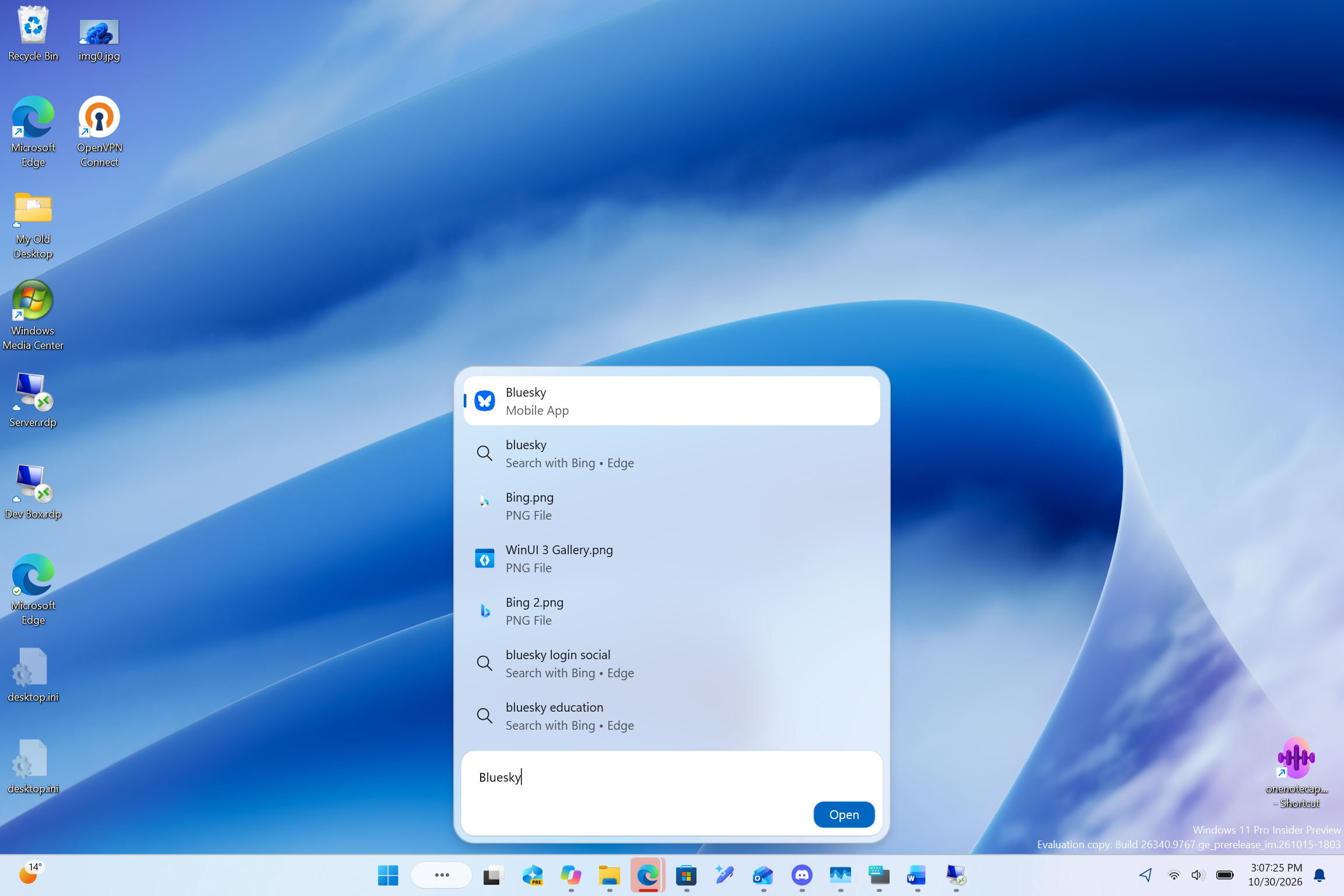
    I searched for Bluesky and saw a result named Bluesky with “Mobile App” underneath, right at the top. Below it were the usual Bing suggestions and a couple of PNG files from my PC, so Search treats the phone app like any other app result.
    Bluesky mobile app appearing in Windows Search
    Windows 11’s new Search shows Bluesky from my Android phone as a Mobile App result. Credit: Windows Latest

    Search gives linked Android apps the same entry point as Windows software. To me, it looks like another attempt to reduce instances of us having to open the Phone Link app first and then mirror an app from our Android phone. You just type the app’s name and press Open. That’s convenience for the win!

    Selecting the result mirrors the Android app through Phone Link

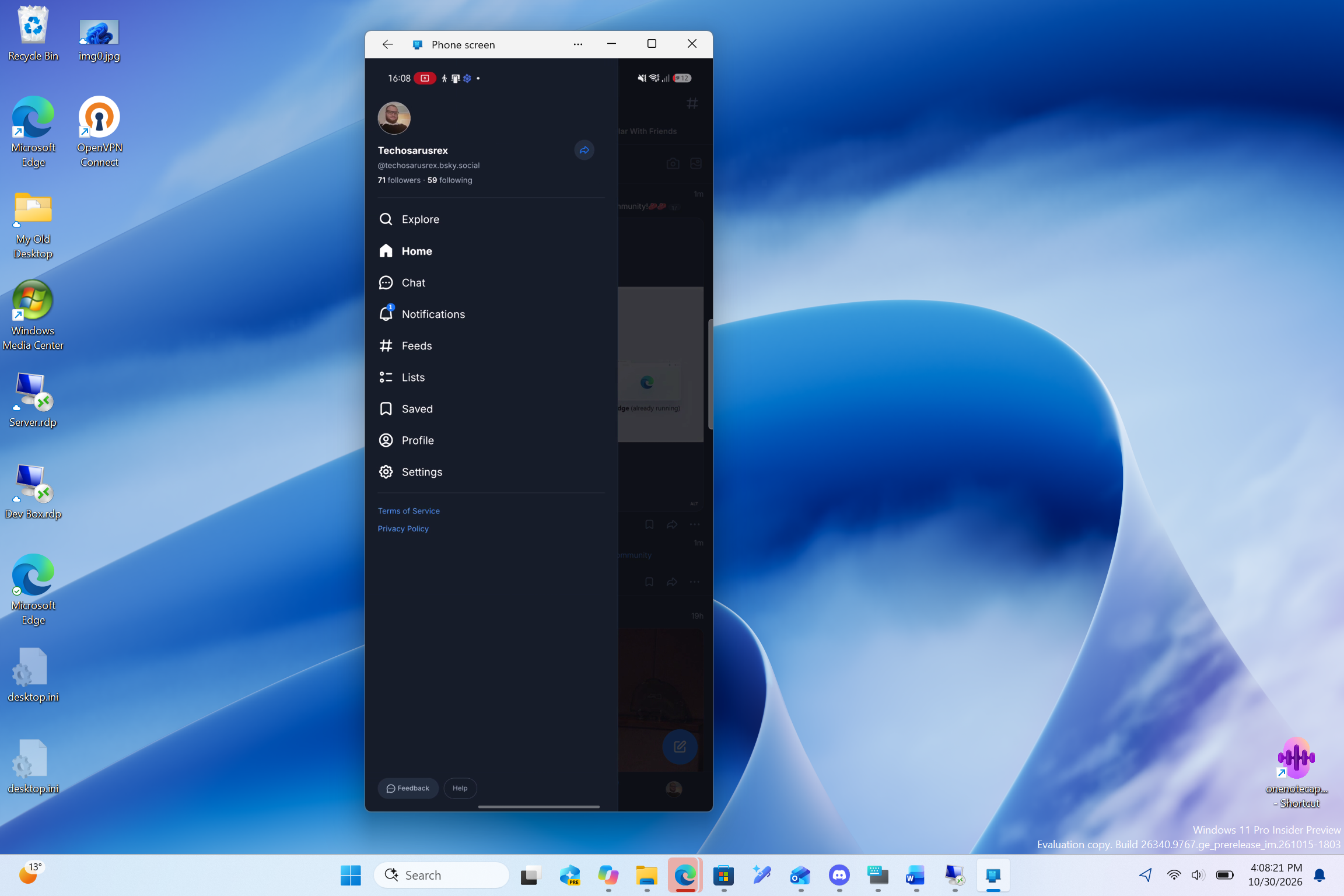
    Clicking Open launched Bluesky on my phone, and a “Phone screen” window from Phone Link appeared on my PC a moment later, showing the app with my phone’s status bar on top.
    Bluesky running on phone and mirrored
    Selecting the result opened Bluesky on my phone and mirrored it to my PC through Phone Link. Credit: Windows Latest

    Just to be clear, Bluesky isn’t installed on Windows. The app keeps running on the phone, and the PC gives it a bigger screen, a keyboard and a mouse. Microsoft killed the Windows Subsystem for Android in March 2025, so streaming from the phone is now the only official way to use Android apps on Windows 11.

    Yes, you could already open supported Android apps in Phone Link, add favorites, pin them to Start or the taskbar, and even run them almost full-screen. Search adds another way in, without creating a shortcut first, and if you usually open apps by typing their name, this feels a lot more natural.

    My test only covered opening the app. I haven’t used it long enough to judge how reliable it is day to day, or if it works with multiple apps.

    Microsoft confirms phone actions in Windows 11 Search

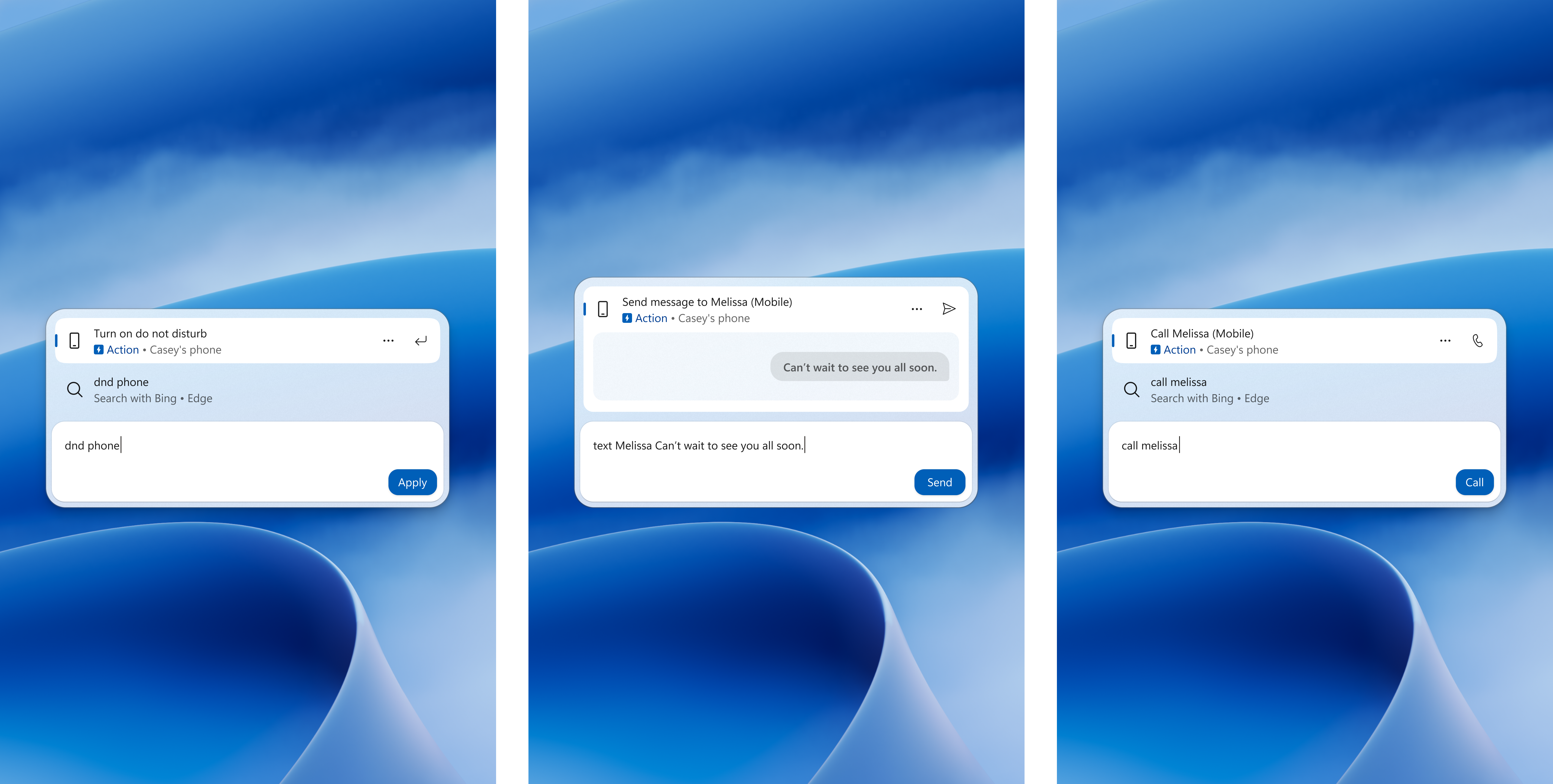
    On October 30, Microsoft released build 26340.9843 with more features for the new Windows Search. “With a supported phone connected through Phone Link, you can now call or text a friend and access phone actions such as Do Not Disturb,”Microsoft says, adding that “Android support is available now with iPhone support coming early next year.”
    Microsoft's screenshot of phone actions in Windows Search.
    Microsoft’s screenshot of phone actions in Windows Search. Image: Microsoft

    In Microsoft’s screenshots, typing “dnd phone,” “text Melissa” or “call Melissa” shows an Action result for the phone with an Apply, Send or Call button. Opening phone apps isn’t shown yet, but it fits right in with these actions and with the phone controls Microsoft is testing in Quick Settings.

    Which Android phones work with apps in Windows Search

    Only some phones that pair with Phone Link can stream apps. According to Microsoft’s Phone Link Apps requirements, you need select Samsung, HONOR, OPPO, ASUS, vivo or Xiaomi phones with Link to Windows preinstalled, running Android 10 or newer, connected to the Wi-Fi network your PC uses. Pairing for calls and messages doesn’t mean app streaming will work.

    The new Search is also rolling out gradually to Insiders, and Microsoft hasn’t said when Phone Actions will reach everyone, let alone my discovery of phone apps shown in Windows Search. Either way, results may differ between setups, so take my test as a first look.

    Android apps killed Microsoft Windows
    Follow on Google News Follow on Flipboard
    Share. Facebook Twitter Pinterest LinkedIn Tumblr Email Copy Link
    myappsplus
    • Website

    Related Posts

    Week 1 early Black Friday Doorbusters, Pixel 11 series up to $350 off, Pixel Watch 5 $100 off, more (All-time lows)

    October 31, 2026

    Nothing’s Android 17 update arrives early for four more phones

    October 31, 2026

    Build Generative UI Apps with A2UI & CopilotKit Agents- Google Developers Blog

    October 31, 2026
    Add A Comment
    Leave A Reply Cancel Reply

    Top Posts

    Cathay Pacific tests Google AI that dramatically cuts airplane contrails — tiny altitude shifts slash environmental impact by 40% in early trials

    September 8, 2026137 Views

    Keep running out of mobile data? This new unlimited plan gets you up to 80Mbps 5G speeds for just AU$50/m

    October 8, 202615 Views

    What was the PSX? The souped-up PS2 rarely sold outside of Japan

    September 14, 202615 Views
    Latest Reviews

    Google’s latest AI weather model gives you no excuse to forget your umbrella

    myappsplusSeptember 3, 2026

    Beyerdynamic is back with affordable Aventho Y wireless headphones — and the 90-hour stamina alone can be my ‘why’

    myappsplusSeptember 3, 2026

    Amazon drops the Razer Huntsman V3 Pro TKL back to its all-time low at $124.99

    myappsplusSeptember 3, 2026
    Stay In Touch
    • Facebook
    • YouTube
    • TikTok
    • WhatsApp
    • Twitter
    • Instagram

    Subscribe to Updates

    Get the latest tech news from FooBar about tech, design and biz.

    Most Popular

    Beyerdynamic is back with affordable Aventho Y wireless headphones — and the 90-hour stamina alone can be my ‘why’

    September 3, 20260 Views

    Amazon drops the Razer Huntsman V3 Pro TKL back to its all-time low at $124.99

    September 3, 20260 Views

    Everything announced during the PlayStation State of Play double header

    September 3, 20260 Views
    Our Picks

    We awarded this RGB TV 4.5 stars and an Editor’s Choice — and it’s 50% off right now

    October 31, 2026

    Fanttik’s recently-released T2 Max cordless soldering iron kit is yours for $80

    October 31, 2026

    Google, Reddit, and more tech stocks plummet: What’s driving market shocks

    October 31, 2026

    Subscribe to Updates

    Subscribe to our newsletter and get the latest tech news, app updates, AI trends, smartphone reviews, and exclusive deals delivered straight to your inbox.

    Facebook X (Twitter) Instagram Pinterest
    • About Us
    • Get In Touch
    • Disclaimer
    • Privacy Policy
    • Terms & Conditions
    © 2026 MyAppsPlus. All Rights Reserved.

    Type above and press Enter to search. Press Esc to cancel.