


Build Generative UI Apps with A2UI & CopilotKit Agents
OCT. 29, 2026
Google A2UI Team
Atai BarkaiCEO at CopilotKit
Agent-User Interactions are now evolving from text exchanges to rich UIs. Until recently, most conversations looked like this:
User: “Find me a holiday package to Bali in March.”
Agent: (six packages in prose, each with dates, hotel, flights, price)
User: “The five-night one with breakfast.”
Agent: “Here’s the link. You can book it on the operator’s site.”
Agents could plan the trip, but everything came back as walls of text. They had no standard way to render a selectable list of packages, a map of the destinations, or a date picker to carry you through the rest of the booking, inside the conversation itself.
Generative UI is the layer that lets agents build interfaces at runtime, shaped by what each request needs – giving users a rich, interactive experience. Implementing that takes two pieces: a way to describe the UI and an agentic stack that connects your agent to your application and renders that UI.
- A2UI (Agent-to-UI) is Google’s framework-agnostic open standard for Generative UI. The agent describes an interface as data, and your application draws it with the components you already have. It’s transport-agnostic by design.
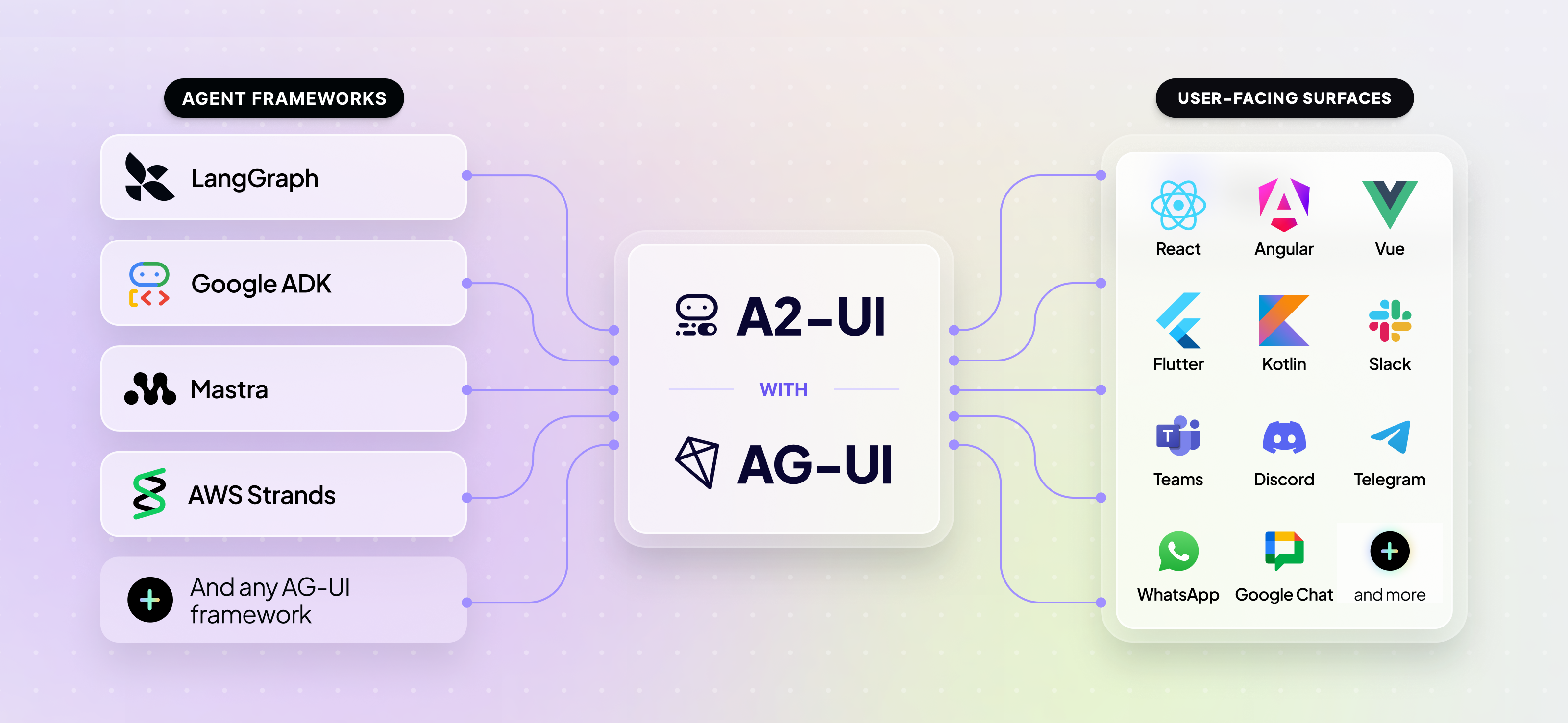
- CopilotKit provides the agent-integration stack to integrate with agent frameworks like “LangChain”, “AWS Strands”, “Google ADK”, etc. for building user-facing agentic apps. It provides a toolkit for building rich applications with A2UI protocol, including the chat surface, runtime, and leverages A2UI renderer, across React and Angular. CopilotKit also provides custom A2UI renderers for Vue and Slack.
What is A2UI?
Generative UI covers a spectrum of approaches, from using predefined higher order components, to enabling your AI agent to have the flexibility to decide how to build the UI.
At the controlled end, you build each component ahead of time, and the agent picks which one to render and with what data. It’s brand-safe but it does not allow for deep customization and personalization based on the user’s intent. At the open end, the agent returns a raw UI program written in HTML, Javascript and/or Dart that renders inside a sandboxed iframe. That covers anything you did not plan for, at the cost of a surface that drifts from your design system and executes code a model wrote.
A2UI works through the entire spectrum. It participates in controlled generation with decision models like Typesafe’s Jev and also open-ended code generation that may output A2UI JSON messages. The declarative mode, where agents assemble pre-declared components and functions, is the most popular. A2UI is the framework-agnostic standard for declaring UI intent, so local or remote agents can generate your UI from your existing component catalog using a common language.
- Security first. A2UI is a declarative data format rather than executable code. The client keeps a catalog of trusted components, so anything the agent invents outside that set is caught before it reaches the screen.
- LLM-friendly and streaming. The payload is a flat list of small JSON messages that reference each other by ID, so the agent emits it incrementally and the client renders components as they arrive.
- Framework-agnostic and portable. The same response renders throughReact, Lit, Angular, SwiftUI, Jetpack Compose (Android) or Flutter (multi-platform), and throughcommunity renderers for Vue, or even the terminal.
Frontend developers can now ship the building blocks once, and the agent composes them for each request.
TheBasic Catalog ships 18 general-purpose primitives across layout, display, input, and containers. The agent can compose entirely different interfaces from the same 18 primitives, depending on what the request needs.
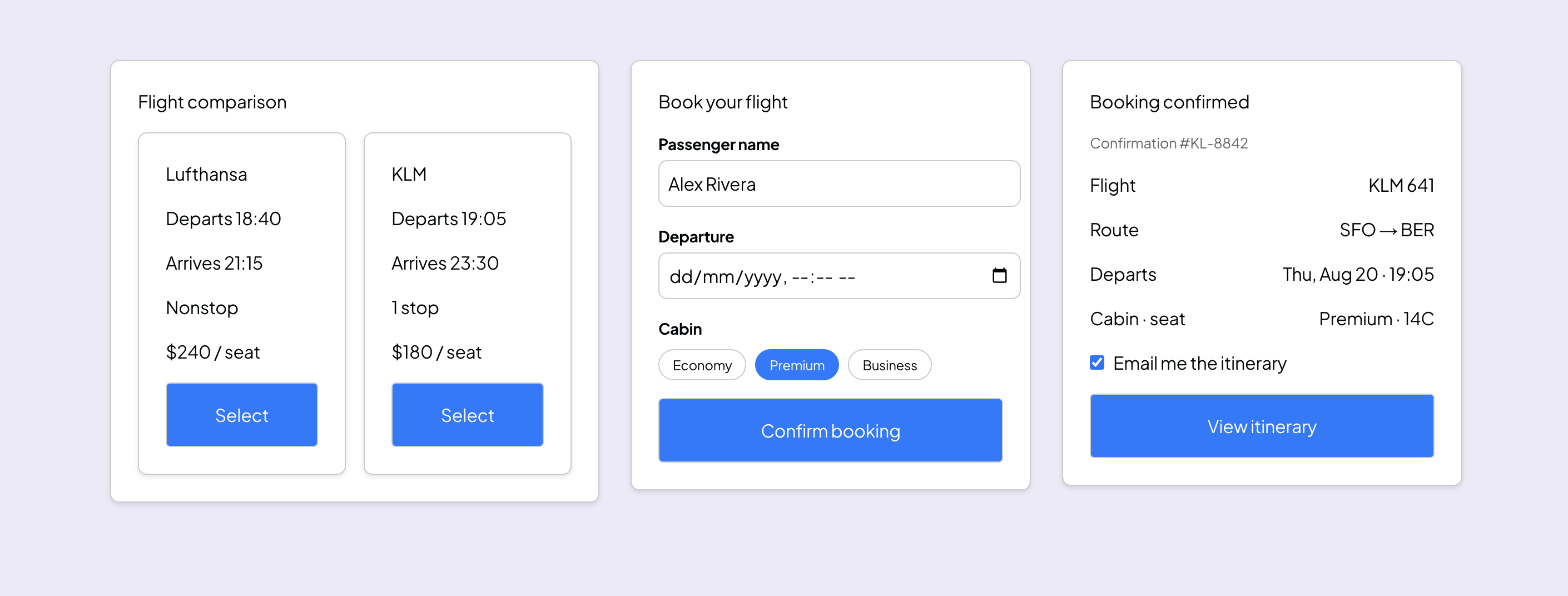
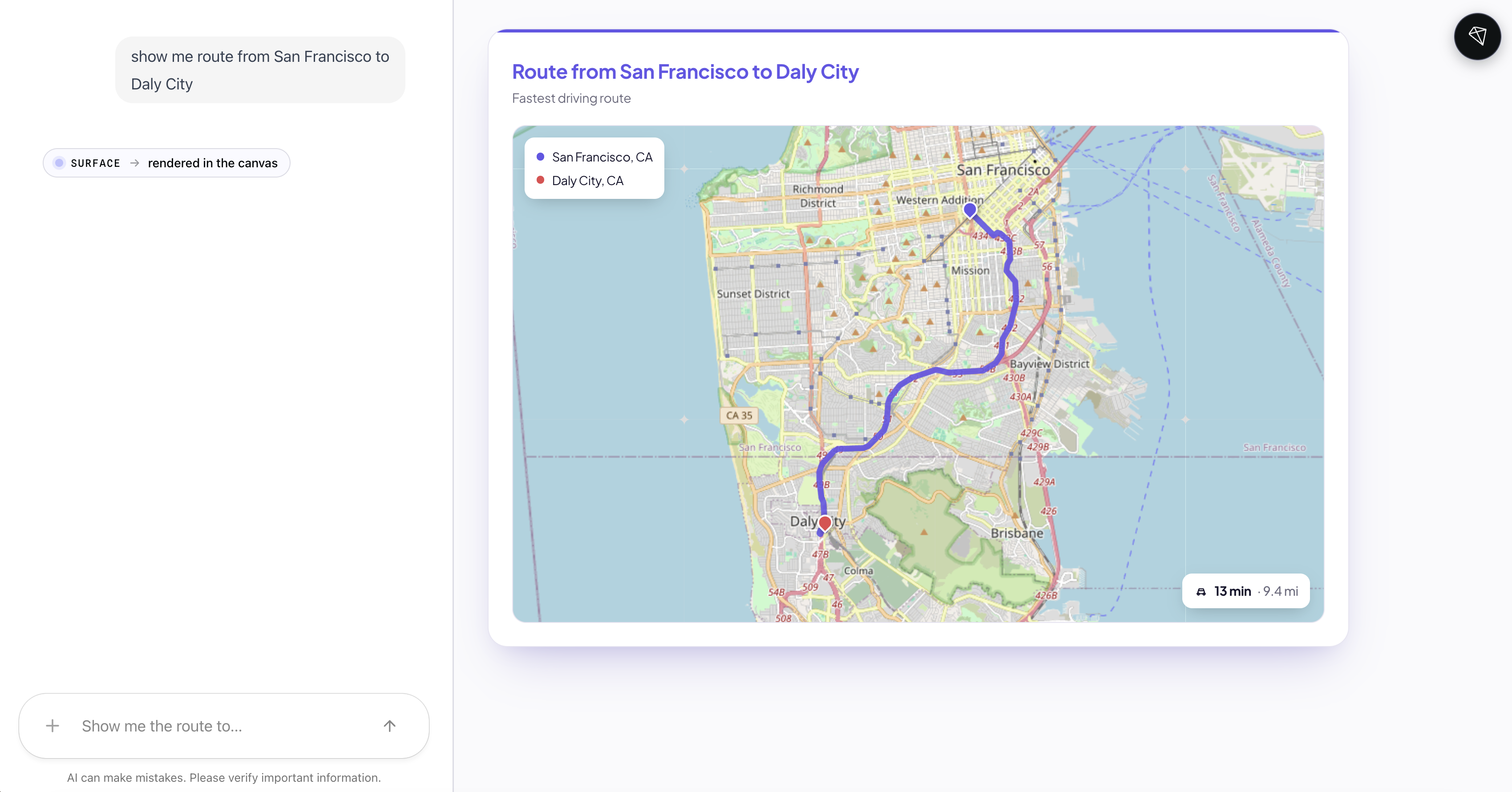
The Basic Catalog is deliberately sparse, so most production appsdefine their own custom catalog. A custom component can be anything your frontend already renders, including a live map the agent fills with coordinates while your renderer draws the route.
How A2UI and CopilotKit work together
CopilotKit is built onAG-UI (Agent-User Interaction Protocol), which supports A2UI payload and provides Agent SDKs across many agentic backends.
Your agent emits A2UI operations. AG-UI carries them to the client as typed events. When the user takes any action, the values are sent back along the same stream.
A2UI works with any AG-UI compatible agent. Frameworks like Google ADK, LangChain, Mastra and Strands are all AG-UI compatible, so the setup is identical whichever one your agent runs on.
Setting up A2UI in your app
Setup comes down to two things: connecting your agent to CopilotKit, and defining which components the agent is allowed to use.
Using Google ADK as the example, the ag_ui_adk package wraps any ADK agent and serves it as an AG-UI endpoint on FastAPI:
from fastapi import FastAPI
from google.adk.agents import LlmAgent
from ag_ui_adk import ADKAgent, add_adk_fastapi_endpoint

root_agent = LlmAgent(
    name="flight_agent",
    model="gemini-3.8-flash",
    instruction="Help users find and book flights. Call generate_a2ui to show results.",
)

adk_agent = ADKAgent(
    adk_agent=root_agent,
    app_name="flights",
    user_id="demo_user",
    use_in_memory_services=True,
)

app = FastAPI()
add_adk_fastapi_endpoint(app, adk_agent, path="/")
On the app side, you register that endpoint with the CopilotKit runtime at /api/copilotkit. It’s a few lines of standard setup, covered in theGoogle ADK quickstart, and it needs nothing A2UI-specific.
A2UI itself turns on from the client, where your components already are. Define what the agent is allowed to draw, map each definition to a renderer, and pass the catalog to the CopilotKit provider.
import { CopilotKit, CopilotChat } from '@copilotkit/react-core/v2';
import {
  createCatalog,
  type CatalogDefinitions,
  type CatalogRenderers,
} from '@copilotkit/a2ui-renderer';
import { z } from 'zod';

const catalogDefinitions = {
  FlightCard: {
    description: 'A flight result with airline, times, and stops.',
    props: z.object({
      airline: z.string(),
      departs: z.string(),
      arrives: z.string(),
      stops: z.number(),
    }),
  },
} satisfies CatalogDefinitions;

const catalogRenderers = {
  FlightCard: MyFlightCard, // your React component
} satisfies CatalogRenderers<typeof catalogDefinitions>;

const catalog = createCatalog(catalogDefinitions, catalogRenderers, {
  catalogId: 'flight-catalog',
  includeBasicCatalog: true,
});

<CopilotKit runtimeUrl="/api/copilotkit" a2ui={{ catalog }}>
  <CopilotChat />
</CopilotKit>
The description goes into the agent’s prompt, so the model knows when to reach for FlightCard instead of a generic card. The Zod schema validates the props it sends back.
The A2UI configuration can be set up ahead of time on the server, or it can be created dynamically, shipped from the client to the server with the request. The ADK code above used dynamic configuration which is why it used generate_a2ui without defining it. Thedocs cover both approaches.
That’s the CopilotKit path. You can also consume the event stream directly with @ag-ui/client and hand the A2UI operations to any compliant renderer:@a2ui/react, or the Flutter, Lit, or Angular equivalent.
Building bi-directional A2UI surfaces
Most agent-generated UI is one-shot. The agent draws something, you read it, and it goes stale the moment anything changes.
A2UI surfaces are bi-directional and the components are reactive, which makes multi-step flows possible. Any action the user takes on the interface (picking dates, choosing a flight, entering passenger details) travels back along the same stream, and the agent re-emits the surface from there using those values.
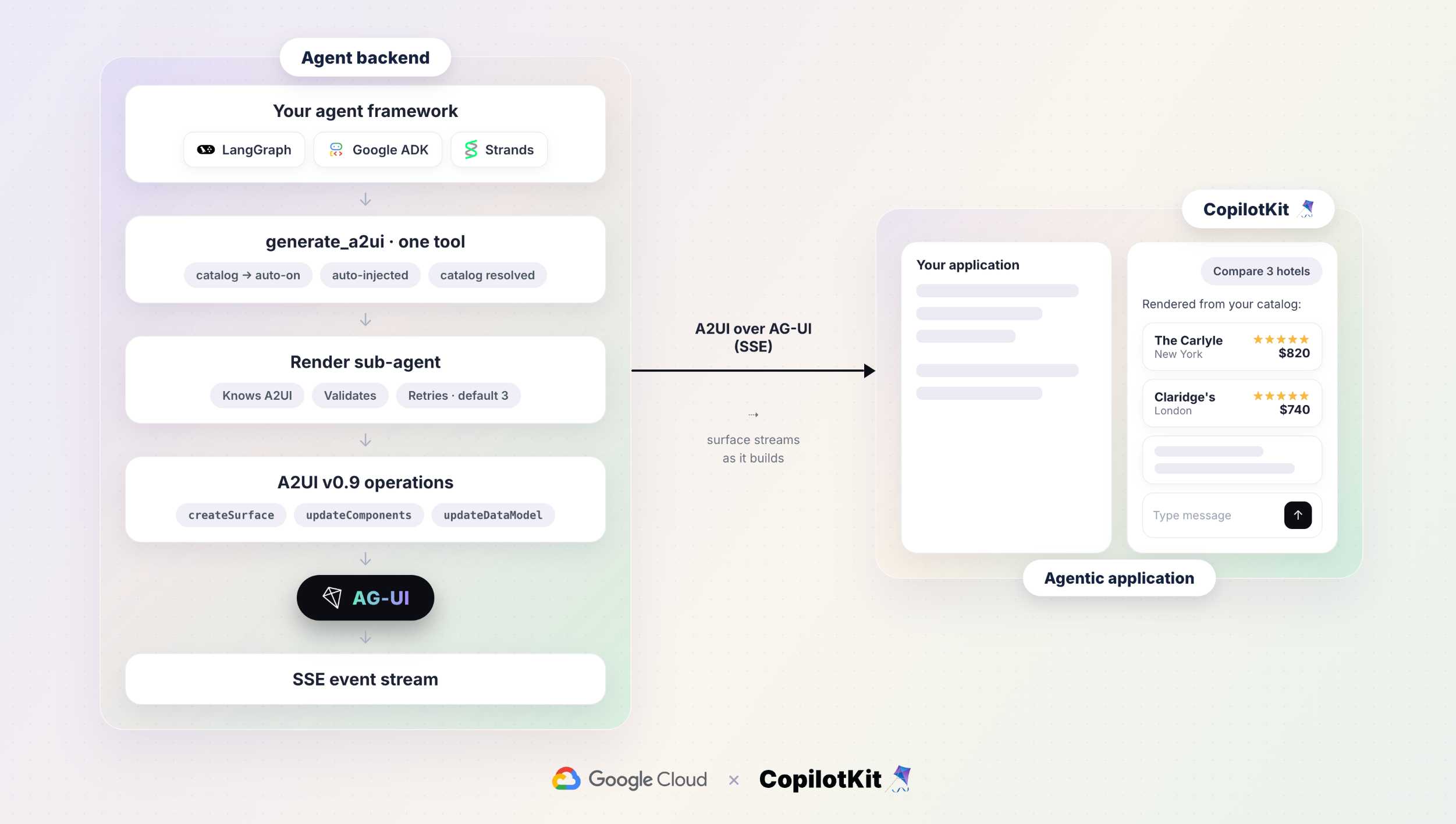
Here is a high-level architecture example of an end-to-end booking flow, with an AG-UI agent on Cloud Run streaming A2UI surfaces to a CopilotKit frontend.
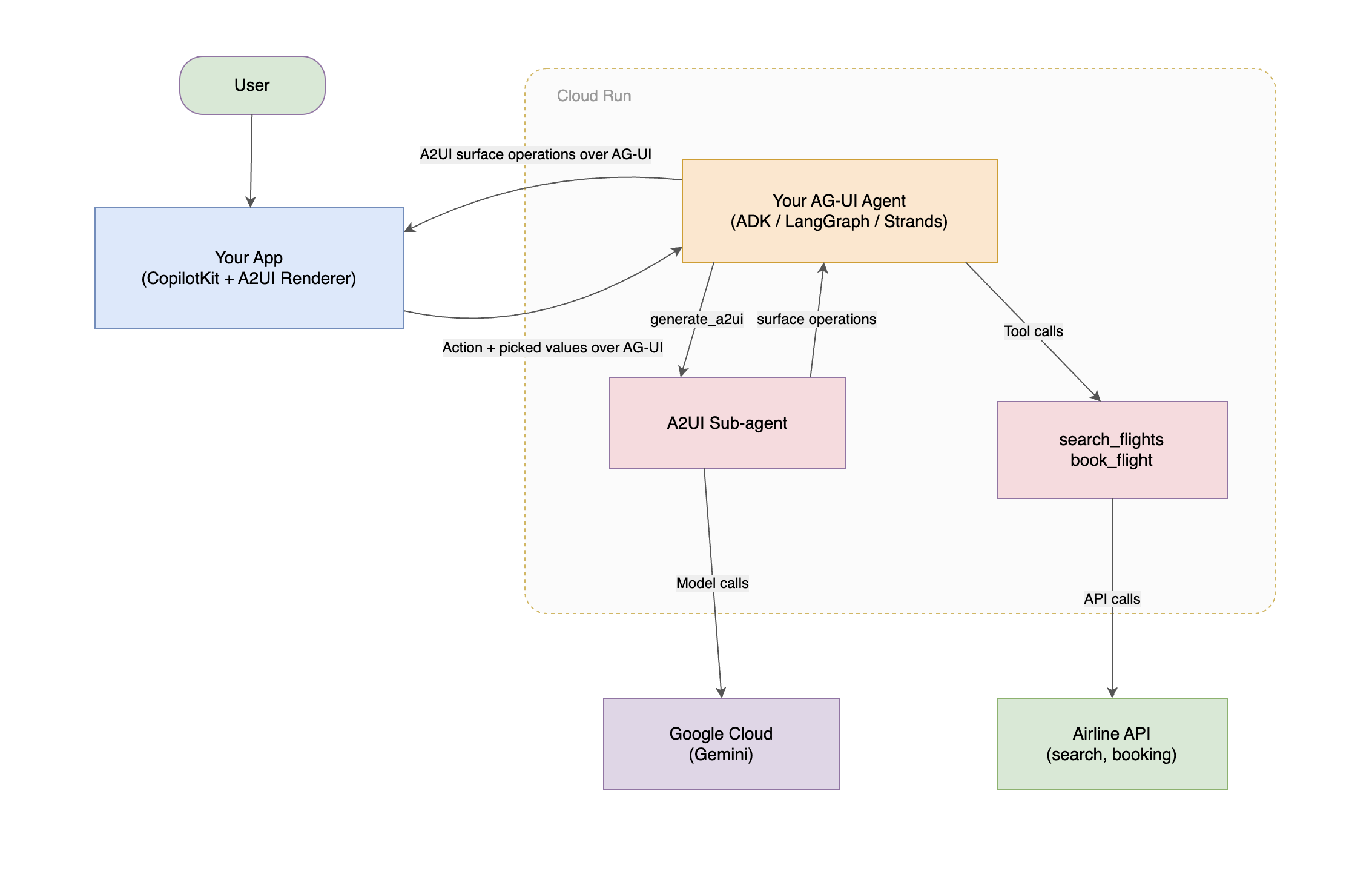
Two things make the round trip work: inputs bound to a data path, and a button carrying an action that names which paths to send back.
{ "id": "cabin", "component": "ChoicePicker", "variant": "mutuallyExclusive",
  "options": [ { "label": "Economy", "value": "eco" },
               { "label": "Business", "value": "biz" } ],
  "value": { "path": "/booking/cabin" } },
{ "id": "confirm", "component": "Button", "child": "confirm_label",
  "action": { "event": { "name": "confirmBooking",
                         "context": { "cabin": { "path": "/booking/cabin" },
                                      "email": { "path": "/booking/email" } } } } }
Validation runs on the client, so a bad email shows an error inline without a model call. Nothing reaches the agent until the button fires.
Then the client sends the bound values, and the agent re-emits against the same surfaceId. That is how the whole flow lives on one surface: flight search, results, passenger details, and confirmation.
Benefits of running A2UI over AG-UI
Every AG-UI integration inherets these benefits, so you don’t have to build them yourself:
- Minimal server-side setup: the catalog reaches the agent on setup, so registering it on the client is all it takes.
- Generation in a dedicated sub-agent: the catalog and protocol rules stay out of your main agent’s context window, and the surface streams to the client as the sub-agent produces it.
- Self-healing output: invalid generations are caught and the specific errors go back for a correction, so nothing broken reaches the screen.
- Graceful failure: when retries are exhausted, the surface resolves to a short message and the conversation continues instead of dying in an error state.
Get Started
Create a complete A2UI + CopilotKit application. This creates a starter A2UI application with Copilotkit Agent integration.
npx copilotkit@latest create --name my-app --framework a2uiTheCopilotKit Dojo has runnable A2UI demos: fixed server-side schema, dynamic schema against a custom catalog, and an error-recovery example where an invalid first render heals into a valid one.
Explore how to build Generative UI Agents with CopilotKit, or dive into A2UI documentation to learn how to integrate A2UI with any framework of your choice.
