Close Menu
MyAppsPlus

    Subscribe to Updates

    Get the latest creative news from FooBar about art, design and business.

    What's Hot

    How Google’s flawed reboot defined future hardware [Video]

    October 31, 2026

    Apple Alerts Stores to iPhone Duo’s Display Cracking Issue

    October 31, 2026

    New license plate reader technology helps recover stolen vehicle on Kaua‘i

    October 31, 2026
    Facebook X (Twitter) Instagram
    Facebook X (Twitter) Instagram
    MyAppsPlusMyAppsPlus
    Saturday, October 31
    • Home
    • Breaking Tech
    • Apps & Software
    • AI & Automation
    • Android
    • iPhone & iOS
    • More
      • Reviews
      • How-To Guides
      • Deals & Discounts
      • Shop
    MyAppsPlus
    Home»Apps & Software»2025.38.14 Official Tesla Release Notes
    Apps & Software

    2025.38.14 Official Tesla Release Notes

    myappsplusBy myappsplusOctober 31, 2026014 Mins Read
    Share Facebook Twitter Pinterest Copy Link LinkedIn Tumblr Email Telegram WhatsApp
    Follow Us
    Google News Flipboard
    2025.38.14 Official Tesla Release Notes
    Share
    Facebook Twitter LinkedIn Pinterest Email Copy Link

    Minor Fixes

    This release contains minor fixes and improvements

    Santa Mode

    Tesla Santa Mode feature in update 2025.38.14

    Available Worldwide
    2026
    Undocumented
    Models:
    New S
    New X
    2026
    Undocumented

    Tesla has added Santa Mode to 2026 Model S and Model X vehicles. These cars use the Unreal Engine and did not include Santa Mode until this update. Santa Mode was noticeably absent from the Toybox, and when users tried to enable the feature through voice commands, the system would say that Santa Mode is not available and will be enabled in a future update.

    New FSD Guide

    Tesla New FSD Guide feature in update 2025.38.14

    Undocumented
    Models:
    S
    3
    X
    Y
    CT
    Undocumented

    When a user activates FSD from the Controls > Autopilot menu, Tesla will now present a one-screen guide that introduces the user to FSD.

    The guide includes the same disclaimer as previous updates and now also includes an image of the steering wheel controls for FSD, letting the user know how to switch FSD Profiles and set the maximum speed (for FSD V13 and below).

    The image used is specific to the vehicle and will either include steering wheel buttons or stalks, depending on the model.

    More Charging Information

    Tesla More Charging Information feature in update 2025.38.14

    Available Worldwide
    Undocumented
    Models:
    New S
    3
    New X
    Y
    CT
    Undocumented

    While a vehicle is charging, Tesla now includes a link for ‘Additional Charging Information’ in the Controls > Charging section. If the vehicle is charging, the link will appear in blue in the top-right corner.

    Tapping the link displays a pop-up containing additional information, such as the maximum and current battery input power.

    Maximum Battery Input Power is the total power the charger can deliver.

    Battery Input Power is the amount of energy that is being actively put into the vehicle’s battery. The battery input power may be less than the maximum charger capability for several reasons, including a high vehicle charge level. The vehicle will also draw power directly from the charger rather than draining the battery if it needs to run the HVAC system, screen, or other components. This reduces battery wear by using energy from the battery, only to have to re-add it.

    Keep Accessory Power On App Control
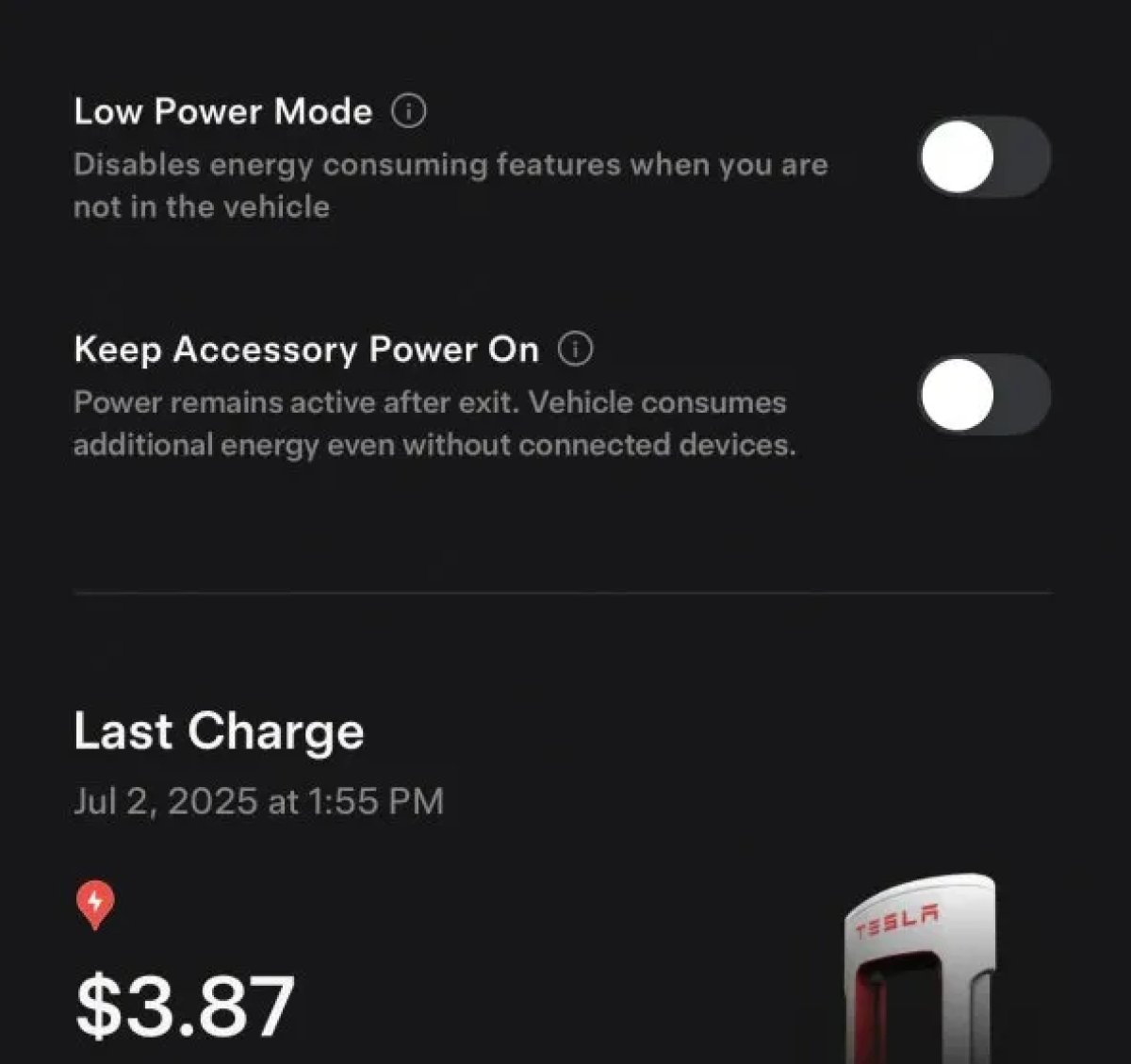
    Tesla Keep Accessory Power On App Control feature in update 2025.38.14

    The 2025.38 vehicle update adds support for the ‘Keep Accessory Power On’ option in the latest Tesla app. This option is part of the latest Tesla app update, which adds the new Charging menu that consolidates most charging options under a single menu.

    It also adds a button for Low Power Mode, instead of just being under Quick Actions.

    Other Features in the Latest Tesla App

    Buy Parts

    Tesla Buy Parts feature in update 2025.38.14

    Tesla has added a Buy Parts button to Tesla’s Service Mode. Tapping the button displays a QR code that takes users to Tesla’s service site, where owners can buy parts directly from Tesla.

    Parts can be shipped directly to the customer or to the nearest service center.

    Charger Visualization

    Tesla Charger Visualization feature in update 2025.38.14

    Tesla has added a visualization of a charger when the vehicle is parked and plugged in. In this photo, the owner is using a non-Tesla charger, so a generic charger is displayed. Tesla will presumably display a mobile charger, Wall Connector, or Supercharger if those are plugged into the vehicle.

    Service Mode Improvements

    Tesla Service Mode Improvements feature in update 2025.38.14

    New Trunk Panel

    A new Trunk panel with an overview of the liftgate status, latch status, and calibration status for the trunk is now available. The panel also provides additional information, such as the request

    Models: ModelS (2021+), Model 3, Model X (2021+), Model Y

    New Front Trunk Panel

    Cameras Panel Update – Mismatched Firmware Detection

    In the Cameras panel, detection for when Driver Assistance System (DAS) Hardware 4 (HW4) cameras have mismatched firmware versions has been added.

    If a DAS HW4 camera with mismatched firmware is detected, touch the Update Camera button to initiate a camera firmware update.

    Models: ModelS (2021+), Model 3, Model X (2021+), Model Y, Cybertruck

    Brakes Panel Update – ESP Stiffness Test Routine Changes

    In the Electronic Stability Program (ESP) replacement panel, the routine TEST-BRAKE_CORNER_STIFFNESS-TEST has been replaced with TEST_BRAKE_X_STIFFNESS-TEST-SERVICE.

    Models: Model 3(2017-2023), Model Y (2020-2024)

    20253814 Notes Official Release Tesla
    Follow on Google News Follow on Flipboard
    Share. Facebook Twitter Pinterest LinkedIn Tumblr Email Copy Link
    myappsplus
    • Website

    Related Posts

    Bose’s new QuietComfort Ultra Headphones hit Prime Day low again

    October 31, 2026

    Kindle’s latest software update introduces useful feature

    October 31, 2026

    YouTube bug keeps kicking viewers out of full screen and killing audio

    October 31, 2026
    Add A Comment
    Leave A Reply Cancel Reply

    Top Posts

    Cathay Pacific tests Google AI that dramatically cuts airplane contrails — tiny altitude shifts slash environmental impact by 40% in early trials

    September 8, 2026137 Views

    Keep running out of mobile data? This new unlimited plan gets you up to 80Mbps 5G speeds for just AU$50/m

    October 8, 202615 Views

    What was the PSX? The souped-up PS2 rarely sold outside of Japan

    September 14, 202615 Views
    Latest Reviews

    How to watch ‘The Gentlemen’ season 2 online — stream the hit crime-thriller series from anywhere

    myappsplusSeptember 3, 2026

    Xiaomi’s new passport-style foldable looks shorter and wider than the Galaxy Z Fold 8

    myappsplusSeptember 3, 2026

    Get 1TB of lifetime cloud storage for just $200

    myappsplusSeptember 3, 2026
    Stay In Touch
    • Facebook
    • YouTube
    • TikTok
    • WhatsApp
    • Twitter
    • Instagram

    Subscribe to Updates

    Get the latest tech news from FooBar about tech, design and biz.

    Most Popular

    Anker unveils new Sleep Earbuds 4 Pro with onboard touchscreen and Adaptive Snore Masking at IFA

    September 3, 20260 Views

    Sennheiser Momentum True Wireless 5 review: A significant upgrade at the same price

    September 3, 20260 Views

    Case company shows possible shades in product photos

    September 3, 20260 Views
    Our Picks

    How Google’s flawed reboot defined future hardware [Video]

    October 31, 2026

    Apple Alerts Stores to iPhone Duo’s Display Cracking Issue

    October 31, 2026

    New license plate reader technology helps recover stolen vehicle on Kaua‘i

    October 31, 2026

    Subscribe to Updates

    Subscribe to our newsletter and get the latest tech news, app updates, AI trends, smartphone reviews, and exclusive deals delivered straight to your inbox.

    Facebook X (Twitter) Instagram Pinterest
    • About Us
    • Get In Touch
    • Disclaimer
    • Privacy Policy
    • Terms & Conditions
    © 2026 MyAppsPlus. All Rights Reserved.

    Type above and press Enter to search. Press Esc to cancel.