

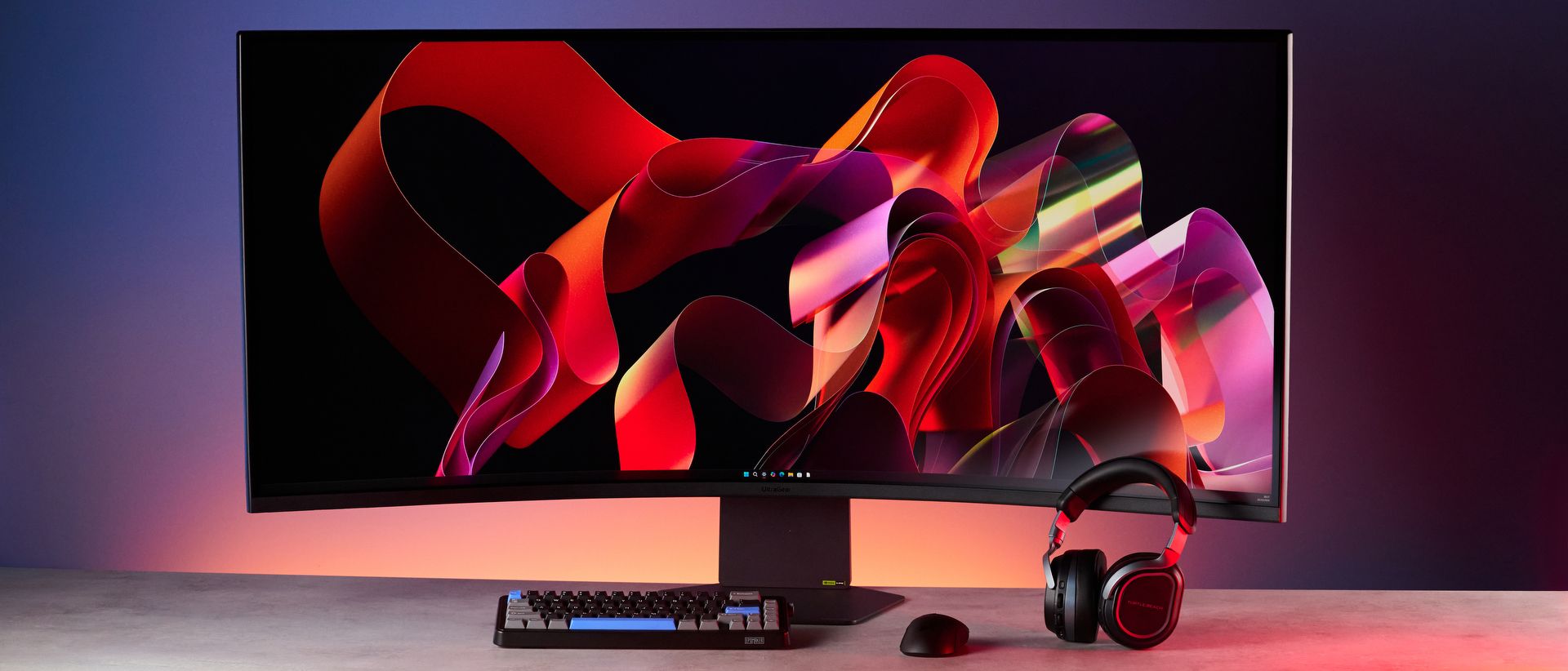
Oh. My. Goodness. This thing is large.The LG UltraGear 52G930B is a massive 52-inch gaming monitor that makes you feel like you’re the main character in your favorite games. With its 5K2K resolution, excellent color coverage and accuracy, and strong SDR performance, it delivers beautiful visuals. Thanks to its 240Hz refresh rate and 1ms response time, the 52G930B doesn’t give you much to complain about.
But it does have a couple of shortcomings. While its VA LCD panel is detailed, it doesn’t deliver the inky blacks I’ve come to love on OLED panels. It’s also very expensive, priced at nearly $2,000. Oh, and you should forgo getting it if you’re short on space.
Could this still be the best curved monitor for you? Read my full LG UltraGear 52G930B review to find out.
LG UltraGear 52G930B review: Cheat sheet
- What is it?A 52-inch 5K2K curved gaming monitor with a 240Hz refresh rate and 1ms response time
- Who is it for?Gamers who want the ultimate immersive experience… and have a lot of space
- How much does it cost?$1,697 / £1,599
- What do we like?The massive 52-inch panel, good SDR brightness, strong color coverage and accuracy, and gaming performance
- What don’t we like?The non-OLED panel and premium price point
LG UltraGear 52G930B review: Specs
|
Power, 2x HDMI 2.1, 1x DisplayPort 2.1, 1x USB-C (upstream, DisplayPort 1.4 Alt Mode, 90W PD), 2x USB-A, 1x 3.5mm jack |
|
|
46.3 x 28.1 x 13.8 inches (with stand) |
|
LG UltraGear 52G930B review: The ups
There’s a lot to love about the LG UltraGear 52G930B: excellent color coverage and accuracy, strong SDR performance, and a massive 52-inch panel for immersive gaming. Throw in a 240Hz refresh rate and 1ms response time and you’ve got yourself a winner.
So much screen real estate
As the numbers in its name suggest, the LG UltraGear 52G930B is a 52-inch mammoth — it’s only a touch smaller than my 55-inch TV! You’re getting a lot of real estate here. The 52G930B is a curved monitor with a massive VA LCD panel that has a 5120 x 2160 (5K2K) resolution.
At the time of writing, it’s the world’s largest 5K2K 240Hz gaming monitor — and it’s definitely the biggest monitor I’ve ever tested. I think of other curved monitors, like the MSI MPG 341CQR QD-OLED X36 ($949) and the Dell Pro P3426WEV ($749), and all of a sudden, they feel really small.
Naturally, the 52G930B isn’t designed for small spaces, as it measures 46.3 x 28.1 x 13.8 inches (with stand). It also weighs a lot, at 37.03lbs, so you might struggle to pick it up all by yourself. I’ll whine about that in “The Downs” section below.
Back to the good things for now. Thanks to its large panel, the 52G930B delivers a truly immersive gaming and viewing experience. The 1000R curve pulls the screen’s outer edges towards you, bringing the panel into your natural field of view.
Even though I had to move my head slightly to see, say, mission objectives in Cyberpunk 2077, it never became annoying or, more importantly, fatiguing. The 52G930B, then, feels very manageable, and anytime I used it, I felt enveloped in the colors and visuals.
Just the right number of ports
The LG UltraGear 52G930B is a well-endowed monitor, packing enough ports for nearly all of your needs. They’re all located on the back and LG happily includes a plastic clip-on cover if you want to hide them or protect them from dust.
These include a power port (of course), two HDMI 2.1, one DisplayPort 2.1, two USB-A ports for hooking up peripherals, and a 3.5mm jack for plugging in headsets or a mic. This level of connectivity is par for the course for gaming monitors, and is similar to what you’ll find on the MSI MPG 341CQR QD-OLED X36 and the Alienware AW3926DW ($1,099).
You also get a USB-C DisplayPort Alt Mode upstream port with 90W of power delivery. What “DisplayPort Alt Mode” essentially means is that it enables the USB-C port to receive video signals using the DisplayPort protocol.
You get higher data bandwidth, and you can even daisy-chain multiple monitors from a single port — handy for cable management as well as routing graphics through a docking stationutions and refresh rates. I’ve seen this on the Dell UltraSharp U3226Q ($2,499) before but not on a gaming monitor
A bright panel
When I used the OSD (On-Screen Display) on the LG UltraGear 52G930B to push its brightness to the max, I flinched because of just how bright the monitor got — and my lab testing all but confirmed what my eyes were seeing.
|
Peak brightness (10% window size, HDR) |
||
|---|---|---|
|
Lenovo Legion Pro 34WD-10 OLED |
||
As you can see in the table above, the 52G930B reached a peak brightness of 415 nits in SDR mode, outclassing nearly all of its competitors. The MSI MPG 341CQR QD-OLED X36 (280.2 nits), the Alienware AW3926DW (243 nits) and the Lenovo Legion Pro 34WD-10 OLED ($1,199, 266 nits) all pale in comparison. These are OLED panels, though, and they don’t get nearly as bright as non-OLED ones.
The 52G930B is upstaged by the Samsung Odyssey Neo G9 ($2,499) and its 619 nits in SDR, but the monitor also costs a lot more than LG’s offering. I’d advise against using any of these monitors with their brightness turned all the way up anyway, so there isn’t much in it.
Frustratingly, though, the 52G930B struggles in its HDR mode, achieving only 252 nits on 10% of the display. Many of its chief rivals — barring the Lenovo Legion Pro 34WD-10 OLED — perform better in this area, if that is of concern to you.
Commendable gaming performance
Let’s talk about the main event now. The LG UltraGear 52G930B is, first and foremost, a gaming monitor — and it’s a beast. Its native 5K2K resolution is beautiful in every sense of the word, though you’ll need a high-end graphics card, like RTX 4090, to drive it.
Packing a 240Hz refresh rate, the 52G930B ensures you don’t experience any choppiness during fast-paced games. The smooth, blur-free performance is outstanding, really. It also features a 1ms response time to negate motion blur and ghosting. Some OLED monitors, like the MSI MPG 341CQR QD-OLED X36 and the Alienware AW3926DW, feature low 0.03ms response times (on account of featuring OLED panels), but the 52G930B should be fast enough for most casual gamers.
That all sounds great on paper, and it’s even better in real-world use. I played Cyberpunk 2077, Forza Horizon 5 and Final Fantasy VII: Crisis Core Reunion, and was highly impressed with the 52G930B’s performance. The 240Hz refresh rate resulted in a buttery smooth experience across all three games, and as promised by the 1ms response time, I didn’t experience any ghosting.
The visuals are stunning, too. Even though FFVII: Crisis Core Reunion doesn’t natively support an ultrawide resolution, the 16:9 aspect ratio it occupied on the mahoosive 52-inch panel still looked incredible. The black bars didn’t really deter from the viewing experience. Watching cutscenes in FFVII: Crisis Core Reunion and Cyberpunk 2077 felt like watching a movie.
The 52G930B’s visual performance is further bolstered by outstanding color coverage. In my lab tests, the monitor covered 161.3% of the sRGB color space and 114.2% of the wider DCI P3 gamut. This is similar to what you get with the MSI MPG 341CQR QD-OLED X36.
100% coverage is what we’re always looking for, so the 52G930B goes above and beyond. Colors on the 52G930B appear bold but balanced. Blues and reds look rich while greens appear vivid. Blacks are dark but they aren’t as inky as you’d expect on an OLED panel. There’s no oversaturation either, which you sometimes get with monitors that cover nearly 200% of the color gamuts.
Strong color accuracy, too
In addition to outstanding color coverage, the LG UltraGear 52G930B boasts strong color accuracy, too. Color accuracy is represented by Delta-E, a numerical representation of how much two colors differ, and how close the color relayed on screen (i.e. the monitor) is to the color output from the. You want this score to be as close to zero as possible, as that means the colors are extremely accurate
My lab tests showed that the 52G930B has a Delta-E score of 0.06, which is excellent. The monitor trumps most of its competitors, as you can see from the table above. I can confirm that the colors on the monitor appeared exactly how they looked on my testing laptop.
This gave me confidence to edit photos for my Instagram photography account. This is a gaming monitor, though, and I’d recommend a monitor like the Dell UltraSharp U3226Q if you want productivity-specific features.
LG UltraGear 52G930B review: The downs
There are two things that may deter you from buying the LG UltraGear 52G930B: it doesn’t feature an OLED panel, and it’s quite expensive. Oh, and it isn’t designed for small spaces either.
Not for small spaces
“Man, I really need to start working out more.” Nothing has humbled me more than when I was dragging the LG UltraGear 52G930B’s box across the floor. What I’m about to say isn’t a dealbreaker, but a pre-purchase consideration, especially if you’re short on space.
In its box, the 52G930B is gigantic. Take it out (or at least struggle to) and you realize just how mahoosive and heavy this thing is. If you live on your own, you might want to ask a friend to pop over and help you assemble it.
As I mentioned before, with the stand attached, the 52G930B weighs a whopping 37.03 pounds or 16.8 kilograms. That sounds like a lot on paper and you’re right: it’s a lot. Don’t try lifting it on your own lest you actively want to pull your back.
Of course, when LG offered me the 52G930B for review, the “52” in the name should have been a dead giveaway about the weight and size — but even so, I was stumped, as was our studio photographer. My 55-inch TCL C6K television is lighter than the 52G930B monitor, weighing 24.9 pounds which feels featherlight in comparison. Good lord, this thing is a lot.
Not OLED
Even though the LG UltraGear 52G930B boasts powerful performance and gorgeous colors, it features a VA (Vertical Alignment) LCD panel and not an OLED one. OLED panels deliver superior picture quality, infinite contrast, and instant response times, while VA LCD ones prioritize higher sustained brightness and zero risk of screen burn-in.
This might be a dealbreaker for some users, especially given how much the 52G930B costs. If you inky blacks and a response time that’s faster than the 52G930B’s 1ms speed, I’d recommend the MSI MPG 341CQR QD-OLED X36, the Alienware AW3926DW, or the Lenovo Legion Pro 34WD-10 OLED instead.
Expensive
Given that the LG UltraGear 52G930B doesn’t feature an OLED panel (or the strongest HDR performance), it feels a little overpriced. It has a retail price of $1,697 at Amazon U.S. / £1,599 at Currys U.K., so it’s priced similarly to the Samsung Odyssey OLED G9 ($1,799). That’s a lot of dough for a VA LCD monitor.
As I mentioned earlier, you’d be better off with the likes of the MSI MPG 341CQR QD-OLED X36 ($949) or the Alienware AW3926DW ($1,099) instead — though you won’t get as much screen real estate as the 52G930B. The good news is that the 52G930B is at least cheaper than the Samsung Odyssey Neo G9 ($2,499) and the Dell UltraSharp U3226Q ($2,499), even though they don’t pack OLED panels either.
LG UltraGear 52G930B review: Verdict
Though it’s heavy and unwieldy, the LG UltraGear 52G930B massive 52-inch curved panel with its 1000R curvature puts you right in the heat of the action. A 5K2K resolution along with outstanding color coverage and accuracy, as well as strong SDR performance, delivers gorgeous visuals. You also get a 240Hz refresh rate and 1ms response time for buttery smooth gaming performance.
But you should only get the 52G930B if you have a large desk as it takes up a lot of space, and it’s quite heavy for the average person (or me, at least) to lift on their own. It doesn’t feature an OLED panel either, which many cheaper monitors do. Speaking of, it isn’t for the budget-conscious buyer as it retails for $1,700.
If none of those things bother you, then the 52G930B could be great for you. It isn’t perfect, but my goodness, it’s the most immersed I’ve felt when playing games like Cyberpunk 2077.
