

Roku’s streamlined interface has long been my favorite way to watch content. I still use a Roku TV today, and I haven’t made any plans to change that. But I have to admit Amazon’s new Fire TV Stick 4K has given me more than a few reasons to reconsider.
The Fire TV Stick 4K replaces both the 4K Select and 4K Plus streamers, and it’s Amazon’s first 4K device to run its new Vega OS instead of the Android-based Fire OS. The new stick also has a slimmer body, can use USB power from your TV, and comes with a redesigned remote.
While it has downsides, including no Dolby Vision support or Android app sideloading, the Fire TV Stick 4K is still a fast, affordable way to bring a sluggish smart TV back to life, making it a real contender among the best streaming devices.
Amazon Fire TV Stick 4K review: Price and availability
Max resolution:4K
Supported video:HDR10, HDR10+, HLG
Supported audio:Dolby-encoded audio (HDMI pass-through)
Storage: 8GB
Wi-Fi:Wi-Fi 6
Cloud gaming:Amazon Luna, Xbox Game Pass, NVIDIA GeForce NOW (coming soon)
Amazon announced the Fire TV Stick 4K on September 30, 2026. It has a list price of $59.99, which sits between the cheaper Fire TV Stick HD ($19.99) and the more powerful Fire TV Stick 4K Max ($84.99). It replaces the 4K Select and the 4K Plus, both of which are being phased out.
Amazon launched the stick with a $29.99 introductory deal that ran during October’s Prime Day sale. The company often discounts its own hardware during sales, so you can probably find it cheap if you wait until Black Friday or a future Prime Day event.
Keep in mind that the sticker price doesn’t cover everything. There’s no power adapter or HDMI extender in the box, so if your TV doesn’t have a USB port, you’ll need to buy some accessories to make it compatible.
Amazon Fire TV Stick 4K review: Design
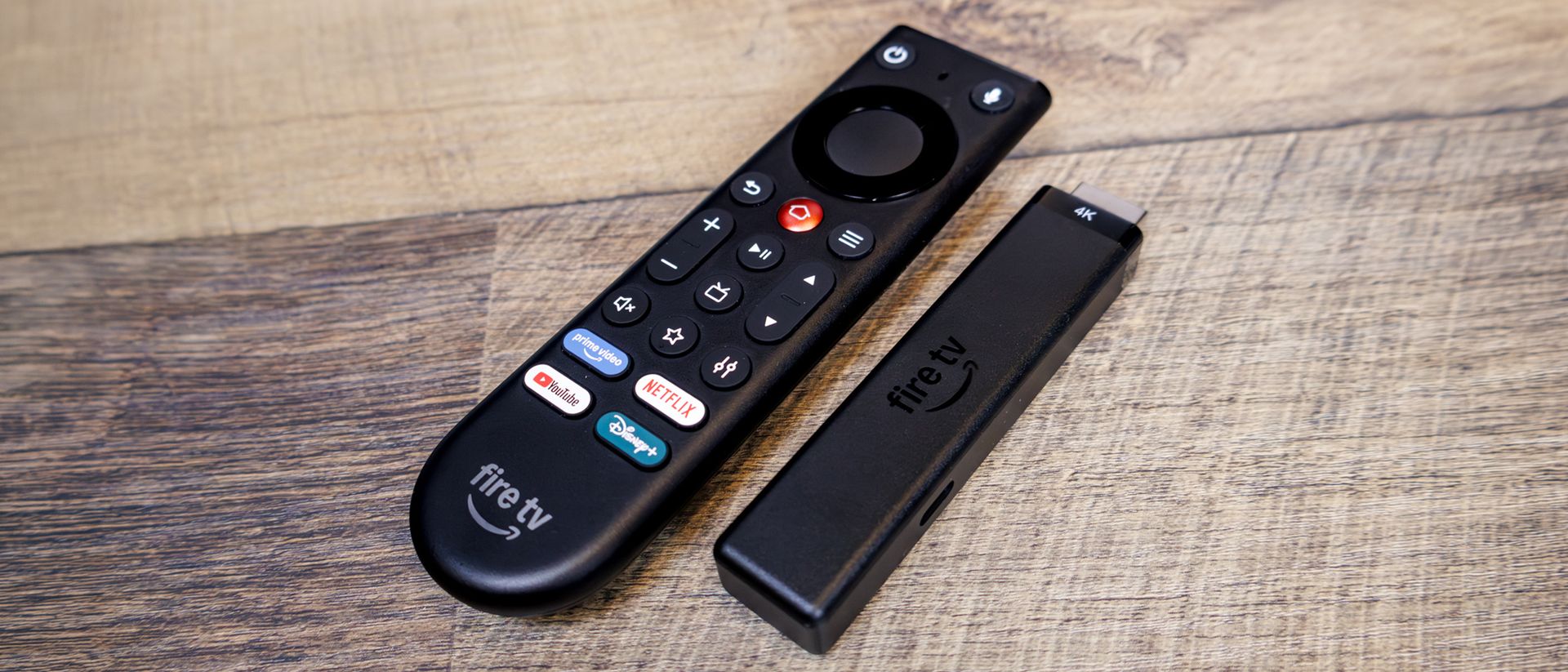
The Fire TV Stick 4K is noticeably slimmer than its predecessors, so it’s easier to squeeze in next to your other various input cables. The biggest change to the stick itself is “Direct Power,” which makes it the first 4K Fire TV Stick that can be powered by your TV’s own USB port rather than an outlet. To me, cutting down on cables is always a welcome change.
The new remote is the real star, though. It’s a full redesign with a flat top and curved bottom, and features a metal Home button that’s easier to find by touch. A new customizable star button opens Prime Video by default, but can launch any app you assign to it. It’ll also control your TV’s power and volume controls, so you won’t need to keep your old remote around.
Amazon Fire TV Stick 4K review: Setup
Setup is about as painless as it gets. Just plug the USB-C cable into the stick, plug the stick into your TV’s HDMI port, connect the other end of the cable to your TV’s USB port, and drop the two included AAA batteries into the remote. Then connect to Wi-Fi, sign in to your Amazon account, and you’re ready to stream.
Older Fire Sticks that ran Fire OS could sideload third-party Android apps, but because the new stick runs Vega OS, you can only install apps from the Amazon app store. Amazon says it has added more than 2,000 apps since Vega launched, including Spotify, Xbox, and VLC, plus Netflix, Disney+, YouTube, Prime Video, HBO Max, Peacock, and more. Your mileage may vary if you rely on a niche app, so check that your must-haves are available before you buy.
Amazon Fire TV Stick 4K review: Performance
The Fire TV Stick 4K has a quad-core 1.7GHz processor, 1GB of RAM, and 8GB of storage. It supports 4K at up to 60 frames per second with HDR10, HDR10+, and HLG, plus Wi-Fi 6. Dolby Atmos works through HDMI pass-through, so you’ll need a compatible soundbar or receiver to get the best-sounding audio.
The new Vega OS experience is smoother, faster, and more intuitive than the old Fire OS. The home screen and menus felt responsive, and all my apps launched quickly without any hitches. Amazon claims that the stick is 20 to 40 percent faster than a similarly priced competing streaming stick, but it doesn’t say which one, so I’d take that with a grain of salt (although you can probably guess which one they’re talking about).
Alexa+ is another highlight. It’s included for free with the Fire TV Stick 4K, and handled all of my requests well. You can ask for a top-rated drama film, then follow up by asking for newer releases, and Alexa+ will narrow your choices down for you. It can also answer questions about what you’re watching, and even move Prime Video content to another Fire TV in your home if you have one.
I’m also a fan of the stick’s Bluetooth headphone pairing feature for late-night viewing.
There are some drawbacks, though. While the home screen is easy to navigate, recommendations and sponsored content take up a big chunk, which got old fast. Also, it lacks Dolby Vision support. This is the first 4K Fire Stick without this feature, so if you’ve got a high-end OLED and want the best possible picture from Netflix and Disney+, you’ll be stuck with HDR10+ or HDR10. If you desperately want Dolby Vision, you’ll have to get either the Fire Stick 4K Max or a Fire TV Cube.
Amazon Fire TV Stick 4K review: Verdict
The Amazon Fire TV Stick 4K is a fast, intuitive, and affordable streaming stick that’s an excellent fix for a slow or outdated smart TV. The new remote is a massive improvement; the slim design and USB power make setup easy, Alexa+ is a nice bonus, and Vega OS feels snappy. You’ll be giving up Dolby Vision and Android app sideloading, and you might spend a little extra on accessories depending on your setup, but for the price, I think it’s a great deal.
If you’re looking for an alternative pick, the closest match is Amazon’s own Fire TV Stick 4K Max. It still runs Fire OS, so you can sideload apps, supports Dolby Vision, and is more powerful overall. But it costs $25 more, and you won’t get the new remote, so it’s up to you to decide if the trade-off is worth it. If you care more about a clean, ad-light interface rather than price, I suggest the Roku Streaming Stick Plus.
All in all, if you want to stream in 4K without spending much, the Fire TV Stick 4K is a great pick, even with its few shortcomings.
