Close Menu
MyAppsPlus

    Subscribe to Updates

    Get the latest creative news from FooBar about art, design and business.

    What's Hot

    The best apps for tracking your reading and discovering new books

    October 26, 2026

    Don’t pre-order the Zelda Switch 2 before seeing this Currys price

    October 26, 2026

    NYT Strands hints and answers for Monday, October 26 (game #967)

    October 26, 2026
    Facebook X (Twitter) Instagram
    Facebook X (Twitter) Instagram
    MyAppsPlusMyAppsPlus
    Monday, October 26
    • Home
    • Breaking Tech
    • Apps & Software
    • AI & Automation
    • Android
    • iPhone & iOS
    • More
      • Reviews
      • How-To Guides
      • Deals & Discounts
      • Shop
    MyAppsPlus
    Home»iPhone & iOS»Adjust iPhone Duo’s Outer Display to Accommodate Your Case
    iPhone & iOS

    Adjust iPhone Duo’s Outer Display to Accommodate Your Case

    myappsplusBy myappsplusOctober 25, 2026002 Mins Read
    Share Facebook Twitter Pinterest Copy Link LinkedIn Tumblr Email Telegram WhatsApp
    Follow Us
    Google News Flipboard
    Adjust iPhone Duo’s Outer Display to Accommodate Your Case
    Share
    Facebook Twitter LinkedIn Pinterest Email Copy Link

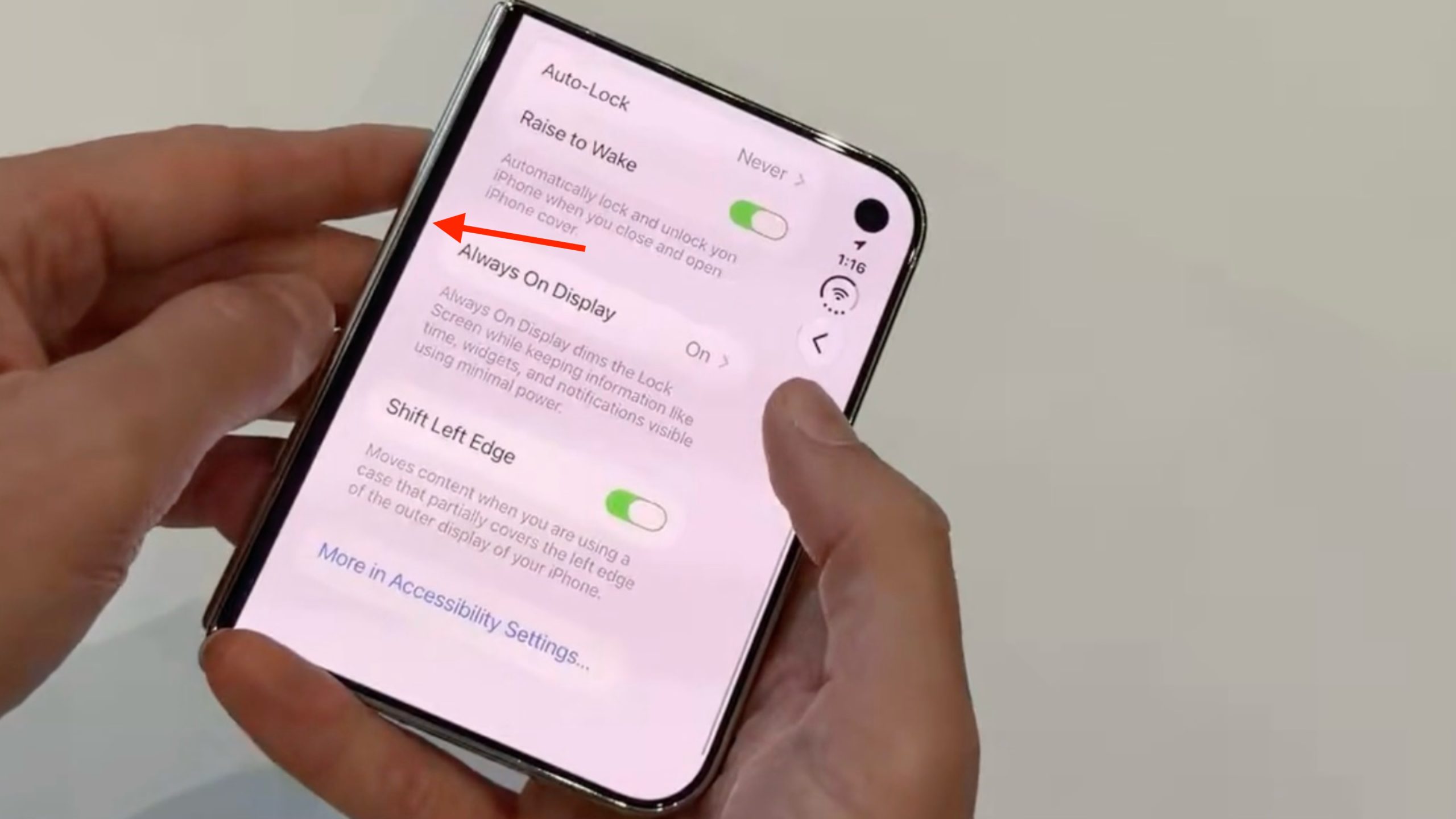
    On iPhone Duo, Apple includes a display setting for cases or frames that partially cover the left edge of the outer display. It’s called Shift Left Edge, and it insets the display edge so that on-screen content isn’t hidden beneath the case.

    We first covered the setting in September, and Apple has since documented it, revealing that when you fit Apple’s official iPhone Duo Case, a prompt automatically appears on the display to direct you to the setting. However, you can also turn it on manually at any time for third-party cases.

    How to Turn On Shift Left Edge

    1. Open the Settings app on your iPhone Duo.
    2. Tap Display & Brightness.
    3. Toggle on Shift Left Edge, then tap Enable in the prompt that appears.

    The final prompt will tell you that your iPhone Duo needs to restart to apply the setting, but it’s not a full reboot, and you’ll be returned to the same settings screen after a brief black screen.

    If you subsequently swipe up to the Home Screen, you’ll notice a narrow black border on the left side of the outer screen to accommodate the front portion of the case, leaving no content obscured.

    Apple offers two official cases for its new foldable: the aforementioned iPhone Duo Case, and a Folio with Kickstand that causes no such display occlusion.Related Roundup: iPhone Duo
    Buyer’s Guide: iPhone Duo (Buy Now)
    Related Forum: iPhone
    This article, “Adjust iPhone Duo’s Outer Display to Accommodate Your Case” first appeared on MacRumors.com

    Discuss this article in our forums

    adjust Duos Featured iPhone iPhone Duo
    Follow on Google News Follow on Flipboard
    Share. Facebook Twitter Pinterest LinkedIn Tumblr Email Copy Link
    myappsplus
    • Website

    Related Posts

    iFixit iPhone Duo Teardown Points to Possible Cause of Screen Cracks

    October 26, 2026

    Apple Addresses Web Security Threat, Working on macOS Update With Additional Fix

    October 26, 2026

    Apple has built a device that can inspect an iPhone without opening its box

    October 25, 2026
    Add A Comment
    Leave A Reply Cancel Reply

    Top Posts

    Cathay Pacific tests Google AI that dramatically cuts airplane contrails — tiny altitude shifts slash environmental impact by 40% in early trials

    September 8, 2026137 Views

    Keep running out of mobile data? This new unlimited plan gets you up to 80Mbps 5G speeds for just AU$50/m

    October 8, 202615 Views

    Drone swarm tech valued by both defense and civilian sectors, industry platform says

    September 8, 202615 Views
    Latest Reviews

    Samsung is randomly deactivating some accounts for ‘security reasons’

    myappsplusSeptember 1, 2026

    ‘Sonos 27’ brings a refreshed UI to the app and lets AI agents control your system

    myappsplusSeptember 1, 2026

    Anthropic reveals its view of how AI agents should interact with the physical world

    myappsplusSeptember 1, 2026
    Stay In Touch
    • Facebook
    • YouTube
    • TikTok
    • WhatsApp
    • Twitter
    • Instagram

    Subscribe to Updates

    Get the latest tech news from FooBar about tech, design and biz.

    Most Popular

    Samsung is randomly deactivating some accounts for ‘security reasons’

    September 1, 20260 Views

    ‘Sonos 27’ brings a refreshed UI to the app and lets AI agents control your system

    September 1, 20260 Views

    Anthropic reveals its view of how AI agents should interact with the physical world

    September 1, 20260 Views
    Our Picks

    The best apps for tracking your reading and discovering new books

    October 26, 2026

    Don’t pre-order the Zelda Switch 2 before seeing this Currys price

    October 26, 2026

    NYT Strands hints and answers for Monday, October 26 (game #967)

    October 26, 2026

    Subscribe to Updates

    Subscribe to our newsletter and get the latest tech news, app updates, AI trends, smartphone reviews, and exclusive deals delivered straight to your inbox.

    Facebook X (Twitter) Instagram Pinterest
    • About Us
    • Get In Touch
    • Disclaimer
    • Privacy Policy
    • Terms & Conditions
    © 2026 MyAppsPlus. All Rights Reserved.

    Type above and press Enter to search. Press Esc to cancel.