
Close Menu
MyAppsPlus

    Subscribe to Updates

    Get the latest creative news from FooBar about art, design and business.

    What's Hot

    The best apps for tracking your reading and discovering new books

    October 26, 2026

    Don’t pre-order the Zelda Switch 2 before seeing this Currys price

    October 26, 2026

    NYT Strands hints and answers for Monday, October 26 (game #967)

    October 26, 2026
    Facebook X (Twitter) Instagram
    Facebook X (Twitter) Instagram
    MyAppsPlusMyAppsPlus
    Monday, October 26
    • Home
    • Breaking Tech
    • Apps & Software
    • AI & Automation
    • Android
    • iPhone & iOS
    • More
      • Reviews
      • How-To Guides
      • Deals & Discounts
      • Shop
    MyAppsPlus
    Home»Breaking Tech»Don’t throw away your old, unsupported Nest gadgets — Do this instead
    Breaking Tech

    Don’t throw away your old, unsupported Nest gadgets — Do this instead

    myappsplusBy myappsplusOctober 25, 2026004 Mins Read
    Share Facebook Twitter Pinterest Copy Link LinkedIn Tumblr Email Telegram WhatsApp
    Follow Us
    Google News Flipboard
    Don’t throw away your old, unsupported Nest gadgets — Do this instead
    Share
    Facebook Twitter LinkedIn Pinterest Email Copy Link

    Don’t throw away your old, unsupported Nest gadgets

    Google recently dropped support for some of its early smart thermostats.

    Google generated a bit of fury in October 2025 when it discontinued support for Nest’s first- and second-generation Learning Thermostats. Understandably — while we’re all used to upgrading phones and computers on a regular basis, thermostats are relatively permanent fixtures that we depend on for comfort. They’re not even that demanding on a software level, so it’s not clear why Google couldn’t come up with some solution to keep its older models running for more than 14 years.

    These products aren’t completely useless, to be clear. You can still adjust on-device temperatures and settings, including their auto-schedule functions. But without support on Google’s end, they’re disconnected from outside apps and accessories, and they’re no longer receiving any software updates. The company has tried to make good with discounted upgrades to the fourth-gen Learning Thermostat, but that’s obviously not too appealing if you weren’t planning to double down on Google’s ecosystem.

    Thankfully, there are two other options: recycling and switching to a different brand, or turning to third-party projects attempting to resuscitate the old smart features. Which option you go for may depend on your level of tech savvy.

    The open-
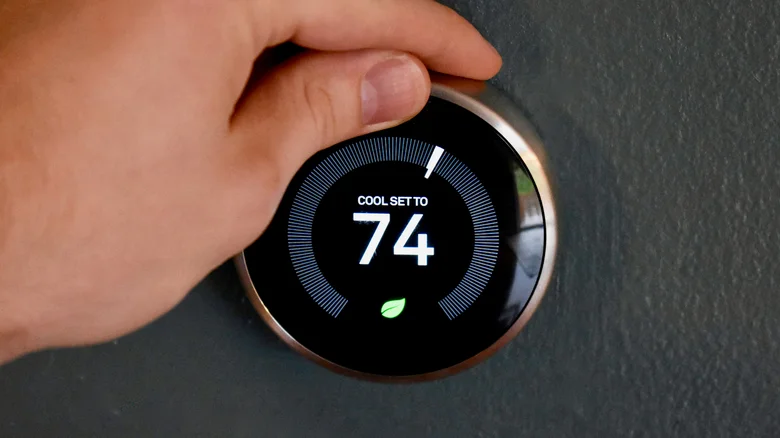
    Spinning the temperature ring on an older Nest Thermostat.

    The main effort to revive older Nest thermostats is a free, open-custom firmware, you can substitute some or all of the advanced functions that were disabled when Google disconnected you from the cloud. There’s actually a No Longer Evil cloud platform, but you can also set up your own server, or connect to the Home Assistant ecosystem

    If any of this sounds intimidating, you might want to stay away. While there’s an automated installer that guides you through the process, there’s a non-zero risk of bricking your thermostat. If that happens, you won’t be able to use it again in any capacity, even its “dumb” form. That could be dangerous if you have to go an extended period without a replacement in hot or freezing conditions.

    If the weather is tolerable and you’re prepared for an upgrade, it’s good to take advantage of Google’s free recycling program. You’ll get a prepaid shipping label, which saves you the trouble of having to drive anywhere or spend anything. If you don’t have access to a printer, however, you’ll have to look up what local retailers and e-waste centers offer in your area and do things the hard way. Regardless, be sure to perform a factory reset by going to Settings > Reset > All Settings. You don’t want any trace of personal data on something you’re handing to a stranger.

    Do you really need a new smart thermostat?
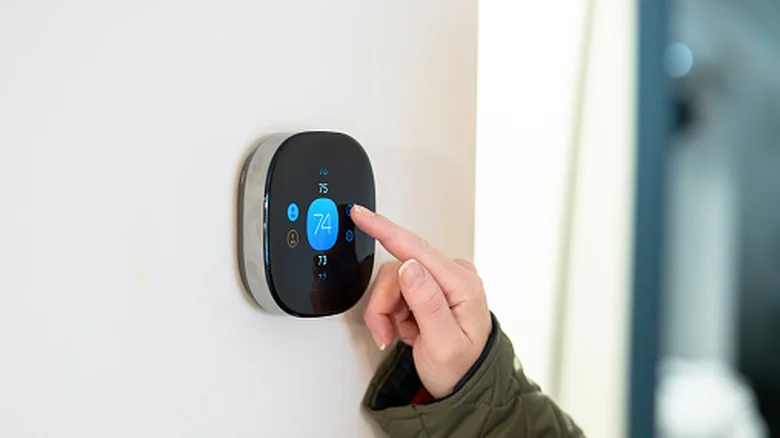
    Cooling things down with Ecobee's Smart Thermostat Premium.

    It may well be worth investing in a new one from Google or another smart thermostat maker if your goal is to cut energy bills. Better models optimize performance not just in terms of general efficiency, but by detecting occupancy and syncing with cloud-based weather data. If nothing else, it can be helpful to adjust temperatures remotely — when no one’s at home, there’s no sense wasting money on perfect heating or cooling.

    Beyond that, there may not be a real need for you to invest in a new smart thermostat. If the people in your home have predictable habits, you should be fine enough with your Nest’s built-in scheduling. Comfortable temperatures don’t vary much during the year. If you want to save cash, a simple tactic is to let yourself get a little hotter in the summer, and a little colder in the winter. Changing clothes or using portable fans and heaters is often more economical than forcing your entire HVAC system to work harder.

    If you do think it’s worth buying a new thermostat, be sure to check for any rebate programs offered by your energy provider. I recently bought a new Ecobee, and the rebate was steep enough that I was able to afford a top-of-the-line model for less than what a midrange one would cost on sale. Entry-level thermostats might as well be free.

    away Dont Google Throw Your
    Follow on Google News Follow on Flipboard
    Share. Facebook Twitter Pinterest LinkedIn Tumblr Email Copy Link
    myappsplus
    • Website

    Related Posts

    The best apps for tracking your reading and discovering new books

    October 26, 2026

    Don’t pre-order the Zelda Switch 2 before seeing this Currys price

    October 26, 2026

    Why Google chrome is always using so much RAM

    October 26, 2026
    Add A Comment
    Leave A Reply Cancel Reply

    Top Posts

    Cathay Pacific tests Google AI that dramatically cuts airplane contrails — tiny altitude shifts slash environmental impact by 40% in early trials

    September 8, 2026137 Views

    Keep running out of mobile data? This new unlimited plan gets you up to 80Mbps 5G speeds for just AU$50/m

    October 8, 202615 Views

    Drone swarm tech valued by both defense and civilian sectors, industry platform says

    September 8, 202615 Views
    Latest Reviews

    Samsung is randomly deactivating some accounts for ‘security reasons’

    myappsplusSeptember 1, 2026

    ‘Sonos 27’ brings a refreshed UI to the app and lets AI agents control your system

    myappsplusSeptember 1, 2026

    Anthropic reveals its view of how AI agents should interact with the physical world

    myappsplusSeptember 1, 2026
    Stay In Touch
    • Facebook
    • YouTube
    • TikTok
    • WhatsApp
    • Twitter
    • Instagram

    Subscribe to Updates

    Get the latest tech news from FooBar about tech, design and biz.

    Most Popular

    Samsung is randomly deactivating some accounts for ‘security reasons’

    September 1, 20260 Views

    ‘Sonos 27’ brings a refreshed UI to the app and lets AI agents control your system

    September 1, 20260 Views

    Anthropic reveals its view of how AI agents should interact with the physical world

    September 1, 20260 Views
    Our Picks

    The best apps for tracking your reading and discovering new books

    October 26, 2026

    Don’t pre-order the Zelda Switch 2 before seeing this Currys price

    October 26, 2026

    NYT Strands hints and answers for Monday, October 26 (game #967)

    October 26, 2026

    Subscribe to Updates

    Subscribe to our newsletter and get the latest tech news, app updates, AI trends, smartphone reviews, and exclusive deals delivered straight to your inbox.

    Facebook X (Twitter) Instagram Pinterest
    • About Us
    • Get In Touch
    • Disclaimer
    • Privacy Policy
    • Terms & Conditions
    © 2026 MyAppsPlus. All Rights Reserved.

    Type above and press Enter to search. Press Esc to cancel.