Close Menu
MyAppsPlus

    Subscribe to Updates

    Get the latest creative news from FooBar about art, design and business.

    What's Hot

    I watched 3 movies with JBL and Samsung’s 2026 flagship soundbars — here’s the one I’d choose and why

    October 25, 2026

    UGREEN’s port-packed 45W universal travel adapter returns to $28 (Save 30%)

    October 25, 2026

    Keep waking up at 3 a.m.? This is what sleep doctors want you to know

    October 25, 2026
    Facebook X (Twitter) Instagram
    Facebook X (Twitter) Instagram
    MyAppsPlusMyAppsPlus
    Sunday, October 25
    • Home
    • Breaking Tech
    • Apps & Software
    • AI & Automation
    • Android
    • iPhone & iOS
    • More
      • Reviews
      • How-To Guides
      • Deals & Discounts
      • Shop
    MyAppsPlus
    Home»Android»Zoom on Googlebook: Use the PWA, Not the Android App
    Android

    Zoom on Googlebook: Use the PWA, Not the Android App

    myappsplusBy myappsplusOctober 25, 2026003 Mins Read
    Share Facebook Twitter Pinterest Copy Link LinkedIn Tumblr Email Telegram WhatsApp
    Follow Us
    Google News Flipboard
    Zoom on Googlebook: Use the PWA, Not the Android App
    Share
    Facebook Twitter LinkedIn Pinterest Email Copy Link

    When using the video conferencing tool “Zoom” on Googlebook, the Android version available from the Google Play Store is an option, but like on Chromebooks, the Android version of Zoom does not support certain features, such as virtual backgrounds or background blur.

    Therefore, at present, when participating in online meetings using “Zoom” on Googlebook, instead of installing the Android appr and use the web app (PWA) version

    Feature Limitations in the Android App Version of Zoom

    TheZoom appdistributed on the Google Play Store for Googlebook claims support for large screens and laptops, with the description explicitly stating “Optimized for PCs”.

    When using the Zoom Android app on smartphones or tablets, you can configure settings such as backgrounds, filters, and avatars from [Settings] > [Video & Effects].

    However, on the Android app version for Googlebook, options to change virtual backgrounds or set background blur are not displayed. The available setting items themselves are also fewer compared to the Web version or those for Windows / macOS.

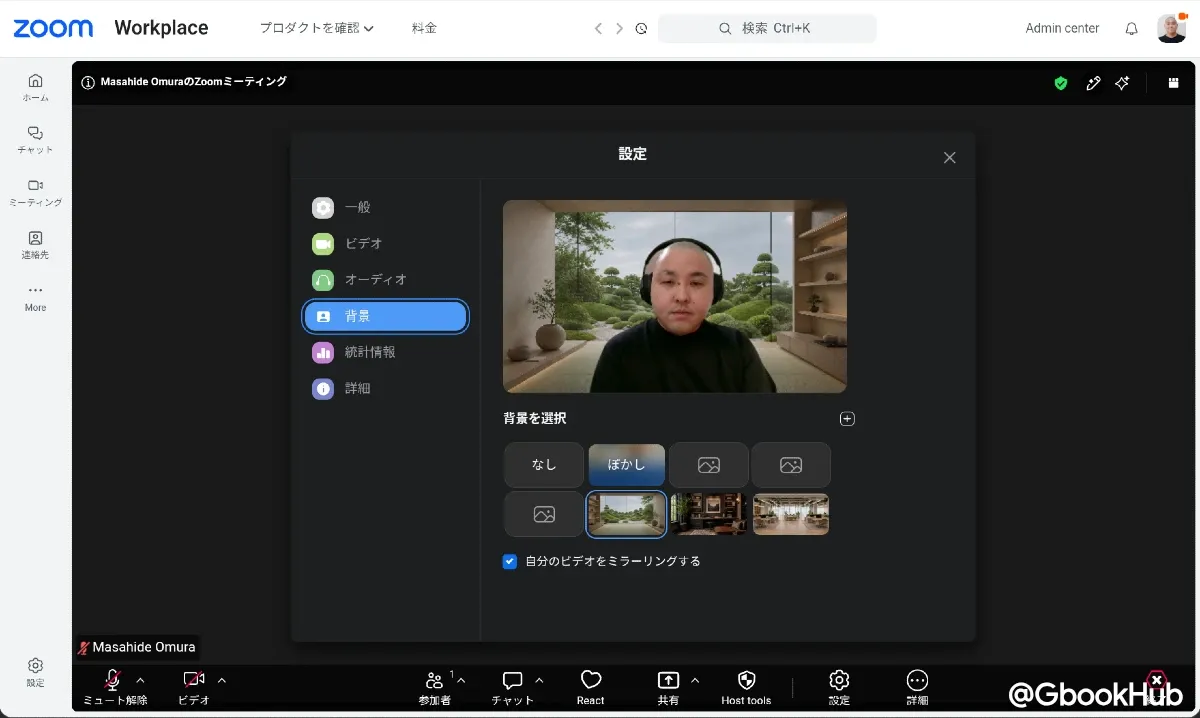
    Therefore, if you want to use virtual backgrounds or background blur in Zoom, you need to use the Web app instead of the Android app.
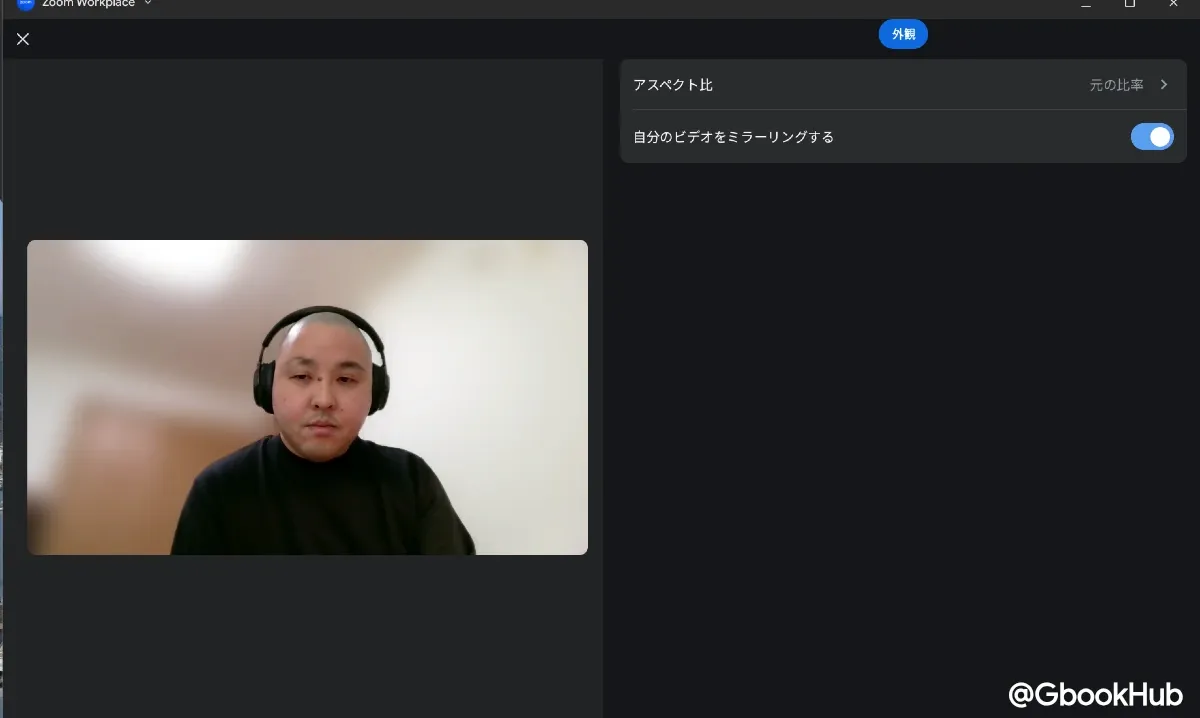
    Zoom App Android Settings
    Zoom Pwa Settings
    <img src="https://api.gbookhub.io/assets/74fae0d6-6892-472c-b01a-2139754d0569.webp?width=570&height=366" alt="Googlebook Meet Camera Settings” loading=”lazy”>

    Note that Googlebook OS has a feature that allows you to apply system-wide background blur from the icon at the top right of the screen when the camera is activated. If you simply want to blur the background, this feature is sufficient, but if you want to use virtual backgrounds with images or effects, you must use the Web app version.

    How to Install Zoom PWA on Googlebook

    To access the Zoom web app (PWA), go tohttps://app.zoom.us/wc/homeor log in to your Zoom account in your browser and select “Web App” from the menu.

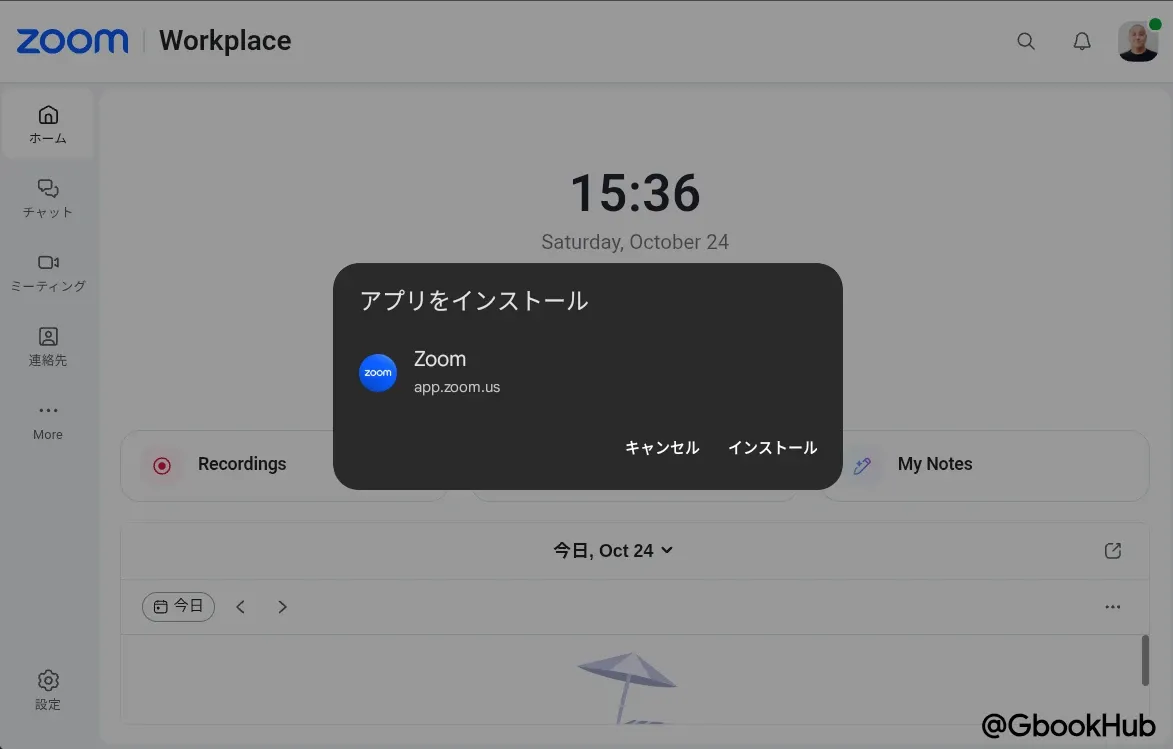
    After the familiar home screen opens, click the install icon on the right side of the address bar to install it as a web app, then select Install in the pop-up that appears.

    This will display the Zoom icon in the Googlebook launcher, allowing you to open the home screen directly in the future.
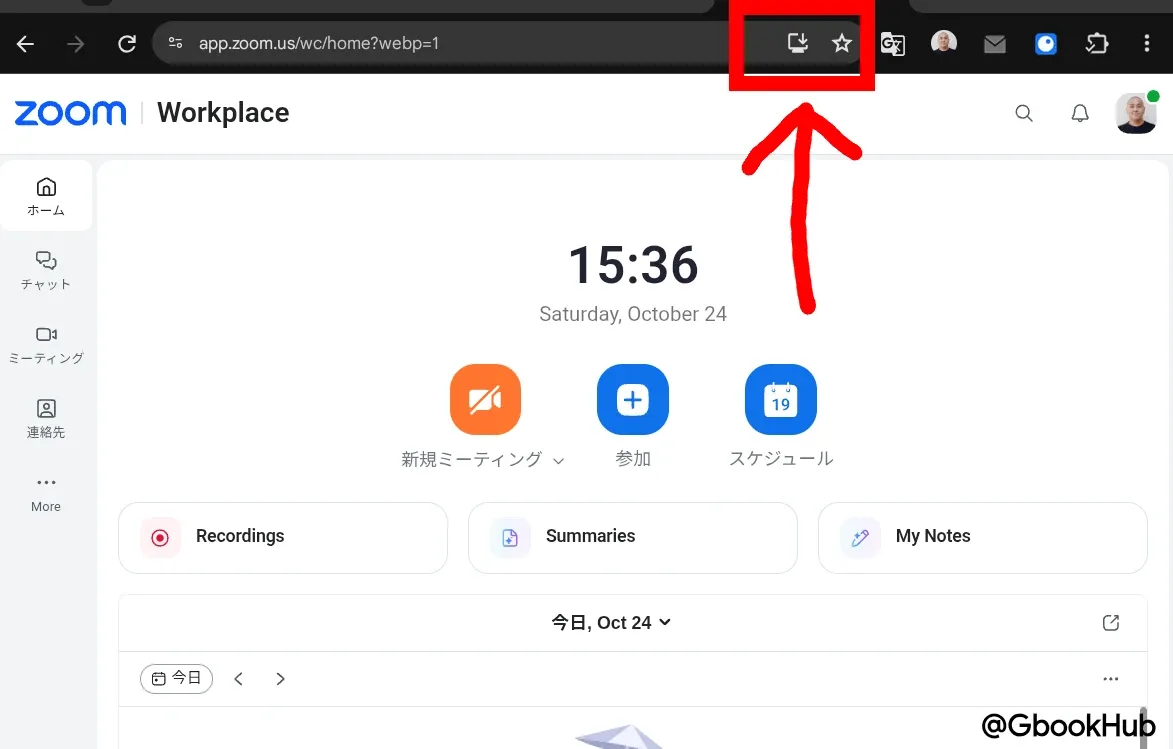
    Zoom Web Home Screen
    Zoom Pwa Install Dialog

    Note that even if the Android Zoom app is already installed, you can install the PWA app directly from the website. Since similar icons will appear side-by-side, it is recommended to uninstall the Android app first.

    After that, start or join a meeting as usual, and you can configure background blur and virtual background settings from the meeting settings.

    Android Googlebook Zoom
    Follow on Google News Follow on Flipboard
    Share. Facebook Twitter Pinterest LinkedIn Tumblr Email Copy Link
    myappsplus
    • Website

    Related Posts

    Blackview announces compact 8.68-inch Android tablet with IP54 rating and expandable storage

    October 25, 2026

    I’ve never owned smart glasses, but Samsung’s Android XR glasses may change that

    October 25, 2026

    This app recreates iPhone Duo’s StandBy mode on any Android foldable

    October 25, 2026
    Add A Comment
    Leave A Reply Cancel Reply

    Top Posts

    Cathay Pacific tests Google AI that dramatically cuts airplane contrails — tiny altitude shifts slash environmental impact by 40% in early trials

    September 8, 2026137 Views

    Drone swarm tech valued by both defense and civilian sectors, industry platform says

    September 8, 202615 Views

    Keep running out of mobile data? This new unlimited plan gets you up to 80Mbps 5G speeds for just AU$50/m

    October 8, 202614 Views
    Latest Reviews

    Samsung is randomly deactivating some accounts for ‘security reasons’

    myappsplusSeptember 1, 2026

    ‘Sonos 27’ brings a refreshed UI to the app and lets AI agents control your system

    myappsplusSeptember 1, 2026

    Anthropic reveals its view of how AI agents should interact with the physical world

    myappsplusSeptember 1, 2026
    Stay In Touch
    • Facebook
    • YouTube
    • TikTok
    • WhatsApp
    • Twitter
    • Instagram

    Subscribe to Updates

    Get the latest tech news from FooBar about tech, design and biz.

    Most Popular

    Samsung is randomly deactivating some accounts for ‘security reasons’

    September 1, 20260 Views

    ‘Sonos 27’ brings a refreshed UI to the app and lets AI agents control your system

    September 1, 20260 Views

    Anthropic reveals its view of how AI agents should interact with the physical world

    September 1, 20260 Views
    Our Picks

    I watched 3 movies with JBL and Samsung’s 2026 flagship soundbars — here’s the one I’d choose and why

    October 25, 2026

    UGREEN’s port-packed 45W universal travel adapter returns to $28 (Save 30%)

    October 25, 2026

    Keep waking up at 3 a.m.? This is what sleep doctors want you to know

    October 25, 2026

    Subscribe to Updates

    Subscribe to our newsletter and get the latest tech news, app updates, AI trends, smartphone reviews, and exclusive deals delivered straight to your inbox.

    Facebook X (Twitter) Instagram Pinterest
    • About Us
    • Get In Touch
    • Disclaimer
    • Privacy Policy
    • Terms & Conditions
    © 2026 MyAppsPlus. All Rights Reserved.

    Type above and press Enter to search. Press Esc to cancel.